Tracking the source of an application
You can use custom tracking links to automatically track inbound candidate sources from beyond Ashby's built-in job board integrations. More on these at How do I set up job board connections?How do I set up job board connections?
Overview
A custom tracking link has a tag added to the end of the URL that relates to a specific source in Ashby. When a candidate applies through a tracked link, Ashby automatically applies the source to that specific job consideration.
You do not need to add a custom tracking link for built-in job board integrations like Indeed. When those integrations are enabled, Ashby automatically applies the associated job board as the source.
If you are using the automated posting or job wrapping options in LinkedIn, we recommend setting up a custom tracking link. More on the LinkedIn integration options at LinkedIn Job Posting.
Permissions & access
Custom tracking links are available across all plans:
Foundations | Legacy Plus | Plus | Enterprise |
|---|---|---|---|
✅ | ✅ | ✅ | ✅ |
Only Organization Admins and users with Elevated Access with the Job Board Tracking Links additional permission can configure custom tracking links. More on this at Additional User Permissions.
Creating custom tracking links
Set up a source
Set up a source at Admin > Organization Setup > Candidate Sources. Click + New Source, enter your source name, and assign a source type.
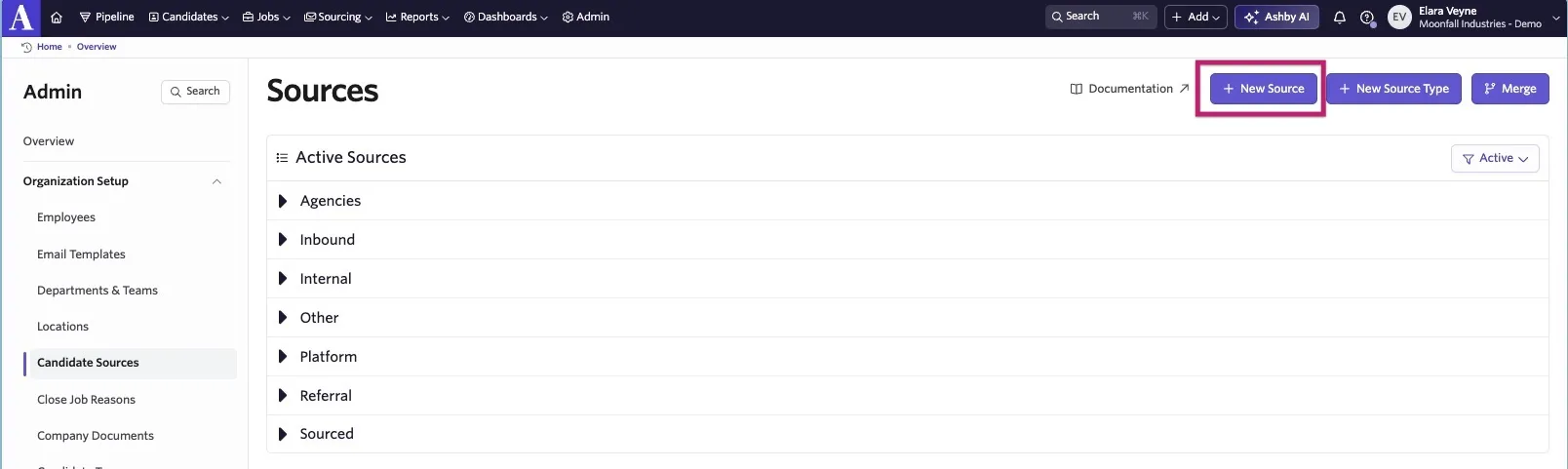
If the source you would like to use already exists, move on to the Creating your custom tracking link steps. See more on creating sources at Source Types and SourcesSource Types and Sources.
Creating your custom tracking link
- Navigate to Admin > Job Boards > Custom Tracking Links.
- Click + New to create a new custom tracking link.
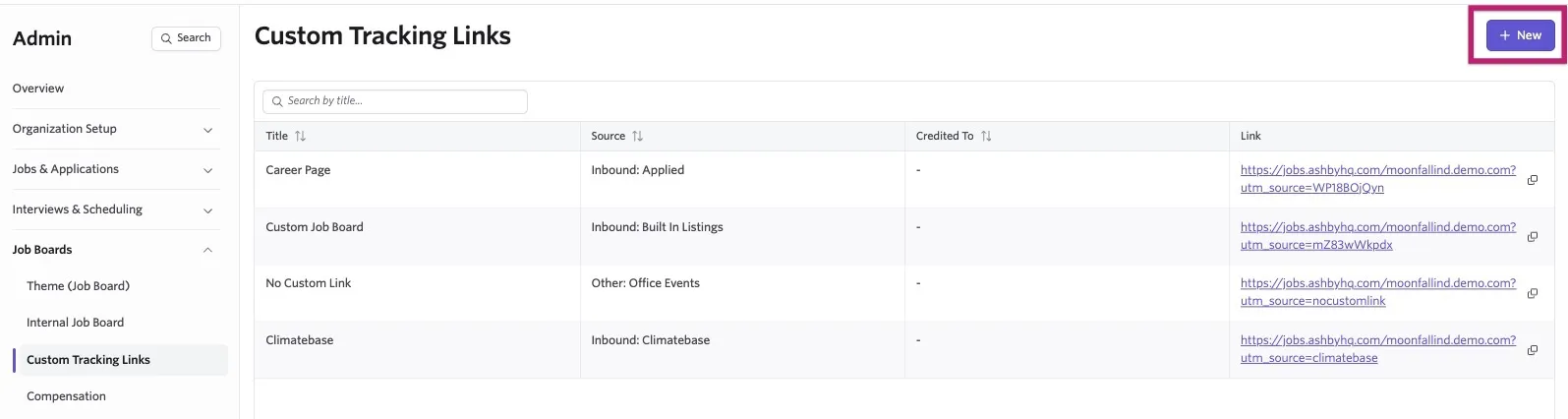
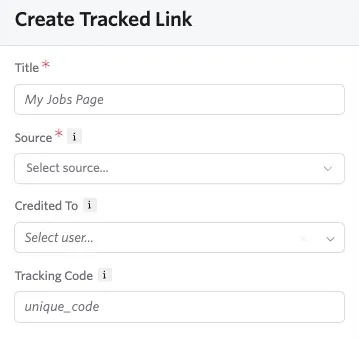
- Enter a title and select the source to apply to candidates who apply via that link.
- Optionally, select a user to add to the Credited To field and enter a tracking code. If you choose not to enter a tracking code, one is generated automatically.
If you are using Multiple BrandsMultiple Brands, you need to select the brand you'd like to configure a custom tracking link for using the dropdown to the right of the + New button.

Using custom tracking links
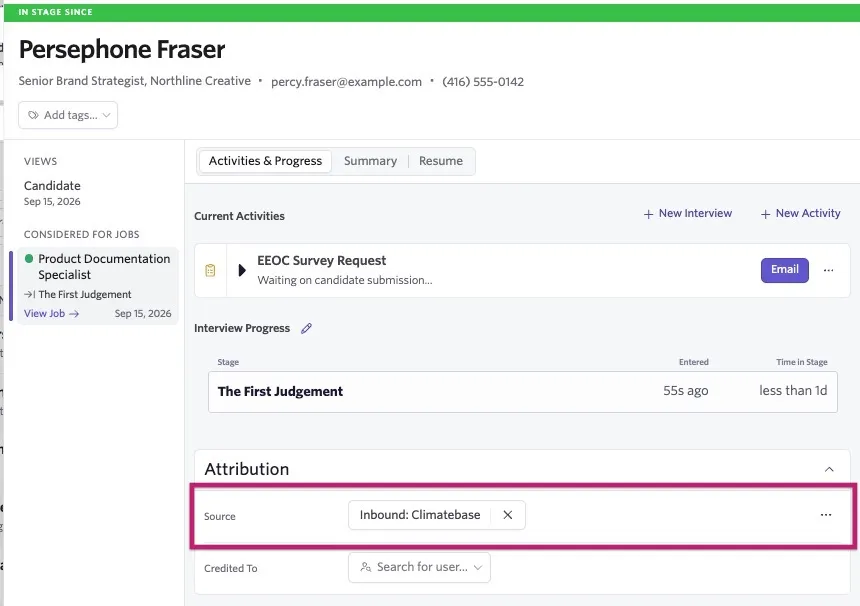
Once you create the link, you can share it or add it to job boards. When a candidate applies through the tracked link, Ashby automatically applies the specified source to their job consideration. You can view a candidate's source in the Attribution section of their profile.
Tracking links for individual jobs
When creating a tracking link, the link goes to the main job board. To get the link for a specific job:
- Navigate to the main custom tracking link generated for the job board in Admin > Job Board > Custom Tracking Links.
- On your job board, click on the specific job.
- Copy the link from the browser's URL field.
FAQs
Why does an application still show a tracking link source if the candidate applies later through a job board?
Ashby saves the code from a custom tracking link in the candidate's browser. If they return later through a different path, such as a regular job board URL, and apply without opening another tracking link, Ashby may still use the saved code to attribute the application.
This is especially noticeable when someone opens a referral link and later test applies to their own job through the regular job board in the same browser. The application may still show the referral link as its source.
This behavior resembles first-touch attribution when no later tracking link replaces the saved code, but it is not strict first-touch attribution when candidates open multiple tracking links. Each time a candidate opens a custom tracking link, Ashby saves that link's code in their browser and overwrites any previously saved code. If the candidate applies through a different custom tracking link, Ashby attributes the application to the custom source associated with the link they used to apply.
How are applications from Indeed Easy Apply or ZipRecruiter Apply attributed?
Applications submitted through Indeed Easy Apply or ZipRecruiter Apply are sent directly to Ashby by Indeed or ZipRecruiter. The candidate's browser is not involved, so browser-based tracking link attribution does not apply. Ashby assigns the built-in integration source, such as Indeed Listings, Indeed Sponsored, or ZipRecruiter Organic Posting.
Can custom tracking links only be used for external job boards?
Custom tracking links can be used any time you'd like to track an external source. Though most commonly used with job boards, they can be used to allow employees or friends of the company to share links externally (e.g. on social media) and still be credited as the source.
What do I enter in the 'Tracking Code' field when adding a tracking link?
You can enter any unique value in the Tracking Code field, or select Add without entering a value to generate one automatically. Ashby uses this code to associate applications with the custom source and tracking link.
The tracking code is the unique character string added to the end of the URL. Some job boards, such as LinkedIn Job Wrapping, ask for the tracking code or source code so they can add it to application links and ensure applications are attributed to the correct source.
Does Ashby support Google Analytics or other conversion tracking?
Ashby doesn't integrate with Google Analytics, so we recommend using the iFrame embed version of the career page and embedding your pixel there. For more information, see Embedding Ashby Job Boards in an external Careers PageEmbedding Ashby Job Boards in an external Careers Page.
The third-party job board allows me to enter the UTM code directly - can I just add in the code there, then have it applied to postings via that route instead?
A lot of third-party job boards support this and yes, you should be able to add the tracking code there, then it is applied to all postings on that third-party job board moving forward.