Embedding Ashby Job Boards in an external Careers Page
Customers often wish to use alternatives to the provided Ashby-hosted job boards (https://jobs.ashbyhq.com). To provide a more branded experience, Ashby supports embedding the Ashby Job Board directly in your own careers website.
Embedding Ashby Job Board in an External Careers Page
Embedding your Ashby Job Board directly in your careers page only takes a few minutes to setup.
- Navigate to Admin > Job Boards > Theme (Job Board).
- Under Job Board Embedding, check the Allow Job Board Embedding option.
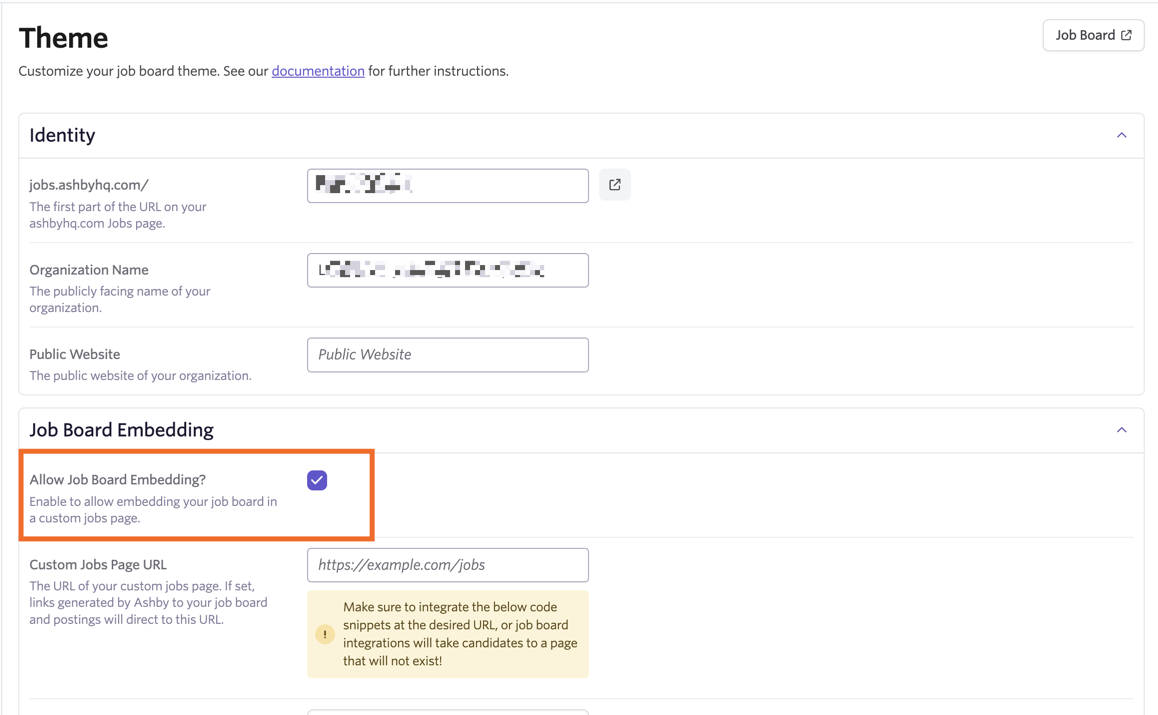
- Add the URL for your job page into the Custom Jobs Page URL field.
If you need links to job postings on a custom jobs page to be anchored to a specific place on the page rather than loading at the top of the page, add that anchor to the end of your URL. For instance, if your positions list is at the bottom of your careers page, and renders with anchor "#positions" at the end of the URL, add that anchor to the end of the URL in this field.
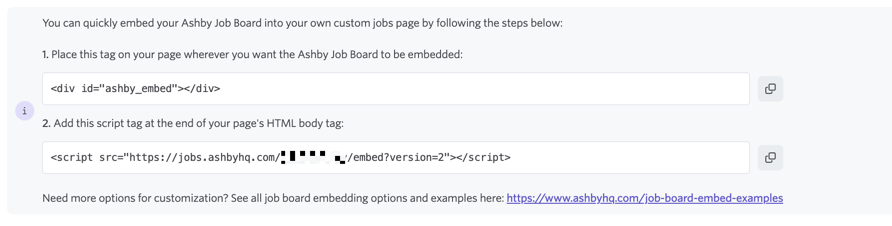
- Once you have set your Custom Jobs Page URL, you’ll see instructions on how to embed your job board. Follow those instructions to edit your careers page and embed your job board.
- Place this tag on your page where you want the Ashby Job Board to be embedded: <div id="ashby_embed">
- Add this script tag at the end of your page’s HTML body tag: <script src="https://jobs.ashbyhq.com/[FILL IN JOB BOARD SLUG HERE]/embed?version=2"></script>
Adding CSS to your job board embed
In the Allowed Custom CSS URLs section, you can determine the URLs that can be used to load external CSS into your embedded job board. Add your Custom CSS URL or URLs into the Allowed Custom CSS URLs field, then click Submit to add them.
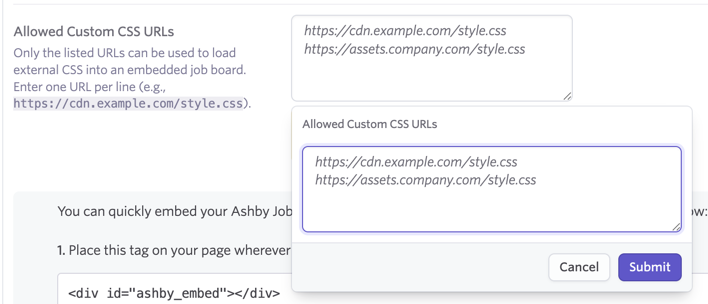
One URL should be entered per line. URLs have to match exactly to that of where the CSS file is hosted. If this field is left empty, then CSS cannot be configured on the embedded job board.
For further information, check out this page with examples.
Once you've added your Allowed Custom CSS URLs, please ensure they are added to your iframe script too. It should look something like the following: <div id="ashby_embed"></div>
<script>
window.__Ashby = {
settings: {
ashbyBaseJobBoardUrl:"https://jobs.ashbyhq.com/ashby-embed-demo-org"
customCssUrl: "https://www.ashbyhq.com/job_board_example_css/full-job-board.css"
}
}
</script>
If the CSS URLs are not included within the script tag, then the CSS will not be applied to your embed.
Embedding a Single Application
The embed script also supports embedding a single application. To do this, you can add the following attributes to the <div id="ashby_embed"> tag:
- data-jid="<JID>": with this attribute set, the embed code will always load that specific job post, identified by the “JID” (e.g. “45134452-f53b-4d4c-915e-4a4615fb6c93", for a job post with the URL https://jobs.ashbyhq.com/ashby/45134452-f53b-4d4c-915e-4a4615fb6c93)
- data-tab="application": with this attribute set, the embed code will load the above application on the application tab (as opposed to the job description tab).
- data-noChrome="true": with this attribute set, the embed code will hide navigation, title, and sidebar “chrome.” Combine this with other attributes to embed an application form that feels like it’s a part of your site.
For other ways to add your jobs board to your external careers page, see Routes for integrating your Ashby job board with your careers page.
FAQ
When I decline cookies on my careers page, my embedded job board doesn’t show up. Why?
Some cookie banner tools, like Termly, can block the iframe from showing up on your careers page.
Why am I receiving a jobs.ashbyhq refuses to connect error on my career page?
The refused to connect message usually means the embed can’t complete its origin check. A few quick tweaks typically resolve it.
- Ensure you are using this exact embed tags provided on the Themes (Job Board) page.
- Remove any editor wrappers
Ensure the code isn’t wrapped by a WYSIWYG in <p>, <br>, or <span> tags. The <div id="ashby_embed"></div> and the <script> tag should be inserted as raw HTML in the page template or a raw/HTML block (and not inside a paragraph).
Why doesn’t the View Posting link within my job posting take me to the specific job posting on my careers page?
If you're using a custom careers page powered by Ashby's API or an embedded job board, you may notice that clicking the View Posting button within a job posting does not automatically route to the job posting on your careers page as expected. Referral links to specific job postings may also display the same behavior and direct candidates to the main job board on your career's page.
This behavior is typically related to how your careers page handles URL parameters. The View Posting button relies on the ashby_jid URL parameter to identify which job to display. For example:
https://yourcompany.com/careers?ashby_jid=<job-id>
For this to work correctly, your careers page needs to include logic that reads the ashby_jid parameter and routes the visitor to the corresponding job posting page.
In most cases, your website should:
- Detect the ashby_jid parameter in the URL.
- Match it to the correct job.
- Redirect or render the appropriate job details page.
Without this routing logic in place, visitors may be directed to your general careers page instead of the specific role.
This configuration is managed on your website, so your web or development team needs to implement this routing behavior. If you need further information on how Ashby provides job identifiers or how to structure the link, feel free to reach out to Support.