LinkedIn Job Posting
LinkedIn is a major channel for reaching active job seekers. Ashby automatically posts and updates your open roles on LinkedIn with no manual reposting required. This article covers two ways to connect your Ashby Job Board with LinkedIn: Basic Jobs, LinkedIn’s free ATS-integrated listing option, and Job Wrapping, a paid option that promotes roles into LinkedIn Job Slots for greater visibility and reach. It also covers how to generate custom tracking links to accurately attribute applications, along with troubleshooting tips and answers to common questions.
Post your jobs as Basic Jobs (free)
LinkedIn only allows free job postings via Applicant Tracking System (ATS) integrations for companies that have been a paying customer for at least 30 days. You can configure the integration when setting up your Ashby account, but jobs are not posted to LinkedIn until the 30-day threshold has passed.
This is part of a LinkedIn-wide policy change to reduce fraudulent postings and is not specific to Ashby. If you have a paid job slot contract with LinkedIn, follow the Job Wrapping steps below.
If you don't have an active LinkedIn contract, there is a workaround for posting jobs manually on LinkedIn during the 30-day period. For more information, see Creating custom tracking links for manual job posting & Job Wrapping below.
LinkedIn Basic Jobs, formerly known as Limited Listings, are picked up from your Ashby Job Board automatically. These jobs are visible to candidates actively conducting job searches on LinkedIn or viewing a company's LinkedIn Page.
Step 1: Enable the LinkedIn integration from the Ashby integrations marketplace
To enable automatically posting Basic Jobs:
- Navigate to the LinkedIn integration panel at Admin > Integrations > Integrations. You need to be an Organization Admin to access the Integrations Marketplace.
- Click Enable LinkedIn within the integration panel.

- Then add your LinkedIn Company ID and confirm your source.

Once the 30-day threshold has passed and the integration is enabled, it can take up to two business days for your roles to be posted as Basic Jobs to LinkedIn.
Where do I find my Company ID?
You can find the Company ID in the URL of the search results page when you click See all jobs on your LinkedIn Page.
If you have yet to post jobs to LinkedIn, you can find your Company ID by viewing all people in the company and extracting the currentCompany from the URL. The Company ID is a numeric value and is usually six to nine digits long. For more information on finding your Company ID, see LinkedIn's guide to finding your Company ID.
If you use a free LinkedIn account, you cannot apply spend to Basic Jobs pushed over from Ashby via the integration within your LinkedIn Admin portal.
Step 2: Enable basic job posting in LinkedIn
If you are creating a new LinkedIn company page or posting a Basic Job for the first time, LinkedIn requires your company to complete the following steps before Basic Jobs can be listed on your company's page:
- Navigate to Settings > Job Postings in your LinkedIn Company page (a company page admin needs to do this).
- Switch on the Enable basic job posting option.
- Click + Connect ATS and select Ashby from the dropdown.
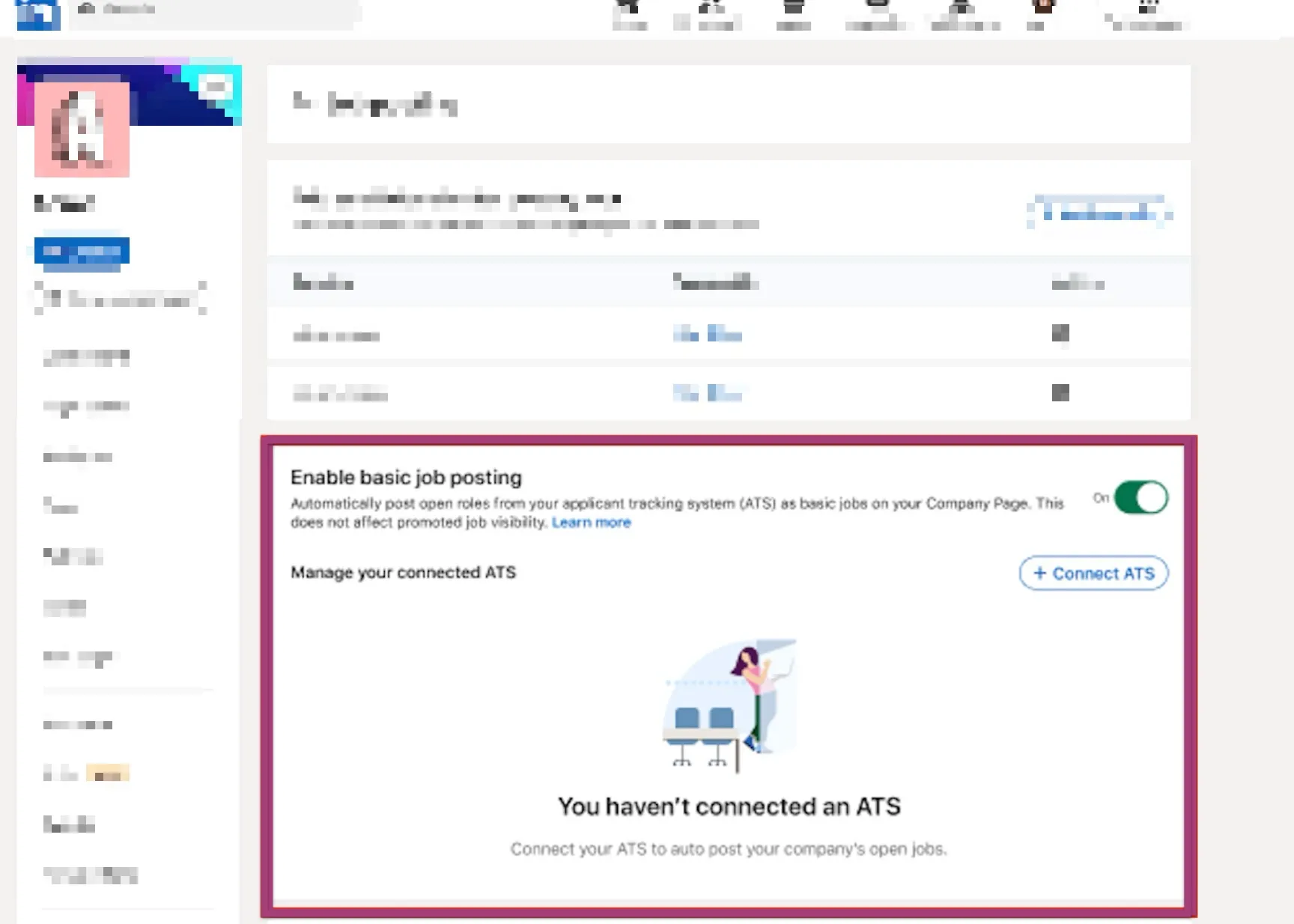
If you do not see Ashby listed, ensure that you have followed the initial steps above first. Once the integration has been configured from Ashby's integration marketplace, it takes roughly 24 hours for LinkedIn to reflect the updated feed.
Companies that have already posted Basic Jobs via another ATS and have configured LinkedIn in Ashby's integration marketplace do not need to re-enable the basic job posting toggle in LinkedIn. However, ensure Ashby is selected by clicking + Connect ATS and choosing Ashby from the list.
Job Wrapping
Job Wrapping is a service LinkedIn provides to ingest jobs in bulk from your company's career site or ATS and post them on LinkedIn. LinkedIn's full guide on Job Wrapping is available in LinkedIn's Help Center. LinkedIn's Job Wrapping FAQs are also available.
With Job Wrapping, LinkedIn pulls jobs from Ashby, uploads them as Basic Jobs, and then promotes jobs meeting your LinkedIn criteria into one of your Job Slots.
Jobs in Job Slots have:
- Greater visibility and reach
- Increased promotion
- Integration with other LinkedIn products
- On-demand analytics and reporting
Setting up Job Wrapping
To start the setup process, take the following steps in LinkedIn Recruiter:
- Click on your profile picture at the top of the home page in Recruiter.
- Click Product settings in the drop-down menu.
- Click Job posting on the left-hand side.
- Next to Job sources for automated job postings, click View/Edit.
- Click the Job source requests tab.
- Click Add new job source.
- Using the Select ATS or other job source drop-down, select Ashby.
Obtaining your URL
To get your URL from Ashby to add to the Job Source URL field in Recruiter:
- Navigate to Admin > Integrations > Integrations and open up the LinkedIn integration tile.
- Enable the Use Job Wrapping? option to generate your feed URL.
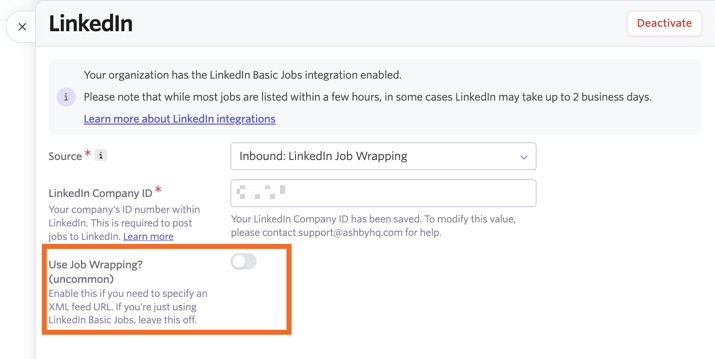
- Update the source listed in the Source field to Inbound: LinkedIn Job Wrapping.
- Copy the URL and add it to the Job Source URL field in LinkedIn.
If you use job slots and Job Wrapping, reach out to [email protected] if you see a message about a 30-day threshold.
Then, fill out the remaining fields in Recruiter, such as your designated job poster and company page on LinkedIn.
For your Applicant source tracking code, create a custom tracking link in Ashby, then add the utm_source parameter into the source tracking code field in LinkedIn. You can read more on creating a custom tracking link in the Create custom tracking links section below.
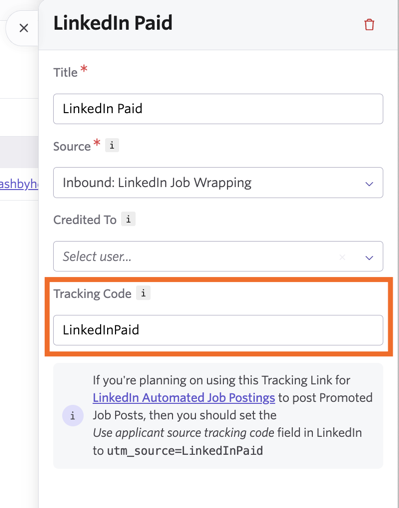
Where do I find the utm_source parameter?
As an example, if a custom tracking link was created with the Tracking Code field set to LinkedInPaid in Ashby, add utm_source=LinkedInPaid to the Use applicant source tracking code field in LinkedIn. We recommend giving this custom tracking link the title LinkedIn Paid for your reference.
It can take some time for your ATS source to be added. Check the status of requests in the Job Source Requests tab.
How can I view my promoted and basic jobs?
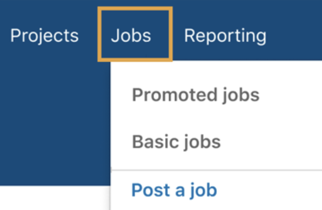
You can view all basic and promoted jobs in the Jobs menu:
- The Promoted tab displays the ingested jobs that met the rules you established to be moved into one of your Job Slots.
- The Basic tab displays the ingested jobs that do not meet the criteria you've established to qualify a job to be moved to a Job Slot.
I don't see the option to set up Job Wrapping in Recruiter — what do I do?
You may need to reach out to LinkedIn Support or your LinkedIn Customer Success Manager (CSM) directly with your Ashby Extensible Markup Language (XML) feed to get your job source updated. Follow the instructions above to find your XML feed URL. We also recommend creating a custom tracking link (more on this in the Creating custom tracking linksbelow section section below) and sharing that with your LinkedIn CSM along with your XML feed URL. This helps ensure the correct source is attributed to applications.
Creating custom tracking links for manual job posting & Job Wrapping
When manually creating a job posting on LinkedIn, you can select how you want to receive candidate information on the Receive qualified applicants page. More on Applicant Options is available in LinkedIn's guide on Applicant Options. To direct candidates to apply via Ashby, select the option to route candidates to an external website.
If you manually post jobs to LinkedIn, you can generate a custom tracking link for a job posting to automatically apply the source to applications made via your LinkedIn post.
If you are manually posting jobs to LinkedIn, you are only able to post one job for free at a time. For more details, see LinkedIn's guide on posting a free job.
You do not need to create a new source to use custom tracking links with LinkedIn. Ashby includes a default source for LinkedIn job postings, which is automatically applied when the integration is enabled. Creating a custom source is optional; you may want to do so if you prefer to track candidates under a different source name (for example, to distinguish between Basic Jobs and paid/promoted postings).
If you need to create a new source for your custom tracking code:
- Navigate to Admin > Organization Setup > Candidate Sources.
- Click + New Source.
- Add in the source name and link it to a source type, then click Create.

To create a custom tracking link:
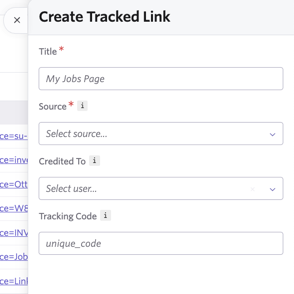
- Navigate to Admin > Job Boards > Custom Tracking Links.
- Click + New.
- Add in a title, specify the source that should be applied when your tracking link is used, and optionally add a user to credit the job consideration to. You can also specify a tracking code — if you leave this field blank, a code is randomly generated.
- Click Add to create the custom tracking link.

Once you've created your custom tracking link, get the tracking link for your specific job if you are creating manual postings. To do this:
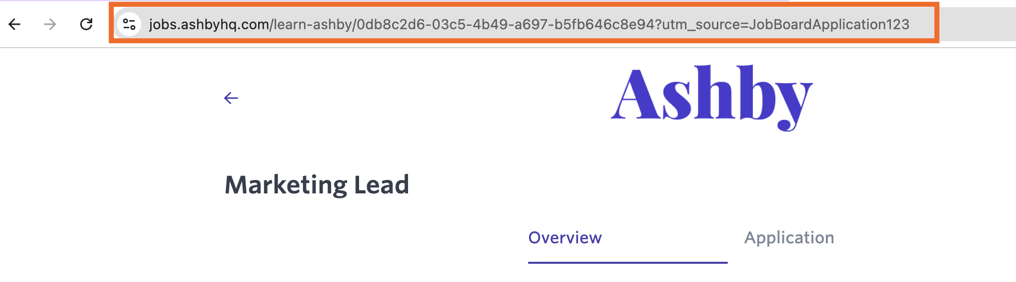
- Click your newly created custom tracking link within the Link section. This takes you to your job board and the URL contains the tracking code.
- Click on the job posting you want to link to your LinkedIn job posting, then copy the URL in the address bar.
- Add this URL to your manual LinkedIn posting so candidates are redirected with the origin still captured in their job consideration.

Troubleshooting
- The job location in Ashby needs to have a physical location set (city/state and/or country, or a city, state, and country for roles based in the US or Canada) to be pulled in as a Basic Job. Where possible, avoid abbreviations and write city, state, and country names in full when configuring locations. If the role is remote, ensure a Country is specified. LinkedIn also has a tool where you can set up data mapping for ATS jobs to map invalid locations to standardized locations in LinkedIn — see LinkedIn's guide on setting up data mapping for ATS jobs for more details.
- When job postings sync from Ashby to LinkedIn, they show with an Apply button.

- Basic Jobs posted through the Ashby integration do not show the hiring team on the post. If a hiring team shows on a job posting, that job was posted directly on LinkedIn (even if the Apply button redirects to Ashby).
- Free job postings do not support hyperlinks. Any hyperlinks you add to your job postings in Ashby do not show on free job postings on LinkedIn. Only job postings added via Job Wrapping support hyperlinks.
FAQs
How long does it take for my job to show on LinkedIn?
Your job appears on LinkedIn and is connected to your company's LinkedIn page within two business days. Any updates you make to the job posting are reflected on LinkedIn within 24 hours. If a job is already posted, LinkedIn does not accept it from Ashby as it is seen as a duplication.
Where does the logo pull from in the preview on a LinkedIn message or post?
This comes from the image uploaded to the Social Media field within Logos on the Theme (Job Board) page within Admin. More on setting up job board logos at Job Board: Configuring Your SetupJob Board: Configuring Your Setup.
Are LinkedIn tags supported for Job Wrapping?
Yes. You can use LinkedIn job wrapping tags by including the tags in the description of your job posting or postings on your job.
How long does it take for a LinkedIn posting to be removed?
If you unlist or unpublish your job posting, or close out the job, if you are using the LinkedIn integration, it can take up to 24 hours for the listing to be removed from LinkedIn.
Can I choose which postings get pulled to LinkedIn?
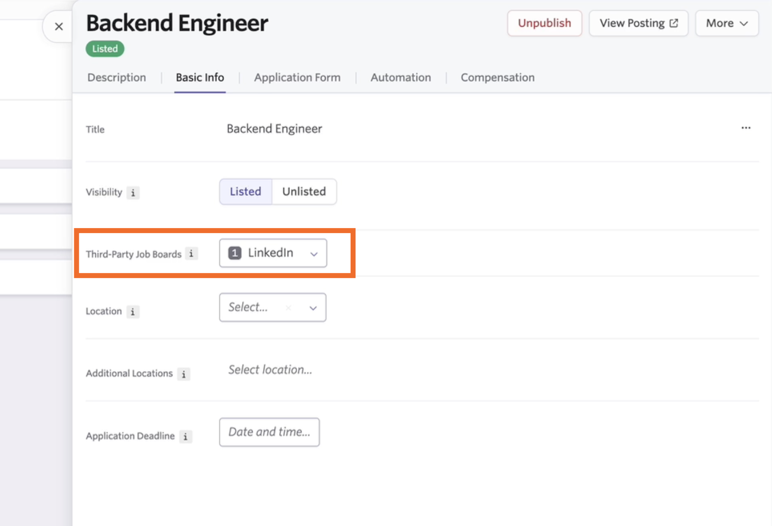
You can, yes. When setting up your job posting, you can use the Third-Party Job Boards dropdown to determine the third-party job boards this posting should be listed on.
All of the third-party job boards you have configured are listed in this dropdown. It can take some time for changes to be updated.
This setting applies only if postings are added to LinkedIn via the direct integration route. If you pull job postings to LinkedIn via an XML feed, this setting does not stop postings from being listed on LinkedIn.
Does the XML feed include the workplace type (Remote, Hybrid, or On-Site)?
Yes, the XML feed includes this information so the workplace type is indicated on third-party job boards like LinkedIn and Indeed.
You can specify the location type within the Location Details section of your location settings at Admin > Organization Setup > Locations.

I've already set up Job Wrapping with LinkedIn using the previous route — do I need to migrate over to use the new feed URL?
This is not required, but is recommended — the new feed URL has syntax specifically for Job Wrapping. To migrate over, reach out to your CSM or Support to enable the new feed option for you. You can then follow the same setup instructions as listed above.
If I set up LinkedIn postings manually using custom tracking links during the first 30 days after signing up for Ashby, do I see duplicates when Basic Jobs are posted via the integration?
We recommend closing manual postings created in LinkedIn once you've enabled the integration and the 30-day threshold has passed to avoid duplicates when jobs are pulled through to LinkedIn as Basic Jobs. You can rely on the integration to pull through open jobs with published job postings moving forward.
Is there a LinkedIn RSC integration available?
We don't currently have a LinkedIn Recruiter System Connect (RSC) integration.
I entered the wrong LinkedIn Company ID when setting up the integration. How do I change it?
To modify the value added into the LinkedIn Company ID field within the LinkedIn integration tile, reach out to Support.