Managing Data Compliance Violations
When a candidate or lead passes the retention date set by your data compliance rules, Ashby flags them as in violation so your team can take action. This guide covers how to view a candidate’s data retention status on their profile, override or ignore retention dates for individual candidates, find candidates who are in violation, and decide whether to anonymize or delete them.
Ashby does not automatically anonymize or delete flagged candidates, so reviewing these candidates regularly helps you stay compliant with your organization’s data retention policies.
For more information on setting up data privacy and compliance rules, see Data Privacy and Compliance: Configuration
Permissions & access
Data privacy and compliance rules are available on all plans:
Foundations | Legacy Plus | Plus | Enterprise |
|---|---|---|---|
✅ | ✅ | ✅ | ✅ |
The permissions you need depend on the action you want to take:
- Viewing data retention details: Any user with access to the candidate profile can view the Data Retention section on the Summary tab.
- Overriding a data retention date & anonymizing or deleting candidates: Organization Admins or users with Elevated Access – Hiring Manager permissions or higher, with the Can See Candidate Profiles and Can Add/Edit Candidates permissions enabled.
See Manage Access Roles for more information on user permissions.
Viewing data compliance status on candidate profiles
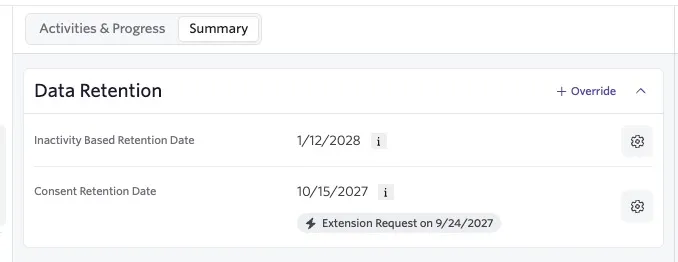
You can view a candidate's data retention dates (as determined by the rules configured in your Data Privacy and Compliance admin settings) on the candidate profile under the Summary tab. You will see a Data Retention section that displays the date after which the candidate is considered in violation of your rules.
The information tooltip explains which event and retention rule Ashby uses to calculate the date.
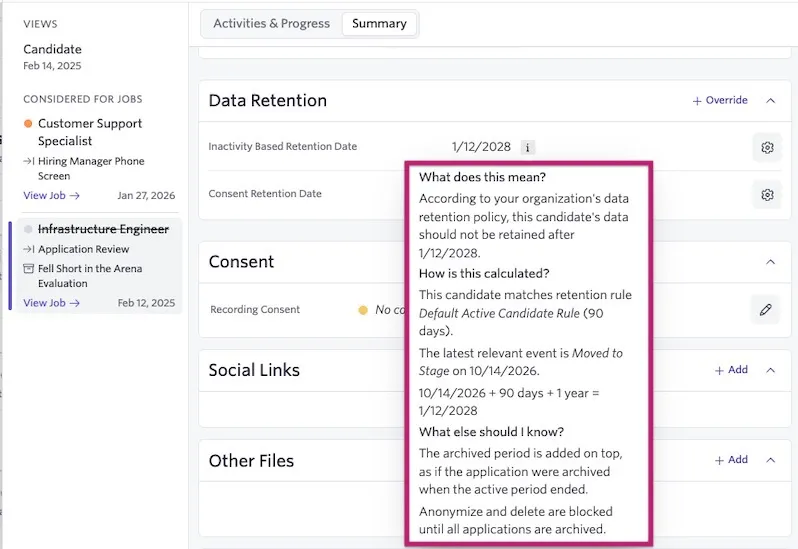
When an active candidate matches both an Active Candidate rule and an Archived Candidate rule, Ashby adds the two retention periods together to set their retention date. This covers the time the candidate will spend archived after they’re eventually rejected. If no Archived Candidate rule matches, Ashby uses only the Active Candidate retention period.
For example, say your Active Candidate rule has a retention period of 1 year and your Archived Candidate rule has a retention period of 2 years. An active candidate covered by both rules has a retention date of 3 years (1 + 2) after their latest relevant activity. If only the Active Candidate rule applies, the retention date is 1 year after their latest relevant activity.
If you have consent extension automation settings in place, you see the date Ashby sends the consent extension request.
Overriding a candidate's retention date
Your configured rules calculate retention dates automatically based on candidate activity, consent, and location. In some cases, however, a specific candidate may have circumstances that fall outside your standard rules. Click + Override to apply a manual exception for that candidate.
- Override and Ignore: Removes the candidate from all compliance rule evaluation entirely. Use this when a candidate has a legitimate and indefinite business reason to remain in your system, for example, an ongoing legal matter, a contractual arrangement, or another legal basis that supersedes your standard retention policy. Overridden candidates still appear in your system and can be reported on using the Is Data Compliance Ignored? field in Candidate Search.
- Override Date: Sets a specific retention date for the candidate that takes precedence over any other rules. Use this when your legal team has determined a date that differs from what your rules calculate, for example, when migrating candidates from a previous system who already gave consent with a known expiry date, or when a candidate's individual circumstances require a longer or shorter retention period than your standard rules provide.
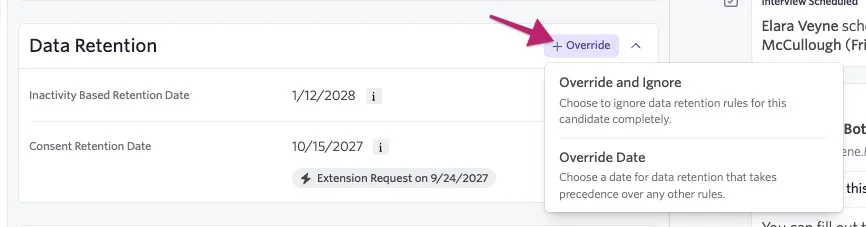
If you choose a new date for data retention via the Override Date option, the consent extension request date adjusts to fit the new date.
Taking action on candidates who are in violation
When Ashby flags candidates as in violation of your data compliance rules, it does not automatically anonymize or delete them.
For instructions on anonymizing or deleting candidates individually or in bulk, see Anonymizing and Deleting CandidatesAnonymizing and Deleting Candidates.
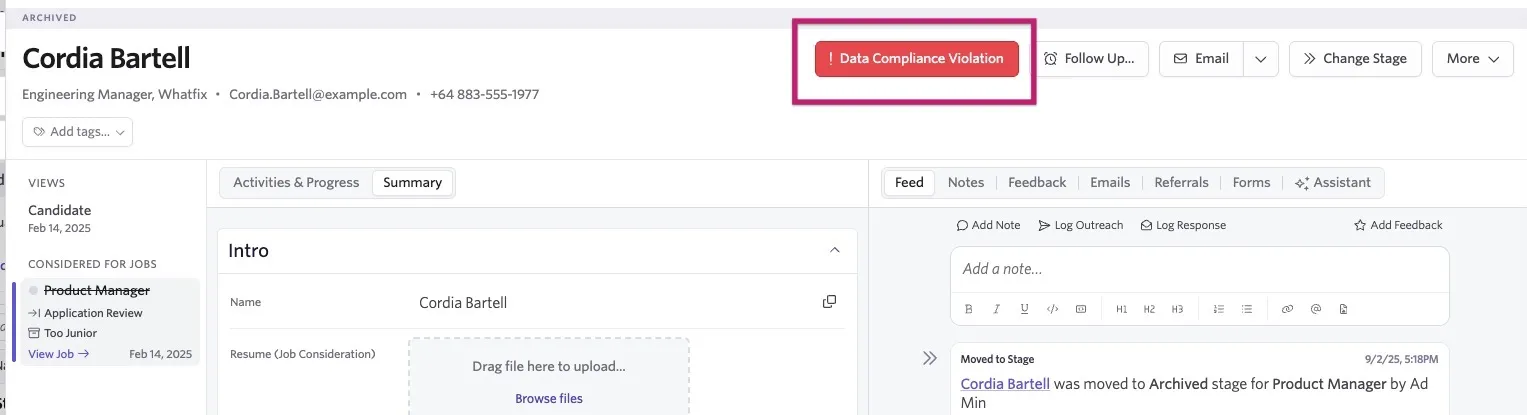
To review candidates who are in violation, use Candidate Search and filter Candidate's Is In Violation of Data Compliance? to Yes.

Candidates with active applications can appear in the results when an Active Candidate rule applies. Review these candidates separately and archive their active applications before anonymizing or deleting them.
Run this search periodically to catch candidates who newly reach your retention threshold.
For more on reporting on data retention rules and violations, see Reporting on Data Retention Rules, Violations of Rules and Consent ChoiceReporting on Data Retention Rules, Violations of Rules and Consent Choice.
What happens if multiple compliance rules apply to a candidate or lead?
Multiple compliance rules may apply to a candidate or lead if:
- They apply to a job posting with multiple locations, and one or more locations have different inactivity or consent rules configured for them.
- A candidate otherwise meets the criteria set for more than one inactivity and/or consent rule.
If multiple rules apply to a candidate, the rule with the longest retention period applies.
For example, if Rule A says delete or anonymize data after one year and Rule B says delete or anonymize data after three years, Rule B sets the candidate's retention date (three years).
FAQs
Should I anonymize or delete candidates?
When Ashby marks candidates as in violation, you must take any action (deleting or anonymizing) manually.
Anonymizing candidates removes any personally identifiable information (PII) but retains enough information to provide useful data for your analytics and reporting workflows. You cannot undo anonymization.
Can I override a data retention date when importing candidates via a CSV file?
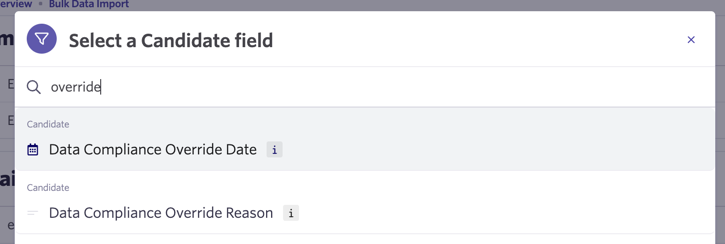
Yes. After you upload your comma-separated values (CSV) file, you can map the date listed in your file to the Data Compliance Override Date field in Ashby.
If you would also like to include an override reason, you can map these fields to the Data Compliance Override Reason field in Ashby.
When importing these fields, the override appears on the candidate profile and takes precedence over any other data retention dates.
For more on importing candidates via CSV, see Bulk Import OptionsBulk Import Options.
How does anonymizing a candidate work with the email events on the candidate's feed?
After you anonymize a candidate, a record of email events still shows on the candidate's feed (including the date and time the email was sent).
However, Ashby anonymizes the subject, body, and the candidate's email address.
What happens if a candidate receives an initial consent email but doesn't click the link and follow the steps to provide consent?
In this case, the Consent Retention Rate field on the candidate profile still shows No Consent Collected, as the candidate has yet to provide consent.
I'm seeing multiple consent form completion events within the Forms section of a candidate's job consideration. Why is this?
If a candidate has applied for a role multiple times, they may have also completed the consent form multiple times as part of the application.
When Ashby merges duplicate applications, only one job consideration shows on the candidate profile, but Ashby lists each application and consent form completed within the singular job consideration for your reference.
For more on this, see How do I merge duplicate candidate profiles?How do I merge duplicate candidate profiles?.
Can an active candidate be marked as out of compliance?
Yes. If an enabled Active Candidate rule applies and the calculated retention date has passed, Ashby can mark the candidate as out of compliance. Archive all active applications before taking anonymization or deletion actions.