Anonymizing and Deleting Candidates
In Ashby, you can delete candidates or anonymize them to remove data from your account. Both options are available in the More menu in a candidate's profile.
Before deleting or anonymizing a candidate, confirm they are not being actively considered for any jobs. If they are still being considered for a role, archive all their job considerations first.
Permissions & access
The following access roles can delete and anonymize candidates in Ashby.
Access role | Can delete/anonymize a candidate? |
|---|---|
Limited Access | ❌ |
Agency Users | ❌ |
Elevated Access - External Recruiter (not linked to an agency) | ❌ |
Elevated Access - Analyst | ❌ |
Elevated Access - Hiring Team Member | ❌ |
Elevated Access - Hiring Manager | ✅ |
Elevated Access - Admin | ✅ |
Elevated Access - Admin (Private) | ✅ |
Organization Admin | ✅ |
Overview
You can find both options in the More section of a candidate's profile.

Anonymizing candidates
To anonymize a candidate, click More on the candidate profile, then Anonymize.
When you anonymize a candidate, Ashby removes personally identifiable information (PII) from their profile, but the information can still be used for reporting (archive reasoning, stage reached, etc.). You cannot undo anonymization.
After you anonymize a candidate, Ashby adds an activity to their profile with a timestamp of the date and time they were anonymized.

Deleting candidates
To delete a candidate, click More on the candidate profile, then Delete. When you delete a candidate, Ashby treats it as a soft deletion.
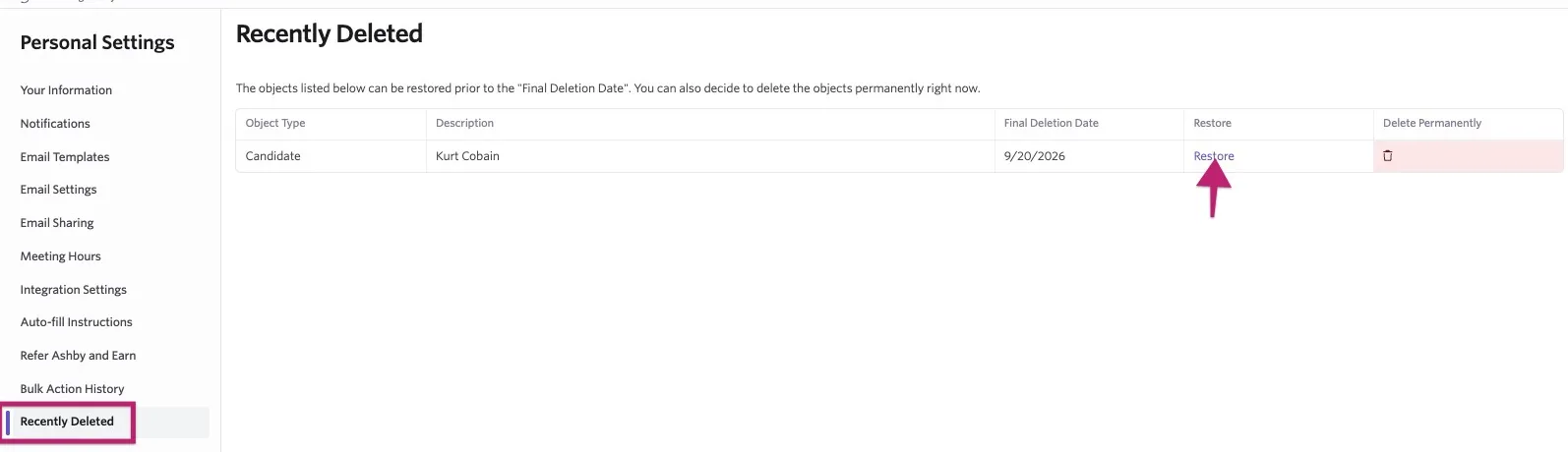
You can restore candidates or fast-track a permanent deletion via the Recently Deleted page found within each user's Personal Settings. If a candidate is not restored within 10 days, Ashby permanently deletes them. The Recently Deleted page lists the date of permanent deletion.
Bulk anonymizing and deleting candidates
Ashby flags candidates who violate your data compliance rules, but it does not anonymize or delete them automatically. Use Candidate Search to find these candidates and take action on them in bulk.
- Navigate to Candidates > Search.
- Toggle on the Advanced filter and apply the Candidate's Is In Violation of Data Compliance? filter, then set it to Yes.

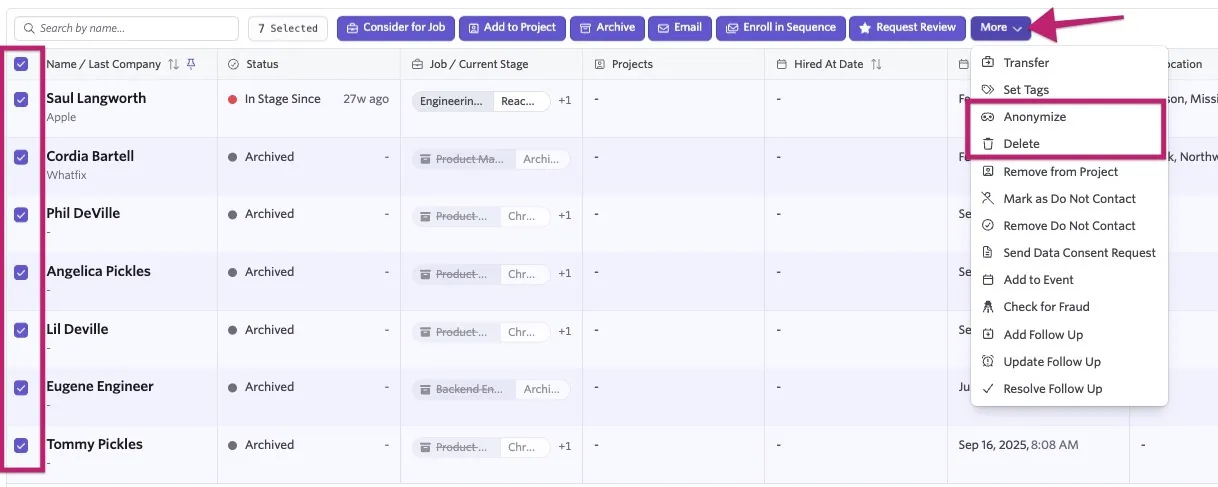
- Select all candidates in the results using the checkbox in the list header.
- Click More.
- Select Anonymize to remove PII from the selected profiles, or select Delete to delete the selected profiles.
- Review the candidates and confirm the bulk action. If Ashby displays an additional confirmation prompt for a large action, enter the requested confirmation text and click Perform.
Run this search periodically to catch candidates who newly reach your retention threshold. For more information about identifying candidates who are in violation of your data compliance rules, see Reporting on Data Retention Rules, Violations of Rules and Consent ChoiceReporting on Data Retention Rules, Violations of Rules, and Consent Choice.
FAQ
Can I configure rules to help maintain compliance with data laws?
Ashby has data privacy and compliance features that can assist with this. For guidance on these features, see Data Privacy and Compliance: ConfigurationData Privacy and Compliance.
A candidate has multiple job considerations or applications on their profile for the same job. Can I delete an application on their profile?
It's not possible to merge or delete job considerations on a candidate's profile. If the candidate should only be considered for the role once, archive the other job considerations you don't plan to move forward with.
How does anonymizing a candidate work with the email events on the candidate's feed?
Once a candidate is anonymized, a record of email events still shows on their feed, including the date and time the email was sent. However, the subject, body, and the candidate's email address are anonymized.
Can I automate anonymizing or deleting candidates?
No. Ashby flags candidates who are in violation of your data compliance rules, but it does not anonymize or delete them automatically. You can use Candidate Search to find candidates where Candidate's Is In Violation of Data Compliance? equals Yes, then anonymize or delete the results in bulk.
Are AI Notetaker recordings, notes, and transcripts deleted when a candidate is deleted or anonymized?
Yes, recordings, transcripts, and notes are all deleted when a candidate is anonymized or deleted.