Interviewer Pools
Interviewer Pools is an admin tool to help you group and manage interviewers based on their qualifications or other attributes. If you have certain individuals who are qualified to lead certain interviews, for instance, you can assign an interview pool when setting up the interview activity to select from multiple qualified interviewers.
Interviewer Pools can be used independently on in conjunction with Interviewer Training Interviewer Training , which is a part of the Advanced Scheduling Automation Add-OnAdvanced Scheduling Add On.
Permissions & access
The Interviewer Pools tool is available on the Foundations, Plus, Enterprise and Legacy Plus plans:
Foundations | Legacy Plus | Plus | Enterprise |
|---|---|---|---|
✅ | ✅ | ✅ | ✅ |
See the table below for information on the roles that have access to create to interviewer pools.
Access Role | Has Access? |
|---|---|
Limited Access | ❌ |
Agency Users | ❌ |
Elevated Access - External Recruiter (not linked to an agency) | ❌* |
Elevated Access - Analyst | ❌* |
Elevated Access - Hiring Team Member | ❌* |
Elevated Access - Hiring Manager | ❌* |
Elevated Access - Admin | ❌* |
Elevated Access - Admin Private | ❌* |
Organization Admin | ✅ |
*Only Organization Admins can configure interviewer pools by default. Elevated Access users can be given access to this feature if needed. More on this at Additional User Permissions .
Interviewer pool setup steps
- To create a pool, navigate to Interviewer Pools in Admin. Click + New in the top right corner and give the pool a name.

- On the page for the pool you just created click + Add Interviewers under the Qualified Members section. Search and/or select an employee from the Employee drop-down. Click Submit to add the employee.
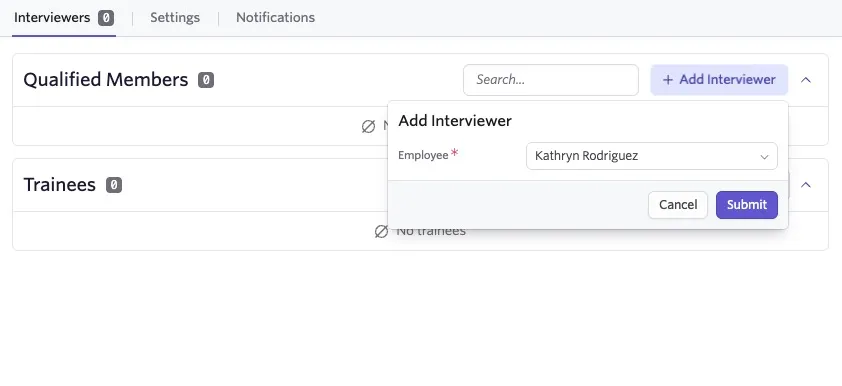
You can also add employees to interview pools as qualified members via the Interview Info tab of their profile. Adding an employee directly to an interviewer pool's qualified members using this method will remove them from the pool's training path if they are currently training for that pool.
The section to add Trainees is only for Enterprise plans with Interviewer Training enabled, or those who have purchased the Advanced Scheduling Automation Add-On .
Managing interviewer pools
Once you have created an interviewer pool, you can update it at any time by navigating to Admin > Interviewer Pools and clicking on the pool name.
On the Interviewers tab, you can add or remove additional interviewers from the pool as needed. The search bar allows you to search for specific members to take action on them.
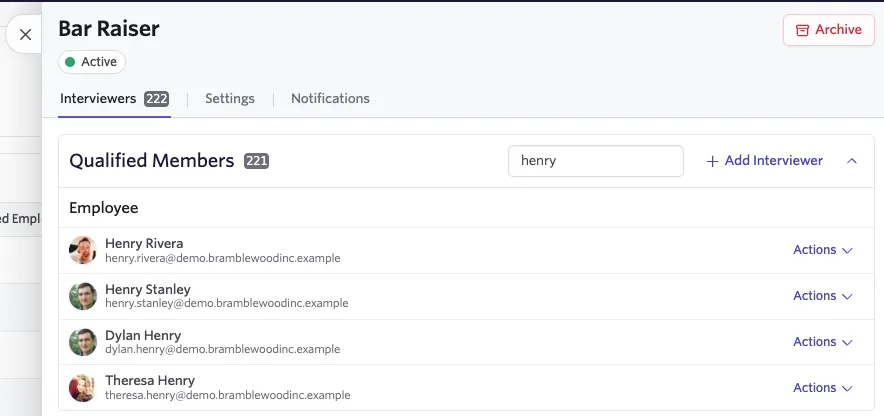
If you have interviewer training in your plan, you will see an option to pause membership in the pool. This will prevent the employee from being added to interviews when this pool is used.
To pause an interviewer globally (e.g. prevent them from being added to interviews for a duration of time, such as when on vacation), you can navigate to their employee profile > Interviewer Info and turn on Pause Interviewer. For more information, see Assigning Interviewers .
On the Settings tab, you can rename the interviewer pool or toggle the training settings if your plan includes training.
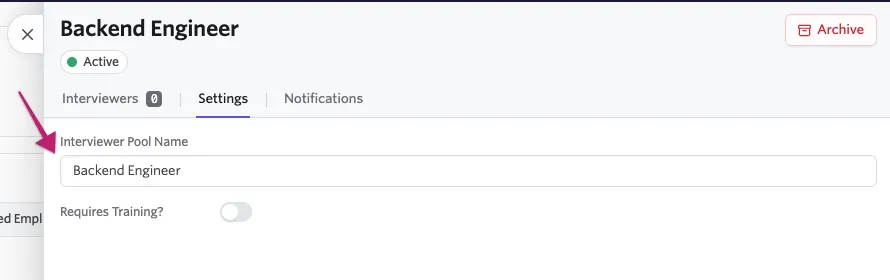
If at any point an interviewer pool is no longer needed, you can select the Archive button in the top right to archive the pool.
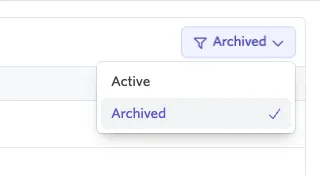
Using the filter in the above right of the pool list, you can opt to view all archived pools. Clicking on a pool and selecting Restore will restore the pool to the active list.
The Notifications tab is only relevant to those with interviewer training included in their plan. See Interviewer Training for more information.
Congrats, you've learned to create and manage interview pools! See Setting up Schedule Interview Activities for more information on adding pools to interview activities, or Interviewer Training for how to use pools of trainees.
FAQ
Are there limits on how many interview pools I can create based on my plan?
No, any plan type can create as many interviewer pools as they need. Foundations, Legacy Plus, and Plus customers without the Advanced Scheduling Automation Add-On are limited to a single interviewer pool that has a training path.