Understanding Candidate Activity Statuses
This article provides a comprehensive overview of the candidate activity statuses available in Ashby as a candidate moves through the pipeline. These statuses typically appear in green, yellow, or red bars within the candidate pipeline or on the candidate's profile and give your team real-time visibility into where a candidate stands in your hiring process, helping you identify next steps and keep your pipeline moving efficiently.
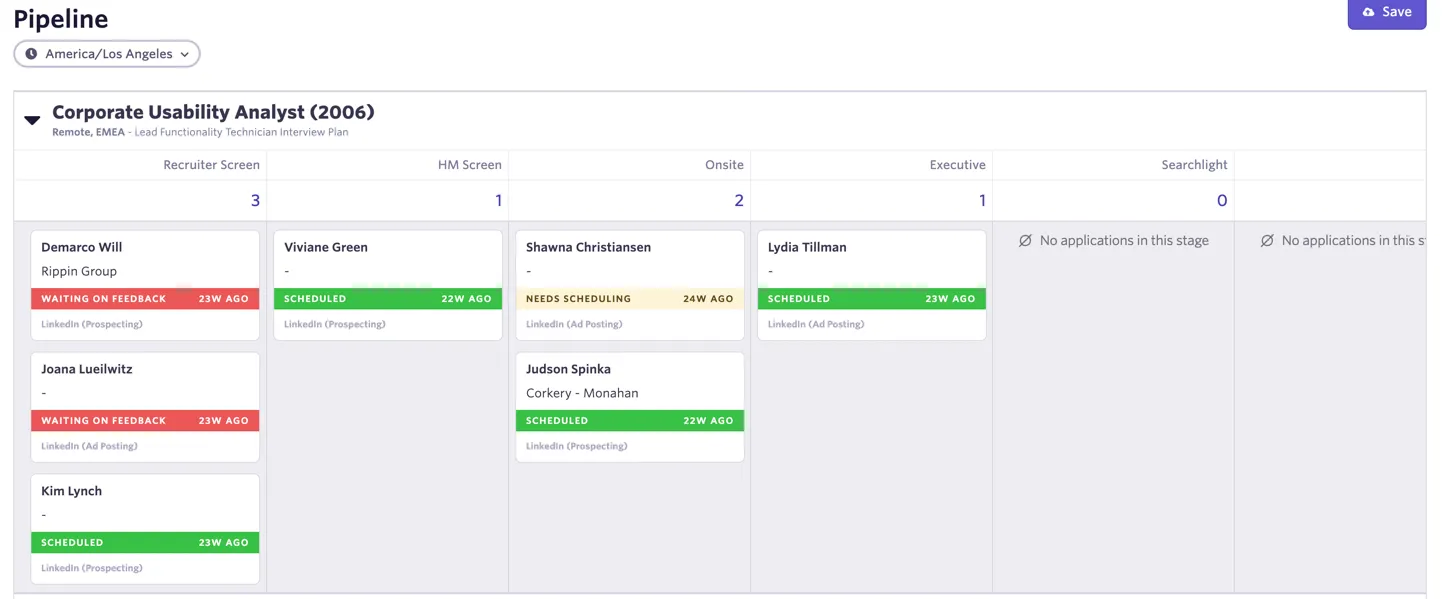
See What do the card colors mean on the Candidate Pipeline report? to understand how status colors on the candidate pipeline and profile are determined.
Prerequisites: To view and manage candidate statuses, you must have the necessary permissions to view candidate profiles and application details within your Ashby environment.
How the overall status is determined
If a candidate has multiple active activities (e.g., two different interview types happening in the same stage), Ashby calculates an overall status to display at the top of the candidate profile and in your pipeline views.
The overall status reflects the earliest chronological status across all active processes. For example, if a candidate has two active interviews and one interview is Scheduled but another in the same stage Needs Scheduling, the overall status will remain Needs Scheduling until the second activity is addressed, because Needs Scheduling occurs earlier in the linear progression of interview statuses. This ensures that no steps are missed during the hiring process.
Candidate-level status
Candidate-level statuses represent the person's overall relationship with your organization, independent of any specific application thread.
Status | Description |
|---|---|
Lead | The candidate has no active applications (e.g., for sourced candidates or prospects). |
Application statuses
Application statuses indicate the next step required to progress the interview and are designed to be linear. They progress automatically as actions are taken and only revert to earlier statuses in specific scenarios like cancellations or link invalidation. They are described in their general linear order below.
Status | Description |
|---|---|
Needs Scheduling | An interview or take-home assignment is active but not yet scheduled. This includes "On-hold" interviews and take-homes waiting to be sent. |
Scheduling Requested* | A scheduling request has been sent, but not scheduled. This status can only be reached from Needs Scheduling. If a scheduling request is created or submitted while an activity is not in Needs Scheduling, the status will not change to Scheduling Requested. |
Booking Link Sent | A direct booking link was sent via Ashby. Note: Copying and sending links outside of Ashby will not trigger this status change. |
Waiting on Availability | An availability request was sent via Ashby. Like booking links, this status only triggers if sent directly through the platform. |
Availability Submitted | The candidate has provided their times. If a candidate "un-submits" their availability, the status reverts to Waiting on Availability. |
Scheduled | An interview is officially on the calendar. This status is reached automatically from any prior status once all current activities are scheduled. |
On Hold* | Technically treated as Scheduled, but displays as On Hold in when an interview is scheduled as a hold but not yet confirmed. |
Waiting on Feedback | The status moves here automatically once the scheduled interview time has passed. |
Waiting on Submission | A take-home assignment was sent, and we are waiting for the candidate to upload their work. |
*These statuses are only available with the Advanced Scheduling Automation Add-On or on Enterprise plans.
Status reversions and invalidations
While the process is linear, certain actions will cause a status to move backward:
- Invalidating Links: If a booking or availability link is invalidated, the status reverts to Needs Scheduling (or Scheduling Requested if a request exists).
- Cancellations: When you cancel a scheduled interview, it reverts to Needs Scheduling or Scheduling Requested. Even if availability was previously submitted, it will not automatically return to Availability Submitted status.
- Activity Deletions: If you delete all active activities, the status may revert to In Stage Since, showing the duration of time since the last stage was entered.
- Re-requesting Availability: Once availability is submitted, re-requesting it using the same link will not revert the status to Waiting on Availability unless the original link is first invalidated.
Manually changing the application status
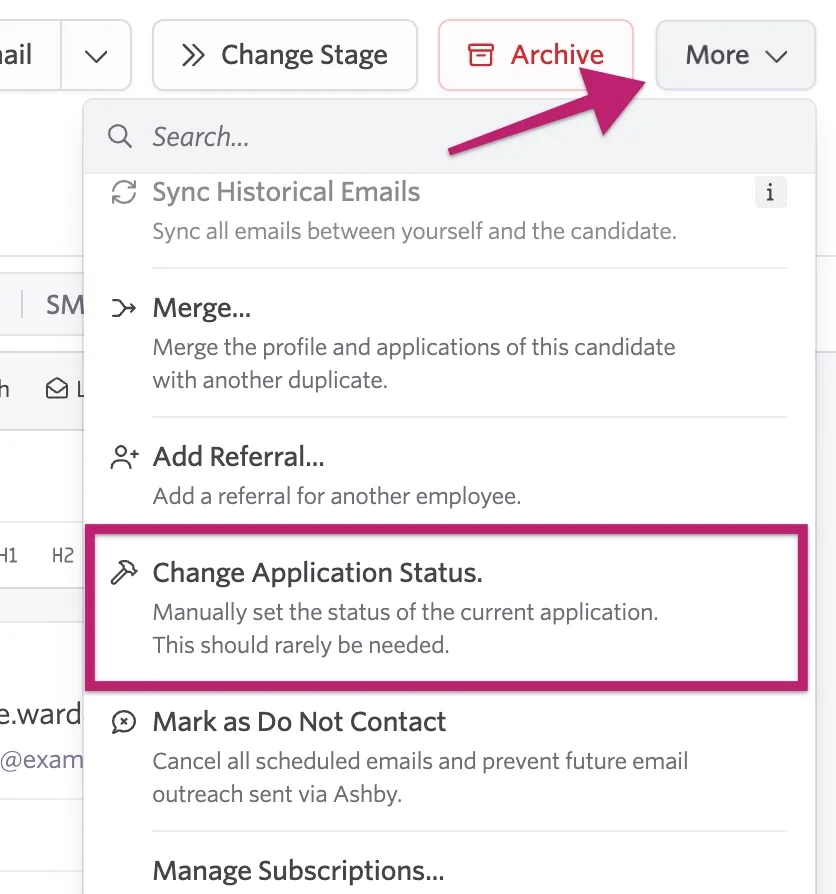
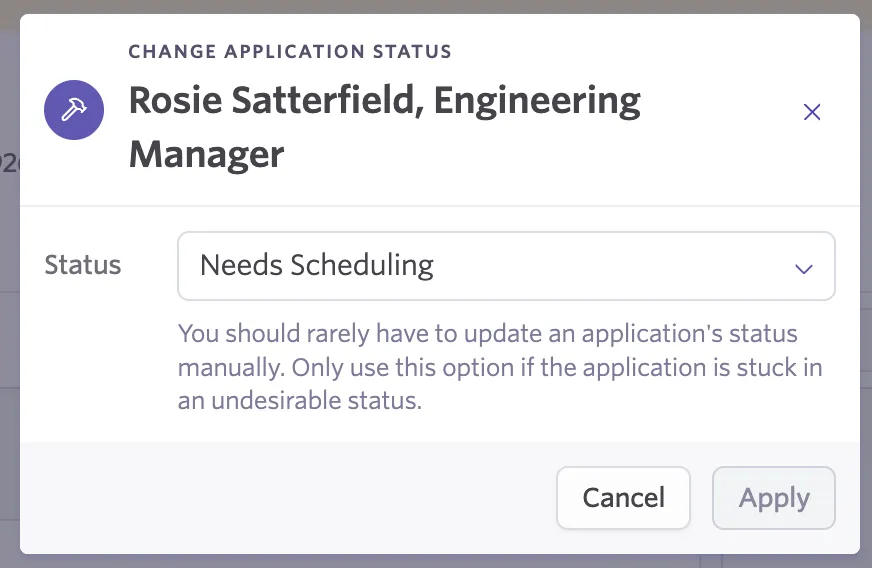
While this should be rarely needed, it is possible to manually update the application status if needed. To do so, select More in the upper right corner of the candidate's profile. Then, select Change Application Status.
Then, select the status you'd like to change it to from the drop-down.
Assessment statuses
Use these statuses to monitor the progress of external or technical assessments.
Status | Description |
|---|---|
Waiting on Assessment | An assessment has been sent to the candidate, but it has not been completed yet. |
Assessment Submitted | The candidate has finished the assessment, and the results are ready for review. |
Check out Reporting on Integration Partner Assessments for more information on tracking assessments using reports.
Pipeline and decision timing statuses
These statuses help you manage transitions between hiring stages and track how long candidates remain in certain parts of the process.
- Needs Decision: The next step is a hiring decision. This occurs when an interview or take-home activity is marked as "Complete."
- In Stage Since: When no other specific status applies, Ashby emphasizes the total time spent in the current stage.
- Last Interaction: Primarily used for data imported from other systems (like Greenhouse or Lever) to track the recency of activity.
Offer statuses
These statuses reflect the final stages of the hiring process where an offer is being prepared or considered.
Status | Description |
|---|---|
Needs Offer | The candidate has cleared the final interview stages and an offer needs to be generated. |
Needs Offer Approval | An offer has been drafted but requires internal approval before it can be sent to the candidate. |
Waiting on Offer Acceptance | The offer is in the candidate's hands, and we are waiting for their response. |
Candidate Accepted Offer | The candidate has officially accepted the offer. |
Candidate Rejected Offer | The candidate declined the offer. These candidates remain actionable for future roles. |
Terminal statuses
- Hired: The candidate has been officially marked as hired for the application.
- Archived: The application process is closed. The candidate-level view may still show other active applications if they are being considered for other jobs.