What do the card colors mean on the Candidate Pipeline report?
This document walks through the card colors you will see on the Candidate Pipeline report and their meaning.
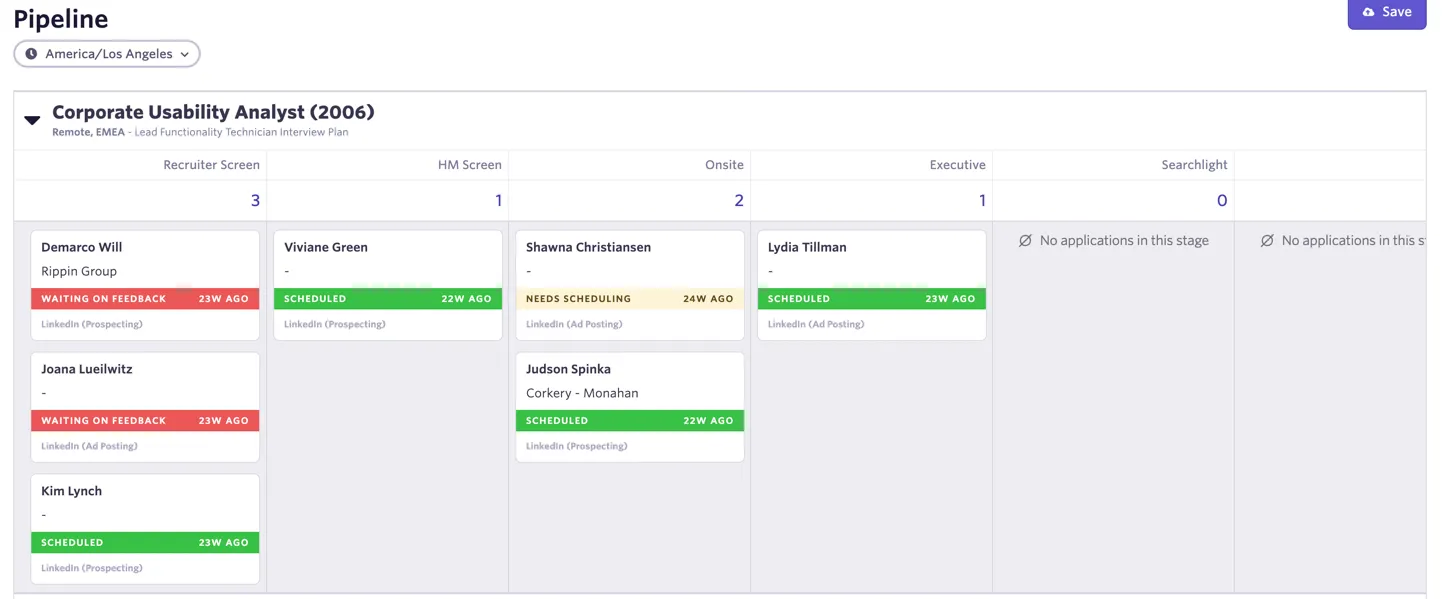
The below table shows the Candidate Pipeline for the Corporate Usability Analyst role.
When visualizing the Candidate Pipeline via the card (kanban) view, the colors on each card are based on either time or activity.
If there are structured activities (interviews, take home assignments, etc) in the active stage, the card colors mean the following:
Card Color | Activity | Examples |
|---|---|---|
Green | Up to date | Scheduled |
Yellow | Waiting on candidate to submit availability, accept offer, interview needs scheduling, etc | Needs Scheduling, Booking Link Sent, Submitted Availability, Waiting on Offer Acceptance |
Red | Hiring team needs to take action | Needs Decision, Waiting on Feedback |
If there are no structured activities for that specific stage, the card will say In Stage Since, and the card colors mean in the following:
Card Color | Time |
|---|---|
Green | In stage <2 days |
Yellow | In stage 2-5 days |
Red | In stage 5+ days |