What are ‘Shared’ Interviews, Application Forms, and Feedback Forms?
We highly recommend using shared application forms, feedback forms, and interviews rather than custom ones, since you can't report on custom versions unless they're connected to a custom field via Form Field ConnectorsForm Field Connectors.
What does ‘Shared’ mean?
‘Shared’ refers to application forms, feedback forms, and interviews that you can use across as many jobs as needed.
- You can set up shared interviews in Admin > Interviews & Scheduling > Shared Interviews.
- You can create shared feedback forms in Admin > Interviews & Scheduling > Feedback Forms.
- You can set up shared application forms in Admin > Jobs & Applications > Application Forms.
What does ‘Custom’ mean?
‘Custom’ refers to an application form, feedback form, or an interview that has been created or customized specifically for one job, interview, or interview activity, and you can't link it to multiple instances unless you promote it to ‘shared’ status.
Shared application forms
When configuring a job posting for your job, you can select the application form you'd like the applicant to complete when applying for that role. You see two options when assigning or amending the application form: Unlink & Edit and Change Link.
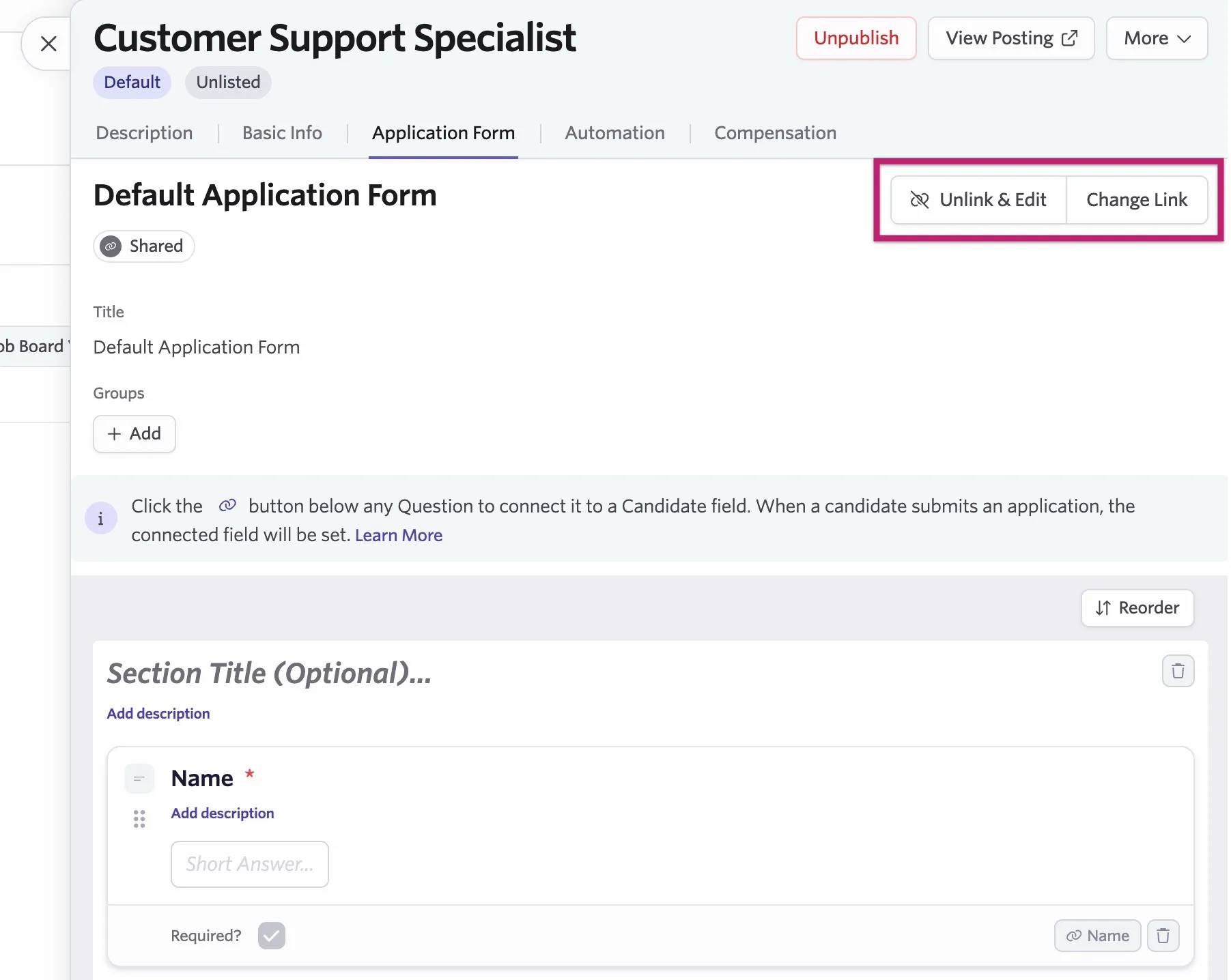
Unlink & Edit: Using this option to amend the application form only edits the form for that specific role, creating a custom application form. The amended application form is not saved as a shared application form for use across other jobs.
Change Link: You can switch from one shared application form to another using this option. If you're looking to set up additional application forms to use across multiple jobs, we'd recommend doing this on the Application Forms page.
For more on configuring job postings, check out Job PostingsJob Postings.
Shared feedback forms
You can assign feedback forms to your interviews on the Interviews page. Similarly to application forms, you see the Unlink & Edit and Change Link options when selecting your feedback form on the Feedback Form tab.
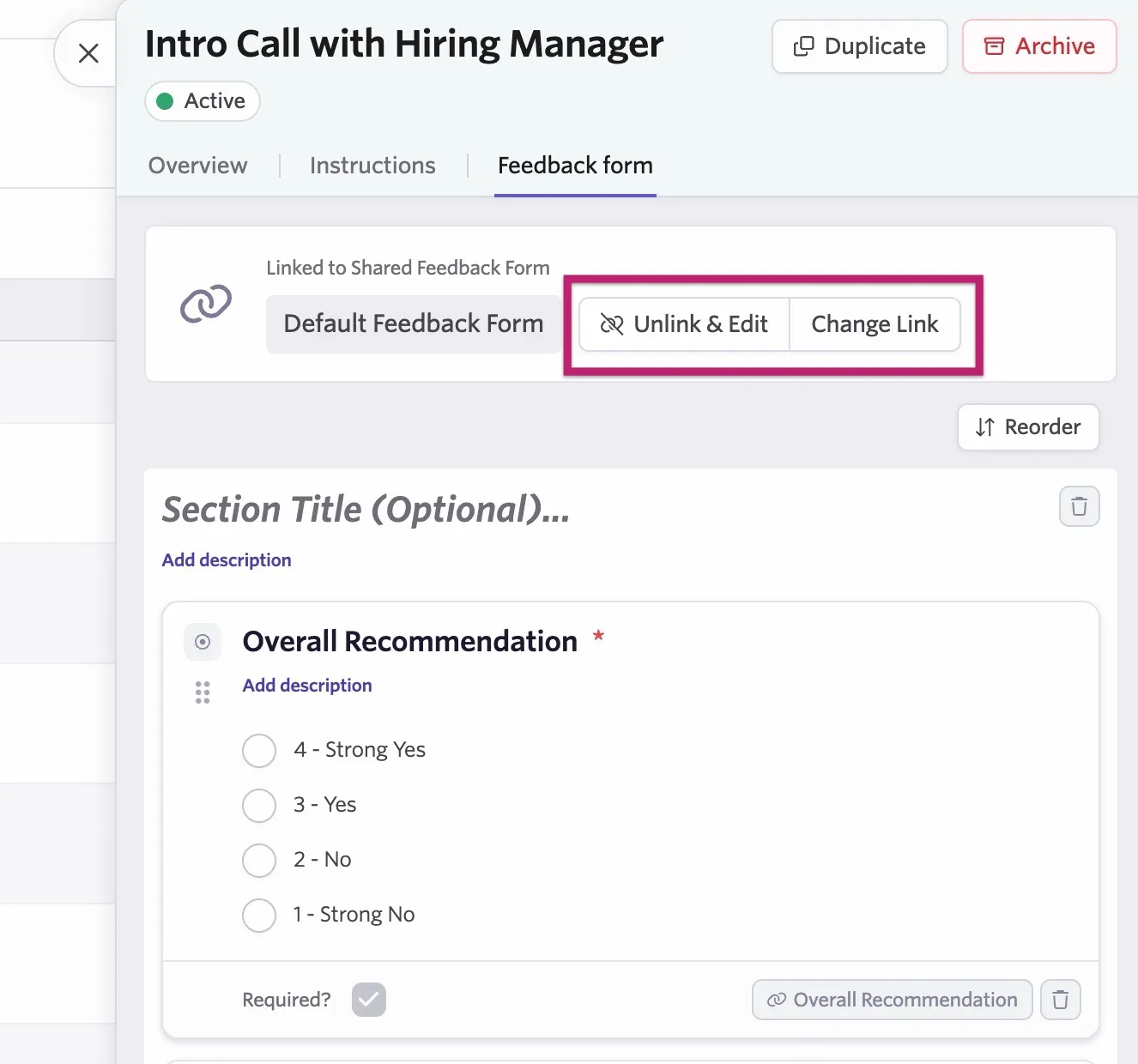
Unlink & Edit: Just like application forms, you can click this option to amend the current form and create a custom one. Any changes you make here apply only to this job and don't apply to the shared feedback form.
Change Link: Use this option to switch to a different shared feedback form set up on the Feedback Forms page. You can use shared feedback forms across as many jobs as you'd like.
Shared interviews
When adding a schedule interview activity to a stage in a job's interview plan, you see the option to Create New Interview or Add Shared Interview.
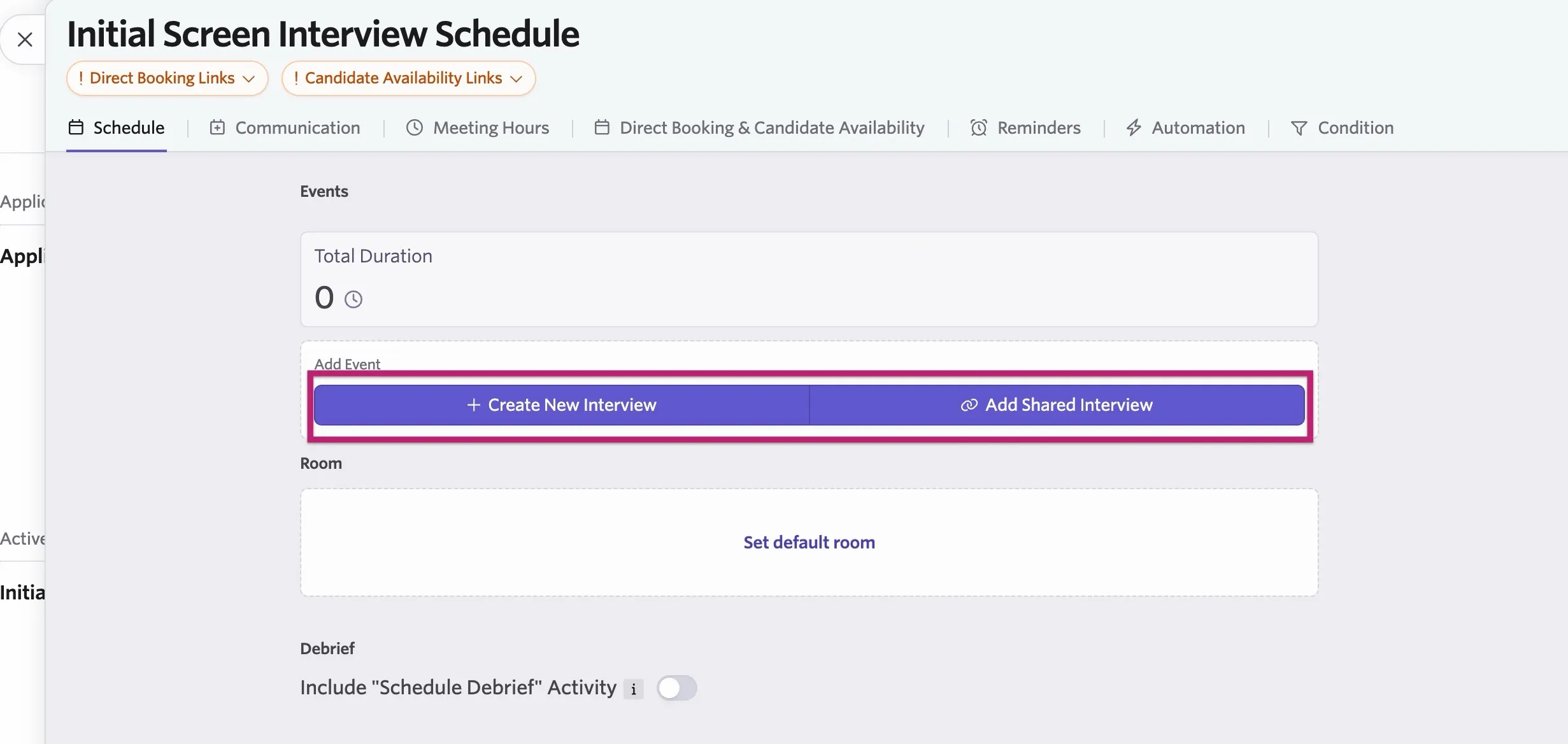
Create New Interview: If you create a new interview, it's a one-off custom interview that you can only use for that schedule activity. The custom interview you create here isn't available when clicking Add Shared Interview on other interview activities until it's given ‘shared’ status.
Add Shared Interview: If you would like to create interviews that you can use across multiple jobs, we'd recommend setting up an interview in the Interviews section of your Ashby account. When clicking Add Shared Interview, you can then select your shared interview of choice from the list.
For more on configuring schedule interview activities, check out Setting up Schedule Interview ActivitiesSetting up Schedule Interview Activities.
How do I switch from a custom form or interview to a shared one?
The custom form or interview isn't saved or retrievable after you switch to a shared form.
If you'd like to switch from a custom form or interview to a shared one, you can take the following steps.
Switching from a custom application form to a shared application form
- Navigate to Jobs > Jobs, then Job Postings.
- Click the Application Form tab.
- Click Delete & Link to Shared.
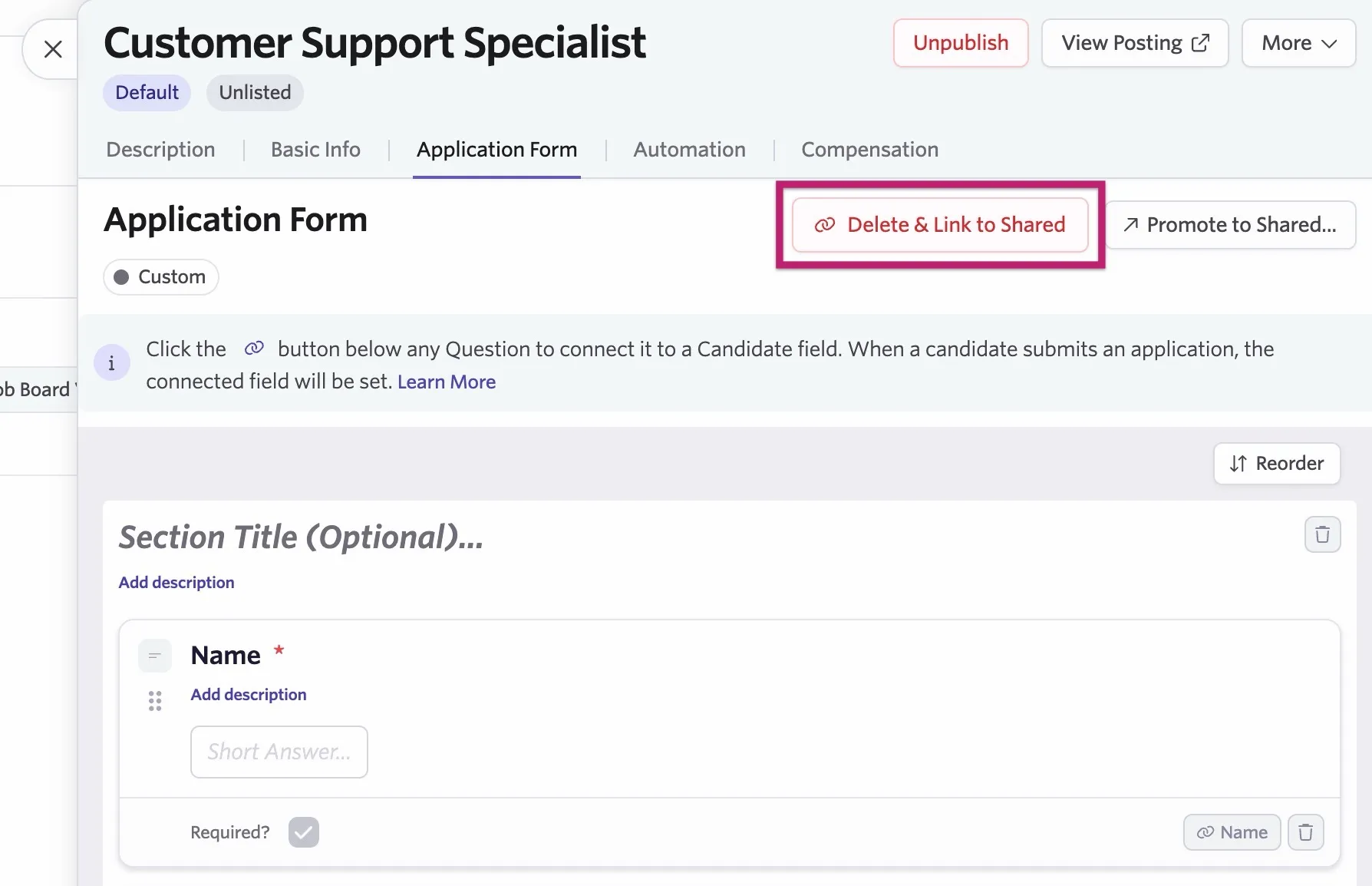
- Select the shared application form from the dropdown.
Switching from a custom feedback form to a shared feedback form on a shared interview
- Navigate to Admin > Interviews & Scheduling > Shared Interviews.
- Click on the interview with the custom feedback form assigned to it.
- Click the Feedback Form tab.
- Click Delete & Link to Shared.
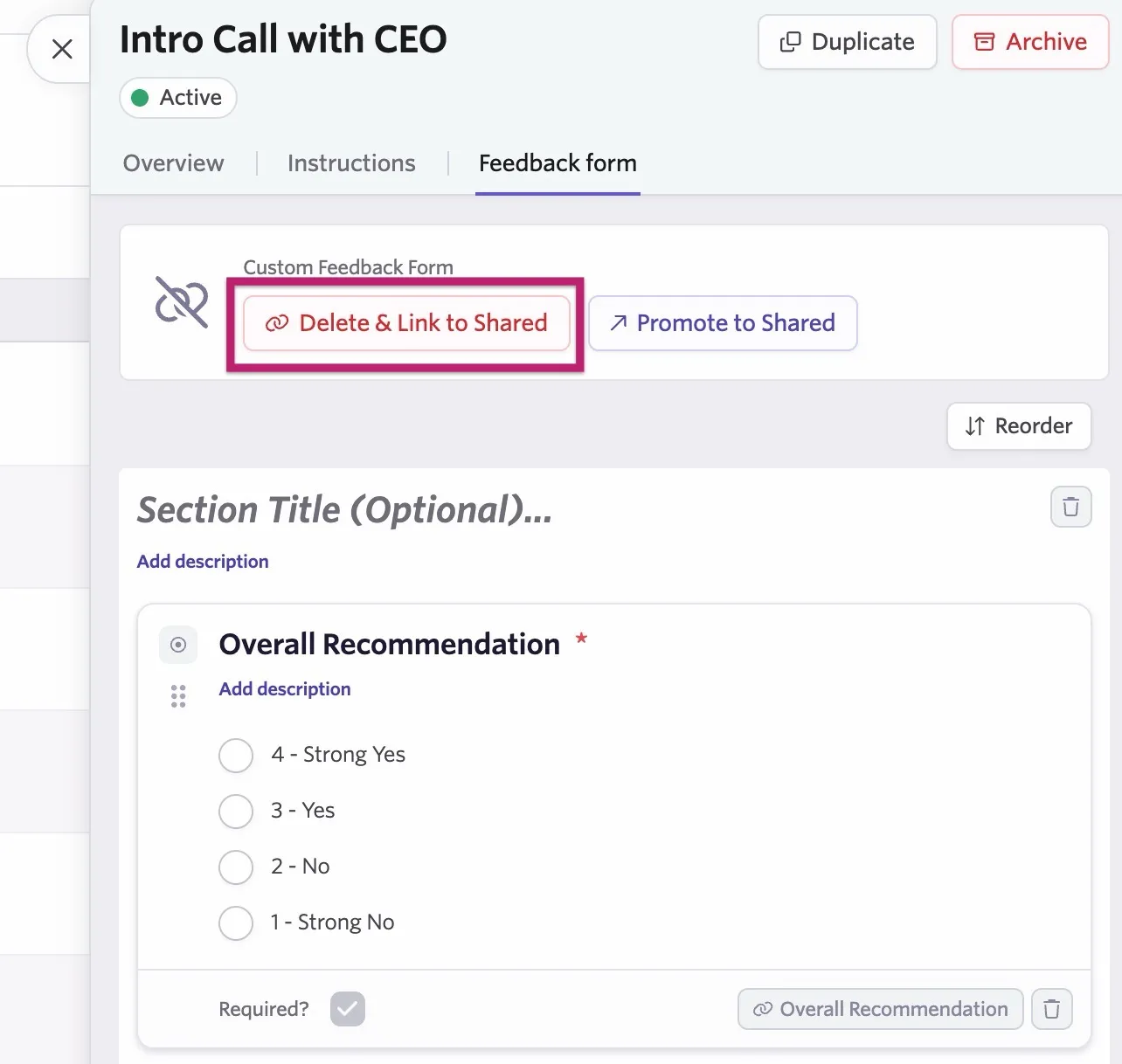
- Select the shared feedback form from the dropdown.
Switching from a custom feedback form to a shared feedback form on a custom interview
- Navigate to the schedule activity by heading to Jobs, clicking Interview Plan, and clicking on the schedule interview activity.
- Click on the Custom Interview field to open up the interview details.
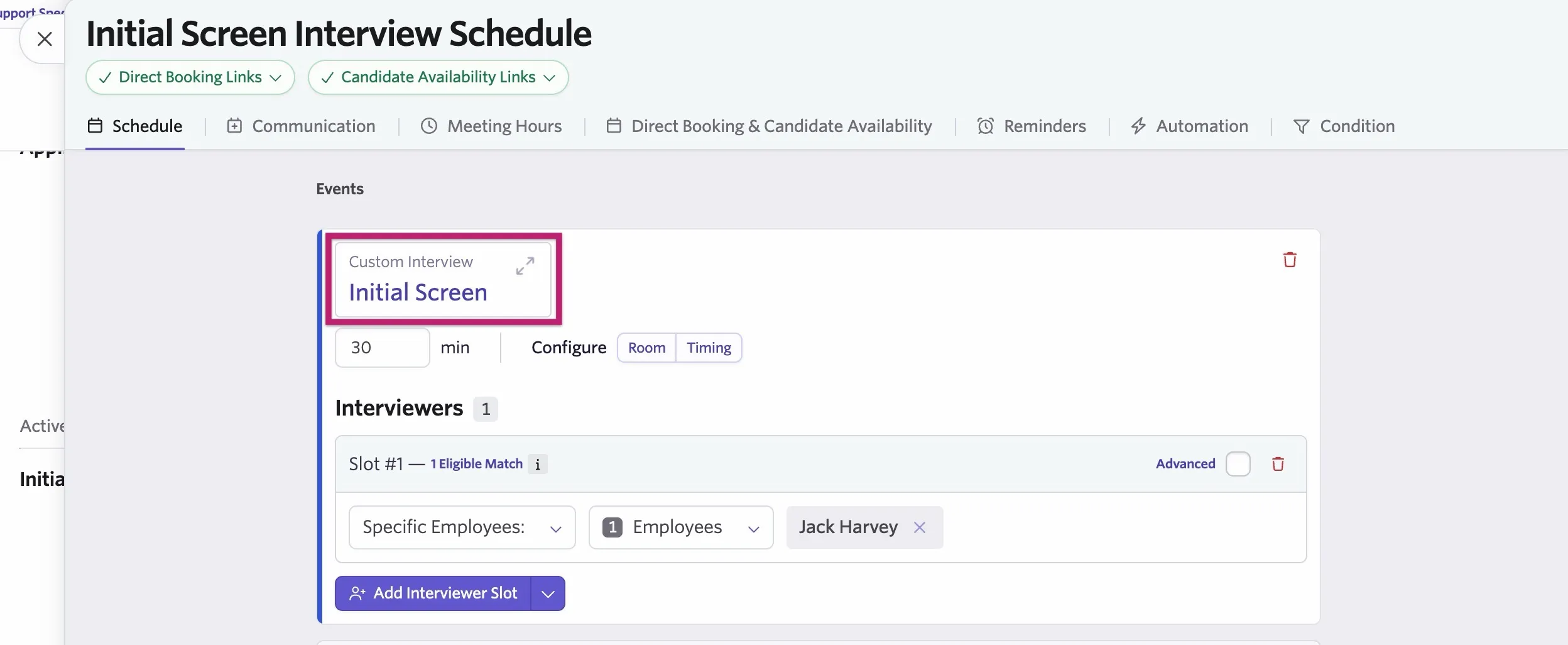
- Click on the Feedback Form tab on the custom interview.
- Click Delete & Link to Shared.
- Select the shared feedback form from the dropdown.
Switching from a custom interview to a shared interview
- Navigate to the schedule activity by heading to Jobs, clicking Interview Plan, and clicking on the schedule interview activity.
- Click on the Custom Interview field to open up the interview details.
- Click Delete & Link to Shared.
- Select the shared interview from the dropdown.
Promote a custom interview, application form or feedback form and make it into a shared one
You can promote custom application forms, feedback forms, and interviews, turning them into shared application forms, feedback forms, and interviews.
Promote a custom application form to a shared application form
- Navigate to Jobs > Jobs, then Job Postings.
- Click the Application Form tab.
- Click Promote to Shared.
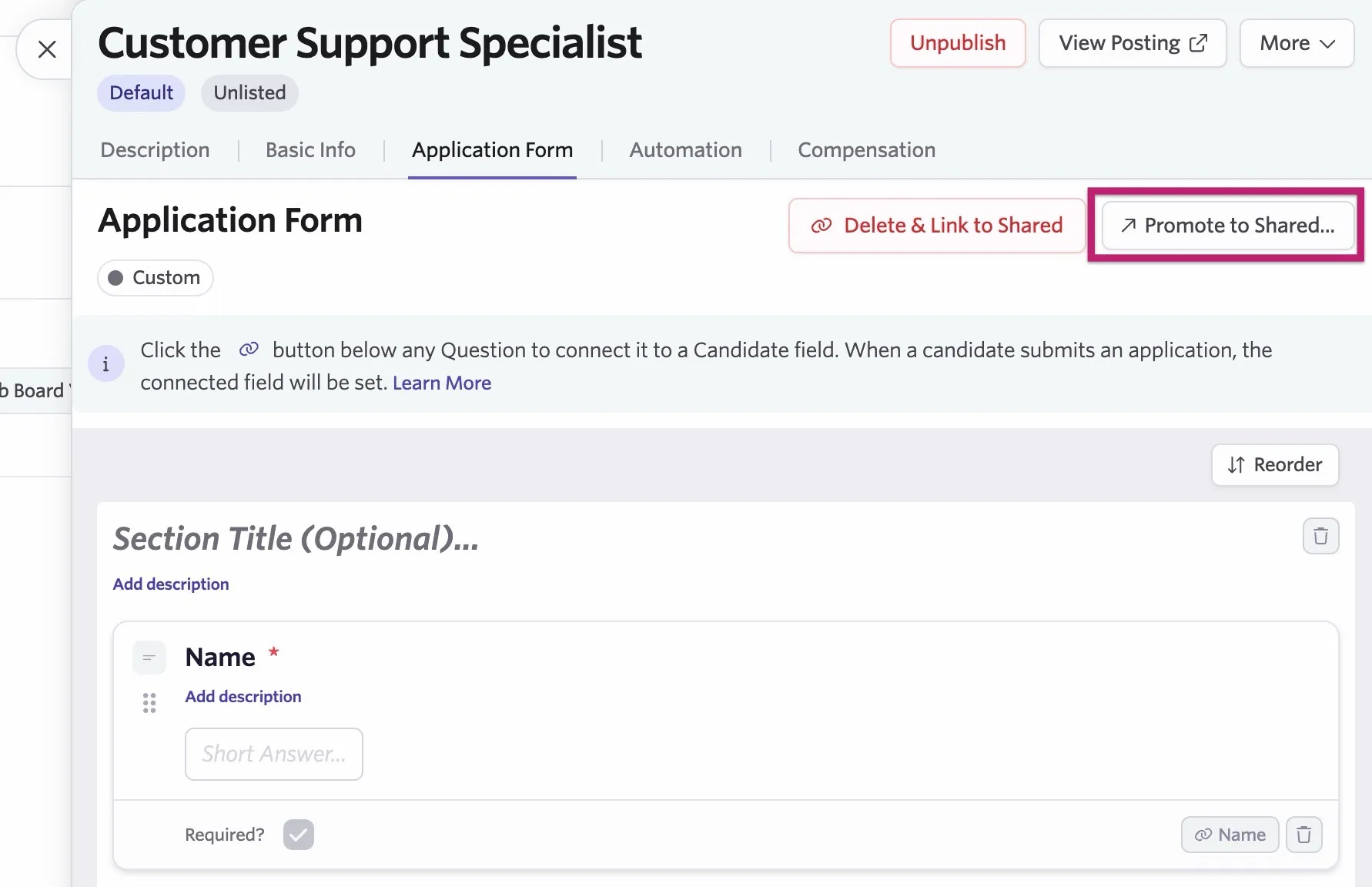
- Type a title for your new application form and click Promote to Shared.
Promote a custom feedback form to a shared feedback form from a shared interview
- Navigate to Admin > Interviews & Scheduling > Shared Interviews.
- Click on the interview with the custom feedback form assigned to it.
- Click the Feedback Form tab.
- Click Promote to Shared.
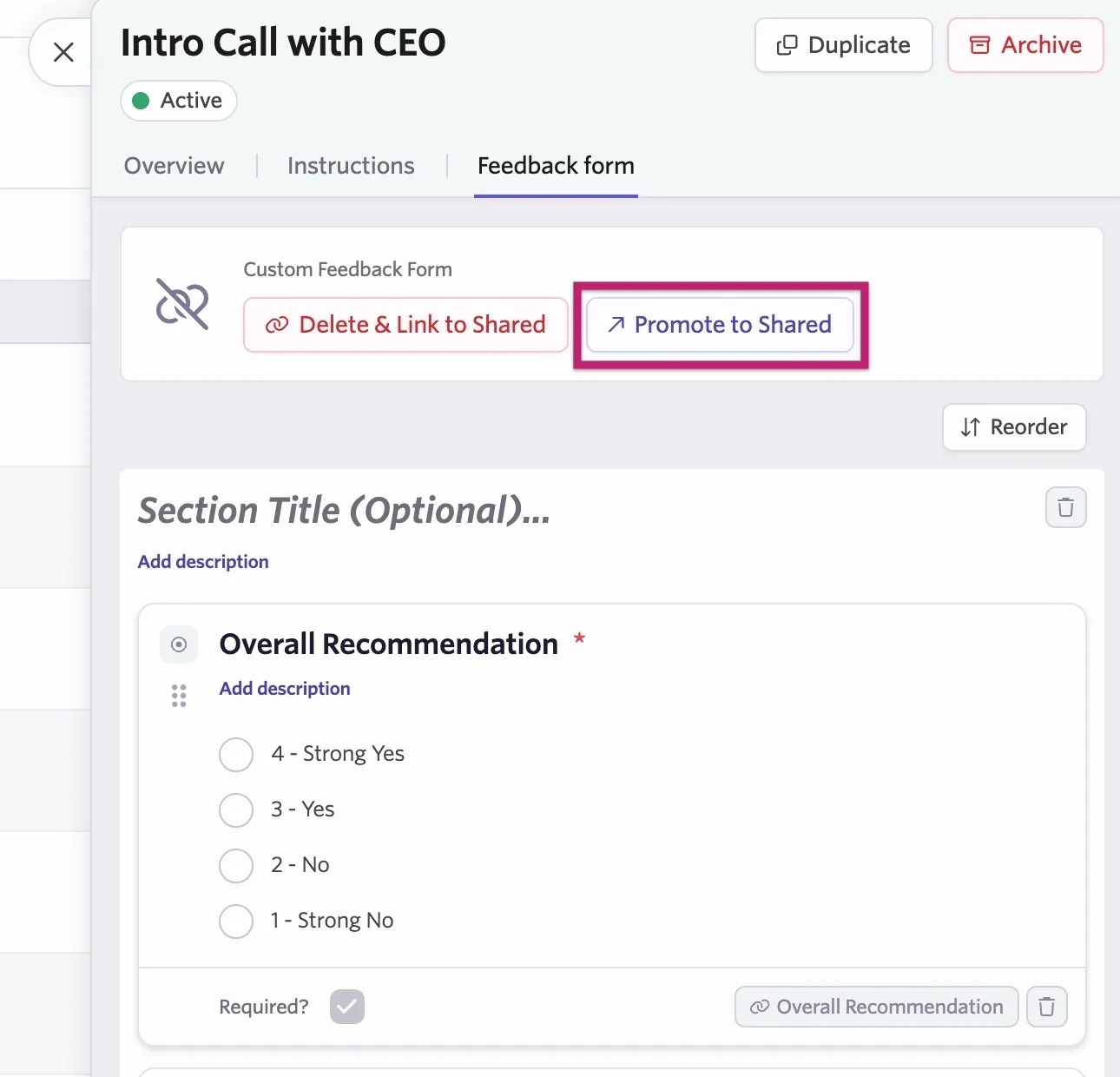
- Type a title for your new feedback form and click Yes.
Promote a custom feedback form to a shared feedback form from a custom interview
- Navigate to the schedule activity by heading to Jobs, clicking Interview Plan, and clicking on the schedule interview activity.
- Click on the Custom Interview field to open up the interview details.
- Click the Feedback Form tab.
- Click Promote to Shared.
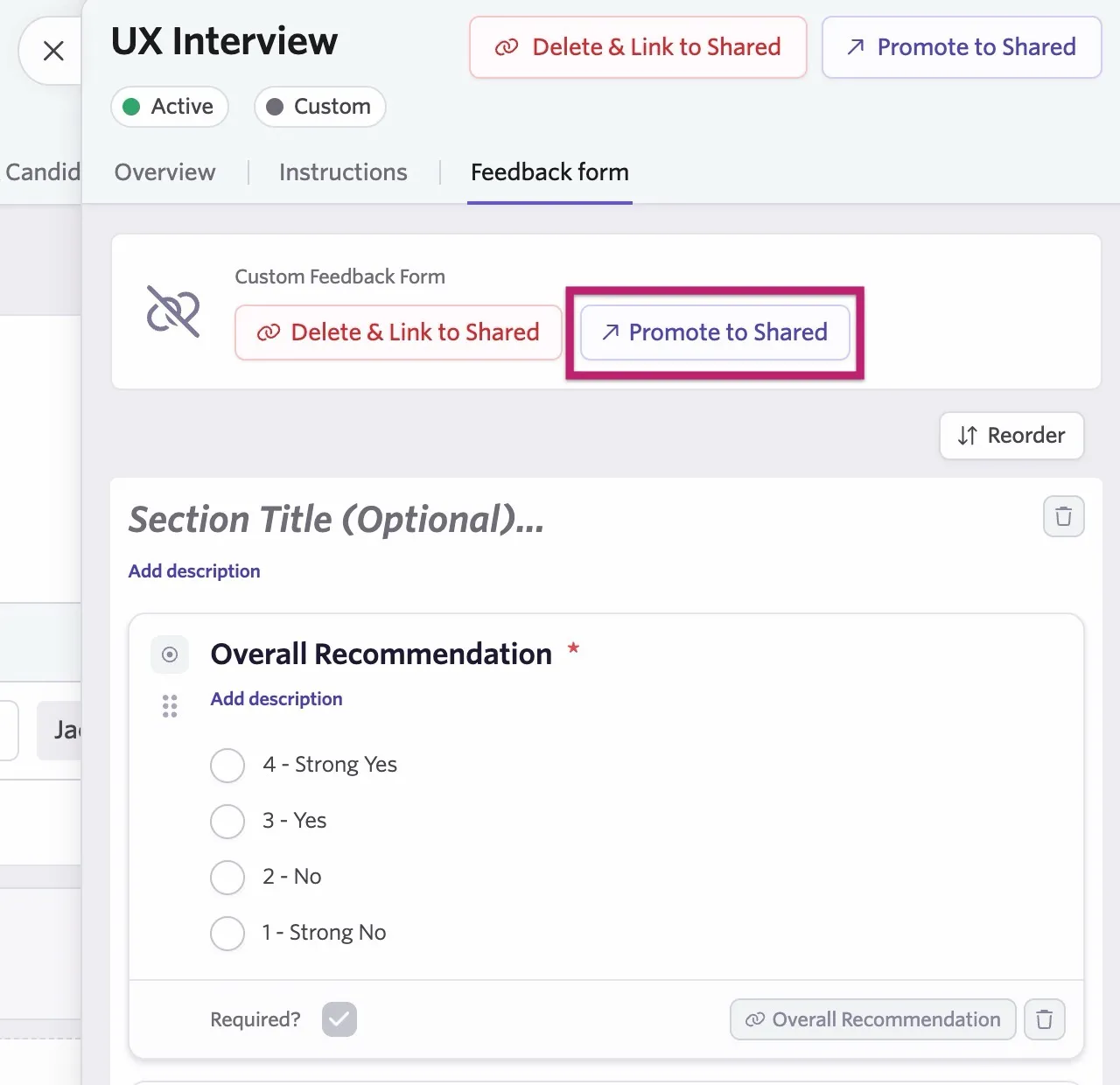
- Type a title for your new feedback form and click Yes.
Promote a custom interview to a shared interview
- Navigate to the schedule activity by heading to Jobs, clicking Interview Plan, and clicking on the schedule interview activity.
- Click on the Custom Interview field to open up the interview details.
- Click Promote to Shared.
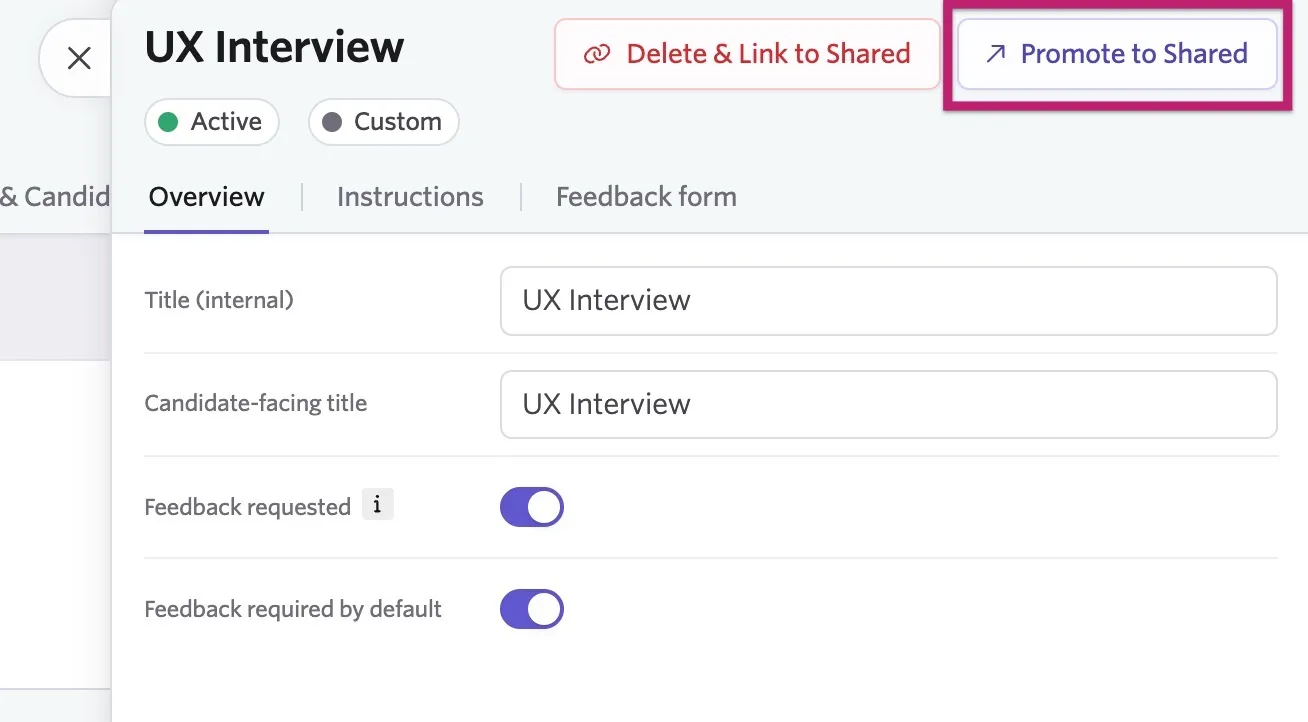
- Type a title for your new interview and click Yes.