Job Postings
Job postings are used when you want your job to appear on your Ashby or third-party job boards, allowing you to collect applications from candidates. Create a job posting to add the job description, additional locations, the application form, and override compensation information for the specific instance of the job you're hiring for. This article outlines the steps required to successfully create and publish a job posting.
Prerequisites:
- To set up a job posting, you must create a job first.
- To publish a job posting, your job must be set to "Open", and may require an active Opening to be assigned depending on your settings and plan type.
You can read more on creating and opening jobs at Creating & Opening Jobs
Permissions & access
Job postings are available on all plans:
Foundations | Legacy Plus | Plus | Enterprise |
|---|---|---|---|
✅ | ✅ | ✅ | ✅ |
To create or edit a job and its postings, users must have one of the following:
- Elevated Access - Admin
- Elevated Access - Admin (Private)
- Organization Admin
Users with custom access roles must also have the Can add/edit jobs permission scoped to the relevant job, team, or location.
Creating and publishing a job posting
Step 1: Start the job posting draft
- Navigate to the job you'd like to post by going to Jobs > Jobs in the top navigation bar.
- Select the Job Postings tab within the job.
- Click New Draft to get started.

You can create a draft job posting while your job is in a Draft state, but your job must be set to Open in order to publish your job posting.
Step 2: Add the job description and basic info
Once you've created your draft, you have five different tabs where you can fill in posting details:
- Description
- Basic Info
- Application Form
- Automation
- Compensation
We'll cover the Description and Basic Info tabs in this section.
Description

Social Description: The description information added to the Social Description field shows when the posting is shared on social media (for example, linked in a post on LinkedIn). There is a limit of 200 characters.
Description: Applicants see this information when they view this job on your Ashby job board (on the Overview tab). Ashby also sends the description to any third-party job boards you choose to integrate with. You can add links, images, and videos to your description using the toolbar at the bottom of the field.
Basic info
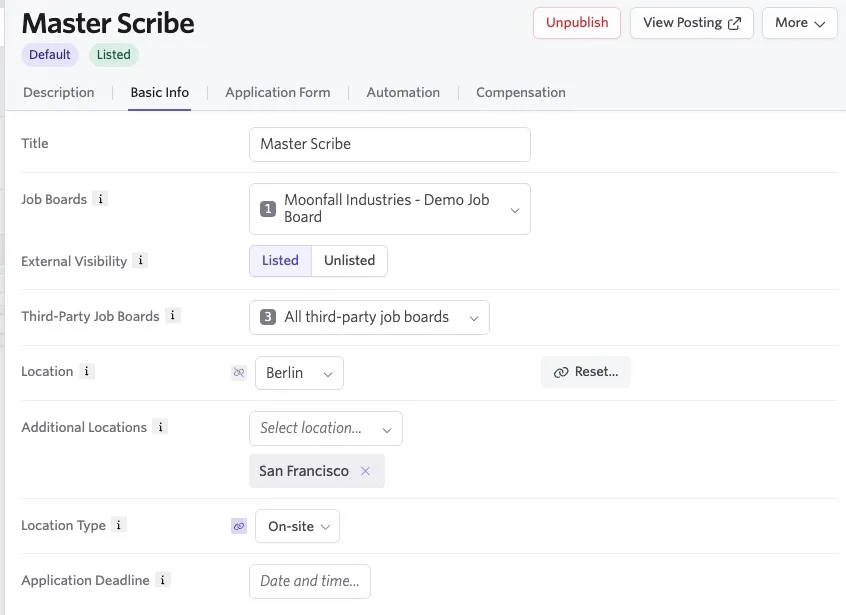
- Title: Enter the title as you would like it to appear on the posting. By default, the title used when creating the job appears.
Amending the title here will not impact the title of the job internally in Ashby. For example, if the Head of Marketing job title was amended to display as Head of Digital Marketing in this field, the job posting would reflect the new title but the job will still show as Head of Marketing to an internal user when viewing the job in Ashby.
- External Visibility: Here you can choose to list your job publicly on your Ashby job board or third-party job boards (Listed), or not (Unlisted).
If a job posting is published but set as Unlisted, an applicant can still access it if they have a direct link to the posting. For unlisted postings added to the internal job board, users would still need to sign in to be able to view the posting.
- Third-Party Job Boards: If you have any third-party job board integrations in place, you can choose the job boards that you'd like to display this posting using the checkboxes in the drop-down.
If you are using an XML feed to pull your job postings to LinkedIn (rather than the direct integration listed in Integrations), deselecting LinkedIn from the checkboxes here will not stop your job posting from being listed on LinkedIn. This option will only work for the direct LinkedIn integration.
- Location: Determine the location that should be listed on your posting. Changing the location here, like changing the title, will not impact the location listed on the job internally in Ashby. Click Create within the dropdown to create a new location inline.
- Additional Locations: If candidates can work from various locations, you can add additional locations here. Each additional location displays in the Locations section of the job posting on your Ashby job board. Click Create within the dropdown to create a new location inline.
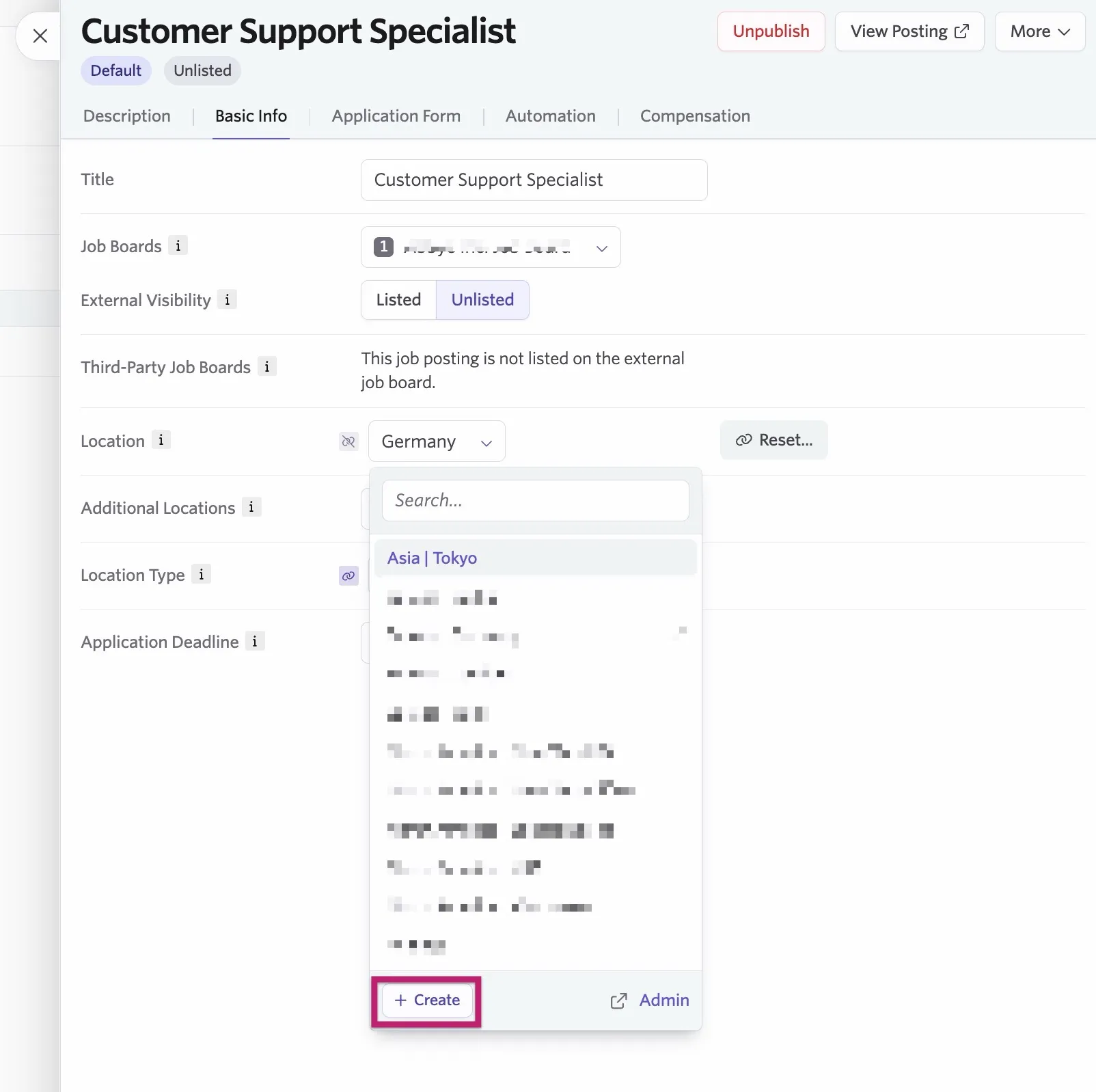
When a job posting has multiple locations (a main location and additional locations) listed, third-party job boards automatically create separate job postings for each location. For example, if a job posting has a main location of New York and additional locations of San Francisco and Los Angeles, three separate job postings would be created on the third-party job board.
- Location Type: Indicates whether a job is on-site, hybrid, or remote. It appears on the job posting and is shared with supported third-party job boards. This defaults to the location type set on the Location field, but can be overidden with this field.
- Application Deadline: Set a date and time that applications must be submitted by. Candidates see the deadline date and time in their own time zone. If you set a deadline, a setting appears that, when enabled, allows you to automatically unpublish the posting once the deadline has passed.
Step 3: Associate or edit the application form
On the Application Form tab, you can choose which application form candidates see when they apply for the job.
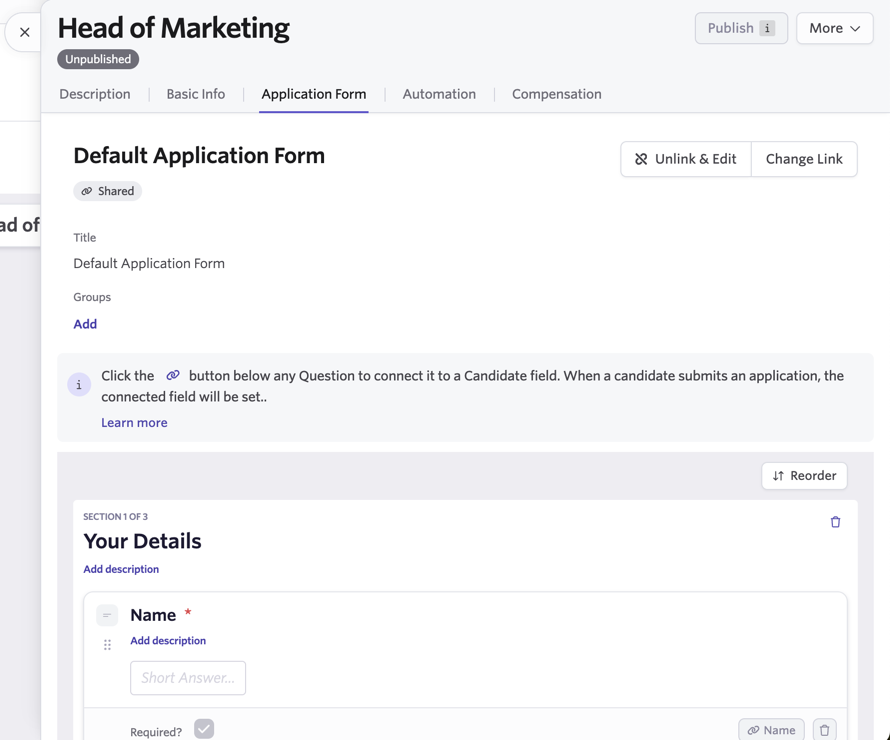
Your organization's default application form is automatically assigned for this job posting; however, you can switch to a customized form or unlink and make edits to the form that are unique to this posting.
To understand how to create a customized application form, see Create application forms in Admin.
To understand how to change the form associated with this job posting, or to unlink and edit the default form, see Where forms are assigned.
Step 4: Configure application automations
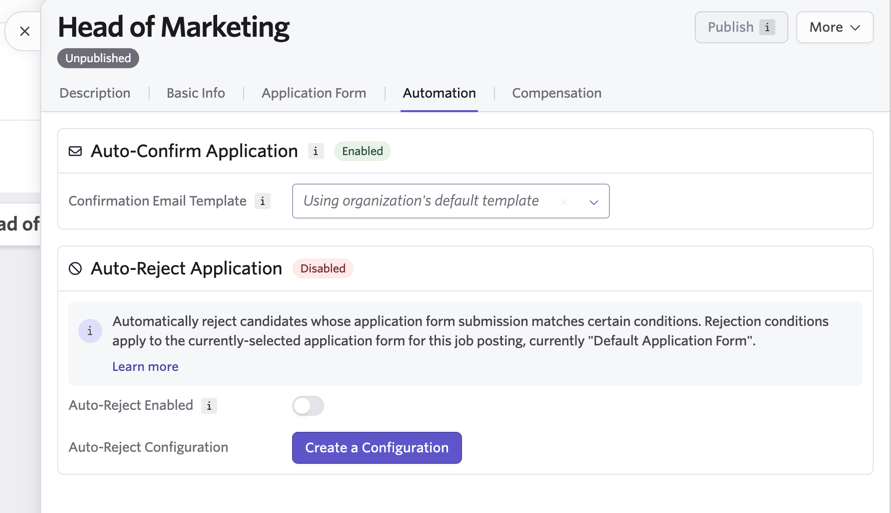
Ashby can automatically send application confirmation emails, as well as auto-reject candidates based on certain criteria. Configure these settings under the Automation tab within the job posting.
Auto-Confirm Application
If your organization has Application Email Confirmations set up, this automation is automatically enabled and set to "Use organization's default template." If you'd like to use a specific email template for applications submitted for this posting, use the drop-down to select a template.
Email Template Creation and ManagementEmail Template Creation and Management is a great article to learn all about creating email templates for various roles and reasons.
If you need to create the default application confirmation email template for your organization, see the section on Email Template Creation and ManagementApplication confirmation templates.
Auto-Reject Application
To auto-reject candidates based on certain criteria, create a configuration by selecting the Create a Configuration button and setting your criteria. For information on setting up and editing these configurations, see Auto-Reject Applications.
Once you've created your configurations, you can turn on the Auto-Reject Enabled toggle.
Step 5: Confirm compensation details
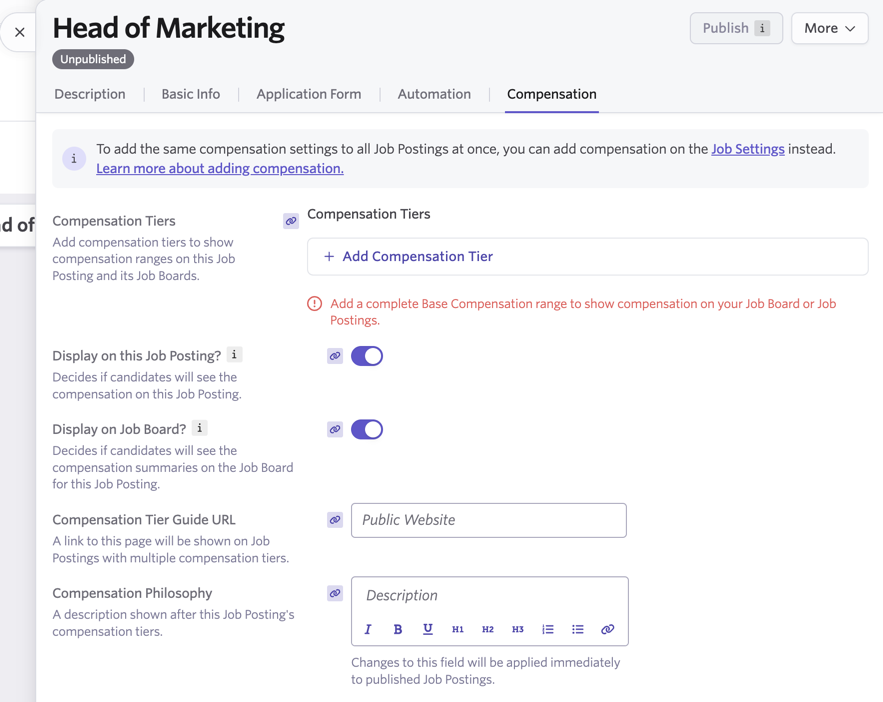
On the Compensation tab of your job posting, you can determine whether you'd like to display the compensation on the posting (both in the posting details and on the posting listing when viewing jobs on your Ashby job board), as well as optionally add additional compensation information. If no additional information is added, compensation information for the job posting defaults to the information included on the job.
Full details on setting up compensation information can be found in our article on CompensationCompensation.
Final step: Publish your job posting
To publish your posting, the job it is tied to must be set to Open (to accept inbound applications) and a job description must be added to the job posting.
If you have set compensation to be displayed on your posting, you also need to ensure that you have at least one valid salary range in place in the Compensation tab to publish your posting.
When ready to publish, click the Publish button in the upper right corner of the posting. If the button is greyed out, that indicates there is required information missing in your job posting. Hover over the button to see details, and update the posting until the button turns purple.
Viewing your job posting
For more information on customizing your job board, check out Job Board: Configuring Your Setup.
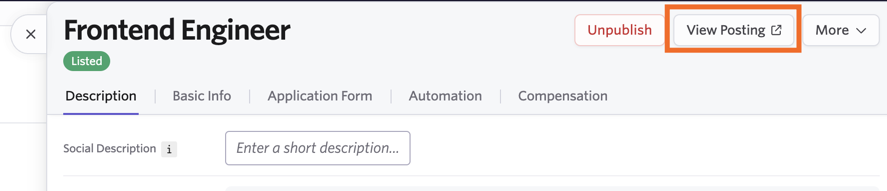
Once published, you see a View Posting button in the upper right corner of the admin view of your job posting. Click this button to view how candidates see the posting on your job board.
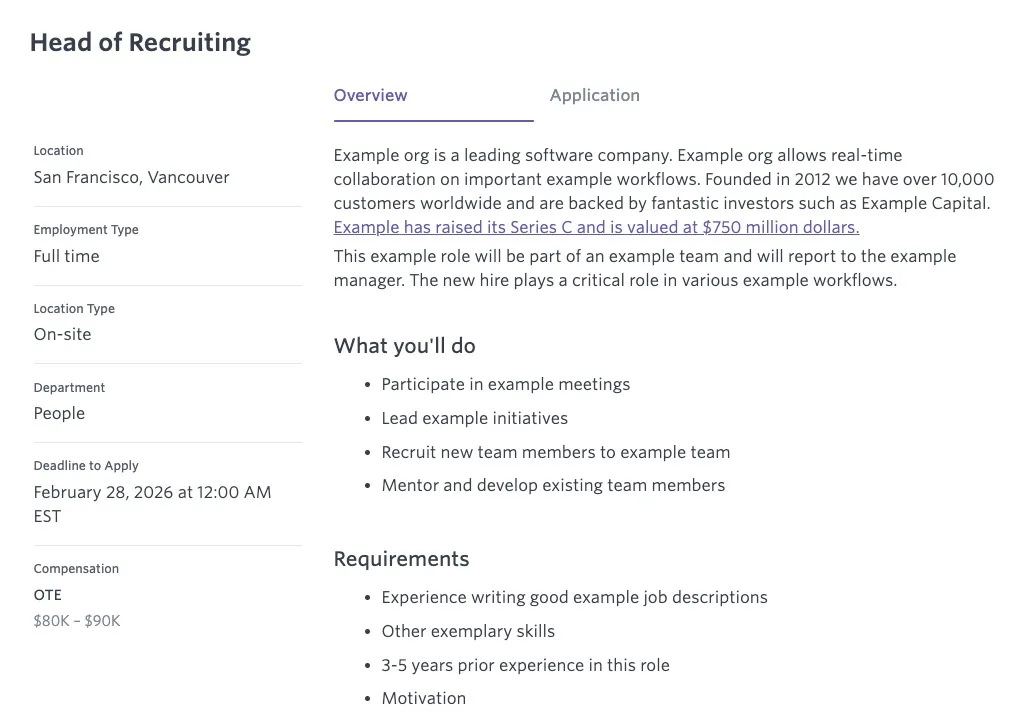
When opening the posting, you see the following:
- Job Posting Title: The job title appears in the upper left. It is taken directly from the Title field in the Basic Info tab of the job posting.
- Location: The location and any additional locations added to the job posting show on the left side.
- Employment Type: Ashby pulls this from the Employment Type field in the Settings tab of the job itself (not the job posting).
- Location Type: Ashby pulls this from the job posting's Basic Info tab. Indicates to candidates whether the job is on-site, hybrid, or remote.
- Department: Ashby pulls this from the Team field within the job's Settings tab.
- Deadline to Apply: If you have set a deadline in the job posting's Basic Info tab, it is listed here (shown in the applicant's time zone).
- Compensation: If you have opted to display compensation information, it is displayed here.
- Overview: On the right two thirds of the screen, this is where the description you've added to your posting in the Description field is displayed.
- Application: The application form can be completed by clicking into the Application tab.
Additionally, if you have the job posting set to Listed in the Basic Info tab, it shows with other listed jobs when viewing your job board:

Managing job postings
Once created, your job postings live under the Job Postings tab of the corresponding job. From here, you can manage various aspects of the job posting, including setting it as the default, unpublishing, or deleting the posting altogether.
Default job posting
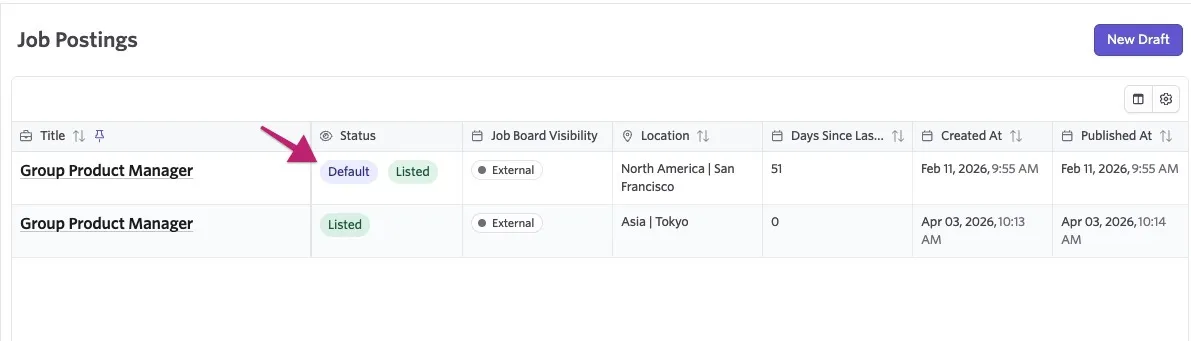
The first posting you create for a job automatically becomes the default posting, and this is indicated under the Status column of the Job Postings tab.
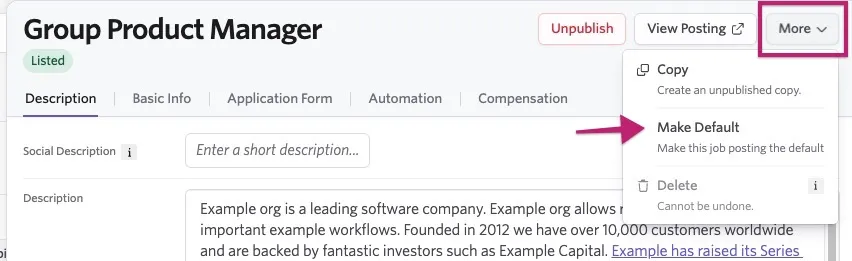
You can change which posting is the default by clicking into it and selecting More, and then Make Default.
The posting marked as the default impacts certain elements of the hiring process for the role:
- Application Requests: When application request links are sent manually or automatically to invite candidates to apply, the details shared are based on the default job posting, which is assigned to the application. This also means that any automations configured on the default job posting are applied to these applications.
You can learn more about sending application requests in Application RequestsApplication Requests.
- Email Template Tokens: For applications that don't have an explicit job posting assigned (e.g. manually created applications, or applications transferred from another job), email template tokens like "job posting description" and "job posting URL" fall back to the default posting.
- Interview Briefing Documents: The job posting section shown to interviewers in briefing documents also uses this same fallback to the default posting for applications without an explicit posting attached.
Unpublishing and deleting job postings
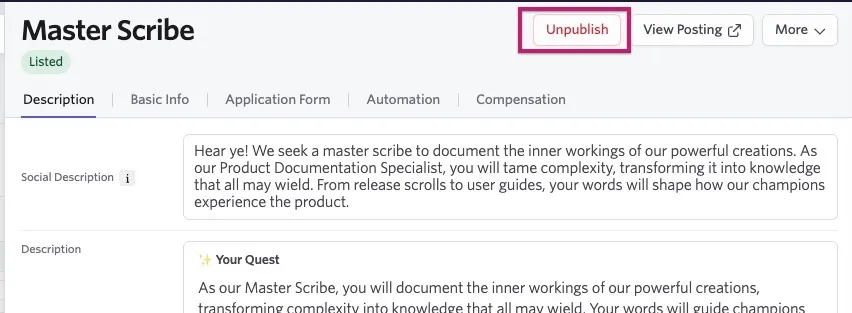
You can unpublish a published job posting by clicking into the posting and selecting Unpublish in the top right. Unpublishing a listing removes it from job boards until it is published again.
Additionally, job postings can be deleted if needed by selecting More > Delete.
- Deleting a posting cannot be undone.
- You cannot delete a published job posting, so unpublish it first.
- If you have multiple postings and need to delete the default posting, you must first set a different posting as the default.
- If you have only one job posting, you can delete it.
Congrats! You've learned how to create, view, and manage your job postings. If you'd like to understand how to build job posting reports, check out Reporting on Job PostingsReporting on Job Postings.
FAQs
Can I create multiple job postings for one job?
Yes. On the Job Postings tab, click the New Draft button again to create an additional job posting. Applications from all postings on the job are added to the same pipeline.
Is it possible to see the number of clicks on a job posting?
It is not currently possible to track clicks or other activities on a job posting within Ashby.
How does LinkedIn display a job posting with multiple locations?
When a job posting has multiple locations (a main location and additional locations) listed, LinkedIn automatically creates a separate job posting for each location. So if a job posting has a main location of New York but additional locations of San Francisco and Los Angeles set in Ashby, three separate job postings are created in LinkedIn.
How do I get a direct link to a job posting?
If you have set your posting to Unlisted and would like to send a direct link to a lead, navigate to your published posting and click the View Posting button. You can then copy the URL from the posting to share.
Can I preview a job posting?
To preview a job posting, set it as Unlisted and click View Posting on the job posting.
What if I have one job with multiple locations?
You have two options:
- Add multiple job postings to a job, each with a different location. Your job board will have a job posting for each location.
- Add multiple locations to one job posting. This makes the career page look cleaner (no duplicate jobs).
Does the Ashby XML feed include the workplace type (Remote, Hybrid, or On-Site) in the job posting details?
Yes, the XML feed includes this information, so the workplace type is indicated on third-party job boards like LinkedIn and Indeed.
You can specify the location type within the Location Details section of your location settings at Admin > Organization Setup > Locations.

My job posting is currently unlisted and candidates are still able to apply - why?
If your job posting was listed on your Ashby job board at any time, the job posting links can be scraped by external job boards, meaning candidates can still submit applications. If a candidate also has the specific job posting URL, they can apply for the job via that posting, even if the posting is unlisted. Candidates can also share the unlisted job posting URL. To stop candidates from applying via that job posting completely, it needs to be unpublished.
What is the difference between an unlisted and an unpublished job posting?
Unlisted: The job posting is published but can only be accessed via a direct link, and the posting does not appear on your main Ashby job board. Candidates can apply via the direct link.
Unpublished: Candidates cannot access this job posting at all and cannot apply for the job via this posting until it is published.
How do I create or edit an application form for a job posting?
Application forms are assigned to job postings, not directly to jobs. Navigate to Jobs > Jobs, select the job, and open the Job Postings tab. Select an existing posting to edit its application form, or click New Draft to create a new posting. Then open the Application Form tab and select Change Link to use a shared form or Unlink & Edit to customize the form for that posting.
See Application Forms for more information.