Reporting on Approvals
Overview
Some approval fields are available to add as columns to custom list reports or to group results by in segmentation or count over time reports.
Custom reports can be configured on the Plus, Enterprise, and Legacy Plus plans:
Foundations | Legacy Plus | Plus | Enterprise |
|---|---|---|---|
❌ | ✅ | ✅ | ✅ |
Prerequisites: Approval processes must be configured and used before they can be reported on. For more on creating and using approval flows, check out Creating and Editing Approval ProcessesApprovals.
Approval fields for offers
Column field name | Description |
|---|---|
Job Consideration's Offer's Latest Approval Process Approved At | The timestamp showing the date and time the offer was approved. |
Job Consideration's Offer's Latest Approval Process's Created At | The timestamp showing the date and time the approval request was created. |
Job Consideration's Offer's Latest Approval Process's Completed Approver | The approvers on the completed approval. |
Job Consideration's Offer's Latest Approval Process's Approver | The approvers on the approval (including pending, cancelled, overridden, approved, and completed). |
Job Consideration's Offer's Latest Approval Process's Requester | The requester on the approval. |
Job Consideration's Offer's Latest Approval Process's Rejection Note | If an approval was rejected, the note included as part of the rejection. |
Job Consideration's Offer's Latest Approval Process's Rejected By | The approver who rejected the approval. |
Job Consideration's Offer's Latest Approval Process's Status | The status of the offer approval. |
Approval fields for openings
Column field name | Description |
|---|---|
Opening's Current Approval Process's Approved At | The timestamp showing the date and time the opening was approved. |
Opening's Current Approval Process's Created At | The timestamp showing the date and time the approval request was created. |
Opening's Current Approval Process's Completed Approver | The approvers on the completed approval. |
Opening's Current Approval Process's Approver | The approvers on the approval (including pending, cancelled, overridden, approved, and completed). |
Opening's Current Approval Process's Requester | The requester on the approval. |
Opening's Current Approval Process's Rejection Note | If an approval was rejected, the note included as part of the rejection. |
Opening's Current Approval Process's Rejected By | The approver who rejected the approval. |
Opening's Current Approval Process's Status | The status of the opening approval. |
These allow you to see approvers for openings, and offers at a glance and also open up auditing opportunities.
Reporting fields for job approvals are not currently available.
Example reports
Offers pending approval
The example report below provides a list of offers pending approval, including the approvers and those approvers who have completed their step of the approval process.
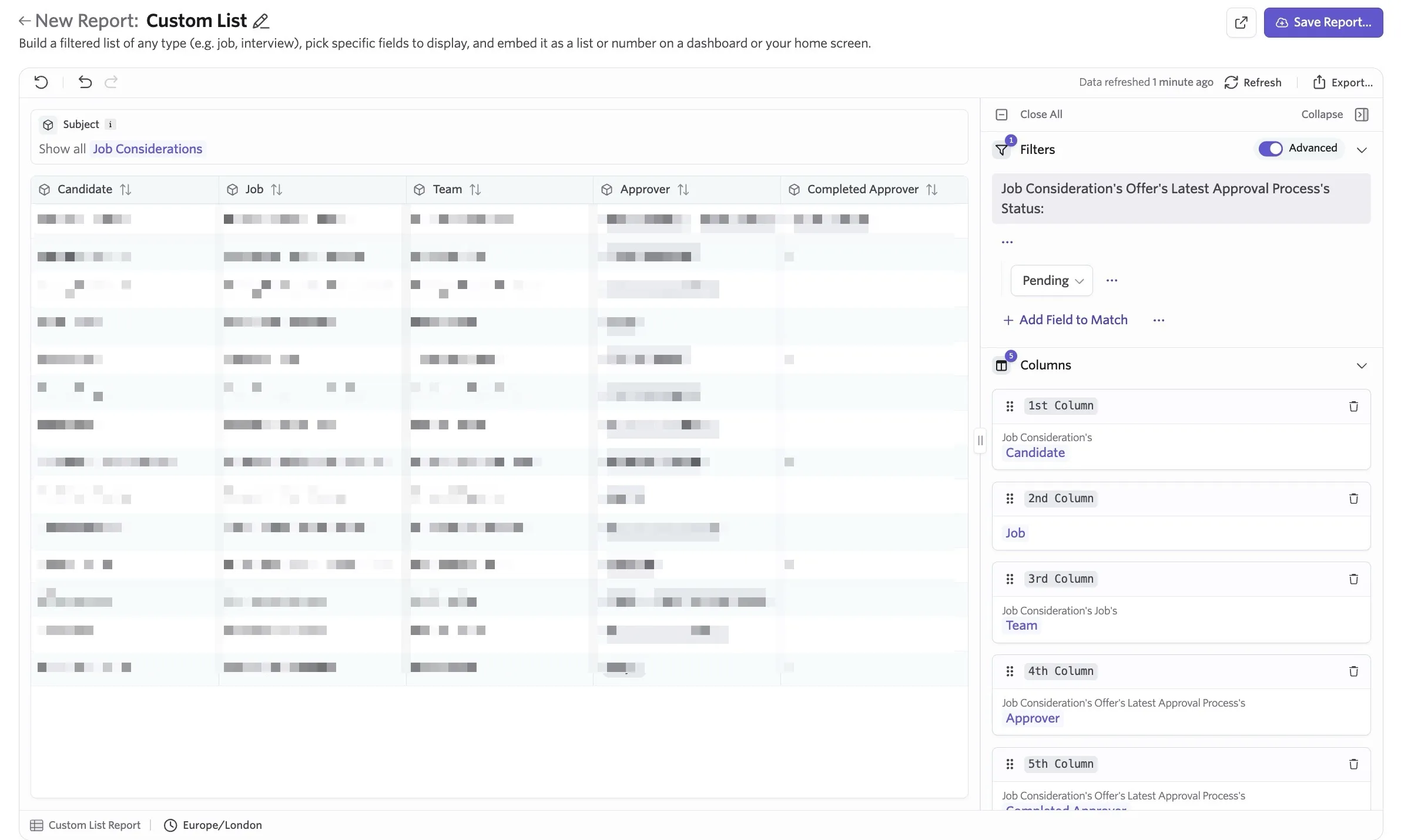
Report Type: Custom List
Subject: Offers
Filters: Job Consideration's Offer's Latest Approval Process's Status = Pending
Columns: Job Consideration's Candidate
Job Consideration's Job
Job Consideration's Job's Team
Job Consideration's Offer's Latest Approval Process's Completed Approver
Job Consideration's Offer's Latest Approval Process's Approver
Approval information for an audit
You may want to pull a custom list report showing offer information, including the approvers, and configure AlertsAlerts to go to your HR team. The example report setup below includes some offer details and the approval details in one table.
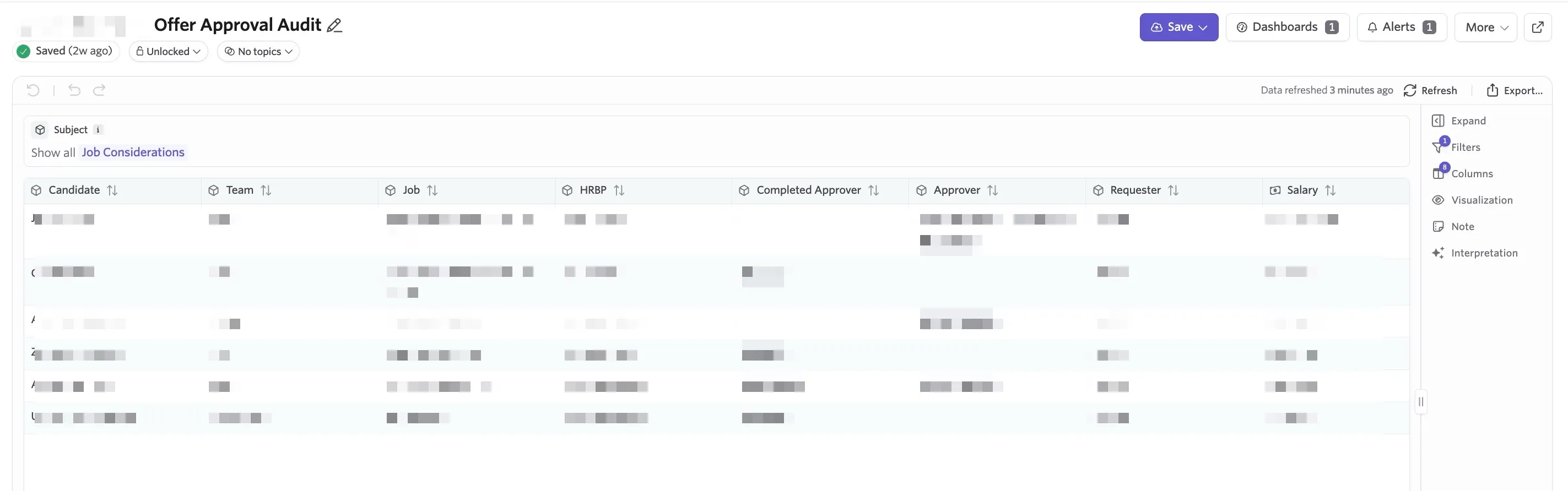
Report Type: Custom List
Subject: Job Considerations
Filters: Job Consideration's Offer's Latest Approval Process's Approved At [set your time range here]
Columns: Job Consideration's Candidate
Job Consideration's Job
Job Consideration's Job's Team
Job Consideration's Offer's Latest Version's HRBP (this is a custom field, more on configuring this below)
Job Consideration's Offer's Latest Approval Process's Completed Approver
Job Consideration's Offer's Latest Approval Process's Approver
Job Consideration's Offer's Latest Approval Process's Requester
Job Consideration's Offer's Latest Version's Salary
Configuring the HRBP custom field
You can create an offer custom field to have the option to add an HR team member or HRBP to the offer and pull it into the report dynamically. To configure this custom field:
- Navigate to Admin > Organization Setup > Custom Fields.
- Click on the Offer tab, then the + New button.
- Give your custom field a title, then set it to be an Employee custom field.
Now when you are creating an offer, you can set an employee who is on your HR team as the user in this field. They then appear in the HRBP column of your report.
For more on setting up custom fields, check out Custom FieldsCustom Fields.
Creating an alert for your audit report
If you'd like to send Slack and email notifications with report information to your HRBP or other users for audit, you can configure an alert once you've saved your custom list report.
Click the Alerts button, then Add Alert.
Configure the alert settings:
- When the alert should be sent (a full list periodically or new records as soon as they are added).
- How they should be sent (via email or Slack).
- Who they should be sent to:
- If you have a group of specific users this report should go to, click + Add user or email to add them as recipients individually.
- If you've configured a custom HRBP field, you can set this field as a recipient field by clicking + Add user role and selecting the appropriate field.
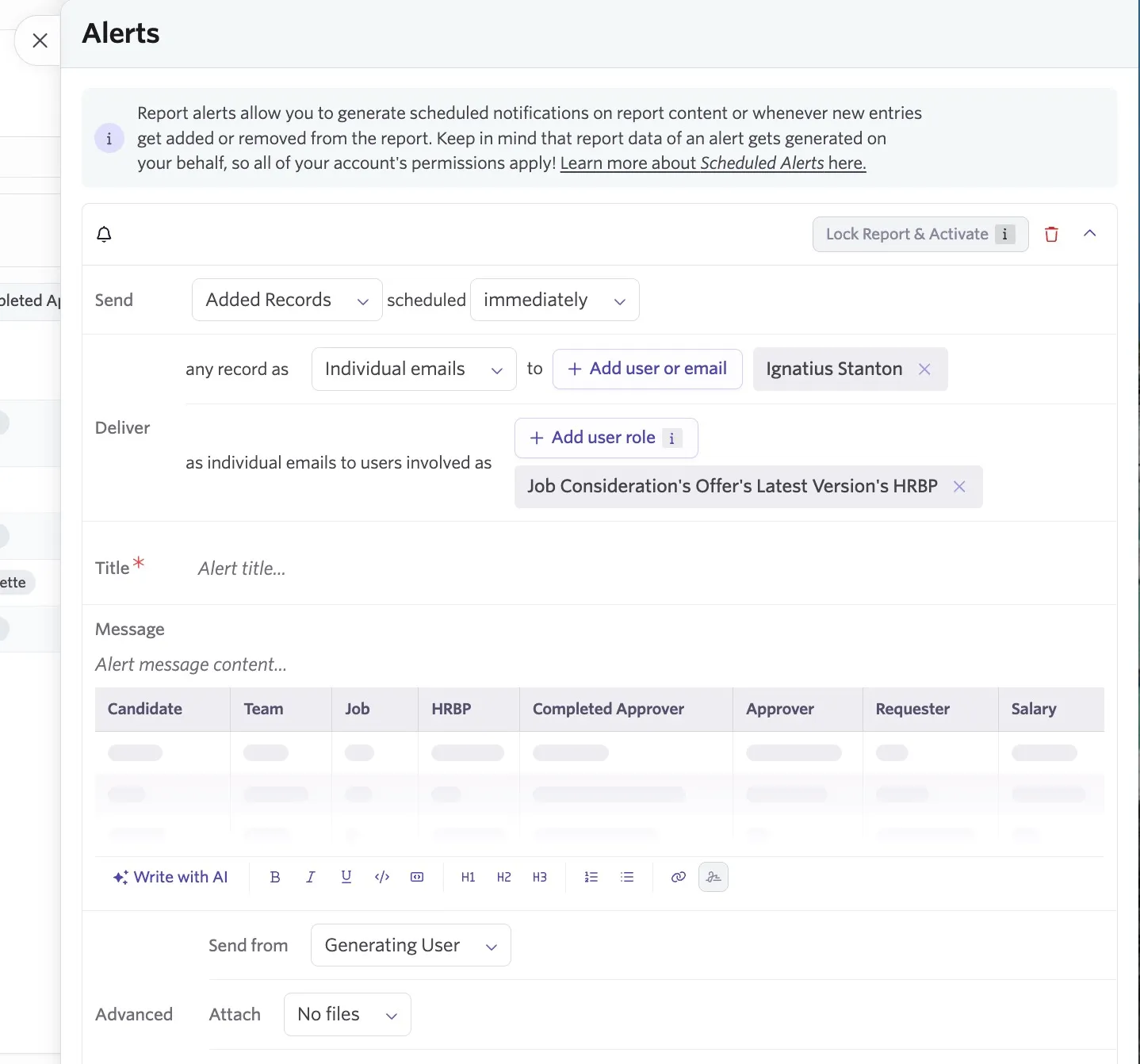
You can read more about configuring alerts in AlertsAlerts.