SSO and SCIM
Ashby supports Single Sign-On (SSO) via Security Assertion Markup Language (SAML) and OpenID Connect (OIDC) connections, along with Directory System for Cross-domain Identity Management (SCIM) through WorkOS.
SSO can be configured on the Foundations, Legacy Plus, Plus, and Enterprise plans:
Foundations | Legacy Plus | Plus | Enterprise |
|---|---|---|---|
✅ | ✅ | ✅ | ✅ |
SCIM can be configured for accounts on the Legacy Plus, Plus, and Enterprise plans.
Foundations | Legacy Plus | Plus | Enterprise |
|---|---|---|---|
❌ | ✅ | ✅ | ✅ |
SSO and SCIM overview
SSO and SCIM are essential tools for modern businesses. Ashby integrates with WorkOS to provide seamless SSO and SCIM capabilities, ensuring secure access and efficient user management for your organization.
Getting started
How do I set up SSO/SCIM for my organization?
- Reach out to our support team at [email protected] with the following details:
- The email address where you'd like any error messages or notifications directed (IT service account recommended)
- Whether you'd like to set up SSO, or both SSO and SCIM
- Support will follow up, providing you with a setup link. Once you receive the link, follow the on-screen instructions to integrate your identity provider with Ashby via WorkOS. The steps are tailored to your identity provider.
Okta provisioning settings
When configuring the Ashby app's provisioning settings in Okta, set the Application username format to Email, not Custom. This setting ensures Okta correctly matches existing Ashby accounts if you unassign and later reassign a user. If you leave this setting as a custom expression, such as one that references the Okta internal user ID, reassigning a previously removed user can fail with a user already exists error because Okta cannot find the existing account to reactivate.
- Test the integration to ensure everything is working correctly. Confirm with support once you've completed the setup process.
For SSO, you can connect multiple domains, with different identity providers if needed. You can also set up multiple WorkOS connections for SCIM and users from the connected systems will flow into Ashby.
What attributes are pulled via SCIM?
Once you've configured SCIM on your company's account, you can determine the attributes that are synced over by navigating to Admin > Integrations > SCIM.
In the Fields to Sync section, use the toggles to confirm the information that syncs from WorkOS.
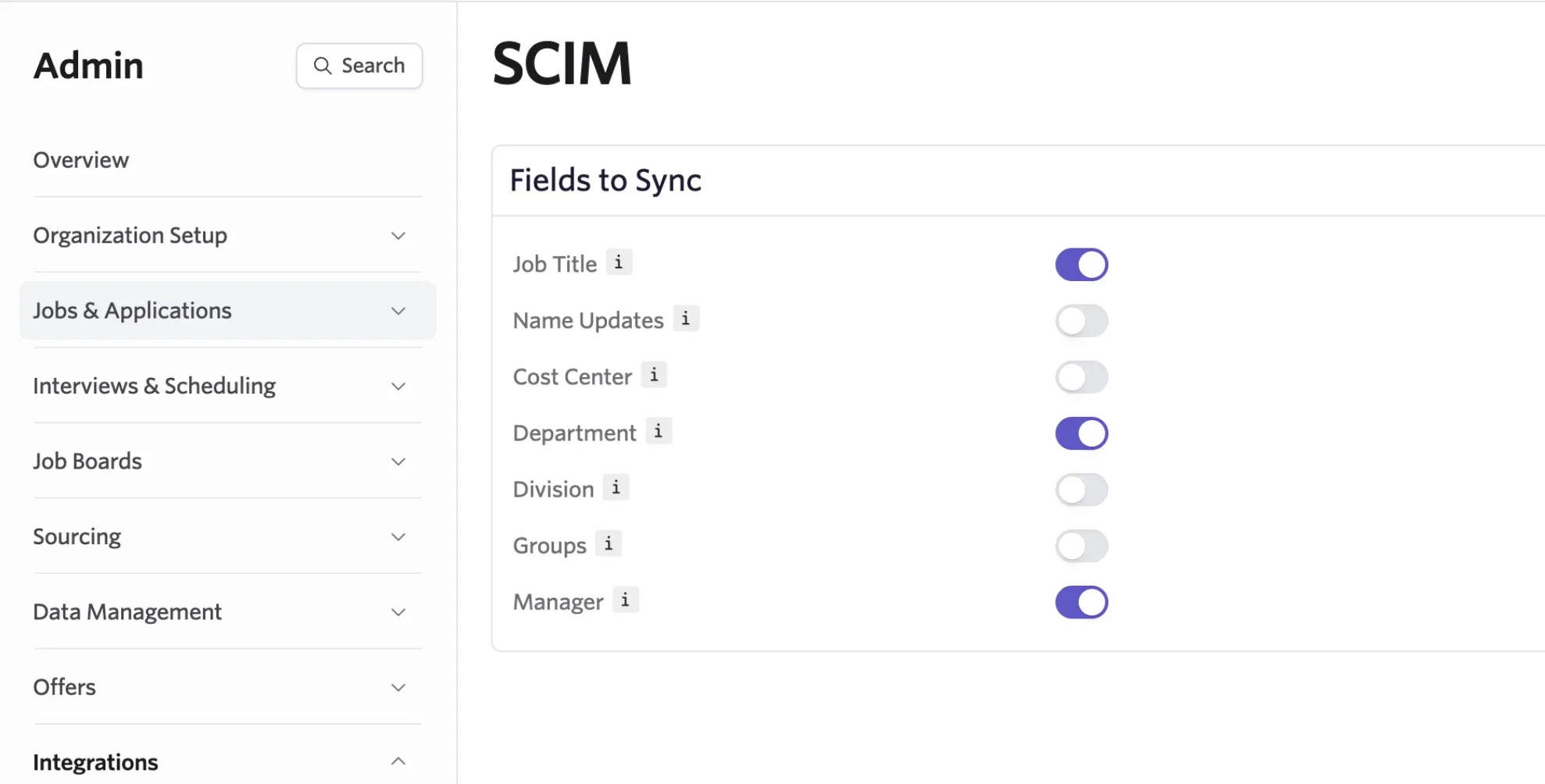
The following fields can be synced:
- Job Title
- Name Updates
- Cost Center
- Department
- Division
- Groups
- Manager
Job Title, Name, and Manager are immediately useful for storing up-to-date information on all your employees without having to manually maintain it in Ashby.
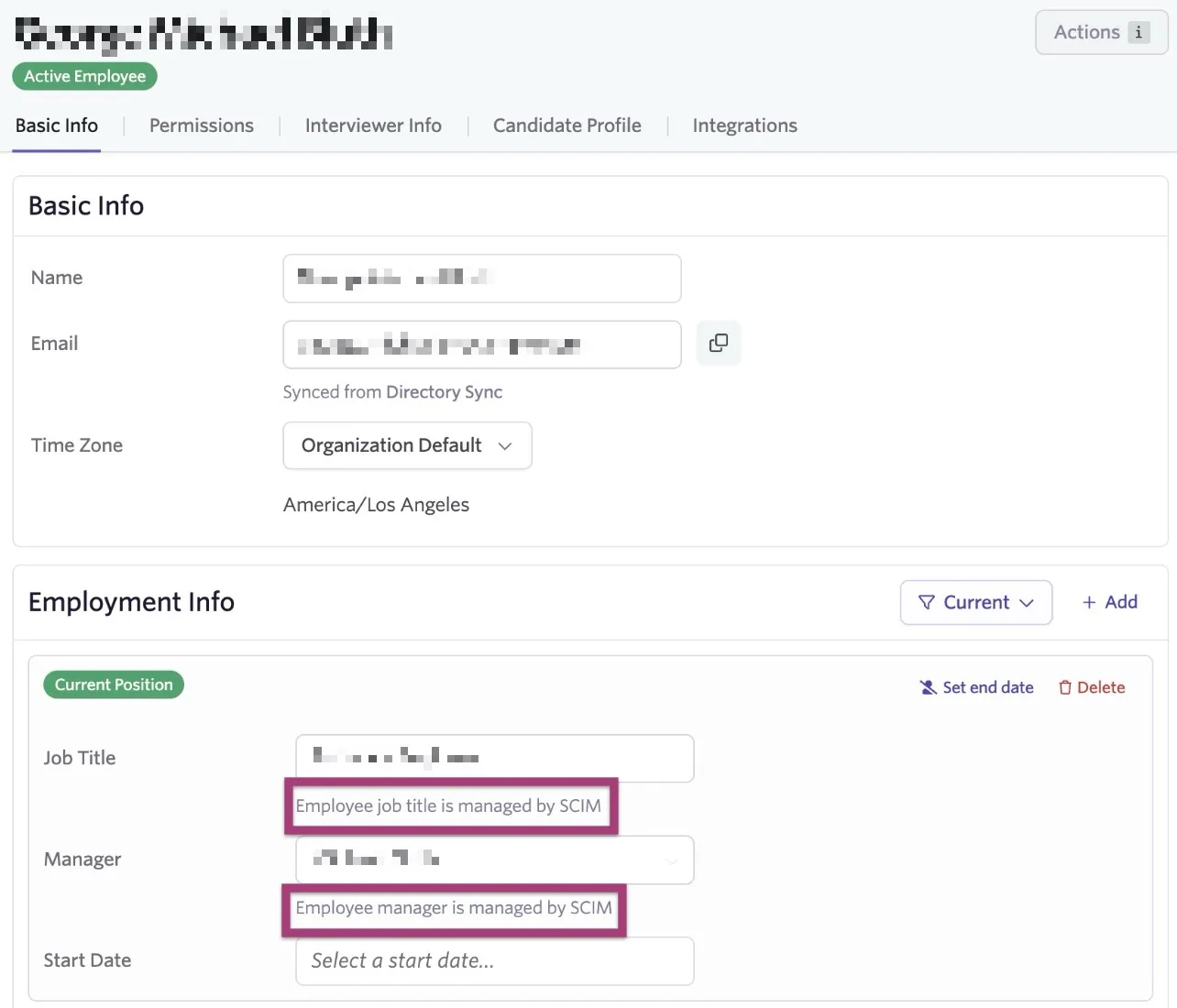
Cost Center, Department, and Division can be useful for further reporting on or grouping employees. These fields are pulled over as Employee custom fields in Ashby and information synced to these fields appears in the Employment Info section of the employee's profile in Admin > Organization Setup > Employees.
Troubleshooting
"User already exists" error when reassigning a user in Okta
If you unassign a user from the Ashby app in Okta and later reassign them, you may see a user already exists error, and the user remains deactivated in Ashby. This happens when Okta's Application username format for the Ashby app does not match the identifier used to provision users. Okta cannot find the existing deactivated record, so it attempts to create a new one instead of reactivating it.
To fix this, open your Okta admin console, open the Ashby app's provisioning settings, and confirm that Application username format is set to Email. Once the identifiers align, unassigning and reassigning a user correctly reactivates their existing Ashby account. If you already see this error and have deactivated users stuck in a conflict, contact Ashby Support for help clearing the affected records.
Pricing
How much does the SSO/SCIM service cost?
- SSO is included for Plus and Enterprise plans.
- For those on the Foundations plan, SSO is a paid add-on. It costs $100 per month, billed monthly or annually, depending on your plan.
FAQs
What is SSO?
SSO (Single Sign-On) allows users to access multiple applications with a single set of credentials. This means you don't have to remember multiple passwords for different services.
What is SCIM?
SCIM (System for Cross-domain Identity Management) is a standard that automates the exchange of user identity information between identity domains or IT systems.
Which identity providers do you support?
Through our integration with WorkOS, we support a wide range of identity providers, including but not limited to Google Workspace, Microsoft Azure AD, and Okta. See WorkOS integrations for a full list of identity providers.
Do you support Just in Time (JIT) provisioning?
Ashby does not support just-in-time (JIT) provisioning through SSO. Submit a feature request to [email protected] if you're interested in this option.
Users signing in through SSO must already have an Ashby account. To automate user provisioning, please configure Directory Sync (SCIM).
If Directory Sync isn't configured, but Google or Microsoft sign-in is enabled, then Limited Access user accounts will be created when a user signs in for the first time.
I have users in Ashby that are not in my directory. If I set up SCIM, will those users still be active when the Directory Sync is enabled?
No, any users that are in Ashby but not in your directory are deactivated in Ashby once the sync is enabled. Before Directory Sync is enabled, confirm that the list of users in your directory is the full list of users that need to access Ashby.
Do you support log streams or domain verification?
We do not support log streams or domain verification.
How do I get the setup link for SSO/SCIM integration?
Contact your Customer Success Manager or our support team at [email protected].
Is the SSO/SCIM integration secure?
Absolutely! Our integration with WorkOS ensures that all data is encrypted and securely transmitted. We adhere to industry best practices to ensure the safety and privacy of your data. Learn more about Ashby's security practices.
I'm facing issues with the SSO/SCIM setup. What should I do?
If you encounter any issues during the setup or have questions about the integration, reach out to [email protected]. We're here to help!
Can I use both SSO and SCIM together?
Yes, you can use both SSO and SCIM together. While SSO streamlines the login process, SCIM ensures efficient user management across platforms.
Can permissions be mapped with SCIM?
At this time, we only support provisioning users, not mapping permissions or access roles via SCIM. Users are added, via Directory Sync, as Limited Access users. You can change their permission level in their employee profile once the user account has been created within Ashby via the sync. For more on permission levels, see User PermissionsUser Permissions.
Once configured, how often do SCIM syncs happen?
SCIM syncs happen hourly. We also respond to webhooks.
Why isn't the manager field populating when I sync via Okta?
Ashby resolves managers by email address, so the manager attribute on your Okta user profile must contain the manager's email and not an Okta ID or display name. To check, open the profile of an affected user in Okta and confirm what the manager field is set to. If it shows an ID or a name, you'll need to update your Okta profile or attribute mapping so the manager field passes through a valid email address. Once that's in place, Ashby will resolve and populate the manager on the next sync.