Justifacts
Integrating Ashby with Justifacts allows you to initiate background checks directly from a candidate's profile and receive real-time status updates within your hiring workflow. This guide explains how to set up the integration and use it effectively to streamline your onboarding process.
Prerequisites:
To complete this setup, you must have Organization Admin permissions in Ashby and an active account with Justifacts.
Setting up the integration
Setting up the Justifacts integration is a two-part process: generating an API key in Ashby and then configuring the Justifacts assessment settings.
Part 1: Create an Ashby API key
- Navigate to the Admin tab.
- In the left-hand menu, select Integrations > API Keys.
- Select + New.
- From the Integration Partner dropdown, search for Justifacts and select the result. This will automatically populate the Name field.
- In the API Scopes section, select Read all and Write all.
- Select Create API Key.
Be prepared to save your API Key to a safe place immediately. You will only have one opportunity to copy it before it is hidden forever. You will need to share this key with Justifacts.
Part 2: Configure Justifacts settings
- Navigate to Admin > Integrations > Integrations.
- Search for "Justifacts" using the search bar and select the result.
- Enter the API key you received from Justifacts (provided to you via email by Justifacts) into the field called Justifacts Credential Verification API Key.
- In the Ashby API Key dropdown, select the API Key you just created in Part 1.
- Copy and paste https://app.justifacts.com/JFACTS/servlet/application.Ashby/ into the Staging Base URL field.
Using the Integration
Once configured, you can add Justifacts background checks as activities within your job's interview plans.
Adding Justifacts to an Interview Plan
To automate the background check process, add it to a specific stage (usually a "Background Check" stage) within the interview plan for a specific job.
If your interview plan doesn't currently have a background check stage, you can add one. See Interview Plans for instructions on setting up interview stages.
- Navigate to the Job Dashboard and select your desired job.
- Go to the Interview Plan tab.
- Locate the stage you wish to conduct a background check in and select Add Activity to and then + Add Activity.
- Under the Integrations section, select Justifacts.
- Select Select assessment type... and choose the specific Justifacts package you want to run for this job.
- Select Add.
Starting an Assessment
When a candidate reaches the Background Check stage:
- Open the candidate's profile.
- Locate the Justifacts Assessment card and select Start Assessment. This triggers the authorization process in Justifacts.
If the assessment does not appear automatically, or if you need to run a different package, select + New Activity > Assessment and select Justifacts.
Monitoring Status Updates
Ashby will automatically update the BGC Status on the candidate's profile as the check progresses:
- Justifacts Received: Ashby has successfully sent the request to Justifacts and the applicant.
- Started: The applicant has begun filling out the background check forms.
- In-Process: Justifacts: The applicant has submitted their information, and Justifacts is currently processing the order.
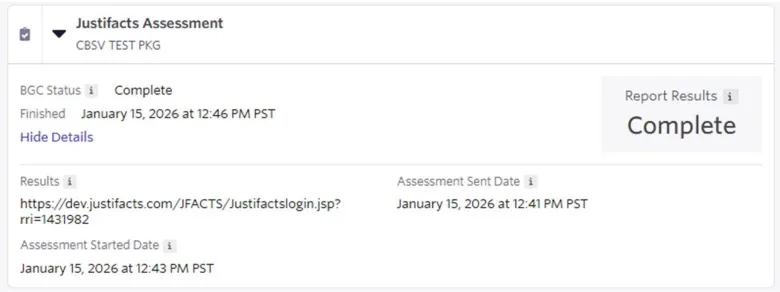
- Complete: The background check is finished.
When the status is Complete, a URL to view the full results will be provided within the assessment activity in Ashby.
FAQs
What if I need to run a different package for a specific candidate?
You can always add a manual assessment by selecting + New Activity on the candidate profile and choosing a different Justifacts package from the list.
Why isn't the "Start Assessment" button appearing?
Ensure the candidate is in the correct stage of the interview plan and that the Justifacts activity has been added to that specific stage.