Job Templates
In Ashby, you can create job templates to save you time when configuring and opening similar jobs. This guide covers both creating templates from scratch and generating templates from existing roles.
Creating a Job Template from scratch
To create a new job template, head to Jobs > Jobs > Job Templates and click Create Job Template.

Add in the template’s title, team and location. Only a title is required for a job template - you can add the location and department to each job generated from this template if you’d prefer to keep this blank for now.

From here, your template will be generated. You can then configure the job template’s settings, interview plan and any postings.

1) Settings: Here you can amend the title, team, location, employment type, any custom fields, compensation settings and the hiring team for this template.
2) Interview Plan: Confirm the stages of your pipeline and add in activities to configure interviews, take-home activities, automated emails, etc in advance. You can read more on each activities via the guides below:
3) Job Postings: Create a draft posting, add in a job description and configure job posting settings for your template here.
Be sure to activate your job template once you’re ready to start using it. You can activate your template by clicking the Inactive drop-down and selecting Activate.
If you’d like to deactivate or archive a job template, you can click the Active drop-down and opt to deactivate it.


Creating a Job Template from an existing job
If you already have a job that you’d like to create a template from, click into the job from Jobs > Jobs and then click More. Select Create Template from the drop-down. You’ll be asked to title your template before it’s created for you.

Remember to activate your job template before you try to use it for a new role! You can make adjustments to the template at any time.
Creating a job from a template
To create a new job, head to Jobs > Jobs and click Create Job. Use the From Template drop-down to select the template you’d like to generate a job from.
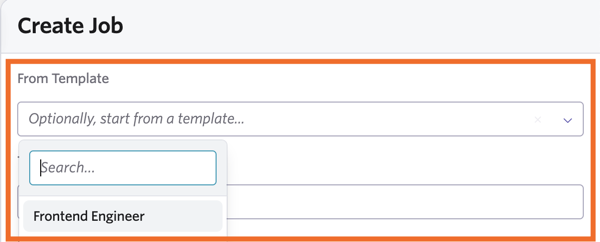
If you didn’t specify a location and department on your template, this will need to be added to the job before it can be created.
You can make amendments to the job that has been generated from a template. Adjustments make to these jobs will not impact the template they’ve been generated from.