BambooHR
Once a candidate has accepted an offer, you can push their data into BambooHR to kick off the new employee onboarding process.
Prerequisites: To create a BambooHR API key with the correct access for this integration, the creating user must have at least Full Admin access to BambooHR.
Permissions & access
The Bamboo integration is available on all plans:
Foundations | Legacy Plus | Plus | Enterprise |
|---|---|---|---|
✅ | ✅ | ✅ | ✅ |
- You need Organization Admin access to configure the integration in Ashby.
- Can add or edit permissions are required on the candidate to push data from Ashby to BambooHR.
Overview
Sync custom fields | Sync offer letters | Sync file uploads | One or two-way sync | Notes |
|---|---|---|---|---|
✔ | ✔ | See Notes | One-way sync from Ashby to BambooHR | Resume upload supported |
When pushing a candidate from Ashby to BambooHR, the following candidate details are included by default:
- Name
- Email Address
- Phone Number
- LinkedIn Profile
- Salary (this is the default Salary Offer field)
- Start Date
You also have the option to sync additional BambooHR fields as Offer custom fields (more on creating these fields at Custom FieldsCustom Fields).
We currently support syncing fields associated with the Job Information and Employee Stock Options tables in BambooHR. These values are sent to BambooHR if included in the candidate's offer form.
If you select BambooHR fields to sync as Offer Custom Fields, this process can take several hours. This includes making changes to existing fields. Custom fields are not available on the Foundations plan.
Set up BambooHR
To set up the BambooHR integration, navigate to the BambooHR page in Admin.
Input your BambooHR API Key and Subdomain to integrate the two applications.
When the integration is enabled, you also have two additional fields: Resume Sync and Offer Letter Sync. You can select the file category you would like the candidate's resume and offer letter added to via these two fields when candidate data is pushed to BambooHR. For more information, see BambooHR's documentation on folders.
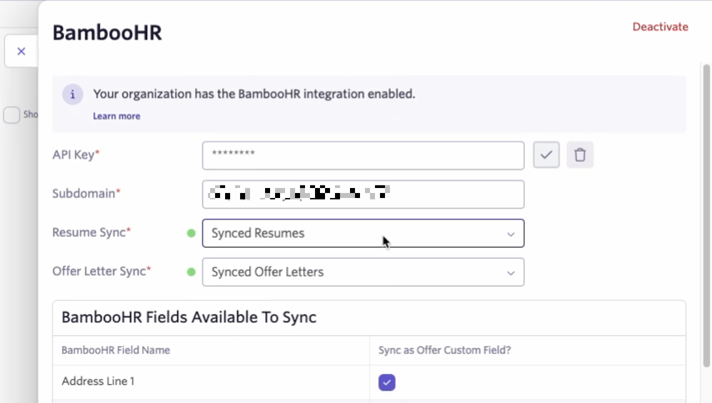
You can use the drop-down to view file categories in BambooHR (so long as the API key has access to them). If you change the API key for the integration, the categories are re-pulled.
To turn off this option, select Choose a File Category from the drop-down menu.
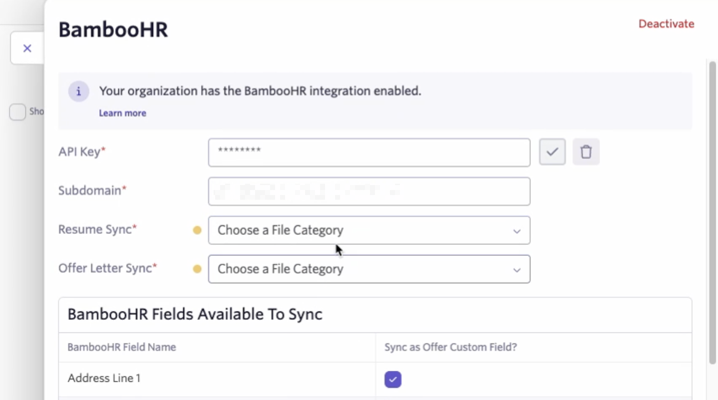
If an API key is changed or if a file category is deleted in BambooHR, a yellow indicator appears beside your Resume Sync or Offer Letter Sync fields to indicate that a new one needs to be selected.
Push candidate data to BambooHR
When a candidate accepts an offer, you see an option to push the hired candidate to BambooHR via an activity on their profile. Clicking Add to BambooHR creates a new employee in the system, including that latest offer data.
Pushing candidate data to BambooHR automatically
One candidate must be pushed to the system via the manual steps above before you can enable this.
After the candidate accepts the offer and is marked as Hired, Ashby can automatically sync their data to BambooHR.
To enable this:
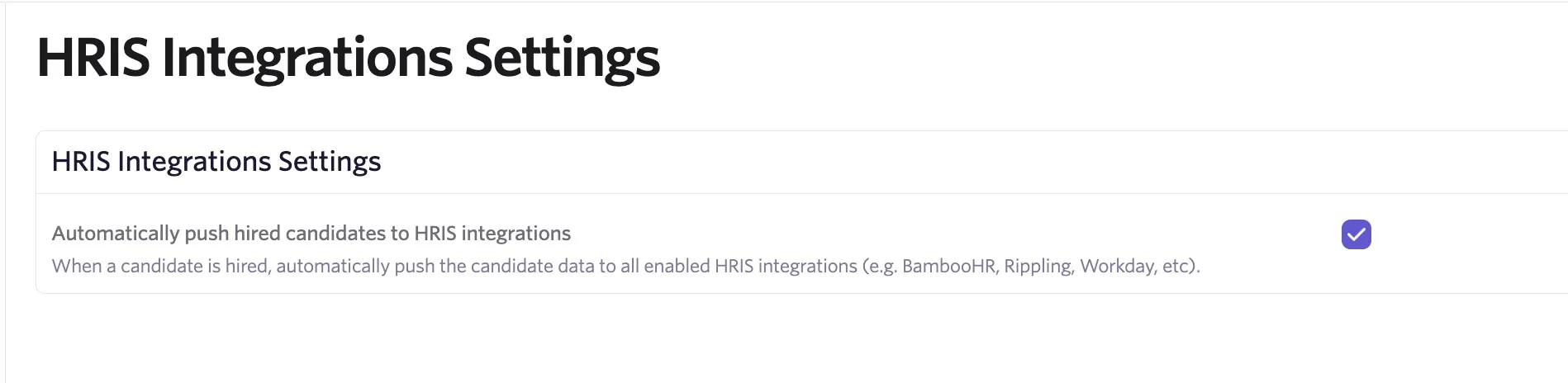
- Navigate to Admin > Integrations > HRIS Integrations.
- Check Automatically push hired candidates to HRIS integrations.
FAQs
Does the BambooHR integration with Ashby support non-USD currencies?
Yes, we support pushing non-USD currency from Ashby to BambooHR; however, the currency formatting is sent to BambooHR in the format their API requires.
If a candidate changes their start date after they've been hired and added to BambooHR, can we push that new date over?
It is not currently possible to send an amended start date to BambooHR if the candidate has already been pushed.
Can I sync country and state values to BambooHR?
We now support syncing country and state values via the BambooHR integration. Check the country and state boxes on the BambooHR Fields Available To Sync table on the integration's settings page to begin syncing these fields.
To sync a value for the state field, you must also provide a value for the country field. This is a requirement on BambooHR's side. If only a value for state is provided, the push to BambooHR fails.
Can Ashby export any additional docs to BambooHR (aside from resume and offer letter)?
Not at this time.
Can I push candidate data to multiple human resources information systems (HRIS) if I have integrated with more than one HRIS?
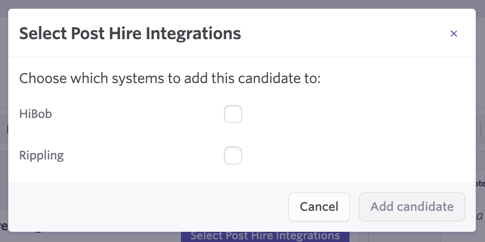
You can! Once a candidate is marked as hired, click the Select Post Hire Integrations button on the Add candidate to Post Hire Integrations activity generated on their profile.
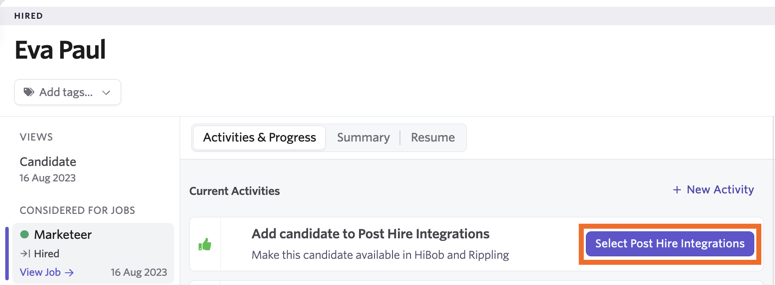
From here, use the checkboxes to determine the HRIS systems the candidate should be added to.
Can I sync additional BambooHR fields from other tables to Ashby as offer custom fields?
We currently support syncing fields associated with the Job Information and Employee Stock Options tables in BambooHR. If you'd like to sync over additional fields from other tables, reach out to your customer success manager (CSM) or Support so they can submit a feature request for you.
I'm pushing a candidate over with payroll details, but I'm getting an error. Why?
When adding a candidate to BambooHR, you must include a birth date if you are also pushing payroll details, as this automatically adds the candidate to their payroll product, which requires a birth date. If you add information to BambooHR-synced payroll-specific fields but don't add a birth date, you receive an error stating that the candidate cannot be added without that information. If you don't wish to collect birth dates in Ashby, you must un-sync all payroll fields (like Pay Schedule) in the integration settings.
Are custom fields impacted if I update the BambooHR API key in the integration settings?
If the BambooHR API key is updated in the integration settings, the custom fields are still synced. If you have added additional options to any of the custom fields within Ashby, those are archived. For example, if you have a custom field called Employment Type with values of Full-time and Part-time that came from the BambooHR sync and then added a new Contractor option in Ashby (not in BambooHR), when you update the API key, only Full-time and Part-time show as options for that field and Contractor is removed.