AI Tokens in Outreach Emails
You can opt-in to use these in the Opt-In Features section of Admin.
AI token overview
Our AI tokens enhance your sourcing outreach emails by injecting an AI powered token that contextualizes and generates copy using your job posting and the candidate's resume.
New to sequences? Check out our Sequences guide to get started.
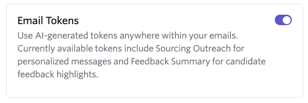
To enable the AI email token feature, head to Admin > Organization Setup > Opt-In Features. You will need to opt-in to use AI features in order to enable the Email Tokens option.
Adding the AI token
When creating or editing a Sequence, click on the T icon on the email toolbar to access substitution tokens. From there, search for the AI Generated Sourcing Outreach token and add it to the body of your email.
The AI token is context-aware of its placement within the email body. As such, the token will take into account the preceding text and personalize accordingly if added within a sentence. It can also be used for a standalone paragraph within an email.
Link your email sequence to a job to ensure the AI token factors in the associated job description in its text generation. There’s more on this at Sequences
Drafting outreach with the AI Token
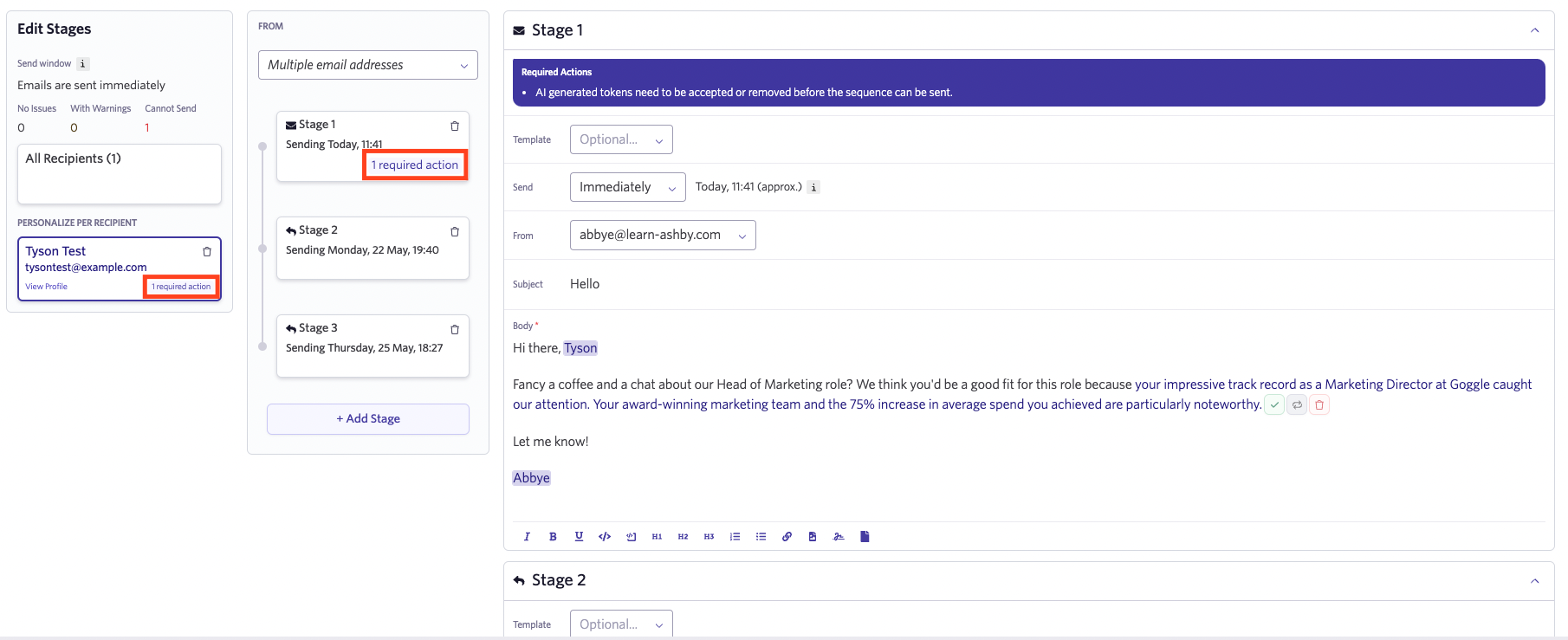
Once you’ve added the token to your sequence, text will be automatically generated when enrolling the lead or candidate in a sequence. The AI token will also automatically generate text for sequences drafted within the Chrome extension. Once the text has been generated, you will then be presented with the following three options:

- Click the checkmark to approve the suggestion.
- Click the grey icon to request another suggestion. It can take a few seconds for a new suggestion to be generated.
- Click the trash can icon to remove the token and suggestion.
You will need to approve the suggestion (using the checkmark icon) or remove the token (using the trash can icon) before the sequence can be started.
After accepting the suggestion, you will have the option to edit the email body in the sequence before sending it.