AI Notetaker FAQs
This article answers common questions about AI Notetaker. Questions are grouped by topic — use the sections below to find answers about features and admin settings, interviewing and scheduling, and post-interview recordings and feedback.
Features & admin
Does Ashby or the AI vendor use these recordings to train their models? Are our calls or notes ever used for training purposes, even in anonymized form?
No. Refer to our Terms for AI Features and other resources in our Trust Center for more information.
Can only users with paid seats have the AI Notetaker enabled?
No, the AI Notetaker can be enabled for all users in your Ashby account, including those with Limited Access.
Is it possible for interviewers to opt out of the AI Notetaker?
While you can disable or enable the AI Notetaker for specific employees via their profile if you are an Org Admin, it's currently not possible for interviewers to opt out of the AI Notetaker themselves.
Are debriefs supported as well as interviews?
Yes! The AI Notetaker can be added to debriefs as well as interviews. The process to add the AI Notetaker to a debrief is the same as with an interview.
Is there a way for me to view who has the AI Notetaker enabled?
Yes, there is a field (Is AI Notetaker Enabled?) that can be used in reporting to see who has the AI Notetaker enabled for them, and enabled users can be viewed on the AI Notetaker admin page as well.
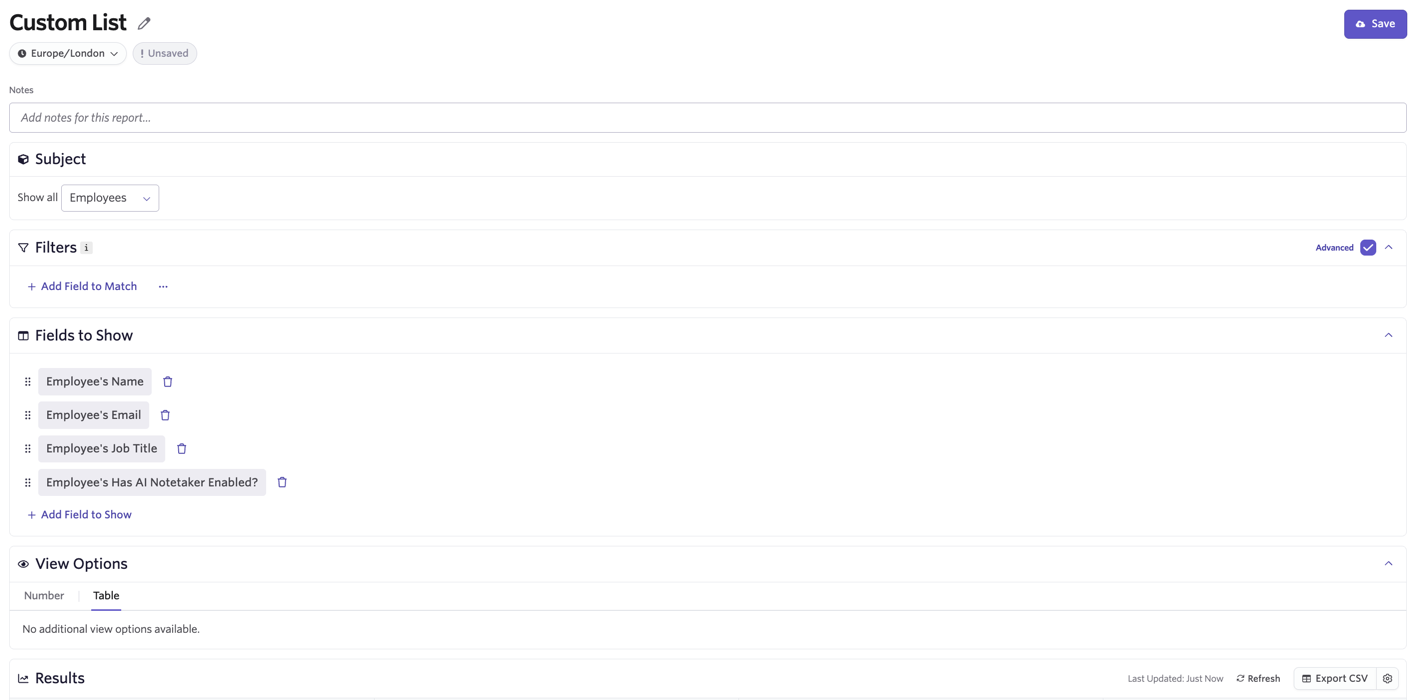
An example of a report you can create using this field is below. Note that custom reports are not available on the Foundations plan.
Employees: AI Notetaker status
Report type: Custom List Subject: Employees Filters: If you'd like to view a specific group of employees, feel free to add filter fields. Fields to show: Employee's Name, Employee's Email, Employee's Job Title, Has AI Notetaker Enabled?
Interviewing & scheduling
A candidate requested not to be recorded after they joined the meeting. How can I remove the AI Notetaker from my interview?
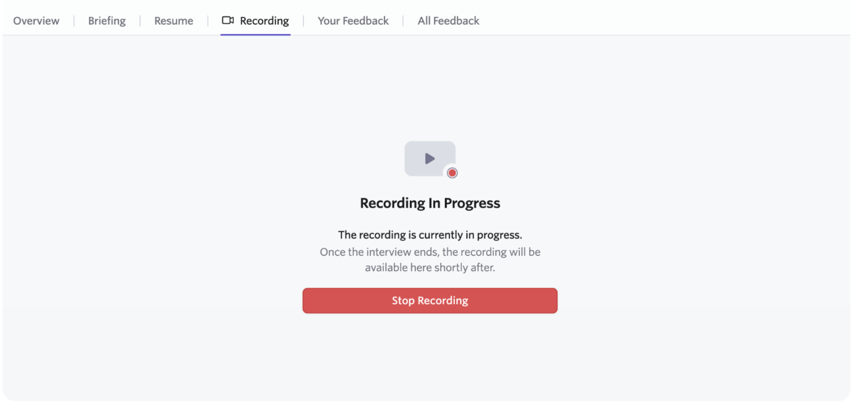
Each video conferencing tool lets you remove the AI Notetaker participant from the call natively. For example, in Zoom, the organizer or host can click the three dots on the AI Notetaker's participant cell and select Remove (make sure you do not report the AI Notetaker). You can also stop the recording from within Ashby by navigating to the Recording tab of the interview briefing and clicking Stop Recording.
If AI Notetaker is enabled, is it automatically added to previously scheduled interviews?
No. Interviews that were already scheduled before AI Notetaker was enabled do not have it added automatically. To include AI Notetaker on those interviews, update them manually by clicking More Actions on the interview activity and selecting Record This Interview.
I've amended the AI Notetaker recording mode settings within my scheduling defaults or within my interview activity. Does this update already scheduled interviews?
Changes made to the recording mode on an interview plan activity or within scheduling defaults only apply to AI Notetakers that are added or scheduled after that change is made.
If you'd like to update the recording mode settings for an already scheduled interview, reschedule the interview and adjust the AI Notetaker settings as part of the rescheduling process. Navigate to the AI Notetaker section within the Communications tab to make adjustments as needed before confirming the reschedule.
When does the AI Notetaker leave the interview?
The AI Notetaker leaves when all other non-bot participants leave, or at the scheduled end time if the interview is part of a multi-event panel.
Which languages are supported by the AI Notetaker?
The AI Notetaker can transcribe conversations in over 99 languages. It automatically detects the language being spoken, so long as there's at least 60–90 seconds of speech in a recording. Transcripts automatically appear in the language being spoken.
Accuracy may vary based on the language and how commonly it is spoken. Generally, more commonly spoken languages have higher accuracy and better support for different accents.
How are multiple languages in one conversation supported?
If an interview conversation switches between multiple languages, some of the transcription may get automatically translated and not reflect the language spoken at that moment. For example, if an interview had portions in Italian and English, some portions spoken in English may appear translated into Italian in the transcript. The transcript is correct but may just appear in a different language.
Can the AI Notetaker translate different languages when summarizing notes?
The AI Notetaker typically summarizes conversations in English, regardless of the language in the transcription.
- Summary notes are likely in English.
- Feedback form auto-fill suggestions are also typically in English, but can be based on the language of the feedback form question itself. A refinement can always be added to a suggestion to ask it to translate or write an answer in a different language.
- The AI assistant typically answers in English or the language that a request is sent in. You can ask the assistant to translate or interact in any specific language you prefer.
How does AI Notetaker work with multi-day scheduling or interviews with multiple events?
Each interview event in a multi-event interview block has its own AI Notetaker, but the next AI Notetaker must successfully join the next meeting before the previous one stops recording.
If an interviewer does not admit the next AI Notetaker from the waiting room, the previous AI Notetaker intentionally keeps recording because it assumes the current interview may be running over. This can result in one long recording with no distinction between each individual interview event. This behavior is by design to avoid missing conversations when interviews go past their scheduled end time, but it also means interviewers may need to admit another AI Notetaker even if one is already in the meeting.
If you want guaranteed separate recordings for each panel interview, use the One invite per interview event setting when you schedule multi-event interviews. This creates more predictable recording boundaries, but candidates need to use separate meeting links to join each interview event instead of staying in one continuous meeting.
For more information on multi-panel interviews, see How do I use multi-day scheduling?.
Post-interview recordings and feedback
Can I view recordings as part of the debrief overview?
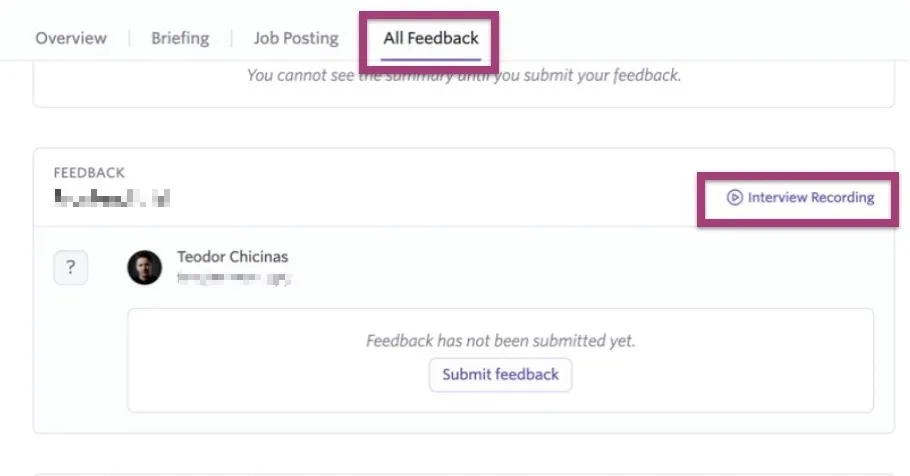
Yes! Where available (and provided the user has permission to view the recordings), interview recordings can be accessed via the All Feedback tab on the debrief information. Click Interview Recording on the feedback in question to access the interview recording and transcript.
Can you send me a notification when my recording is done processing and ready?
Recordings and transcripts are generally processed within a few minutes after a meeting ends, so notifications are not typically needed. However, you can create a report with an alert for when a new recording is created and a video or transcript is available. See Alerts for more info.
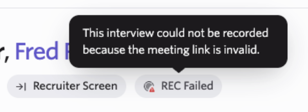
I'm seeing a REC failed tag on my interview — what happened?
You can hover over the REC failed tag in the interview briefing to see why the recording failed.
Can I download a recording?
Yes. Right-click on the player and select Save video as to download the video file.
If you do not see the Save video as option, press play on the video and try again.
Can I download or copy the transcript?
Yes. While viewing the recording, select the three dots next to the Transcript or Notes tabs to copy or download the transcript as a CSV, TXT, or Markdown file.
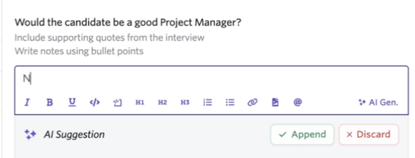
Can I only generate content using AI for one specific feedback form question, rather than all long, formattable text fields in the form?
Yes — use the AI Gen option in the toolbar for a specific field to generate content for that field only.
Can I ask the AI Candidate Assistant about the contents of interviews that have been recorded?
Yes! Context from interview transcripts is automatically made available to the AI Candidate Assistant. From a permissions perspective, the AI Candidate Assistant can access the same things that any specific user has access to. Therefore, only transcripts from interviews a user has access to are available to the AI Candidate Assistant.