Workday Integration FAQ
This page answers frequently asked questions that come up during testing and after implementation of the Workday integration.
General functionality questions
I made an update to an offer — can I re-hire the candidate and feed the data to Workday?
If you'd like to make small updates to an offer after pushing the event over to Workday, we recommend correcting the details manually within Workday itself, rather than pushing the event over again from Ashby. If you'd also like to update the offer details within Ashby, your updated offer may need to go through any approval and e-signature processes.
If extensive updates are being made across the offer, you need to cancel or rescind the Hire event in Workday. This re-opens the position. Within Ashby, go to the job consideration. Click View Offer on the existing offer activity, then Update Offer to update the details of the previously accepted offer. Your updates may require reapproval, and once that approval is completed, you can regenerate the offer letter and send it for e-signature again if needed. After all updates are final and the offer is accepted again, go to the More menu, then click Add Candidate to HRIS to send the event again.
When re-sending the event to Workday, Ashby only sends the Hire, Change Job, or Contract Contingent Worker event. If the hiring scenario was for a conversion where another event was sent from Ashby (e.g., a Termination or an End Contingent Worker Contract event), Ashby will not attempt to send the Termination or End CW Contract event again.
The best practice is to correct the Termination or End CW Contract event in Workday (not rescind it), then push the Hire, Change Job, or Contract Contingent Worker event again from Ashby.
If you rescind the End CW Contract or Termination event in Workday, you need to manually replace it before attempting to add the candidate again from Ashby, or you receive an error that the applicant is already hired.
Why does a position appear unfilled in Workday, while the corresponding opening with the same position ID is marked as filled?
This discrepancy occurs because when an employee is terminated, the position in Workday becomes available for recruiting again. However, Workday's system allows positions to be refilled multiple times. In Ashby, each refilling is denoted by adding "-1" (or "-N") to the position ID. So, even though the position is unfilled in Workday, the opening with the original position ID may be marked as filled in Ashby, indicating it's been refilled. When recruiting for such positions, select the corresponding "-N" position. Workday updates may reflect in the corresponding "-N" opening in Ashby.
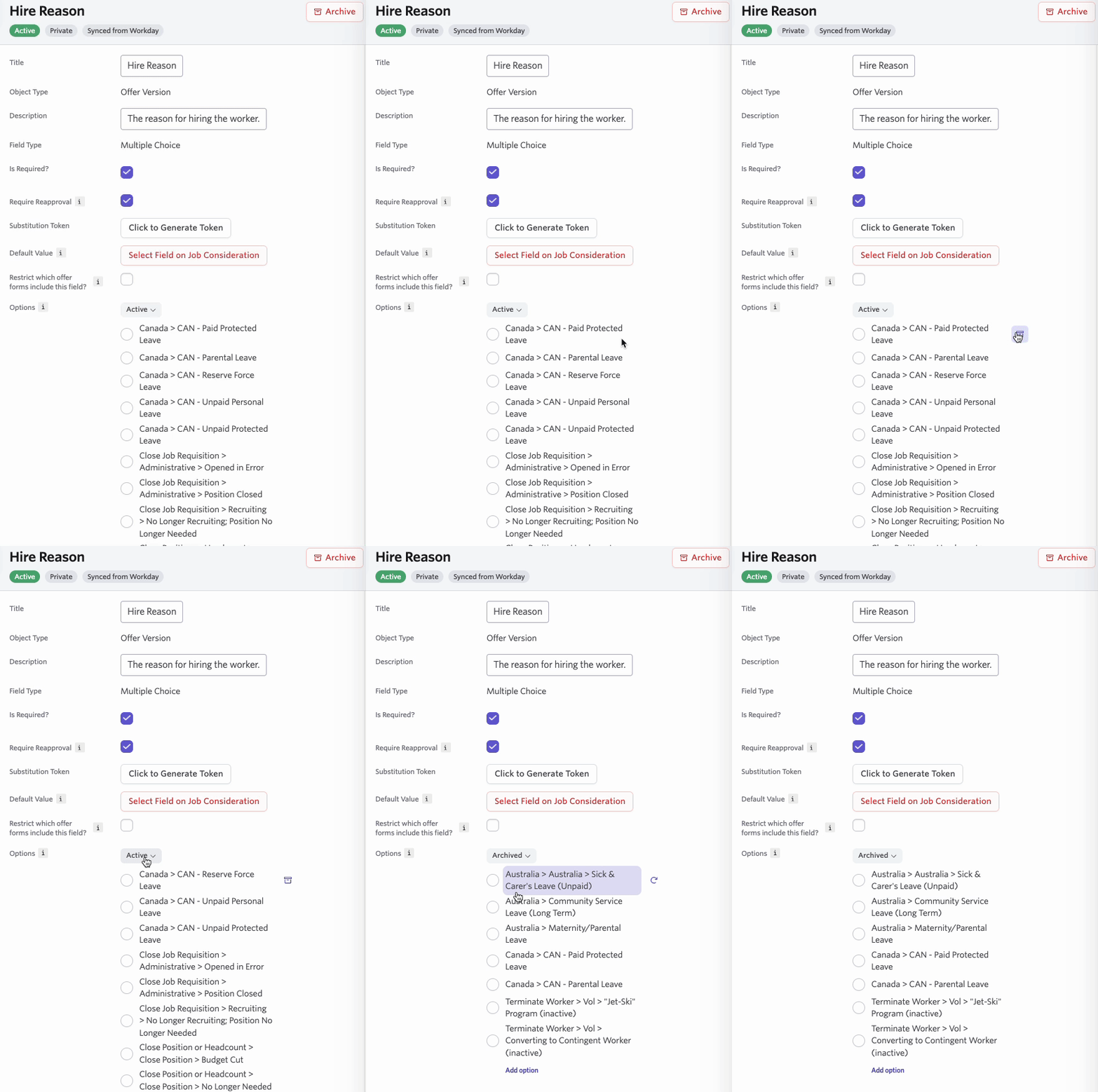
How do I exclude some values on the offer form? (e.g., only show 3 hire types even though there are more options in Workday)
You can remove available values by archiving them in Ashby. If there are values you need to archive that you'd also like to keep, archive all of the values and then activate the ones you want to keep.
How are new hire phone numbers pulled from Ashby into Workday?
The new hire's phone number is pulled from the Summary section of the candidate's profile in Ashby. If there isn't a country code attached to the phone number, Ashby falls back to a US country code as a default when parsing it.
Testing questions
How do we grant additional access to the Ashby sandbox for testing?
Your team can add new users at any time. To add new users, go to Admin > Organization Setup > Employees, then select + New in the top right corner and add the new user with their email. Users are not notified when they are added, so let them know they've been added and can access the sandbox.
Support questions
How can I request additional Workday fields to be available in Ashby?
To request additional fields, contact our Support team at [email protected].
Fields on Jobs, Openings, or Employees can be synced from Workday to Ashby using either a Workday-delivered field or a calculated field on the Job Requisition, Position, or Worker business object. Provide the following details to facilitate the creation of the custom field in Ashby:
- Workday field name
- Title you would like to show in Ashby
- Ashby object (Job, Opening, or Employee)
- Field type (String, Date, Currency, Number, Boolean, Single Instance, or Multi-Instance)
- WQL Alias (for a calculated field, find this on the Additional Info tab under Advanced; for a Workday-delivered field, open the field and it appears at the bottom of the page)
If you need to send additional data from Ashby to Workday in a Hire event push, Support evaluates whether the field is supported in the relevant Workday API, and advises on the timeline to incorporate the field if it is supported.
Functionality to request
Our Workday integration was built to ensure as many organizations as possible can use it out of the box. However, we understand there will always be variations in needs. To add any of the following functionality, reach out to [email protected] or directly to your integration partner. Some of these options may not be relevant depending on your integration mode, so make sure you talk to your implementation partner:
- No Contingent Worker Positions: Only sync Workday Positions that have an "Employee" Worker Type in the "Positions Restriction Data" section; this would exclude Contingent Workers
- Positions Fields as Job Fields: Having Workday Position fields tie to both the Ashby Job and Opening fields. By default, Workday Position fields are only tied to Ashby Opening fields.
- Openings Auto Sync as Open: Workday Positions sync as Openings with a status of "open." By default, Openings appear as "approved" when synced into Ashby.
- Show Workday Custom Fields on all Jobs and/or Openings: By default, Workday synced fields are only available on Jobs and Openings synced from Workday. Enabling this option allows Workday fields to display on all Jobs or Openings (even if they were created in Ashby), so your recruiting team can add data in the correct Workday format for reporting and defaulting values later on in the offer stage.
- Map Cost Centers to Teams: Sync your Cost Center Hierarchy into the Teams/Departments list in Ashby. If the Workday integration is creating Jobs automatically, this allows the Team to be automatically assigned based on the Cost Center from the job requisition. It also means your Team/Department list is automatically updated when new Cost Centers are added, so you don't have to manually manage a separate list of teams and departments in Ashby.
- Map Locations from Workday: Sync your Location Hierarchy into the Locations list in Ashby. If the Workday integration is creating Jobs automatically, this allows the Location to be automatically assigned based on the Primary Location from the job requisition. It also means your Locations list is automatically updated when new Locations are added, so you don't have to manually manage a separate list of locations in Ashby.
- Sync Recruiting Sources from Workday: Pull in the Recruiting Source data from Workday and map it in Ashby so that when the Pre-Hire is created, the Source can be populated with a source recognized by Workday (for example, referrals).
- Sync Employee Business Title as Job Title in Ashby: Some users prefer the employee's job title to be sourced from the Business Title field in Workday instead of the Position Title. Enabling this feature syncs the Workday Business Title into the Job Title field on the employee in Ashby.
- Skip Sending Phone Number and/or Social Links to Workday: By default, Ashby attempts to send the phone number and social links from the candidate profile onto the Pre-Hire profile in Workday. If you don't want this information sent from the candidate profile, we can disable the automatic integration of these fields.
- Automatically Create Confidential Jobs: This feature allows you to use a Recruiting Instruction called Confidential, which creates the Job in Ashby as a confidential one automatically.
- Map Job Roles from Workday: When Ashby is syncing jobs from Workday job requisitions, we can map the Hiring Manager and/or Recruiter assigned on the job requisition automatically into the Hiring Team Role on the Job in Ashby.
- Auto-complete business process steps: By default, Ashby follows your defined business process flow in Workday for the relevant staffing events (Hire, Change Job, Contract Contingent Worker). However, we can set instructions to auto-complete or auto-skip certain steps in the business process under defined conditions to further automate the process and prevent someone from having to click Submit or Skip in Workday to advance the process. The most common requests are:
- Always auto-complete the Propose Compensation and Change Organization Assignment steps
- Auto-complete the Stock Grant and One-Time Payment steps if there is a Stock Grant or One-Time Payment (OTP) in the offer
- Auto-skip the Stock Grant and One-Time Payment steps if there is no Stock Grant or OTP in the offer