What is a confidential job?
Setting a job as confidential allows you to restrict visibility to a select group of users. This is useful for sensitive roles or internal backfills that should not be visible to the broader organization or listed on your public Ashby job board.
When a job is made confidential, it is only visible to:
- The job creator.
- Users explicitly granted access to the role.
- Org Admins with the "access to all confidential roles" permission enabled.
This feature is available on Plus, Enterprise, and Legacy Plus plans.
Foundations | Legacy Plus | Plus | Enterprise |
|---|---|---|---|
❌ | ✅ | ✅ | ✅ |
Creating a job and setting it as confidential
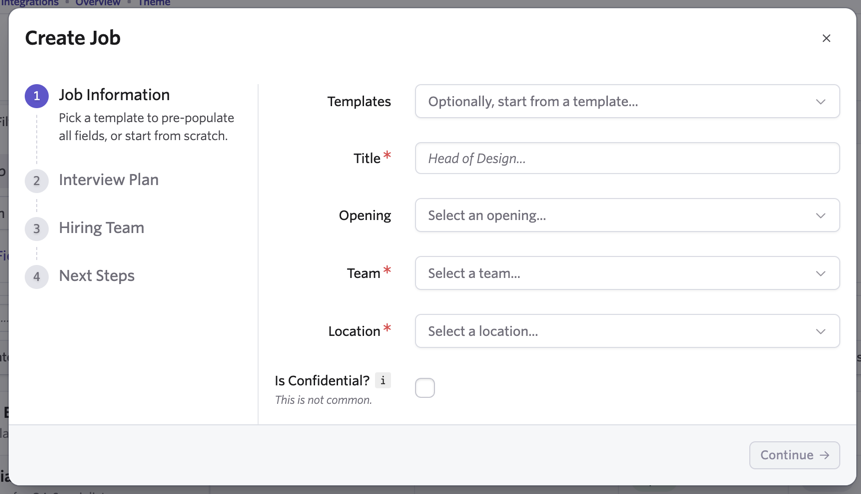
While using the job creation wizard to set up your job, check the Is Confidential? checkbox to mark the job as confidential.
While this isn’t a commonly used option, this can help if you are setting up jobs that only users who have been given specific access should be able to see.
Setting an existing job as confidential
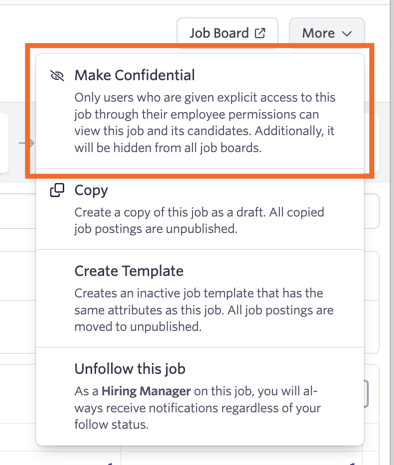
If you have already created a job and want to strictly limit user access to the job, click More when viewing the job, then select Make Confidential.
Only the user who created the job or Organizational Admins can mark the job as confidential or non-confidential.
Sharing the confidential job’s job posting with candidates
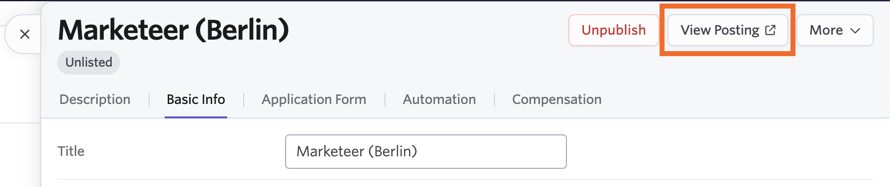
Because confidential jobs are unlisted, they will not appear on your public job board. However, you can still share the posting with specific candidates via a direct link.
To find the link, navigate to Job Postings within the job and select View Posting. You can then copy the URL from your browser's address bar to share it with potential candidates.
Permissions & Access
Can Organization Admins view confidential jobs?
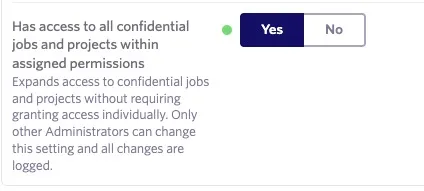
Org Admins can view confidential jobs if they created the job, were explicitly added to it, or have a global permission enabled.
To grant an Org Admin access to all confidential jobs:
- Navigate to Admin > Organization Setup > Employees.
- Select the user and go to the Permissions tab.
- Toggle the Has access to all confidential jobs and projects within assigned permissions option to Yes.
How do I assign users access to a confidential job?
You can grant specific users access to a confidential job without giving them global access.
To assign access:
- Navigate to Admin > Organization Setup > Employees.
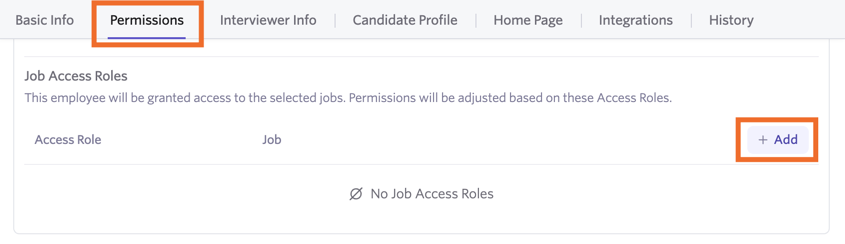
- Select the user and go to the Permissions tab. (The user must have Elevated Access or Org Admin status).
- Scroll to the Job Access Roles section and click + Add.
- Select the desired access role and choose the specific confidential job from the Job dropdown.
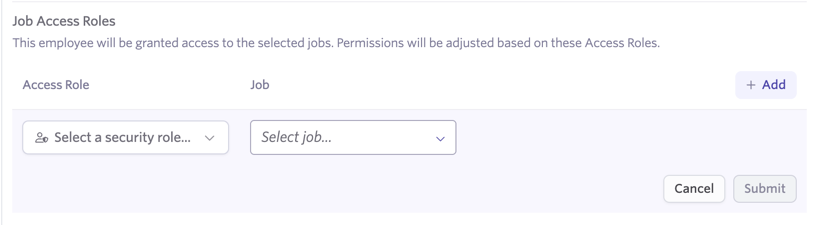
- Click Submit to save.
Reporting
Who can view confidential job data in reports?
Only users with access to the confidential job can see its data in reports. If a user lacks access, report results will only reflect the non-confidential roles they are permitted to see.
This protection extends to candidate profiles. If a candidate is only considered for a confidential role, their profile remains hidden from unauthorized users. If an unauthorized user attempts to access a direct link to such a profile, they will see a permissions error message.

FAQ
Can interview calendar invites be set to Private for confidential jobs?
Yes. If a job is marked confidential during creation, the Is Private? toggle is automatically enabled for all interviews in that pipeline. If you mark a job as confidential after creation, new interviews will be private by default, but existing ones must be updated manually.
When an invite is private, details are hidden from non-attendees viewing the interviewer’s calendar.
Note: If scheduling on a shared/group calendar where users have edit access, details may still be visible. We recommend using personal calendars for these instances.
Will confidential jobs be pulled through to third-party job board integrations like LinkedIn and Indeed?
No. Because the job posting is set to Unlisted, it will not be shared with third-party job board integrations.
What happens if a candidate is considered for both a confidential and a non-confidential job?
The candidate remains searchable and visible to anyone with access to the non-confidential job. However, the confidential job consideration will remain hidden from users who do not have explicit access to that confidential role.
If a user has access to the department a confidential job is linked to, can they see the confidential role?
No. Departmental permissions only apply to non-confidential roles. Access to a confidential job must be granted specifically via a Job Access Role.
Can I set a candidate as confidential?
This is not currently a feature in Ashby.
If I set up specific shared interview types and feedback forms for confidential roles, can they be seen by other Org Admins?
Yes. Shared interview types and feedback forms are visible to all users with permission to manage those areas. To maintain complete privacy, we recommend creating custom interview types or feedback forms directly within the confidential job or using a confidential job template.
How do openings work when assigned to confidential jobs?
If an opening is only linked to a confidential job, it is only visible to users with access to that job. If an opening is linked to both confidential and non-confidential jobs, unauthorized users can see the opening but will not see the link to the confidential job.
How do job approval processes work with confidential jobs?
In the Scope section of an approval workflow setup, you can select the Is Confidential? checkbox.
- Checked: The approval process only applies to confidential jobs meeting your criteria.
- Unchecked: The approval process will not apply to confidential jobs.