Virus Scanning FAQ
Ashby scans files uploaded by candidates for known malicious file signatures.
If a file is found to be potentially malicious, we will display a warning dialog whenever you try to download the file. If you choose to accept the risk, you can download the file by clicking Download Anyway.
Please remember that Ashby’s virus scanning feature is not a guarantee against infection. We always recommend that you treat files submitted by candidates with the same caution as files you download from other web sites.
What files are scanned?
All files uploaded by candidates through Ashby’s job boards and application forms are scanned. This includes resumes, cover letters, take-home assignments, and any other files uploaded by the candidate.
We also scan candidate resumes uploaded through Ashby's public API by our integration partners, resumes uploaded to Ashby by email, and resumes submitted through employee referrals.
How will I be notified if a file is potentially malicious?
If Ashby detects a potentially malicious file, you will see a warning dialog when you attempt to download the file to your desktop:

How should I proceed if I see a warning dialog?
We recommend treating all files you receive from candidates with caution, regardless of the presence of a virus scanner warning.
Remember that virus scanners are not a guarantee against infection; it is possible for a file to be dangerous even if it passes a virus scan, and it is also possible for a non-malicious file to flagged incorrectly.
What other warnings should I be aware of?
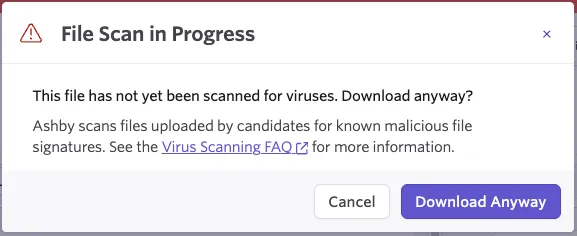
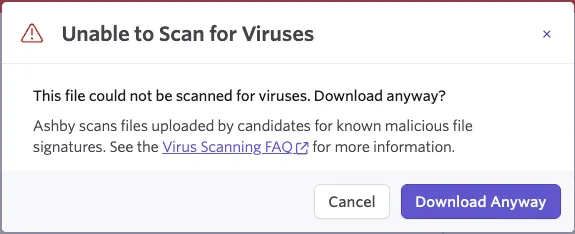
Ashby will also display a warning if the file scan is in progress, or if there is an error scanning the file. This can happen if the file is password-protected, is too large to scan, or if there is an issue with the file format which prevents our virus scanner from processing it.
We err on the side of caution and display a warning in these cases, but a delay or a failure to scan does not generally mean the file is malicious. If you choose to accept the risk, you can download the file by clicking Download Anyway.
If the scan is still in progress, you will see a File Scan in Progress message.
If the scan could not be completed, you will see an Unable to Scan message.
How can I safely handle malicious files?
Ashby isn’t in a position to make specific security recommendations to our customers; the correct level of caution depends on your platform, risk profile, and what other mitigations you have in place. If you have concerns about downloaded files, we encourage you to consult with a computer security expert for specific guidance in your situation.
Regardless of the presence or absence of a virus scanning warnings, we always recommend following general security practices. These include the use of strong passwords and two-factor authentication on important cloud accounts, not executing macros in documents, backing up important files securely in a way that can’t be easily overwritten, and always keeping your operating system, browser and other applications up to date with the latest security patches.