UKG Pro Onboarding
The Ashby UKG Pro Onboarding integration enables you to automatically push hired candidates from Ashby to UKG Pro Onboarding as pre-hires, ensuring a seamless transition of candidate data from Ashby to UKG.
Before setting up this integration, ensure you have:
- An active UKG account with API access.
- Admin permissions in both Ashby and UKG.
- When you set up the API key in UKG, grant it the EmployeeExport read permission. Ashby uses this permission to retrieve employee data for the Onboarding Owner field.
- UKG credentials (these may need to be obtained from UKG Support):
- Client ID
- Client Secret
- Customer API Key
- Basic Auth User Name
- Basic Auth Password
- UKG API configuration details:
- Tenant ID
- API Base URL
Permissions & access
UKG Pro Onboarding can be configured on all Ashby plans.
Integration overview
The Ashby <> UKG Onboarding integration supports:
- Field mapping: Key candidate details (e.g., name, email, job title, start date) are mapped between Ashby and UKG.
- Automated pre-hire sync: Hired candidates in Ashby are, optionally, automatically created as pre-hires in UKG.
There are options to both manually push and automatically transfer hire data to UKG Onboarding as pre-hires.
What data is sent to UKG?
The data sent varies based on the fields you select during integration setup.
Here is a list of supported fields:
Ashby Field | UKG Field | Required? | Built In or Custom Field? |
|---|---|---|---|
First Name (Candidate) | First | Y | Built In |
Last Name (Candidate) | Last | Y | Built In |
Email (Primary, Personal) (Candidate) | Y | Built In | |
Phone Number (Primary, Personal) (Candidate) | Primary Phone Number | N | Built In |
Start Date | Start Date | N | Built In |
Hire Date (Offer) | Hire Date | N | Built In |
Salary (Offer) | Compensation and Currency Code | N | Built In |
Component Company | | Y | Custom Field |
Employee Type (Job or Opening) | Full Time (Y/N) | N | Custom Field |
Interval | Pay Rate | N | Custom Field |
Requisition ID (Job or Opening) | Requisition ID | N | Custom Field |
Location (Job or Opening) | Work Location | N | Custom Field |
| Job Code | | Custom Field |
| Work Location | | Custom Field |
| Former Last Name | | Custom Field |
| Is Full Time | | Custom Field |
| Is Salaried | | Custom Field |
| Middle Name | | Custom Field |
| Orientation Date | | Custom Field |
| Past Start Date Reason | | Custom Field |
| Personal Message | | Custom Field |
| Preferred First Name | | Custom Field |
| Rate Per | | Custom Field |
| Selected FSLA Status | | Custom Field |
| Weekly Hours | | Custom Field |
| Work Hours | | Custom Field |
Offer letters are not sent to UKG with the above data.
Setup instructions
Get your credentials from UKG
Reach out to UKG Support for the following details:
Confirm that the UKG API key has the EmployeeExport read permission. This permission is required for employee data to populate the Onboarding Owner field.
- UKG credentials:
- Client ID
- Client Secret
- Customer API Key
- Basic Auth User Name
- Basic Auth Password
- UKG API configuration details:
- Tenant Alias: The tenant alias is separate from the tenant ID in your environment. It is a unique code that UKG needs to share with you.
- API Base URL
Enable the integration
- Log in to Ashby.
- Navigate to Admin > Integrations > Integrations.
- Search for or find the UKG Pro tile and click on it to open the integration settings.
- Click Enable UKG.
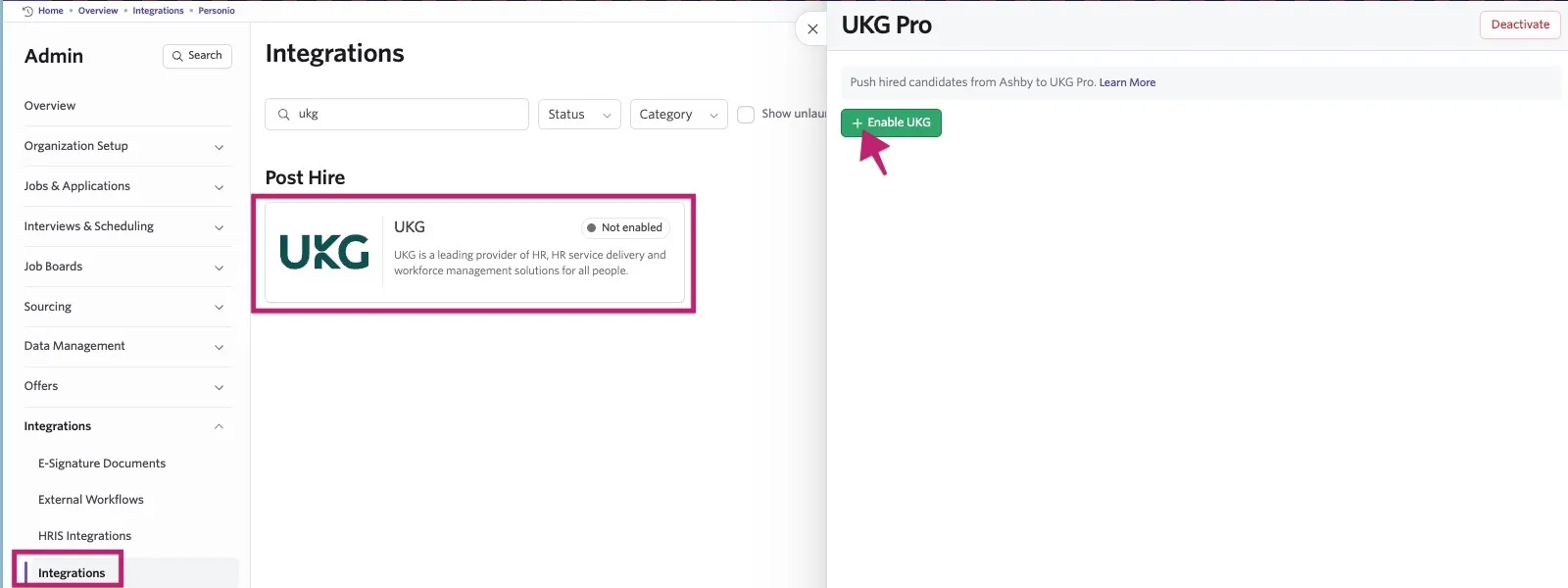
- Enter your client credentials and API configuration.
- Click Save Configuration Details.
Activate the integration in Ashby
Next, partner with your HR team to determine the fields that should be populated by your Talent team when pushing hires.
Once you have your list, toggle Sync Enabled? for each field.
Once all are toggled, click Sync Custom Fields to generate corresponding offer custom fields.
Component Company, Job Code, and Work Location are always required. Do not disable these fields.
Format offer custom fields
Once you toggle on the selected fields, the corresponding offer custom fields are generated. These fields sync to UKG and update as changes occur on the UKG side.
For more details, see Custom Fields and Offers and Offer Letters.
Here are your formatting options:
- Order fields: Slide custom fields by hovering over the space next to the icon to the left of the field name to expose the drag handle.
- Set default values and, optionally, hide fields that always have the same value.
Using the integration
Ashby pushes candidates to UKG as onboarding pre-hires.
When a candidate enters the offer stage, Ashby surfaces the required UKG metadata fields in the offer form.
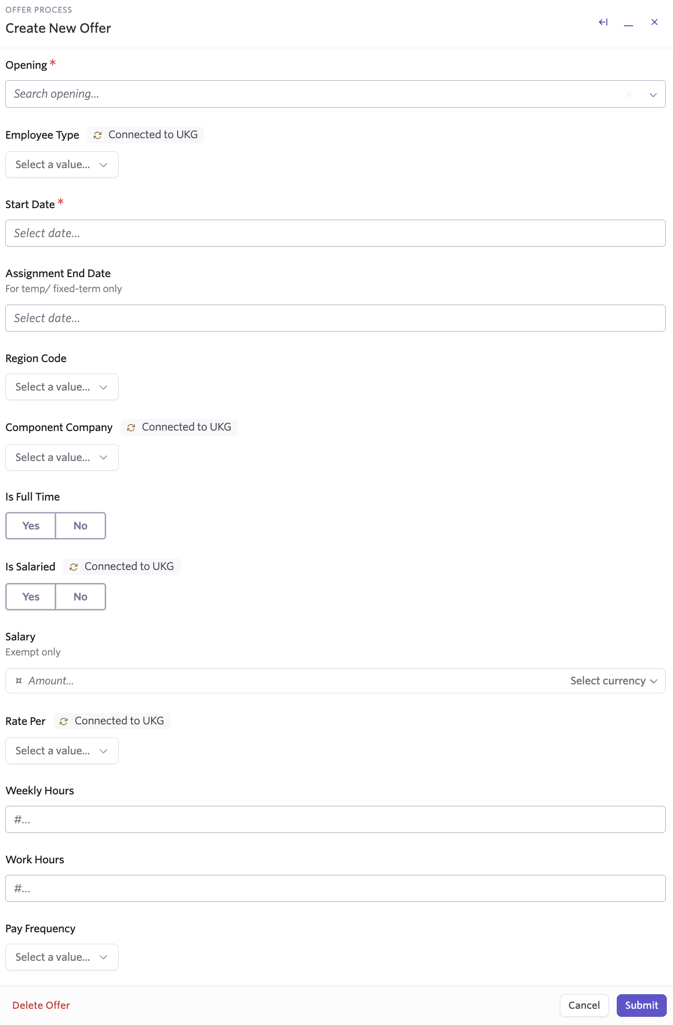
After the candidate accepts the offer and is marked Hired, you can send data to UKG in either of the following ways:
- Manual push: Use the Add Candidate Data button on the candidate's UKG activity.
- Automatic push on hire: Enable automatic sync from the HRIS Integrations page in Ashby Admin.
FAQs
Is the UKG integration a paid integration?
No, the UKG integration is free to use.
Can I sync pre-hires or offer-stage candidates?
Not at this time. Sync occurs only when a candidate is marked Hired.
Can we filter which hires sync to UKG?
Yes. Use the manual push option to selectively sync candidates.
Any limitations with the UKG Pro Onboarding integration?
- The integration supports new-hire records only and does not update existing employee records.
- You cannot currently map custom fields in Ashby.
- Reports To is not currently supported; this is in the backlog.
Can I push the same candidate to UKG more than once?
You cannot push the same Ashby job consideration to UKG more than once. However, you can push the candidate again if they have a different job consideration or a separate candidate profile in Ashby.
You can also push a candidate who already exists in UKG if their existing UKG profile was not originally created through the Ashby integration. In this case, pushing the candidate from Ashby will create a separate, duplicate profile in UKG.