Setting Scheduling Defaults
Scheduling defaults let you set company-wide communication and direct booking/candidate availability settings. Ashby uses these default settings while scheduling unless you specify different values on Interview Plans or individual Interview Schedules.
Permissions:
- By default, only Organization Admins can set scheduling defaults
- Elevated Access users can be granted access to set scheduling defaults as an additional permission. For more, see Additional User PermissionsAdditional User Permissions.
Scheduling defaults overview
The Scheduling Defaults section consists of multiple tabs where you can configure various settings.
These settings dictate organization-wide defaults, and you can override them in certain areas, such as on specific interview plans or individual interview schedules.
Communication
The Communication tab controls how you configure calendar invites and which email templates Ashby uses for candidate-facing communication. The following sections describe each configuration.
Settings
Settings control key details of calendar invites, including the location, which Ashby uses to automatically generate conferencing links or input the candidate's phone number.
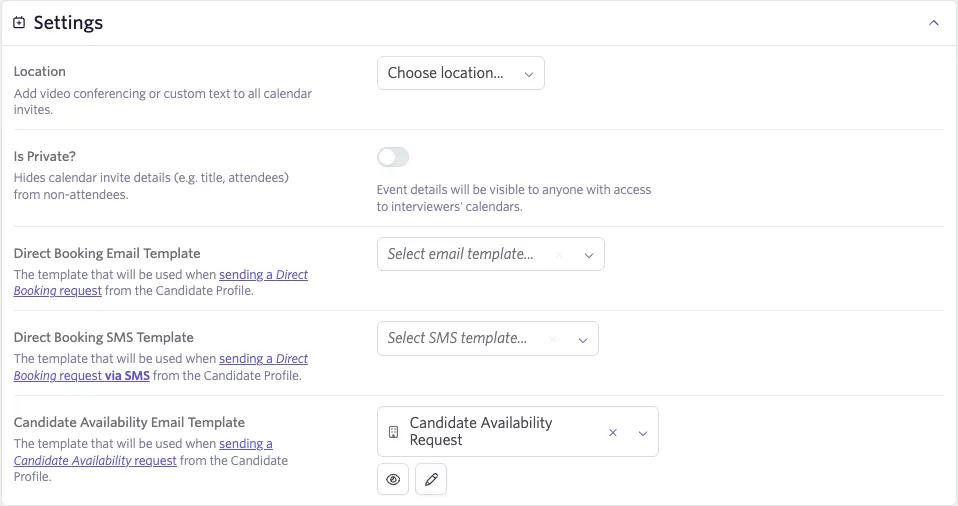
- Location: Set the default interview location for calendar invites. Options include integrated video conferencing tools (Google Meet, Microsoft Teams, Zoom), Phone Call, or a Custom method.
If you select Zoom as the location, specify a Zoom host so Direct Booking links generate correctly.
- Is Private?: When enabled, Ashby hides calendar invite details, including the title and attendee list, from anyone who is not an attendee.
- Direct Booking Email Template: Ashby uses this template when sending a direct booking request from the candidate profile.
- Candidate Availability Email Template: Ashby uses this email template when sending a candidate availability request from the candidate profile.
- Candidate Interview Confirmation: Ashby sends the email template specified here as an interview confirmation once the candidate schedules.
For more information, see Direct Booking & Candidate Availability LinksDirect Booking & Candidate Availability Links and Email Template Creation and ManagementEmail Template Creation and Management.
AI Notetaker
This section appears only when your organization has AI Notetaker enabled. Toggled on, it enables AI Notetaker by default on all interviews if at least one participating interviewer has it enabled. You can turn it off at the interview level if desired.
You must enable AI Notetaker at Admin > Opt-in Features > AI Notetaker to configure this setting.
This is also where you can manage users with AI Notetaker enabled.
See AI Notetaker Setup and PermissionsAI Notetaker Setup and Permissions for more info.
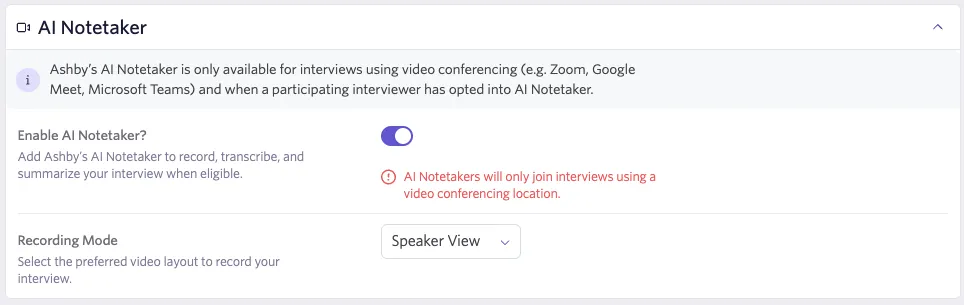
For more on how AI Notetaker works during scheduling, see Scheduling and Conducting Interviews with AI NotetakerScheduling and Conducting Interviews with AI Notetaker.
Candidate interview confirmation
This section controls the confirmation communication candidates receive after Ashby schedules an interview.
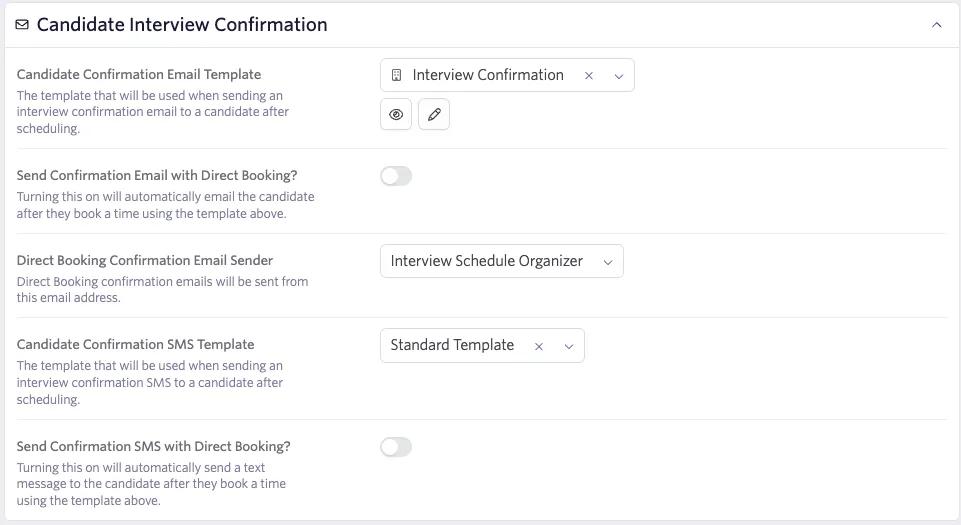
- Candidate Confirmation Email Template: Select the email template sent to the candidate as a confirmation once an interview is scheduled. Ashby uses this template both for Direct Booking confirmations and as the base template for confirmation emails in the manual scheduling flow.
- Send Confirmation Email with Direct Booking?: A toggle that controls whether the confirmation email above is automatically sent when a candidate books via a Direct Booking link. This toggle only becomes visible after you select a Candidate Confirmation Email Template. If you remove the template while this toggle is on, Ashby blocks the removal with a validation error until you turn off the toggle.
- Direct Booking Confirmation Email Sender: Determines who sends the confirmation email when a Direct Booking link triggers it. Options typically include the interview organizer or a configured sender address.
- Candidate Confirmation SMS (Short Message Service) Template: (appears when candidate texting is enabled) Select the SMS template sent to the candidate as a confirmation once an interview is scheduled.
- Send Confirmation SMS with Direct Booking?: (appears once you select a template in the previous setting) A toggle that controls whether the confirmation SMS above is automatically sent when a candidate books via a Direct Booking link. Follows the same behavior as the email toggle above.
Note on manual scheduling: When manually scheduling an interview, the confirmation email defaults to off even if you configure a template here. The exception is the first time a user manually schedules from an Interview Plan activity that has a confirmation template set, in which case the email defaults to on. Ashby remembers each user's preference for subsequent schedules.
Manage candidate invites
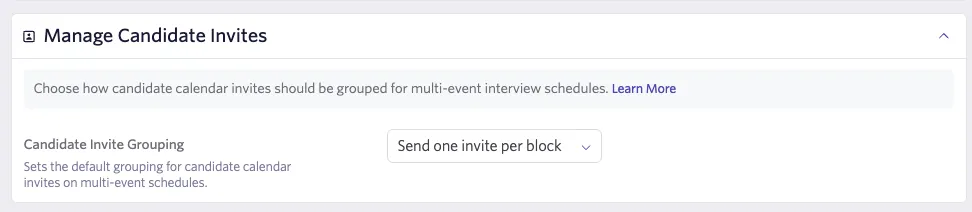
The Candidate Invite Grouping setting under this section allows you to set the default grouping for candidate calendar invites on multi-event schedules. The options are:
- One invite per block: Sends separate invites for each block of consecutive interview events. This is the default.
- One invite per interview: Sends a separate invite for each individual interview event. Splitting invites can make longer schedules easier for candidates to follow by reflecting breaks between interviews. Each candidate invite also gets its own conferencing link, so candidates and interviewers can join separate calls for each event, if preferred.
- One invite per day: Sends a single invite spanning all events scheduled in a given day, including any gaps between interviews.
- Invite grouping only applies to multi-event scheduling.
- The option you choose impacts how Ashby creates conferencing links. Candidates and interviewers may need to join different conference rooms for each event (if you select one invite per interview), or you could have a single conferencing link for an interview block or whole day if you choose one of those options.
For more on how this is set up in schedule interview activities, see the Communication section of Setting up Schedule Interview ActivitiesSetting up Schedule Interview Activities.
Calendar invite templates
This section controls the default title and body content of the calendar invites sent to candidates and interviewers.
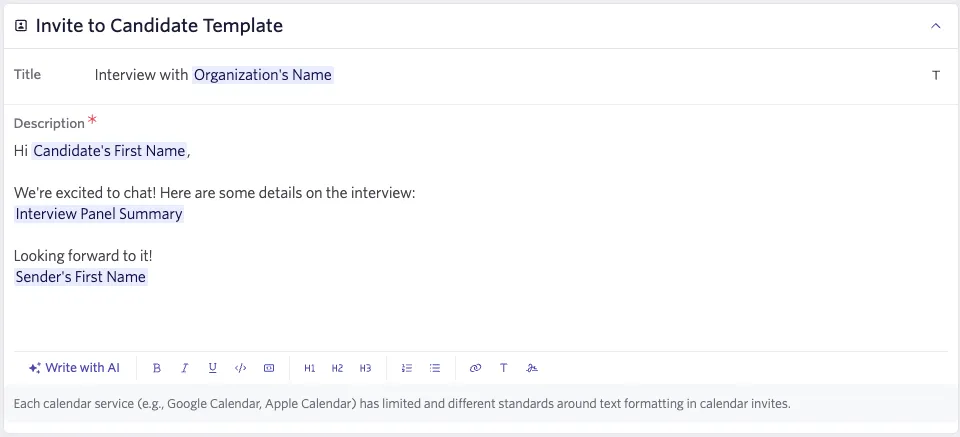
Invite to candidate template
Set the default title and description for the candidate's calendar invite. You can use Substitution TokensSubstitution Tokens (such as candidate name, job title, and interview type) in both fields.
Candidate invites do not support rich text formatting; the description renders as plain text.
Invite to interviewers template
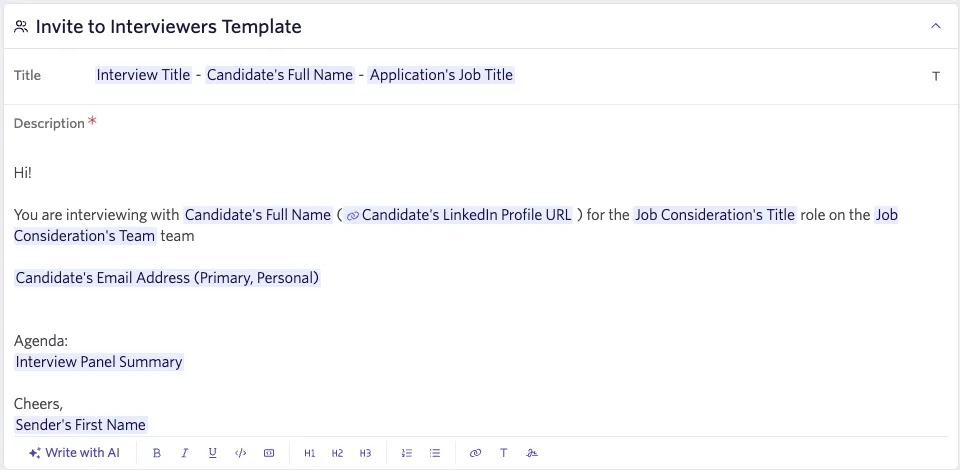
Set the default title and description for interviewers' calendar invites. You can use Substitution TokensSubstitution Tokens and rich text formatting (bold, bullet points, links, etc.) in the description field.
Slack channel
This section appears only when the Slack integration is active for your organization.
This section sets the org-wide defaults for Slack interview channels. When Ashby creates a Slack channel for an interview, it applies these defaults unless you override them at the Interview Plan activity level.
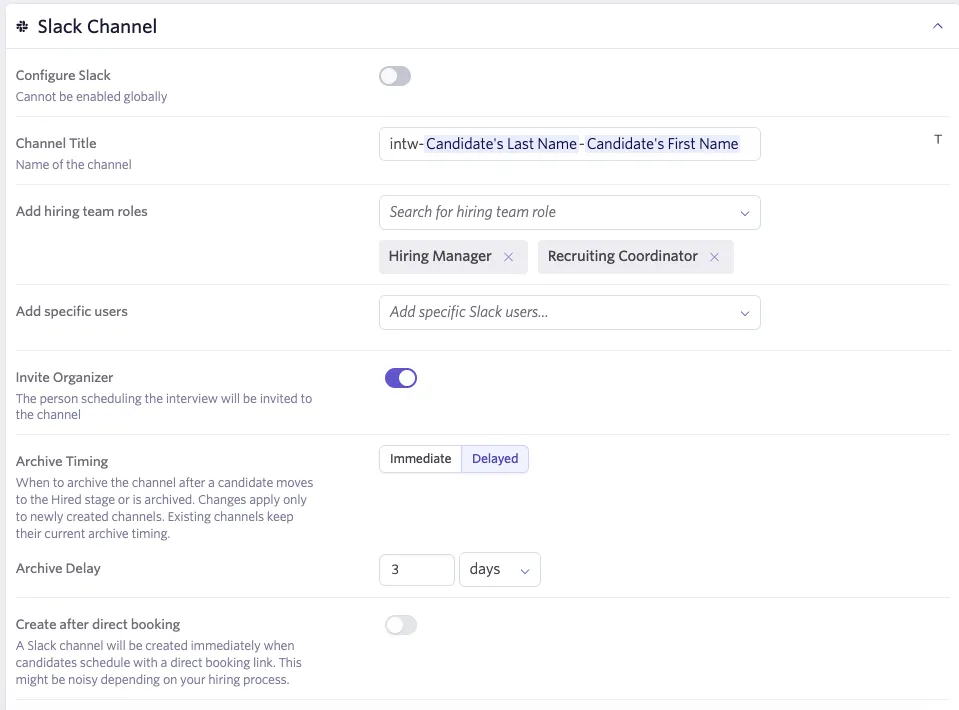
- Channel Title: Sets the default name for the Slack channel created for each interview. The T icon lets you insert substitution tokens (such as candidate name, job title, or interview stage) into the title.
- Add Hiring Team Roles: Determines which hiring team roles Ashby automatically adds to the channel when it creates one. Ashby includes interviewers on the panel by default. You can add additional roles — such as Coordinator, Recruiter, Hiring Manager, and Sourcer — here.
- Add Specific Users: In addition to role-based membership, you can add specific named users to every interview channel by default.
- Default Message: Sets a default message that Ashby automatically posts to the Slack channel when it creates one.
- Invite Organizer: Determines whether Ashby automatically invites the person who schedules the interview (the organizer) to the Slack channel when it creates one.
- Archive Timing: Controls when Ashby automatically archives the Slack channel once the candidate moves to a terminal state (Hired or Archived). Options are:
- Immediately: Ashby archives the channel as soon as the candidate reaches a terminal state.
- Delayed: Ashby archives the channel after a configurable amount of time (hours or days), set in the Archive Delay field, following the candidate reaching a terminal state, up to a maximum of 30 days. This gives the hiring team a window to complete any wrap-up conversation before Ashby closes the channel.
You cannot enable the automatic creation of Slack channels globally from Scheduling Defaults. This is intentional — enabling channels globally would create channels for every interview, including early-stage screens where a dedicated channel is rarely needed. Instead, Scheduling Defaults lets you pre-configure how channels look and who Ashby invites when it creates them, while you make the decision to create a channel at the individual Interview Plan activity level or at the point of manual scheduling.
Direct booking & candidate availability
These settings apply to any Direct Booking or Candidate Availability requests you create based on this schedule.
Direct Booking requests allow candidates to schedule a time to interview from appointment slots determined by interviewers' calendar availability and any meeting hours you define. You can use it only for schedules with a single event. Candidate Availability requests allow candidates to submit one or more timeslots during which they are available. You can then view these times while using Manual Schedule to schedule a preferred time for both you and the candidate.
Available Times
The following settings can be configured in the Available Times section of the Direct Booking & Candidate Availability tab of your scheduling defaults.
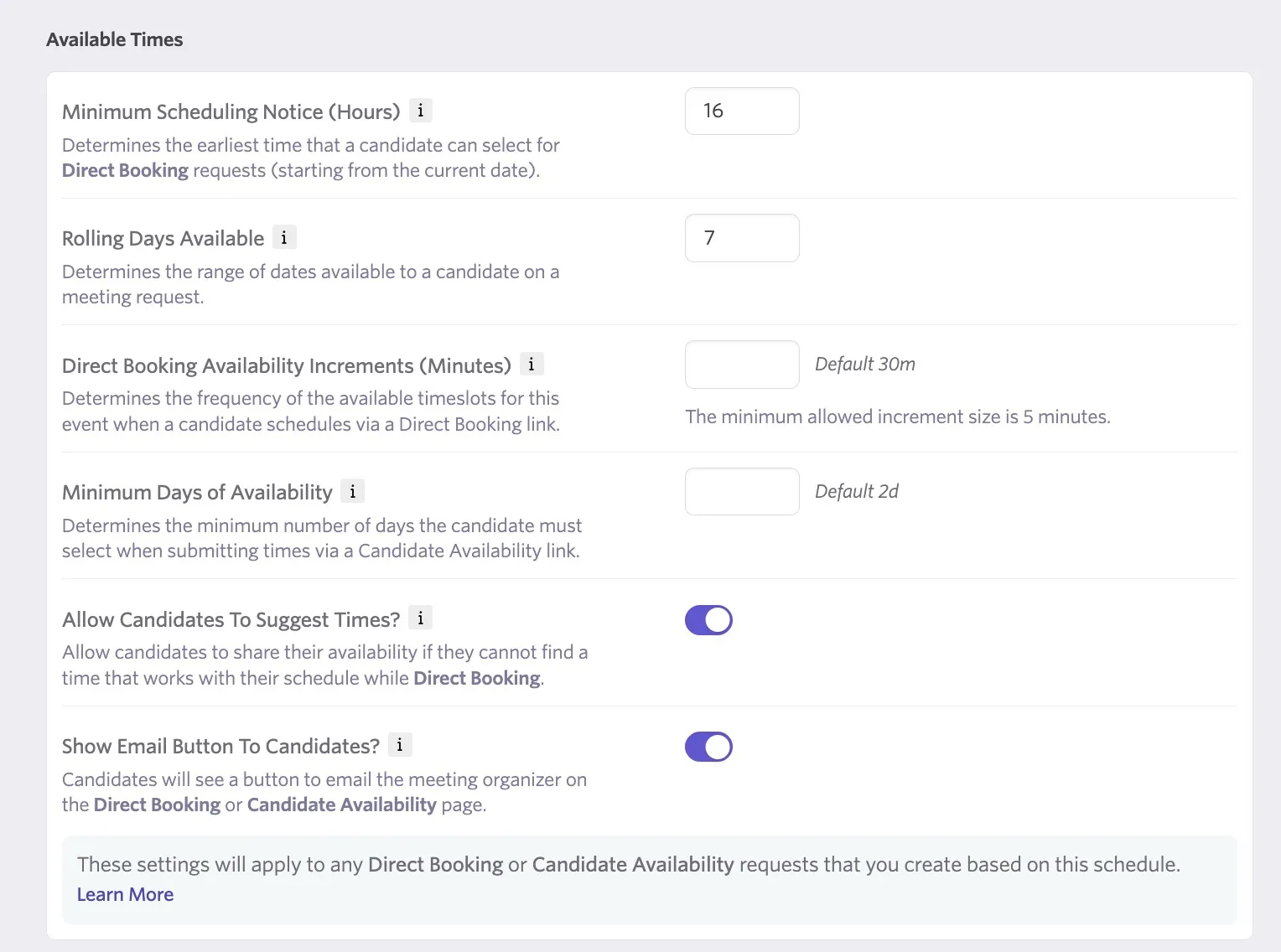
- Minimum Scheduling Notice (Hours): Determines the earliest time a candidate can select (starting from the current date).
- Rolling Days Available: Determines the range of dates available to a candidate on a meeting request.
- Direct Booking Availability Increments (Minutes): Determines the frequency of the available timeslots for this event when a candidate schedules via a Direct Booking Link.
- Minimum Days of Availability: Determines the minimum number of days the candidate must select when submitting times via a Candidate Availability Link.
- Allow Candidates to Suggest Times? Candidates can share their availability if they cannot find a suitable time when scheduling with a direct booking link.
Candidate-Facing Options
Candidate-facing options determine options that allow the candidate to add additional information or reach out via email when using a direct booking link or candidate availability link.
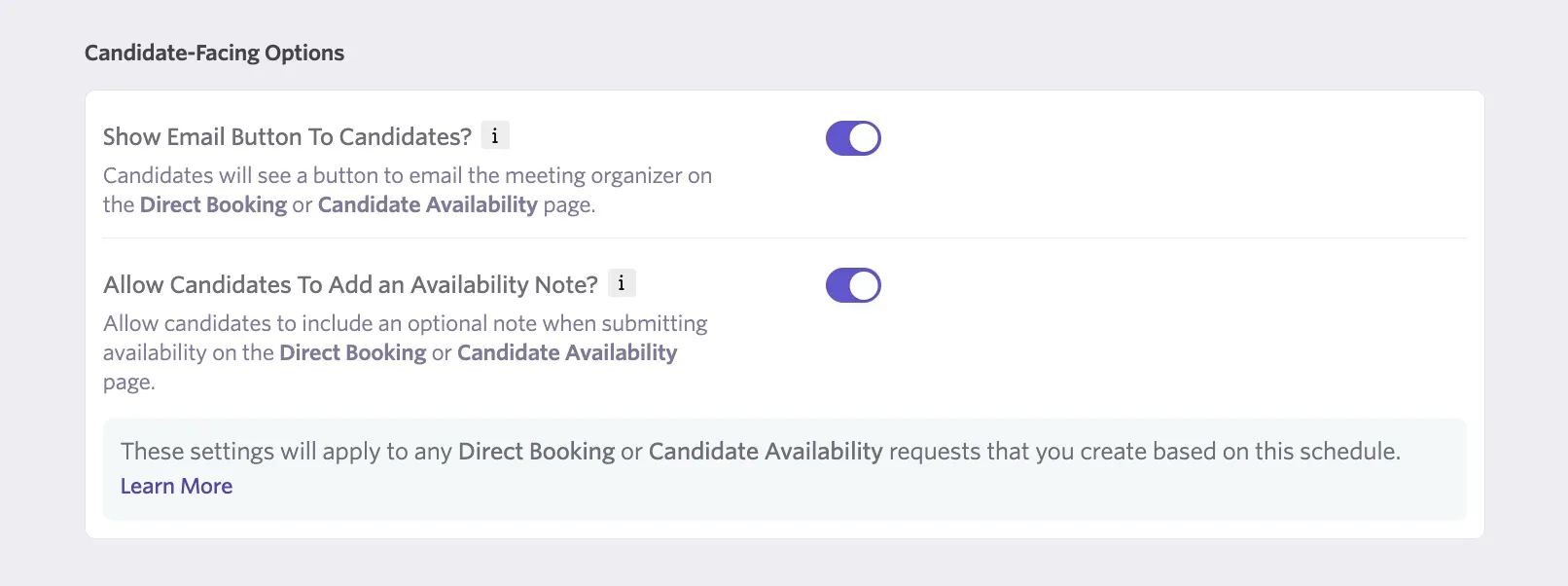
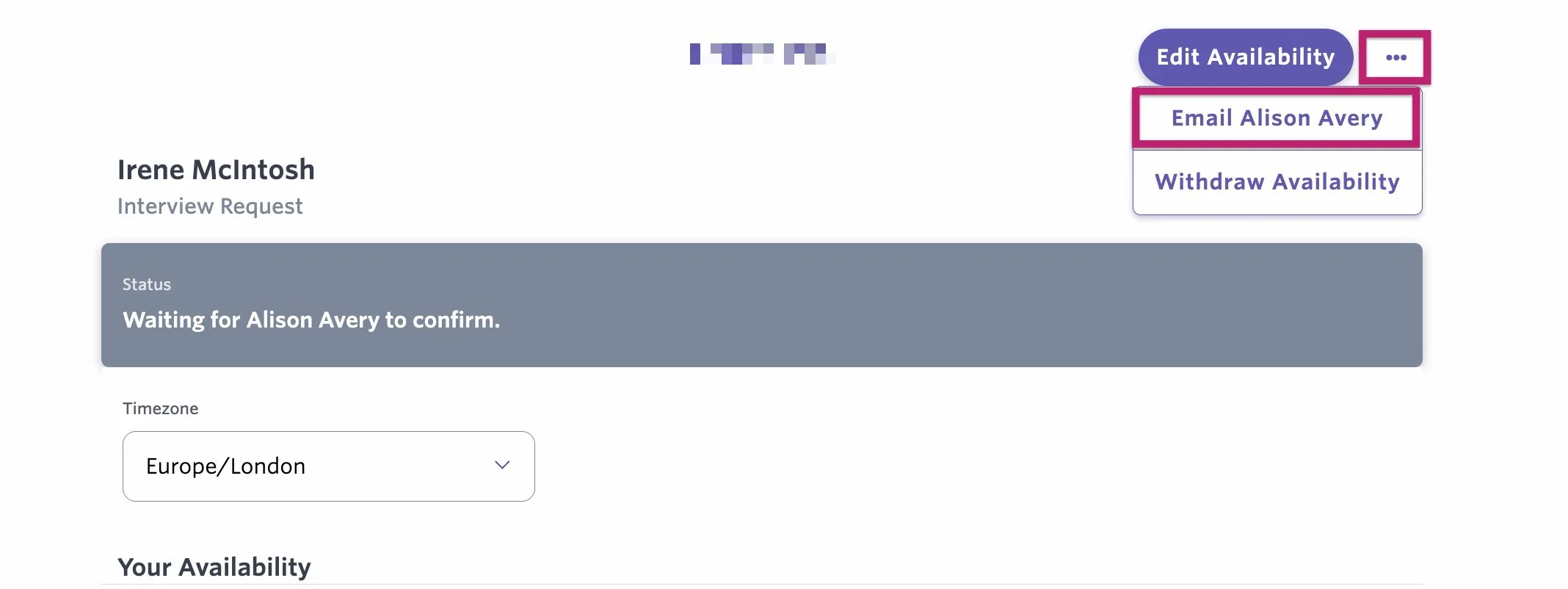
- Show Email Button To Candidates? When enabled, candidates will see an option to email the meeting organizer associated with the direct booking or candidate availability link. This can be found when clicking the three dots in the top-right corner of the booking confirmation page or when clicking Can't Find a Time? during scheduling.
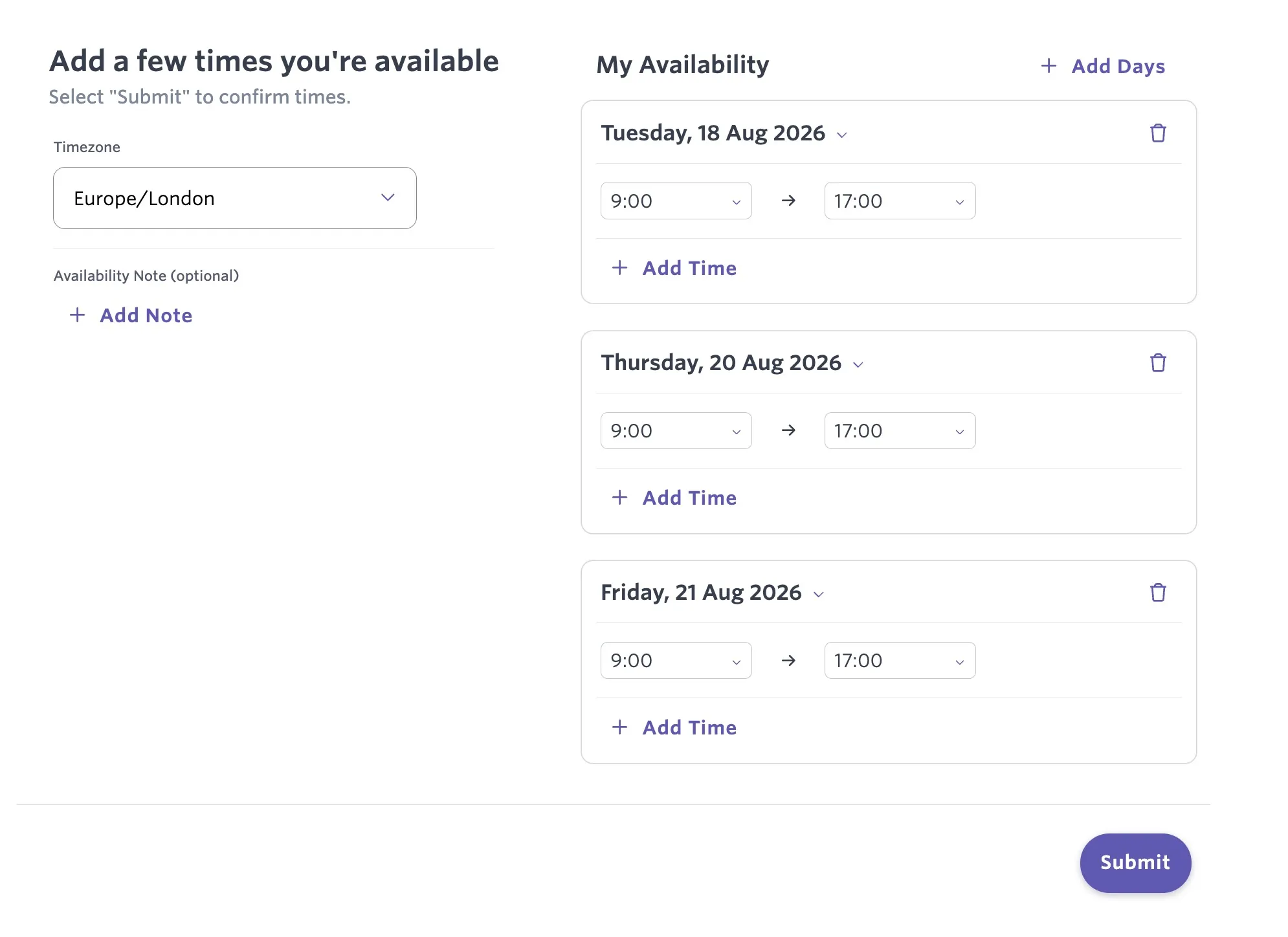
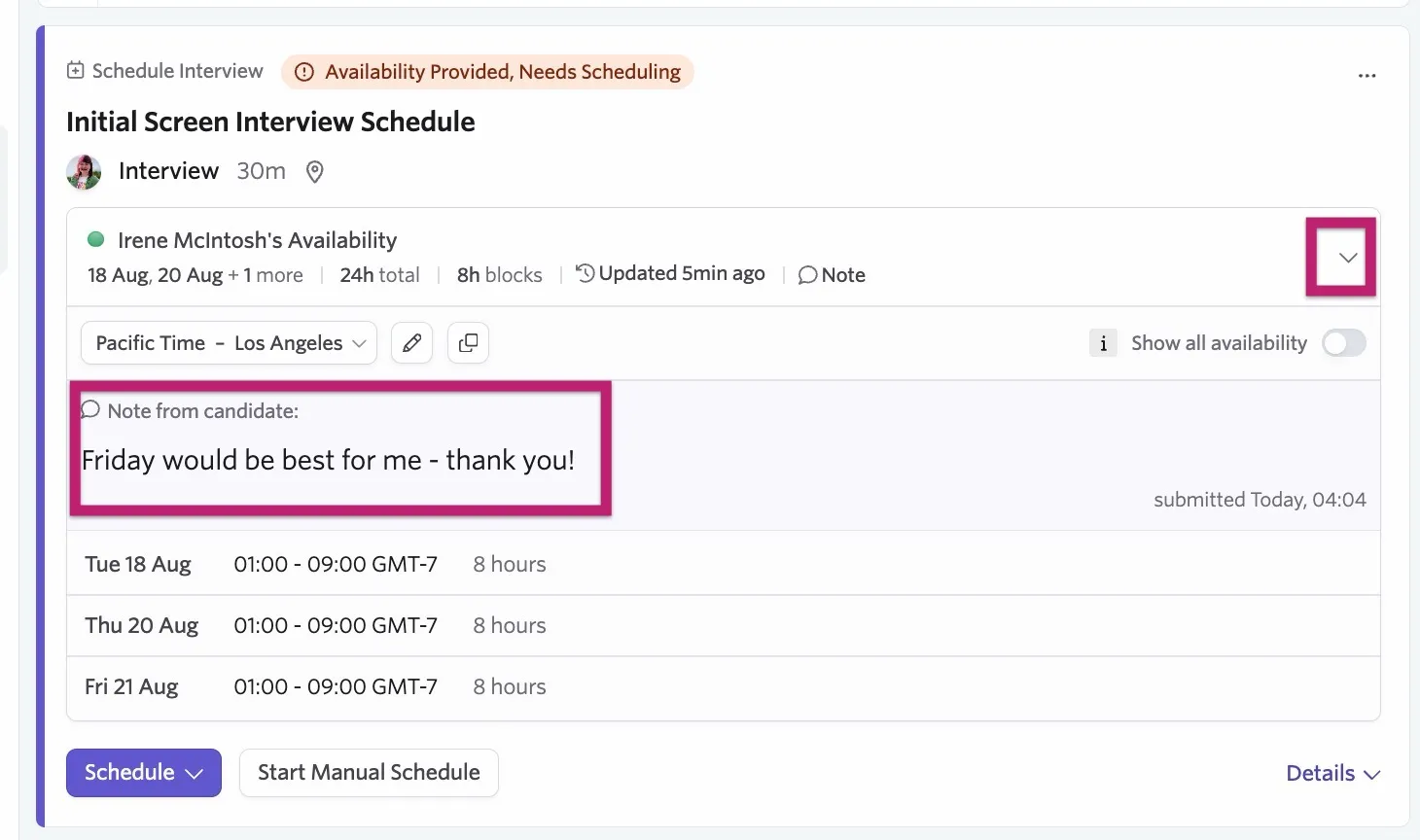
- Allow Candidates To Add an Availability Note? When enabled, candidates can add a note when submitting their availability.
The note will appear within the activity. Hover over Note to view the note information and a timestamp.
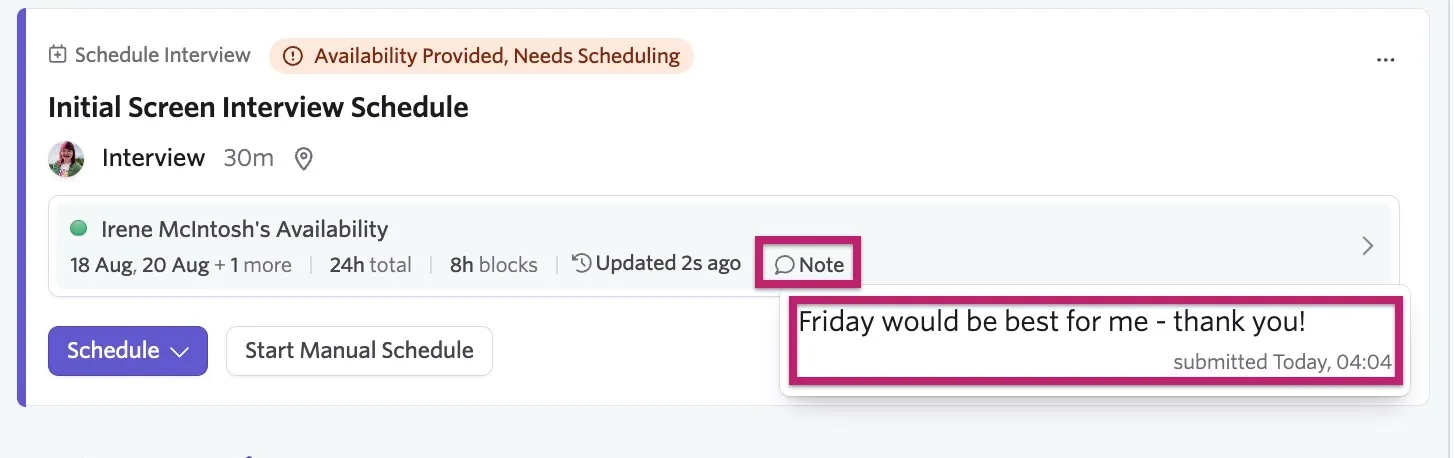
Alternatively, open up the activity details using the arrow on the right-hand side of the activity to view the availability and the note history.
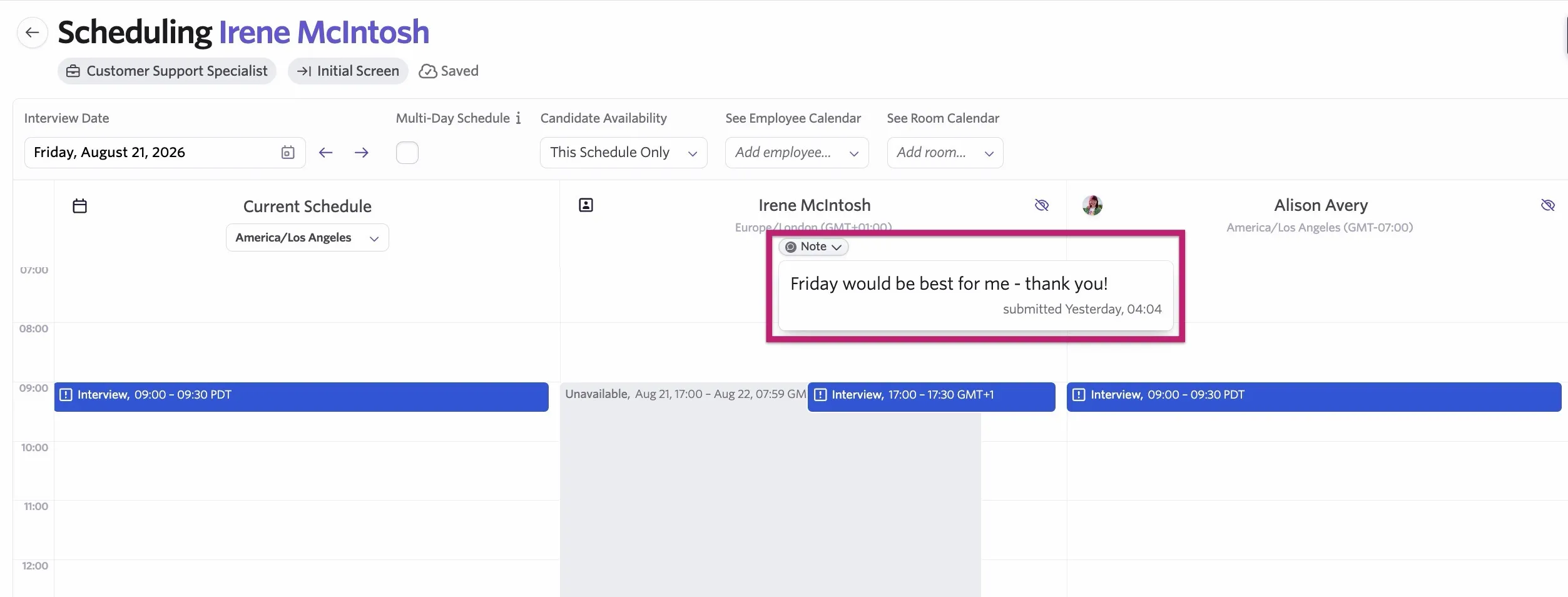
The note will also appear with the candidate column on the interview calendar when manually scheduling the interview. Hover over the Note button to view it.
Meeting buffers
Meeting buffers add protected time around booked interviews to prevent back-to-back scheduling.
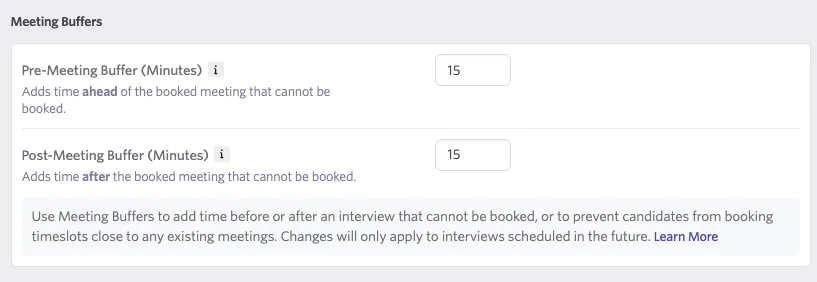
- Pre-Meeting Buffer (Minutes): Blocks time before a booked interview that cannot be scheduled.
- Post-Meeting Buffer (Minutes): Blocks time after a booked interview that cannot be scheduled.
After a candidate books a Direct Booking interview, meeting buffer windows appear as unavailable on interviewers' calendars in Quick Schedule.
Reschedule limits
Reschedule limits control how many times and how close to the interview a candidate can self-reschedule via their booking confirmation link. These settings create a default value for each job's interview plan, but you can override or adjust them at the interview plan level if desired.
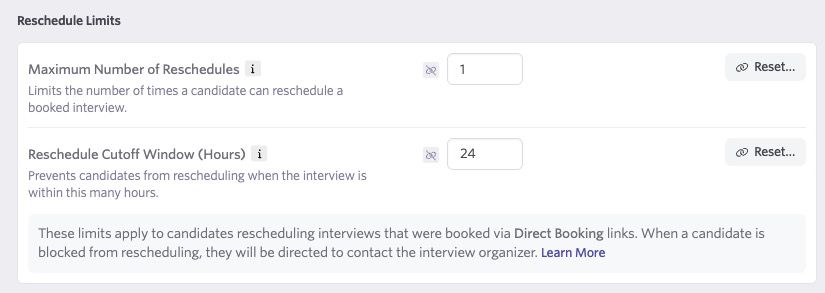
- Maximum Number of Reschedules: Sets a cap on the total number of times a candidate can reschedule a given interview. Setting this to zero prevents any candidate-initiated rescheduling entirely. Leaving the field blank means there is no limit.
- Reschedule Cutoff Window (Hours): Blocks self-serve rescheduling within a specified number of hours before the interview start time. For example, setting this to 24 means a candidate cannot reschedule if the interview is less than 24 hours away. Leaving the field blank means there is no cutoff.
If you configure both limits, Ashby blocks rescheduling as soon as either condition is met. When Ashby blocks a candidate, it directs them to contact the coordinator or organizer directly to reschedule. Only candidate-initiated reschedules count toward the Maximum Number of Reschedules; manual reschedules a recruiter performs do not consume a slot.
Reminders
The Reminders tab is where you configure pre-interview reminders for both candidates and interviewers, as well as scheduling reminders triggered when candidates have not yet acted on a Direct Booking or Candidate Availability link.
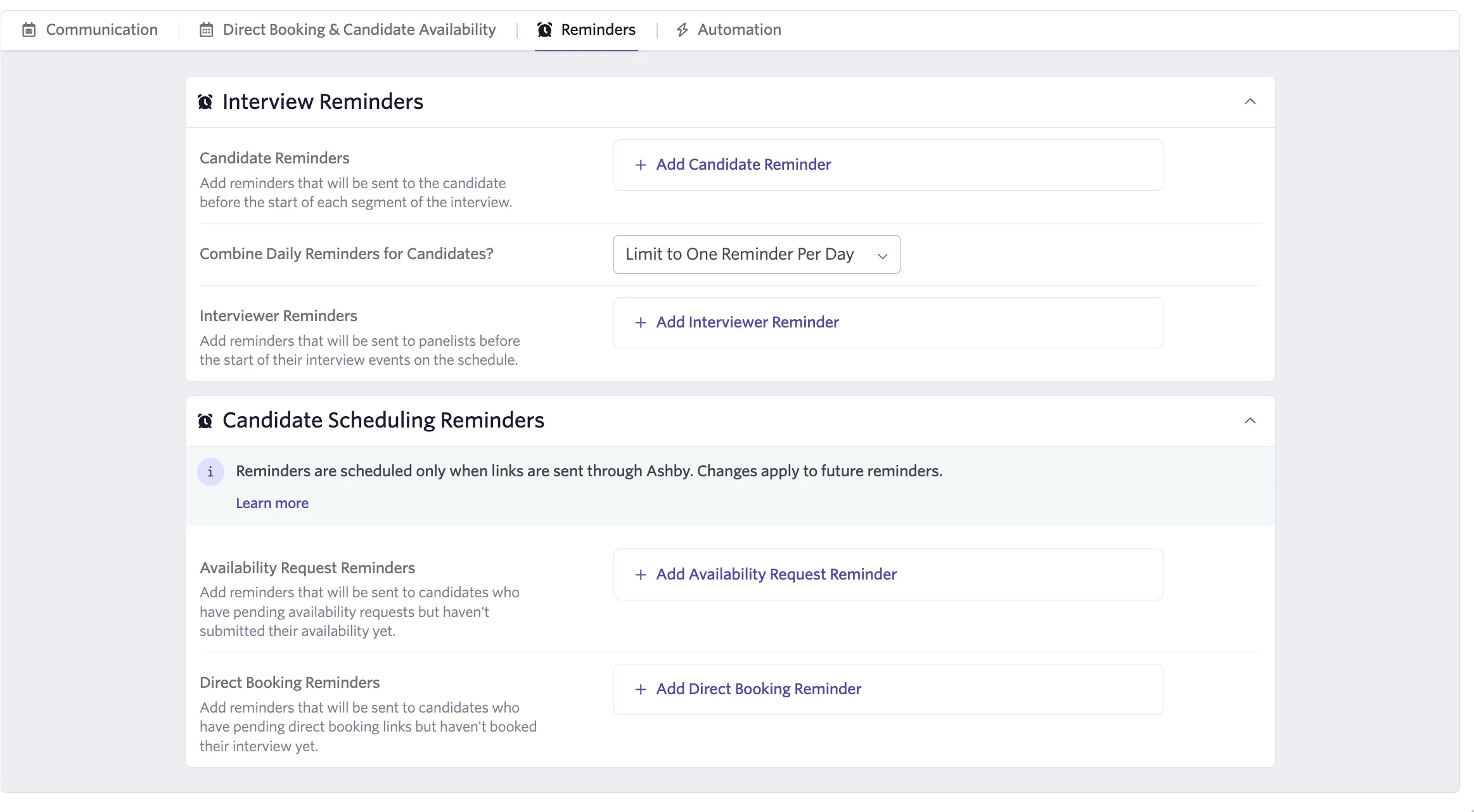
- Interview Reminders: Ashby sends these to candidates and interviewers ahead of a scheduled interview:
- You can send candidate reminders via email only.
- You can send interviewer reminders via email, or via Slack if the Slack integration is active.
- For each reminder, configure: the delivery channel (Send), the sender address (From), how far in advance to send it (When), and the email template to use (Using Template).
- Candidate Scheduling Reminders — Ashby sends these automatically when a candidate has not yet taken action on a link:
- Availability Request Reminder: Triggers when the candidate has not submitted their availability by the configured time after Ashby sends the request.
- Direct Booking Reminder: Triggers when the candidate has not used their Direct Booking link to schedule by the configured time after Ashby sends it.
Reminders you configure in Scheduling Defaults serve as the baseline for all interviews. You can override them on individual Schedule Interview Activities within an Interview Plan, and adjust them when manually scheduling an interview. Any activity-level reminder configuration includes a Reset option to revert to these defaults.
More information on configuring interview reminders can be found at Setting up Schedule Interview ActivitiesSetting up Schedule Interview Activities.
Automation
The Automation tab contains settings that control how Ashby handles automated interviewer management and scheduling workflows. Settings here apply by default across all interview schedules, and you can override them at the Interview Plan level.
This tab is only available for organizations that are on an Enterprise plan, or that have purchased the Advanced Scheduling Automation Add-OnAdvanced Scheduling Automation Add-On. See the linked article for more information.
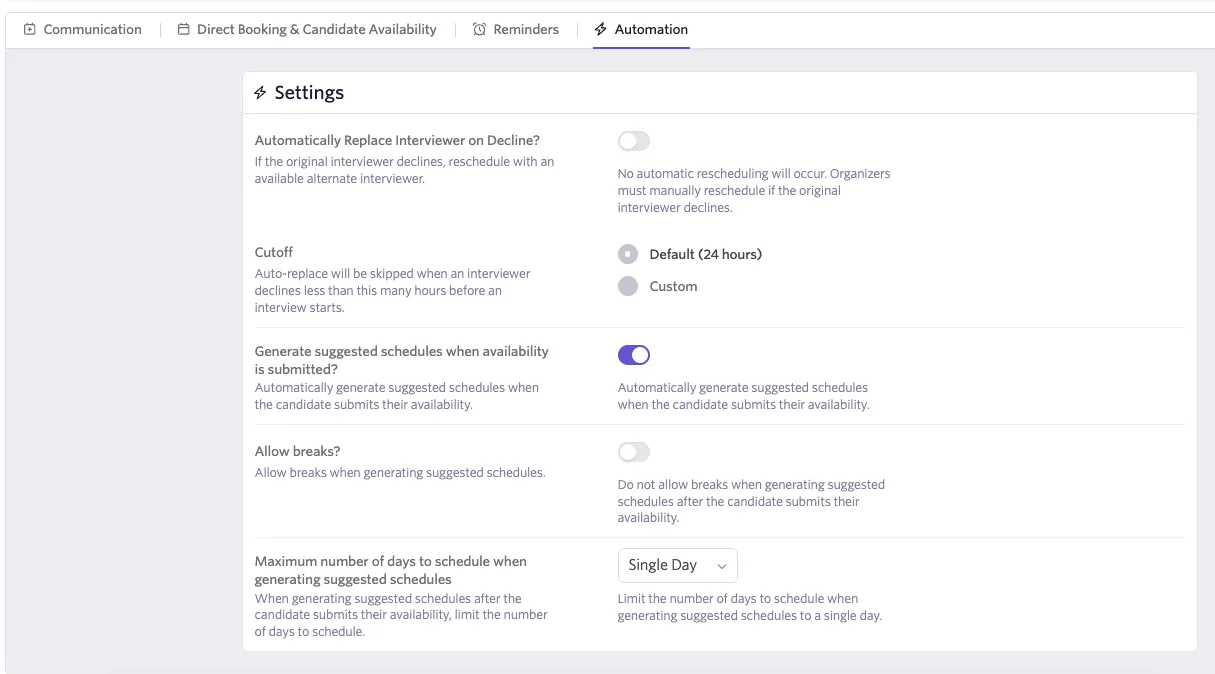
- Automatically Replace Interviewer on Decline?: When toggled on, Ashby automatically replaces a declining interviewer with another eligible member from the interviewer pool assigned to that slot.
- Cutoff: Sets how many hours before the interview start time auto-replace still triggers. Ashby does not act automatically on declines it receives within the cutoff window. You can use the default cutoff (24 hours) or set a custom value.
- Generate suggested schedules when availability is submitted?: Controls parameters used when Ashby proposes candidate interview schedules:
- Allow Breaks: When enabled, Ashby may include gaps between interview events when generating proposed schedules.
- Maximum Days to Schedule: Sets the maximum number of days over which Ashby can spread a multi-day interview schedule.
FAQs
Why can't I format candidate calendar defaults?
Each email provider has different standards around formatting calendar invites; we've disabled formatting for candidate invites to create the best experience for all candidates.
Can I pull my interview locations from my job locations list?
No, interview locations are different from job locations. You set interview locations within the Communications tab of your interview activity; they can be a custom location, a phone number, or video conferencing (Google Meet, Microsoft Teams, or Zoom).