Remote
You can now easily transfer your hires from Ashby to Remote, creating a new employment record using Ashby offer and candidate details.
Overview
You can now push hired candidates directly to Remote from Ashby. You can transfer hired candidates at two points in the hiring process in Ashby:
- At the point of offer approval (or offer creation if there isn’t an approval flow).
- At the point of the offer being accepted and the candidate being marked as hired in Ashby.
Setting up the integration
To set up the Remote integration:
- Firstly, generate an API token in Remote via these instructions.
- In Ashby, navigate to Admin > Integrations > Integrations
- Search Remote and open the integration panel
- Click + Enable Remote
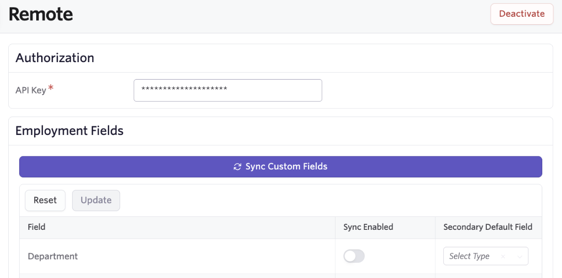
- Add the API token from Remote to the API Key field.
Once the integration is enabled, the Remote fields can be synced over to the integration tile in Ashby. You can then use the Sync Enabled toggle to determine the fields you’d like to sync, then click Sync Custom Fields to create those offer custom fields within Ashby. These fields can then be completed at the offer stage so the data is pulled to Remote when the hired candidate is pushed.
You can opt to define a Secondary Default Field which will allow you to select an existing Ashby field to pre-fill this Offer custom field with. You can override the value pulled in by a secondary default field at the point of completing the offer.
Pushing data to Remote
Once an offer has been approved or accepted, the option to push the candidate to Remote will show in the Activities & Progress section of the candidate profile.
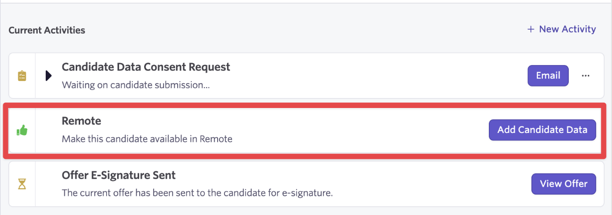
If you opt to automatically push candidates to HRIS via configured integrations, this will happen automatically. You can adjust your HRIS Integrations settings at Admin > Integrations > HRIS Integrations.
What data is pushed to Remote?
The below table outlines the fields and data pushed over to Remote. The information pushed depends on the fields that have the Sync Enabled option toggle on for them. If enabled, corresponding custom fields will be created in Ashby for the Remote fields so the data will be transferred.
Ashby Field | Remote Field | Notes |
|---|---|---|
Full Name | Name | |
Email (personal, primary) | | |
| Department | |
| Does the employee have a seniority date? | Required field |
| Employment eligibility | Required field |
| Job title | Required field |
| Manager | |
| Provisional start date | Required field |
| Seniority date | |
| Type | Required field |
| What is the main job category that the employee performs? | Required field |
| What region(s) is the employee working for? | Required field |
| Work email | |