Microsoft Custom Applications (GCC High)
This feature enables teams to connect their Azure Custom Applications, including GCC High and DoD tenants. This enhanced control lets your team define the permissions granted, enabling better compliance and security tailored to your organization's needs.
Permissions & access
This option is available on the Foundations, Legacy Plus, Plus, and Enterprise plans:
Foundations | Legacy Plus | Plus | Enterprise |
|---|---|---|---|
✅ | ✅ | ✅ | ✅ |
If you're also setting up SSO, create a new app registration rather than using the existing one.
Ashby's Microsoft 365 custom app integration supports a single Microsoft tenant only. If your organization operates across multiple tenants (for example, a parent company and PortCos with separate tenants), the custom app can only connect to the tenant where it is registered and won't be able to support mailbox or calendar access across those separate tenants.
Setting up your M365 custom application
- Log into Azure:
- Go to your Azure portal and click Manage Microsoft Entra ID.
- Create a new app registration:
- Navigate to App Registrations and click New Registration.
- Name your application and click Register.
- Configure authentication:
- In the new app, click Authentication, then Add a platform.
- Select Web.
- In the Redirect URIs field, enter the following:
- https://app.ashbyhq.com/api/oauth/authorize/client_credentials/inbound
- Click Save at the bottom of the page.
- Return to Authentication > Add a platform. Click Add URI again and enter:
- https://app.ashbyhq.com/api/oauth/authorize/inbound
- Click Save at the bottom of the page.
- Set API permissions:
- Go to API Permissions and click Add a permission.
- Select Microsoft Graph → Application permissions.
- Add the following permissions based on your needs:
- Calendar access: Calendars.ReadWrite and MailboxSettings.Read.
- User sync: User.Read.All.
- Email sync: Mail.ReadWrite and Mail.Send.
- Once all permissions are selected, click Add permissions.
- Create a client secret:
- Navigate to Certificates & Secrets and click New Client Secret.
- Enter a title for the secret and select your desired expiration period.
- You are responsible for rotating the secret before it expires to prevent the Ashby ↔ M365 integration from breaking.
- Click Add and copy the value (not the Secret ID or label) of the new secret.
- Retrieve your application ID:
- Go to the Overview section of your app registration in Azure.
- Copy the Application ID.
Configuring in Ashby
Reach out to your Ashby Customer Success Manager to confirm that custom application setup is enabled for your account.
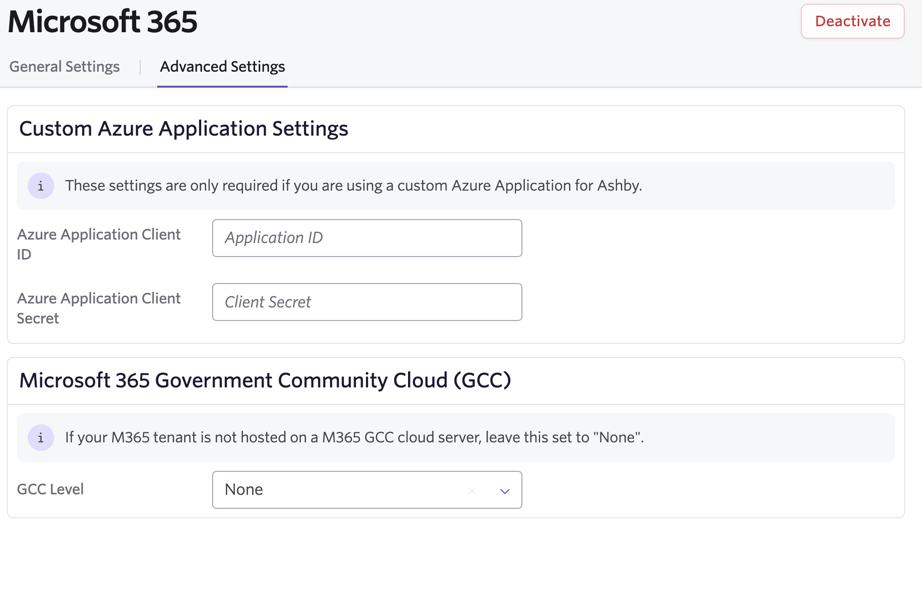
- Visit Advanced Settings:
- Log into Ashby and go to the Microsoft 365 Advanced Settings page.
- Input credentials and configure tenant type:
- Paste the Application ID and Client Secret into the corresponding fields.
- Configure tenant type:
- If your tenant resides on a GCC server, select the appropriate option from the dropdown menu:
- None (default)
- GCC
- DoD
- Authorize the application:
- Navigate to the General Settings tab and click Connect to Microsoft 365 under Application Wide Authorization.
- Follow the prompts to authorize the connection, ensuring only the permissions you configured are granted.
- To complete your authorization, click the General Settings tab, then under Application Wide Authorization, click Connect to Microsoft 365. When prompted, verify that you are connecting to your application and only granting the permissions you set up.
Feature limitations
GCC High environments have some feature limitations, but they do not affect the core offerings used at Ashby (generally online cloud-based email through Exchange and Outlook, and calendaring through Outlook and Microsoft Teams video conferencing).
- There are some limitations on audio and phone-based conferencing in Teams — these also apply to Teams meetings created through Ashby in these environments. You can read more about the potential limitations and differences across Government plans in the Office 365 US Government service description.
- Organizations using GCC High cannot have both a GCC High and a regular Microsoft integration. They also cannot have users from a GCC High domain and a regular M365 domain within the account. This is because the Microsoft Government API endpoints use a different URL — this includes the initial OAuth endpoint.
- The "Sign in with Microsoft" SSO login option does not work for organizations using GCC High.
FAQs
What permissions do I need for calendar and email access?
- For tenant-wide calendar access: Calendars.ReadWrite and MailboxSettings.Read.
- Recommend application scopes.
- For email sync: Mail.ReadWrite and Mail.Send.
- Recommend delegate scopes.
- For user sync: User.Read.All.
- Recommend application scopes.
How do I rotate a client secret?
- Go to Certificates & secrets in Azure.
- Create a new secret before the current one expires.
- Update the secret value in Ashby's Microsoft 365 Advanced Settings.
Best practice: set a calendar event or recurring task with your IT team to ensure this happens before the secret expires.
Can I use only delegated scopes?
Yes, but there are tradeoffs. You also need to securely share your Tenant ID with your Ashby point of contact (POC) so we can store this value in our database. Tradeoffs include:
- Higher maintenance and onboarding burden.
- Delegated access to calendars meaningfully slows down interview scheduling for Talent teams.
What happens if my client secret expires?
The Ashby ↔ M365 integration stops working. You must create and update a new secret to restore functionality.
Can I use this integration with GCC High or DoD tenants?
Yes, the integration supports GCC High and DoD tenants. Ensure you select the correct tenant type in Advanced Settings.
How can I set an Azure custom application to only show free/busy calendar availability?
Microsoft supports this through ExchangePowerShell. See the Set-MailboxCalendarFolder guide for more details.
How can I limit email access to only a subset of users?
Microsoft supports this through app roles. See the app roles guide for more details.
- Best practice is to create one role with more permissive access (e.g., for Recruiter), and address all other users with application-wide permissions.
- When setting up app roles, the Values to be input should be the relevant scopes for the role as comma-separated values. The full list of values, for example, would be Calendars.ReadWrite,MailboxSettings.Read,User.Read.All,Mail.ReadWrite,Mail.Send.
What login options are available once this integration is enabled?
Once your custom application setup is complete, you can use either magic links or SSO to log in to Ashby.
Microsoft SSO is not compatible with GCC High.
My interviewers are receiving a lot of rescheduling notifications from Microsoft when interviewers are being switched around — what can I do to resolve this?
These notifications are handled by Microsoft and there isn't a way to change the configured settings in Ashby. You can check the following areas in the limited admin or user settings to see if further adjustments can be made to reduce the number of notifications being sent:
- Navigate to room/resource mailboxes to adjust auto-accept behavior via the Set-CalendarProcessing cmdlet.
- At a user level, navigate to Outlook Web > Calendar > Settings > Events & invitations.