Microsoft 365: Hybrid Setup
This guide helps teams set up Ashby's native Microsoft 365 integration in a hybrid configuration: keeping some access application-wide for easier scheduling, while relying on individual Microsoft authorization for more sensitive workflows like email syncing and sending.
A hybrid Microsoft 365 setup in Ashby can work well when your team wants the convenience of application-wide scheduling coverage together with more selective user-level access for email workflows. The most successful setups happen when the team decides in advance which workflows should stay broad and which should move to individual Microsoft authorization.
Prerequisites
To complete the hybrid setup route for Microsoft 365, you'll need the following permissions:
- Organization Admin access in Ashby, to enable the native Microsoft 365 integration with application-wide admin consent.
- Microsoft Entra admin access, to remove or manage granted permissions for the Ashby enterprise application in your Microsoft tenant.
What Microsoft hybrid setup supports
Ashby's native Microsoft 365 integration supports both application-wide admin consent and individual user authorization. In a hybrid setup, your team can:
- Keep application-wide access where it reduces rollout and scheduling friction across the organization
- Remove selected application-wide permissions afterward if you prefer a more restrictive setup for specific workflows
- Have users who need those workflows authorize Microsoft individually in Ashby
At a high level, Ashby checks for individual user authorization first and falls back to application-wide access if individual authorization is not present.
Use case for Microsoft hybrid setup
This approach is most useful when your team wants broad calendar coverage for scheduling, but does not want every Microsoft permission to remain application-wide after setup.
A common example is:
- Keep calendar-related access application-wide so recruiters and coordinators can view interviewer availability without requiring every interviewer to authorize individually
- Move email-related workflows to delegated or individual authorization so only the users who actually need to send or sync email through Ashby authorize those permissions
Recommended hybrid setup pattern
Step 1: Connect Microsoft 365 in Ashby with application-wide admin consent
Start by enabling Ashby's native Microsoft 365 integration with application-wide admin consent. This is the fastest way to get the integration in place for your organization. You can access that Admin page here.
Step 2: Keep the application-wide permissions you want for broad coverage
Many teams keep calendar-related access application-wide so interview scheduling works smoothly without requiring every interviewer to connect Microsoft individually.
For example, Ashby uses Calendars.ReadWrite for interview scheduling and calendar sync, and MailboxSettings.Read supports scheduling accuracy by reading settings like time zone and working hours.
It's best practice to keep both of these scopes available at the application-wide level; otherwise, every user in your organization needs to authorize their Microsoft account individually in Personal Settings.
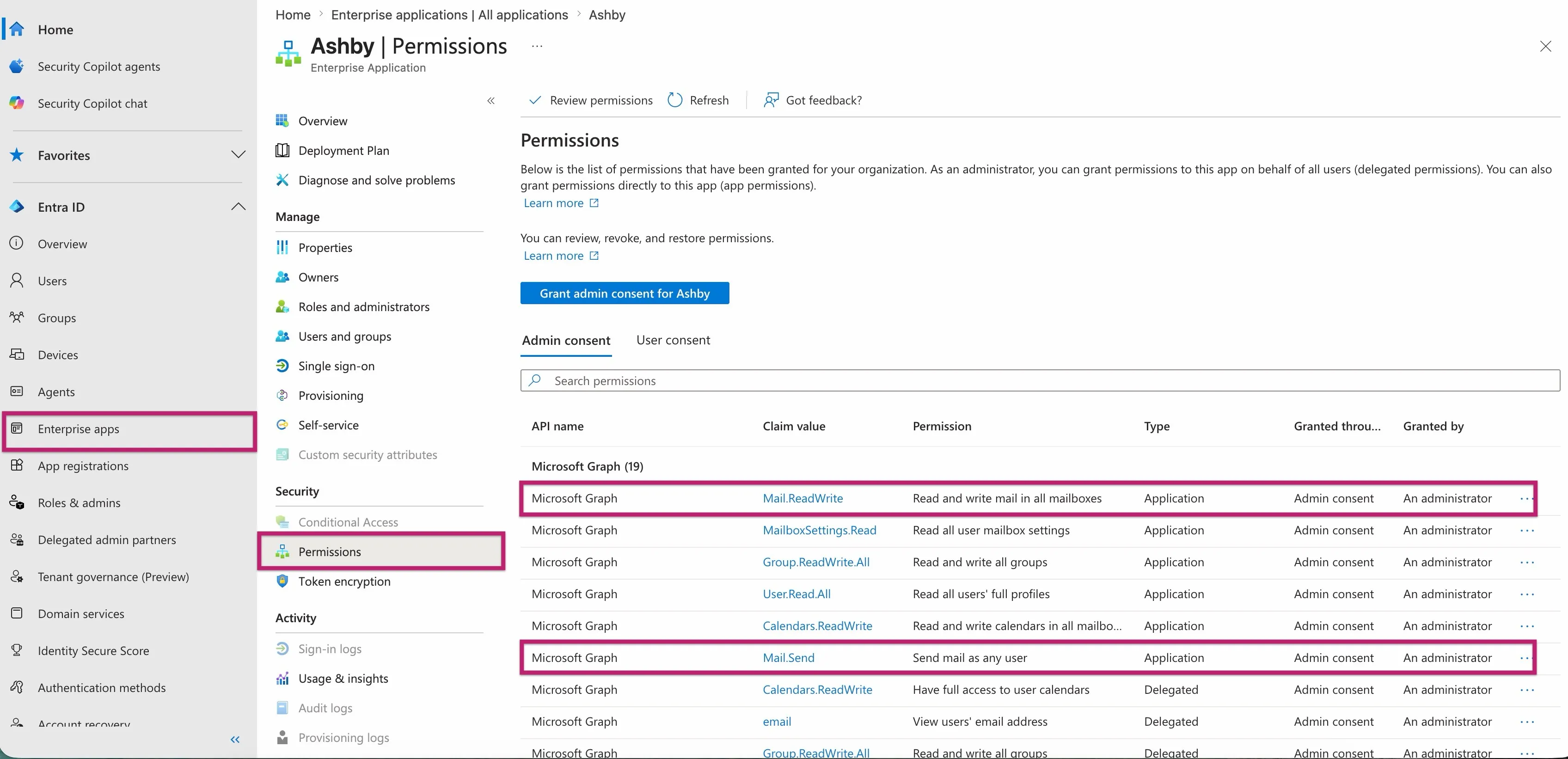
Step 3: Remove selected application-wide permissions in Entra
A common pattern is removing application-wide email permissions such as:
- Mail.Send
- Mail.ReadWrite
For native Ashby Microsoft 365 setups, make these changes in the granted Microsoft tenant authorization for the Ashby enterprise application in Entra.
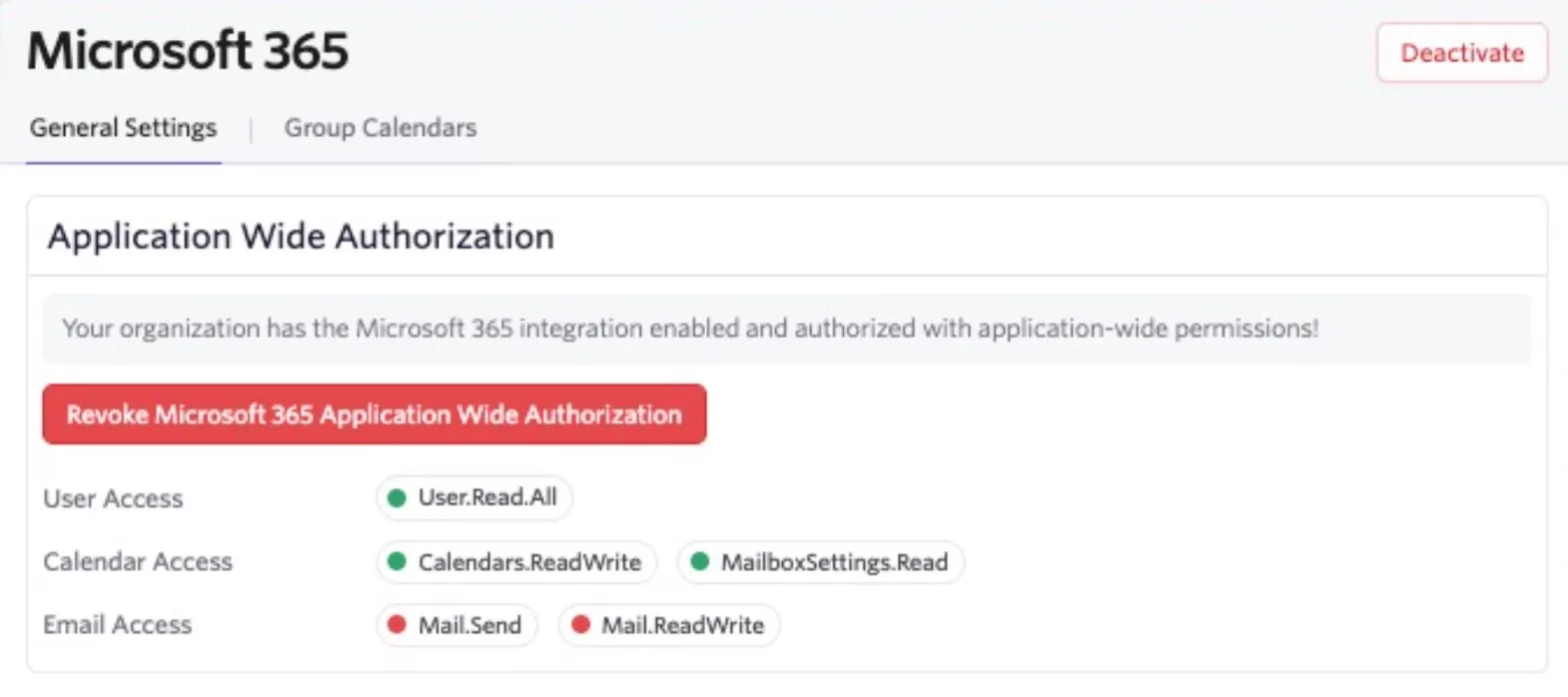
Step 4: Go back to Ashby and refresh integration page
You should see the revoked scopes on the integration with a red circle.
Step 5: Have users who need email features authorize individually in Ashby
Users who need delegated access should go to Personal Settings > Microsoft 365 Settings in Ashby and authorize their Microsoft account individually.
This is especially relevant for users who need to:
- Send email from their own Microsoft account through Ashby
- Sync recruiting-related email history into Ashby
- Use Microsoft Teams meeting creation
- Schedule interviews on Microsoft group calendars
What to expect after the change
If you remove selected application-wide scopes and rely more on delegated access, the experience becomes more user-specific. In practice, that means:
- Users who relied on the removed application-wide scopes may need to complete their own Microsoft authorization in Ashby
- Tenant-side Microsoft policies can have a bigger impact on whether a workflow succeeds
- Some features may stop working if the required permission is no longer available application-wide and the individual user has not authorized it
Important workflows that still require individual authorization
Some Microsoft workflows require individual authorization even if your organization already has application-wide Microsoft 365 access connected in Ashby.
The most common examples are:
- Microsoft Teams meeting creation
- Microsoft group or shared calendar scheduling
If your team plans to use those workflows, make sure the relevant organizers or schedulers complete individual Microsoft authorization in Ashby.
Reconnect warning
If you disconnect and reconnect the native Microsoft 365 integration in Ashby, Microsoft re-requests the full application-wide permission set when you reconnect. If your team intentionally revoked selected application-wide permissions after setup, you need to repeat that cleanup afterward.
For that reason, if your team is intentionally using a hybrid setup, document your expected Entra-side configuration internally before anyone reconnects the integration.
FAQ
Can my security team or other stakeholders have visibility or be notified when users authenticate with their Microsoft 365 credentials in Personal Settings?
Please reach out to [email protected] for further guidance on this.