Meeting Hours
Meeting hours allow you to set regular availability for scheduling interviews. Meeting hours can be set for the company, for individual interviewers, and for schedule interview activities.
Busy events on Google or Microsoft calendars also sync and block off availability if you have either integration configured. Any dates your interviewer is unavailable or out of office (OOO) sync over and are reflected in their availability.
Permissions & access
Permissions Only Organization Admins can amend company-wide meeting hours. Each user with their calendar connected in Ashby can adjust their own personal meeting hours. Those with Elevated Access - Admin or higher can set specific meeting hours on schedule interview activities.
Set company meeting hours
In Admin > Interviews & Scheduling > Meetings & Time Zone, you can set the meeting hours for the company as a whole.
If personal meeting hours or interview schedule activity hours have not been set, the hours listed here show as the interviewer's availability. Ashby takes into account events marked as busy on the interviewer's Google calendar when showing their availability.
Click and drag on the schedule to add or remove meeting hours. Purple indicates available hours, and the white areas indicate times that are not available for scheduling.

How do meeting hours work with interviewer time zones?
Meeting hours show in the interviewer's time zone. If your interviewer is in MDT and the company meeting hours are set from 9:00am–5:00pm, this is reflected as 9:00am–5:00pm MDT for that interviewer, provided they have not set their own personal meeting hours.
Company holidays
On the Company Holidays tab of Admin > Interviews & Scheduling > Meeting Hours, you can determine any company-wide or public holidays on the company calendar. Once company-wide holidays are added, the entire team is marked as unavailable for interviews for the full day.

This means:
- When using Manual Scheduling, interviewers show as unavailable for meetings on company holidays.
- When using Direct Booking, candidates cannot schedule interviews on company holidays.
- When requesting candidate availability, candidates cannot select company holidays.
- When requesting proposed schedules for debriefs, Ashby excludes company holidays from the proposed dates.
Set personal meeting hours
Navigate to Personal Settings > Meeting Hours to set your personal meeting hours. Select the Enable Custom Hours? checkbox and set your available hours.
Meeting hours set here override company meeting hours when you are specified as an interviewer. Ashby takes into account conflicts on your Google calendar when showing your availability.

Timezone
On this tab, you can set your organization's default time zone. This time zone is used for any users who haven't synced their Google Calendar in Ashby, or who haven't specified their own time zone in their personal settings.
Read more about how timezones work herehow time zones work in Ashby.

Set meeting hours for a schedule interview activity
See Setting up Schedule Interview ActivitiesSetting up Schedule Interview Activities for more information on setting meeting hours within schedule interview activities.
Troubleshooting availability
After generating a direct booking link for an interview, you can use the Troubleshoot Availability option to check that availability is showing as expected.
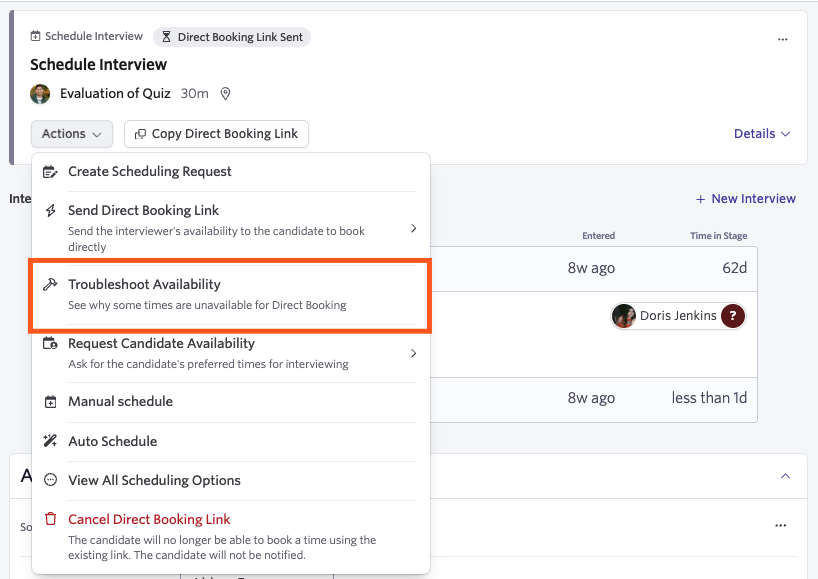
To access the Troubleshoot Availability option, click Actions on the activity, then select Troubleshoot Availability. If you test your booking link and don't see your availability reflected correctly, this tool helps you diagnose why.
If a time slot shows as unavailable when it shouldn't be, click the exclamation point beside it to see why.
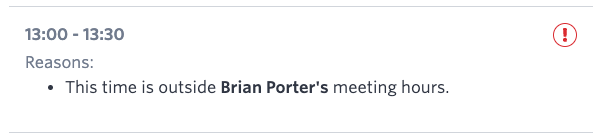
If unavailable times show a This time is outside user's meeting hours message when troubleshooting, check the meeting hours for the schedule activity first. Then have the interviewers listed check their meeting hours in their personal settings. If either are active and set, they override company meeting hours.
FAQs
How can I ask the candidate for their availability for an interview?
When setting up an interview for a candidate, you can create a candidate availability link. The link prompts the candidate to select when they are available. You can then schedule the interview based on the availability they provide. For more information, see Direct Booking & Candidate Availability LinksDirect Booking & Candidate Availability Links.
My Google events aren't blocking off my availability — why?
If the event is on an external personal calendar that is shared with your company Google account, those events are not taken into account. Add those events to your company calendar to block them from your interview availability.
If the event is on your company Google calendar, check if the event is set to Free. Only events set to Busy block your availability.
If interviews have been booked in Ashby but the calendar invites have not been sent out, those interviews block availability for the interviewers on the panel.
Do my Google working hours translate to meeting hours in Ashby automatically?
They do not — we recommend adding personal meeting hours that match your working hours in Google.
How do time zones work in Ashby?
The time zone set on your account, along with your meeting hours, determines your availability for interviews. You can check the time zone on your user account in Personal Info.
If you have the Google Workspace or the Microsoft 365 integration in place, your time zone syncs from your Google or Microsoft calendar.
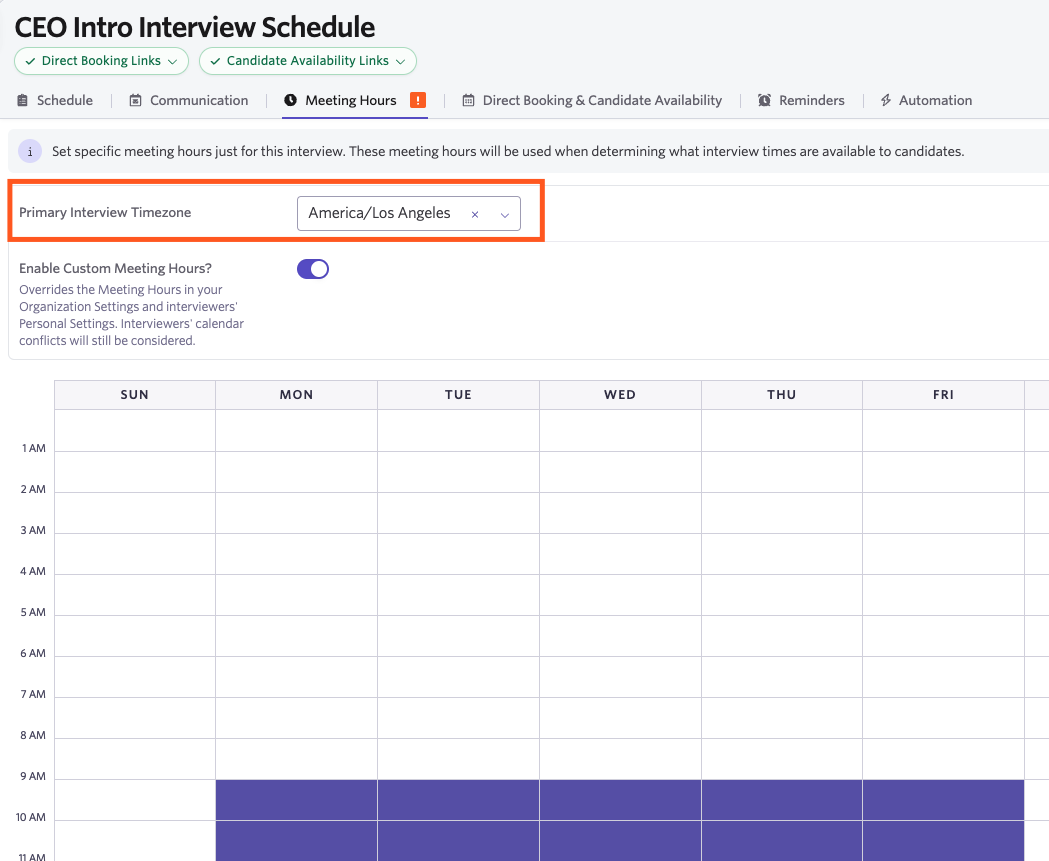
You can also set interview activity-specific time zones in the Meeting Hours tab on each schedule interview activity. Setting a Primary Interview time zone ensures that any custom meeting hours you set for that schedule interview activity are reflected in that time zone, even if interviewers have a different time zone set in their personal settings.
Schedule Activity Timezones
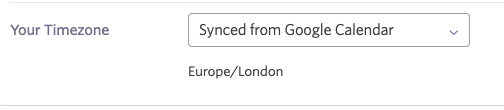
You can also use the drop-down to select your time zone if it is not the same as the organization's default time zone (set in Meetings & Time Zone) and it's not syncing from your Google Calendar.
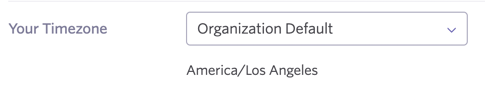
If you do not see Synced from Google Calendar or Synced from Calendar in the Your Timezone field, this may be because the domain on your email does not match the domain of the Google Workspace or Microsoft 365 tenant integrated with Ashby.
If you have a secondary domain on your Google Workspace or Microsoft 365 tenant, reach out to Support at [email protected] to get this added.
Why is a team member showing as available for interviews all day, every day?
Users can only set personal meeting hours if their Google Calendar is synced. If the user was added manually and not provisioned automatically via the Google Workspace integration, ask them to sign out and then log back in using the Sign In with Google option. This helps ensure their calendar is synced so they can set personal meeting hours.
Can I sync additional personal calendars with Ashby?
If you are a Google Workspace user, you can sync additional personal calendars. For more information, see Google WorkspaceGoogle Workspace.
If you're looking to sync company holidays, we recommend using the company holidays feature described above.
Can I add meeting buffers to avoid back-to-back interviews?
You can! If you'd like to apply meeting buffers to interviews by default, see Setting Scheduling DefaultsSetting Scheduling Defaults. For more on adding meeting buffers to a schedule interview activity, see Setting up Schedule Interview ActivitiesSetting up Schedule Interview Activities.
Candidates are only seeing a limited amount of availability — why?
The availability shown to the candidate depends on your meeting hours and calendar availability, as well as the settings for your scheduling interview activity or your scheduling defaults. Check the Minimum Scheduling Notice and Rolling Days Available settings to ensure they are correct. For more on configuring this, see Setting up Schedule Interview ActivitiesSetting up Schedule Interview Activities and Setting Scheduling DefaultsSetting Scheduling Defaults.
Can I create holidays for a specific region or location?
Ashby currently supports setting up holidays at the organization level. You can't configure separate holiday calendars by region or location.