Indeed
You can automatically post your jobs to Indeed via this integration.
Indeed integration overview
The Indeed Apply integration provides a candidate-friendly application experience on Indeed and helps recruiters stand out in search results and achieve incremental impact, increasing the likelihood of being clicked on by 30% compared to non-Indeed Apply jobs.
Learn more:
Enabling and disabling the integration
By default, the integration is enabled and your jobs are automatically posted to Indeed.
To completely disable the integration, visit the Indeed integration settings in Admin > Integrations > Integrations and click Deactivate.
You do not need to have a paid Indeed account to use this integration.
Integration options
The Indeed integration supports two options:
- You can enable or disable the integration entirely.
- You can enable or disable Easy Apply.
Easy Apply allows candidates to complete their applications directly from Indeed. When this is disabled, they are redirected to your Ashby job board to fill out an application.
The jobs feed is synced by Indeed twice daily and your jobs show up on Indeed once the feed is synced. Any updates you make to the jobs within Ashby are reflected in the same amount of time.
On initial setup, the sync can take up to 48 hours.
Location requirements
The job posting needs to:
- Have a country name that can be resolved to a single country code (for example, "USA", not "USA or Canada").
- Have the Location Type set to Remote or have a city and state listed.
The minimum requirement is to have either Remote + country or city and state + country.
If you are posting a remote role, set the Location Type to Remote, include only a country, and include one of the phrases listed in Indeed's documentation on posting remote jobs within the job description.
Locations can be set in Admin > Organization Setup > Locations in Ashby.
If jobs don't meet Indeed's location requirements, they are not picked up via the integration.
Application forms
Indeed translates a job's application form into screener questions. Candidates answer the screener questions when applying for the job through Indeed.
Existing Indeed users
If you already have an Indeed employer account, reach out to your Indeed representative or Indeed's customer support team to make any necessary updates to your account. There are a number of moving parts on Indeed's end that need to be reviewed to ensure there are no hiccups with moving the account over to Ashby.
FAQs
Can I sponsor jobs posted to Indeed from Ashby?
Yes! You can work with a representative from Indeed or spend from your account dashboard, just like sponsoring a job posted directly to Indeed.
What's the difference between the "Inbound: Indeed Listings" source and the "Inbound: Indeed Sponsored" source?
By default, Ashby applies the Indeed Listings source to all applicants that come in via the Indeed integration. However, if your company has paid to sponsor that job on Indeed, the Indeed Sponsored source is used.
Why isn't my job showing on Indeed?
- Indeed places a high value on post quality, and some job posts may be filtered by Indeed's quality assurance checks.
- To improve post quality, Ashby strips emojis from all post text (titles and descriptions).
- Indeed may find certain job titles to be "spammy" and filter them in various ways.
- Indeed does not allow job postings from organizations that operate as recruiting agencies that source and recruit for other companies.
- Indeed does not list jobs on their site that require a background check and are located in New York or New Jersey.
Why are my jobs showing on another company's Indeed page?
Sometimes Indeed assigns your jobs to another company with the same name. If this happens, reach out to Indeed via one of the options listed on their Contacting Indeed page to ensure those jobs get matched properly to your company's Indeed page.
Why is my auto-reject rule ignoring my location rule?
This is likely happening because Indeed doesn't support structured location data and is ignoring the location field on your Easy Apply application. Disable Easy Apply when using a location field in an application.
Does the XML feed include the workplace type (Remote, Hybrid, or On-Site)?
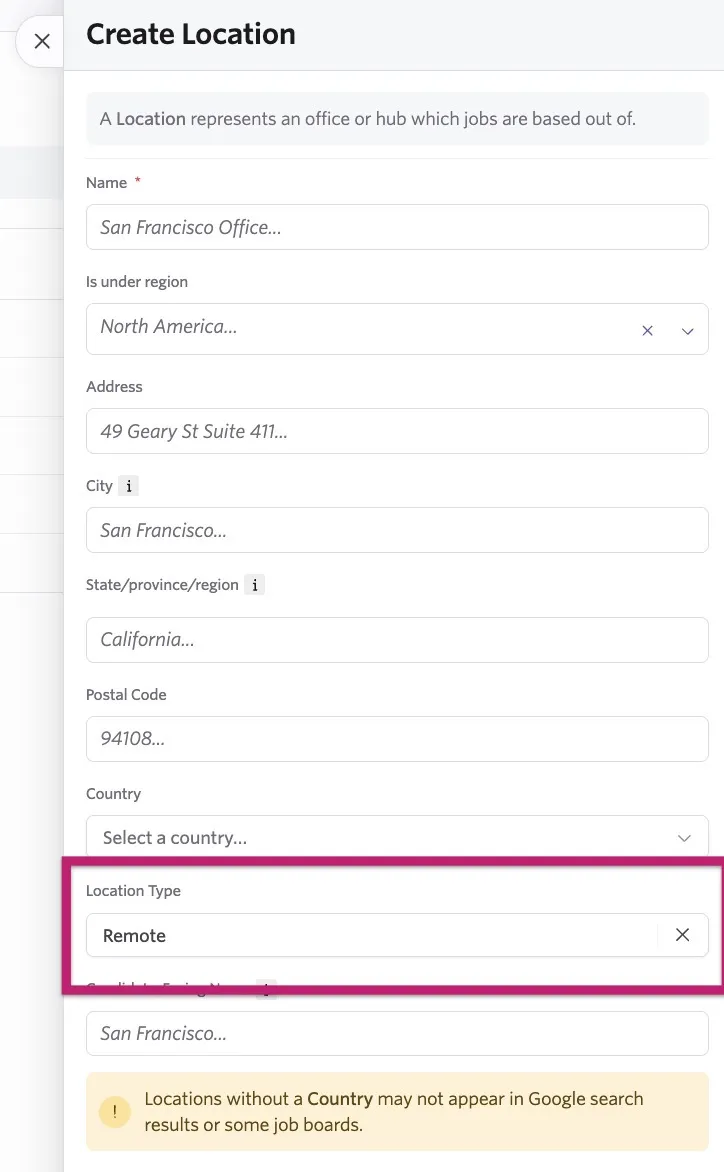
Yes, the XML feed now includes this information so the workplace type is indicated on third-party job boards like LinkedIn and Indeed.
Specify the location type within the Location Details section of your location settings at Admin > Organization Setup > Locations.
Why can't I find an international job I've posted?
For international job postings, search from the appropriate country's Indeed domain, as jobs are posted to the relevant country-specific Indeed site (for example, uk.indeed.com for UK-based roles). To find the appropriate domain for your job posting, see the Indeed worldwide domains list for a full list.