How do I export candidate data?
This document explains how to export candidate data from Ashby.
Exporting Data via a Custom List Report
For more information on creating custom reports, check out Custom Reports
Custom Reports can be set up on the Legacy Plus, Plus and Enterprise plans:
Foundations | Legacy Plus | Plus | Enterprise |
|---|---|---|---|
❌ | ✅ | ✅ | ✅ |
If you’d like to download a list of candidates that meet a certain criteria, you can do the following:
- Navigate to Reports > Build > Custom List.
- Select the Candidates subject, and add the relevant Fields to Show (Name, Email Address, LinkedIn URL, etc).
- Add filters to the report if necessary, e.g. Started At time range, Job, Source, etc.
- Click Export CSV in the Results section.
Exporting Data via the Candidate Profile
You can also export candidate data from an individual candidate’s profile under More. This option can be used if a candidate requests a copy of their data.

Once you click Export Candidate Data, you’ll then be able to select whether you’d like to export the candidate’s data, or their profile and interview feedback.
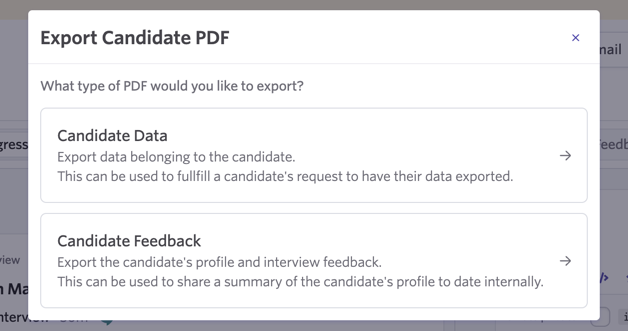
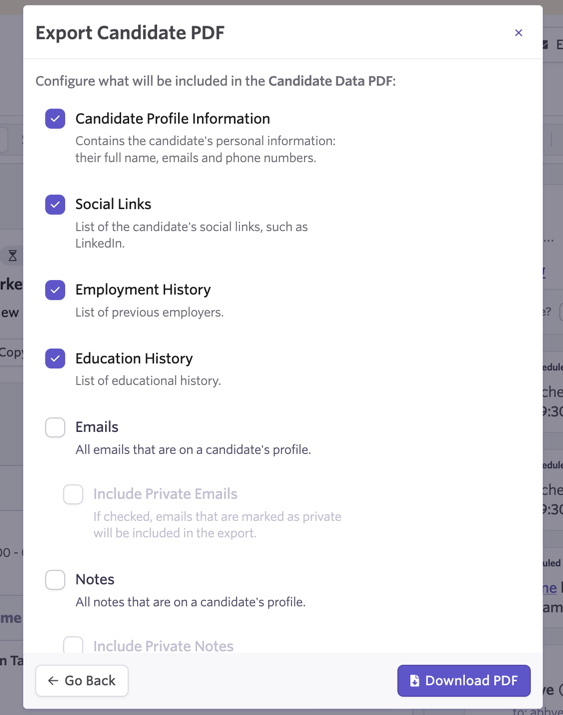
If you opt to export their data, you can use the checkboxes to select the specific fields you’d like to export.
You can select whether you’d like to export the candidate profile information, social links, employment and education history, emails and notes.
You can opt to export emails and notes that have been marked as private too. Once you’ve selected everything you’d like to export, click Download PDF.
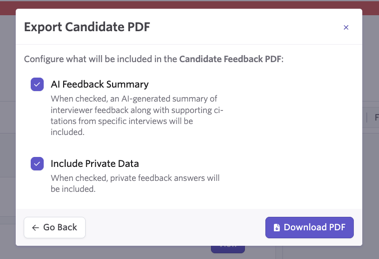
If you opt to export candidate feedback, you will also have the option to include the AI feedback summary for the candidate and private feedback answers in the exported file.
Can I bulk export resumes?
Currently it’s not possible to bulk export resumes in-app. You can export resumes on a candidate-by-candidate basis by clicking on the resume’s file name on the Summary tab of the candidate’s profile, then downloading the file from there. If you do need to export resumes in bulk, please reach out to [email protected] for assistance.