How do I change the archive reason on an archived job consideration?
If you've already archived a candidate but want to change the archive reasons listed on their job consideration, you can update it directly from their profile. This article covers how to change an archive reason on a single job consideration or in bulk, where to set up new archive reasons, and how to add a note explaining why you archived a candidate.
Change an archive reason
To change the archive reason on an archived job consideration:
- Navigate to the candidate's profile and to the job consideration in question.
- On the Activities & Progress tab of their profile, locate the Interview Progress section.
- Click the pencil to the right of the archive reason listed underneath the Archive stage of their interview progress.
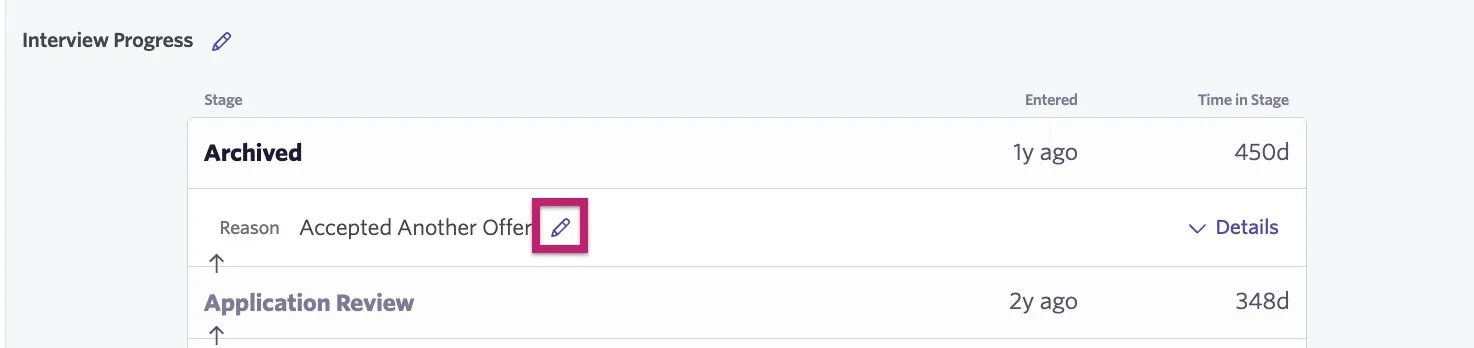
- Select the correct reason from the list of existing archive reasons. You will also have the option to add a note and fill out any archive reason custom fields. Click Submit to save your changes.
You can review an added archive note and other archive reason fields by clicking Details to the right of the archive reason.
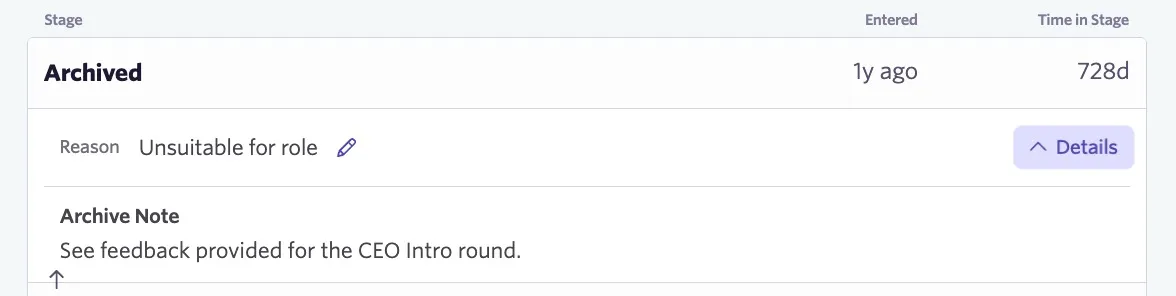
Archive Reason custom fields can be configured on the Plus and Enterprise plans.
Foundations | Legacy Plus | Plus | Enterprise |
|---|---|---|---|
❌ | ❌ | ✅ | ✅ |
Where do I set up a new archive reason?
You can add and edit archive reasons by navigating to Admin > Jobs & Applications > Archive Reasons. Click + New to add a new archive reason, or click an existing archive reason to make edits.
If you create a new archive reason, specify a reason and a reason type for reporting purposes.
For more information on best practices for configuring archive reasons, check out Best Practices: Managing & Analyzing Archive ReasonsBest Practices: Managing & Analyzing Archive Reasons.
Can I change archive reasons on archived job considerations in bulk?
Yes. To change archive reasons in bulk:
- Navigate to the Candidate Pipeline section of your job.
- Select the Archived stage and use the checkboxes to select the candidate job considerations you want to update.
- Click Change Archive Reason.
- Select the new archive reason from the New Archive Reason dropdown.
- Click Start Change Archive Reason on X Records.