Feedback Forms and Interviews
In this article, you learn how to create feedback forms and interview templates. By default, the templates you create are available to all jobs. When you update these templates, all jobs linked to them are also updated.
What's the difference between feedback forms and interviews?
Template Type | Description |
|---|---|
Feedback forms | A standalone form where you capture interviewer ratings or scores for a candidate. These are accessible as a part of an interview template and by clicking More > Submit Feedback Without Interview on a candidate profile. |
Interviews | A set of interviewer instructions and where you assign the feedback form where you capture interviewer ratings of a candidate. These are accessible when scheduling one-off meetings with candidates and are also used as a part of the Schedule Interview activity. This is essentially where you can determine a briefing and the form that interviewers complete. |
In Ashby, you have the option to set up reusable templates in Admin and one-off objects on a per-job basis. We recommend creating templates, as this makes updating many jobs at once easy in the future.
The best practice is to set up standalone feedback forms within Admin > Interviews & Scheduling > Feedback Forms and link them to interviews in Admin > Interviews & Scheduling > Shared Interviews. That way, when you update the feedback form, any associated interviews are updated as well.
Permissions and access
Only Organization Admins can configure shared interviews and feedback forms by default. You can grant Elevated Access users permission to edit shared interviews and feedback forms if needed. More on this at Additional User PermissionsAdditional User Permissions.
Feedback forms and shared interviews can be set up on all Ashby All-in-one plans.
Foundations | Legacy Plus | Plus | Enterprise |
|---|---|---|---|
✅ | ✅ | ✅ | ✅ |
Shared feedback forms
If you want to reuse the same feedback form across multiple interviews, you can create shared feedback forms.
Shared feedback forms are standalone pre-configured questionnaires for application reviewers and interviewers to fill out to rate a candidate.
Create a shared feedback form
To set up a feedback form:
- Navigate to Admin > Interviews & Scheduling > Feedback Forms.
- Click + New, then enter a title for your form.

- You can add sections to your form if you want to add structure to a form with a lot of questions (for example, a section per skill being tested).
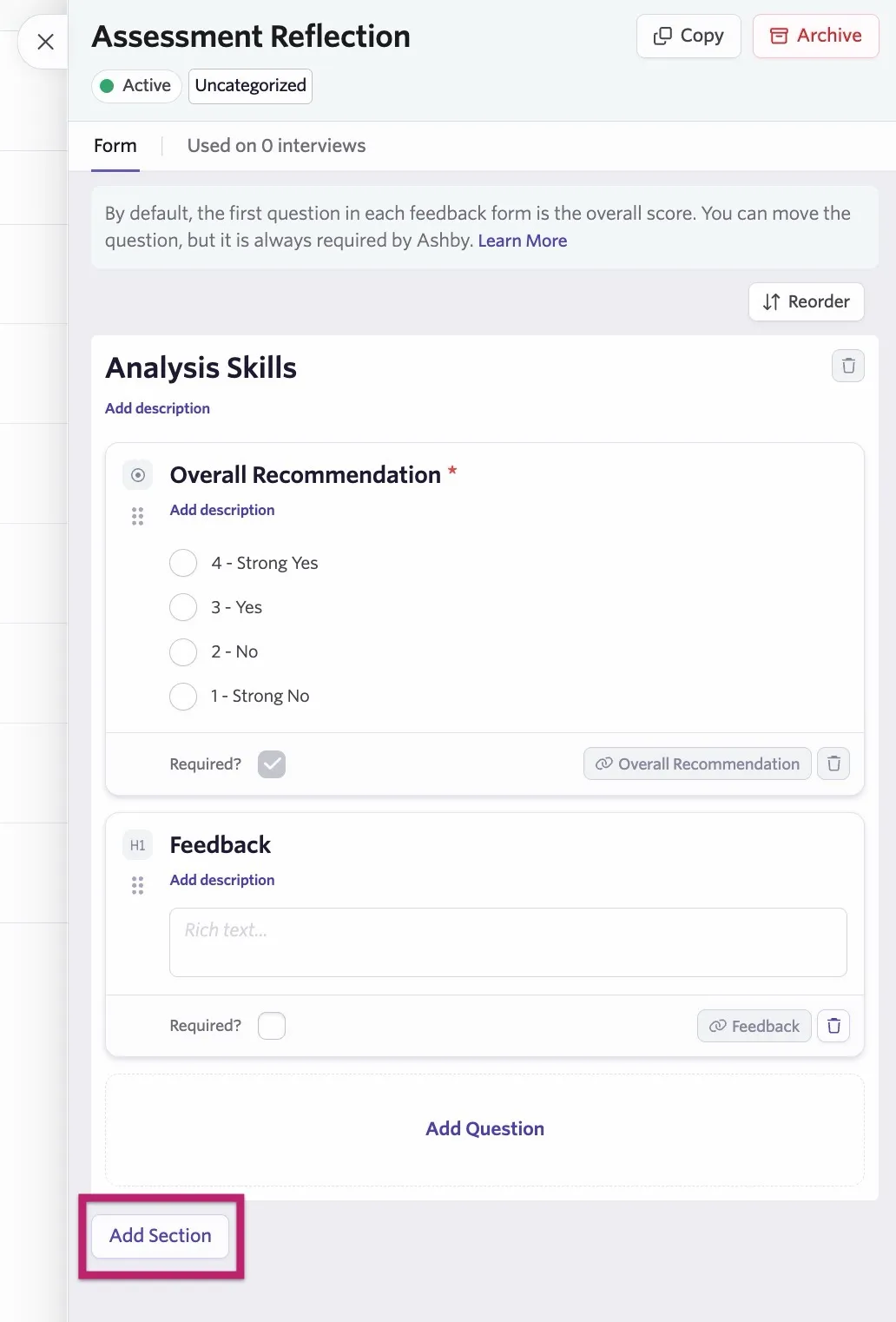
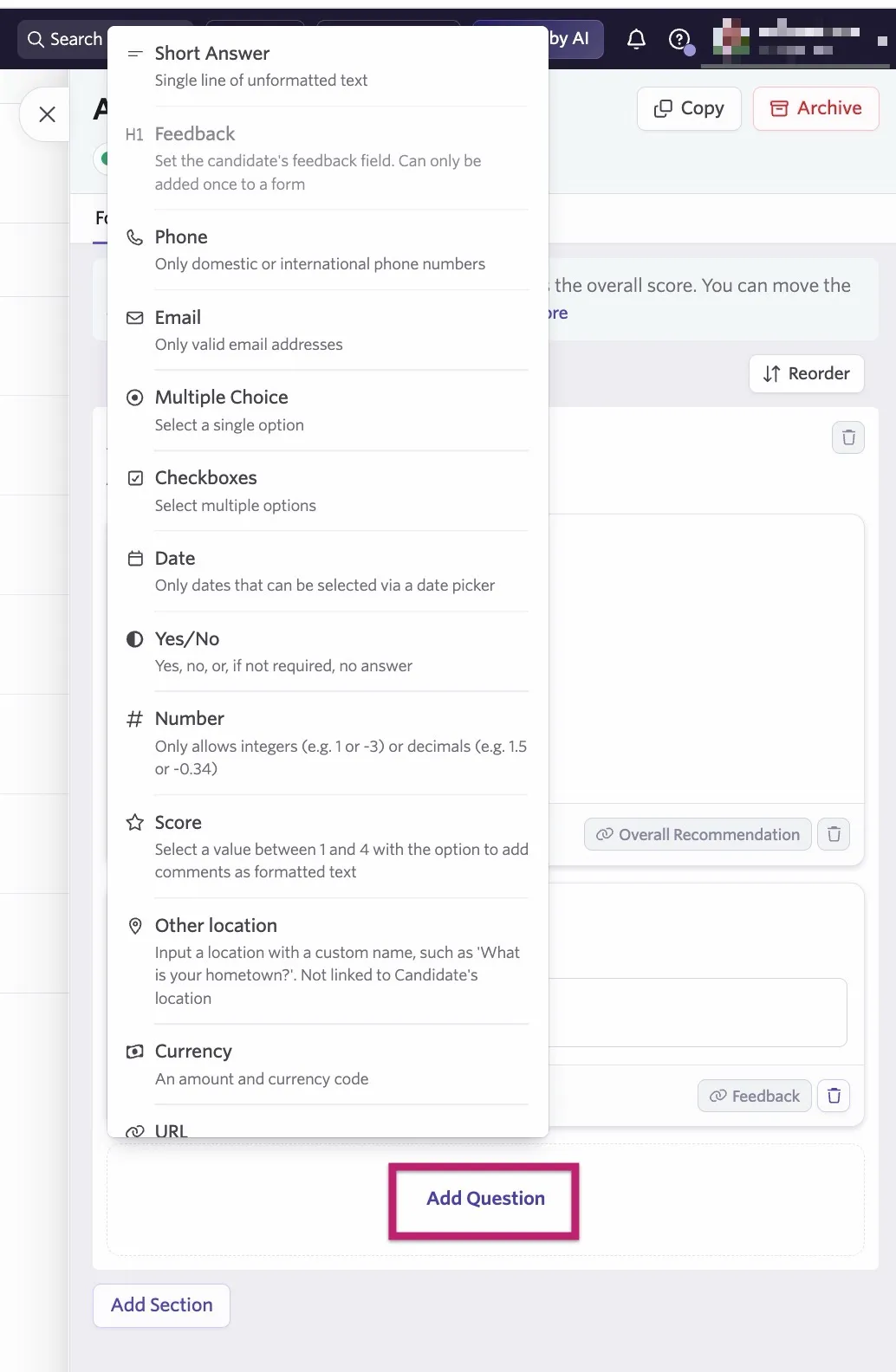
- You can then add fields to the feedback form by clicking Add Question. The following fields are supported:
- Short Answer
- Phone
- Multiple Choice
- Checkboxes
- Date
- Yes/No
- Number
- Score
- Other location
- Currency (an amount and a currency code)
- URL
- Long Formattable Answer
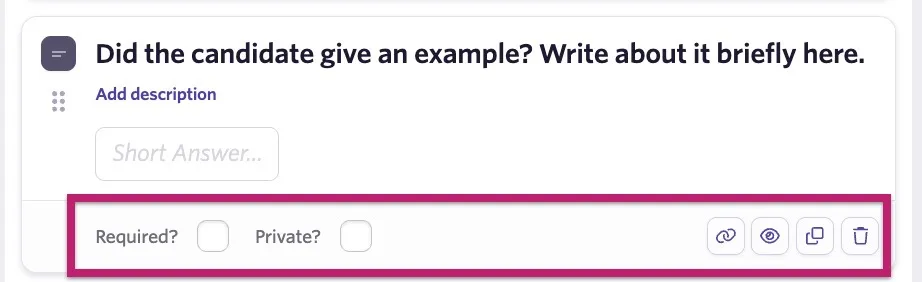
Once you add a question, you can set it as Required or Private:
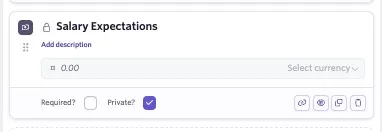
Required: An interviewer must complete this field when submitting feedback. Private: Only those with Organization Admin access or Elevated Access - Admin Private access can see those fields when viewing or completing feedback. Private fields can be added for information like salary expectations.
You can also take the following action with a feedback form question field:
- Click the link icon to link the field to a candidate custom field (more on this at Form Field ConnectorsForm Field Connectors).
- Click the eye icon to set conditions for the feedback form question field to show up (more on this at Conditional Form FieldsConditional Form Fields)
- Click the copy icon to duplicate the feedback form question field.
- Click the trash icon to delete the feedback form question field.
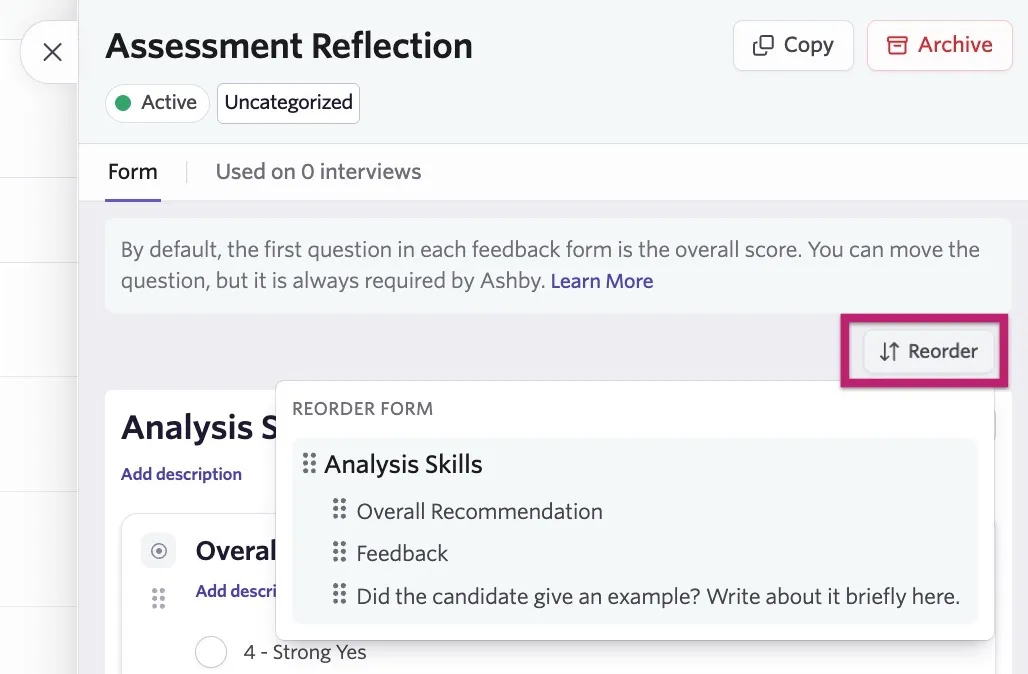
If the feedback form order needs to be amended, click Reorder and then click and drag the questions and sections into place. Feedback form changes save automatically.
Best practices when designing feedback forms for use with AI features
Your organization may use Ashby's artificial intelligence (AI) features, such as AI NotetakerAI Notetaker, to improve the objectivity and efficiency of generating feedback post-interview.
We recommend the following ways to optimize your feedback forms for use with AI features:
- Phrase questions clearly: The AI uses the question as a guide for the summary.
- Include context: Use the question description to provide instructions on what to include, how to format the answer, or what specific evidence to look for.
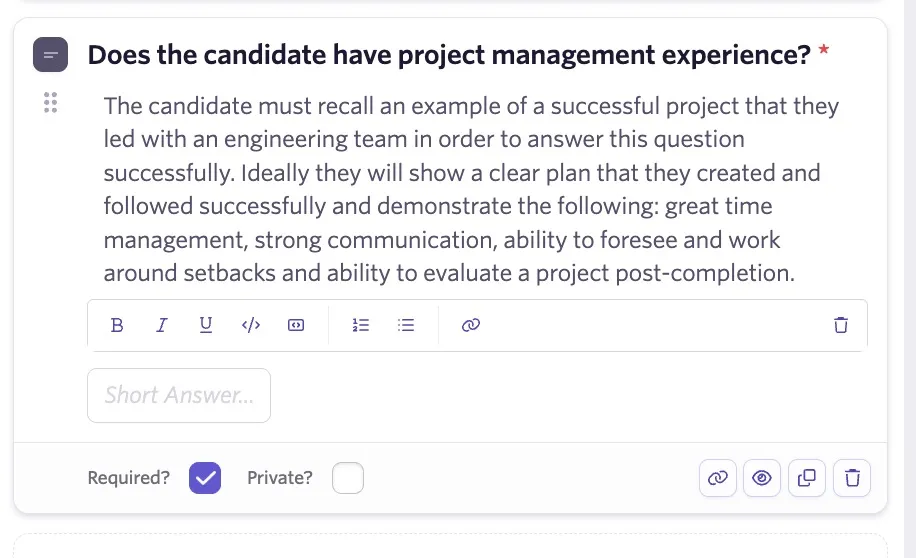
Providing this context upfront ensures AI answers are relevant and saves time by capturing the data your team finds most valuable for hiring decisions.
Use shared feedback forms
You can link a feedback form to an interview and use it ad-hoc on a candidate profile.
Link a feedback form to an interview
- Navigate to Admin > Interviews & Scheduling > Shared Interviews and click on the interview you want to link the feedback form to.
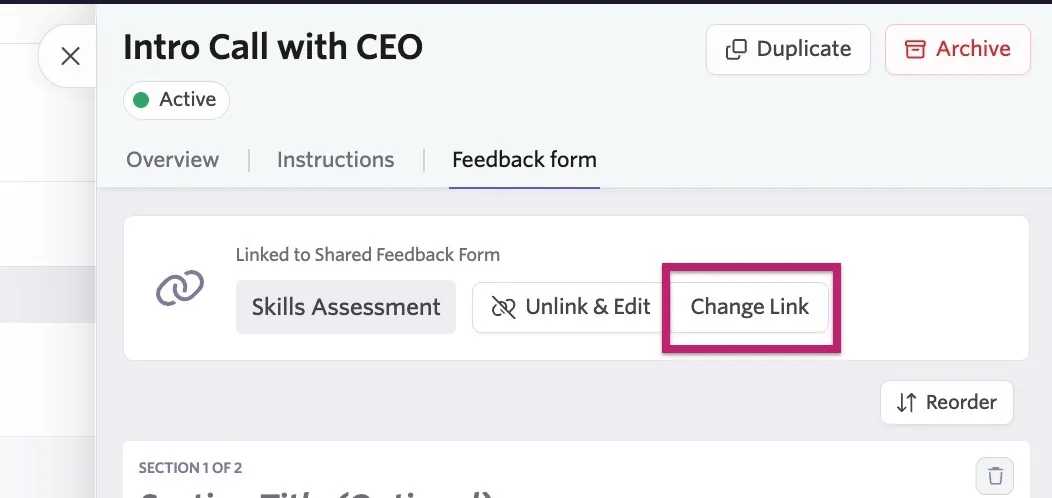
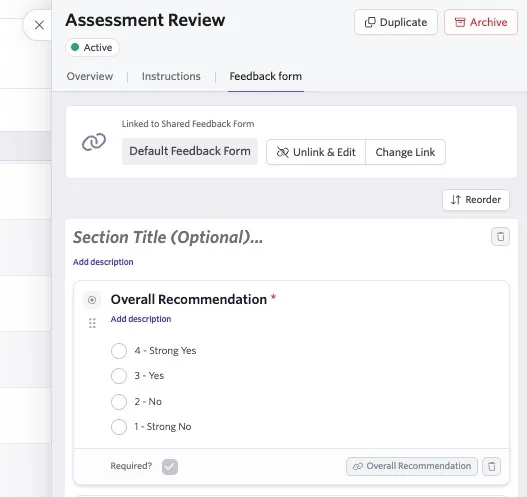
- On the Feedback Form tab, click Change Link to switch out the feedback form for the newly created one.
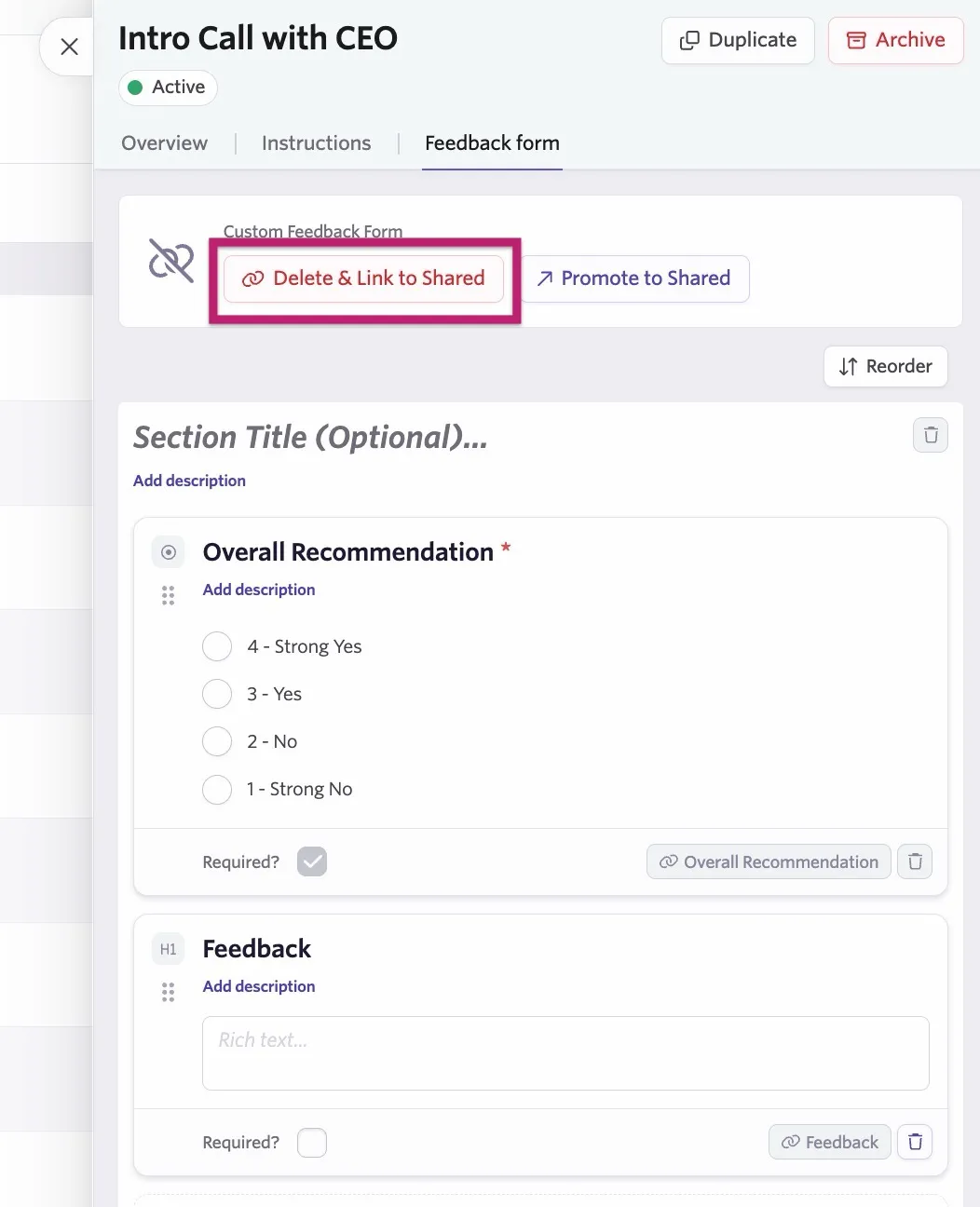
- If you used a custom feedback form for that interview previously, you see the option to Delete & Link to Shared.
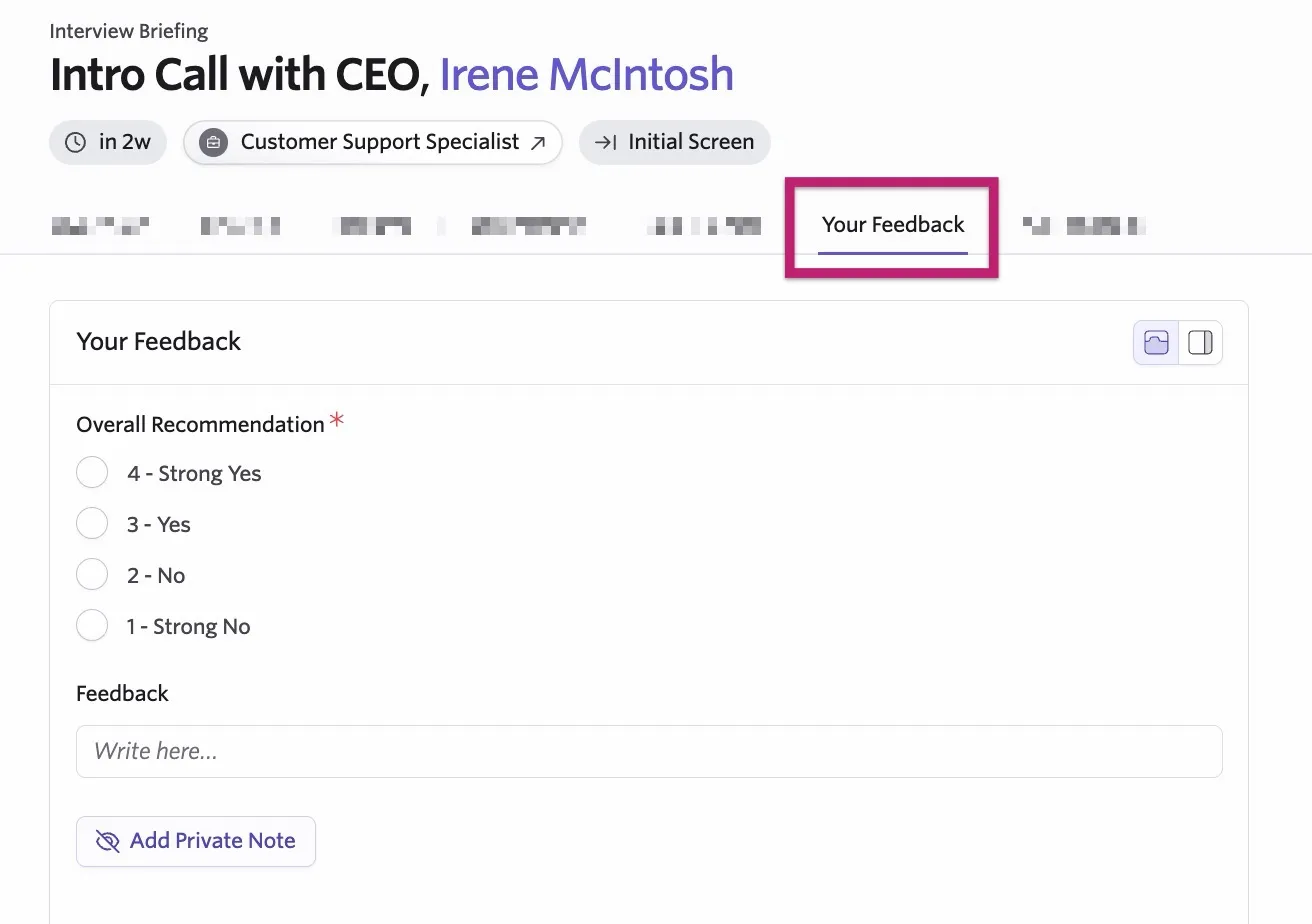
When you link a feedback form to an interview, that form appears on the interview briefing for any interviewer participating in that interview on the Your Feedback tab.
Use a feedback form on a candidate's profile
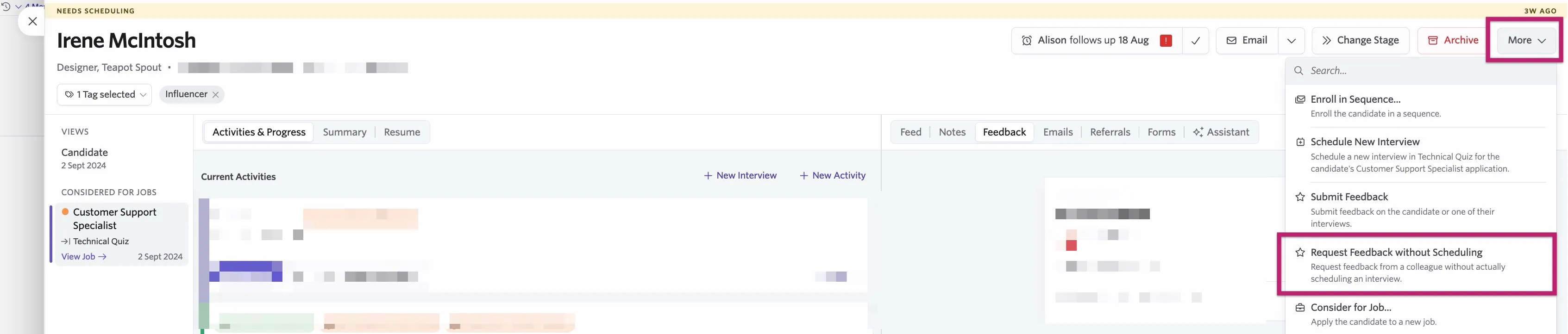
To submit feedback without it being associated with an interview scheduled through Ashby, navigate to the candidate's profile, then click More and Submit Feedback to fill out a feedback form.
You can also click More and Request Feedback without Scheduling to ask another user to add feedback for the candidate without scheduling an interview.
Shared interviews
Shared Interviews allow you to set up interviews that can be used across multiple jobs and stages, while custom interviews can only be set up and used for a specific job on a specific stage.
You can create new shared interview types in Admin > Interviews & Scheduling > Shared Interviews, then reuse them across jobs.
Create a shared interview
To set up a shared interview:
- Navigate to Admin > Interviews & Scheduling > Shared Interviews.
- Click + New, then enter a title and click Create.

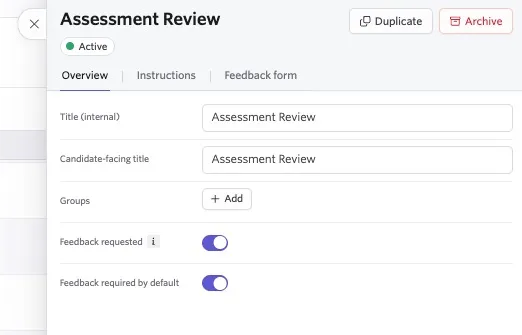
- In the Overview tab, you can set the following:
- Internal Title: Set an internal title for your interview. Only those scheduling and interviewing can see this interview title.
- Candidate-facing Title: Set a title that the candidate sees on their candidate invite and when scheduling.
- Groups: Set up groups to sort your interviews into categories.
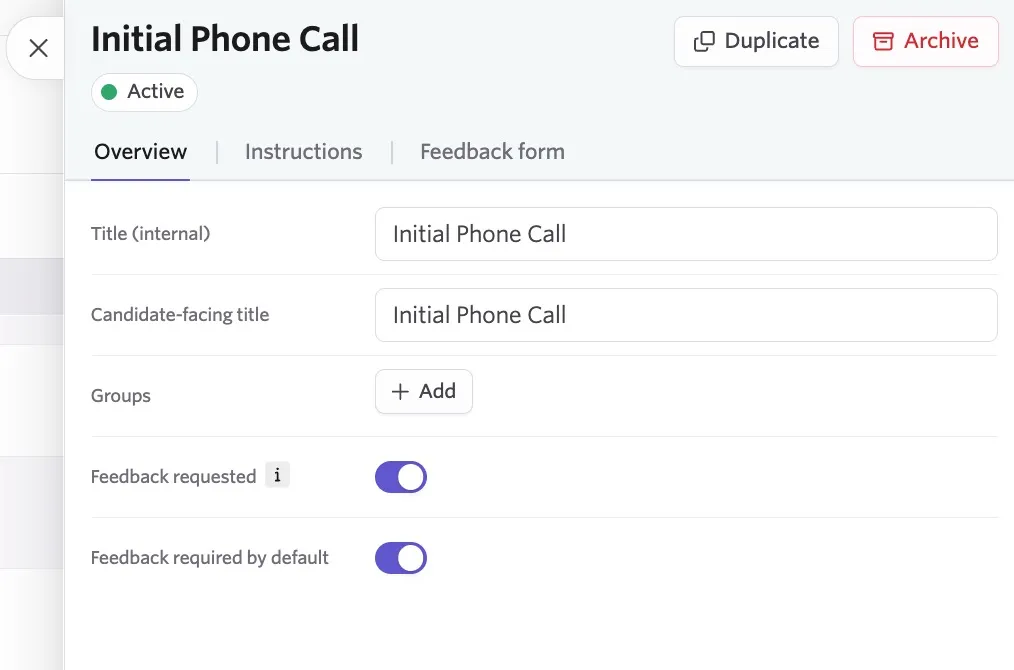
- Is Feedback Requested?: Determine if interviewers are requested to leave feedback. This setting applies to all interviewers assigned to the interview.
- Is Feedback Required?: Determine whether feedback is required or optional for this interview type. If feedback is required, interviewers receive reminders via email automatically to provide feedback. You can adjust interviewer reminder settings in Admin > Organization Setup > Interviewer Notifications.
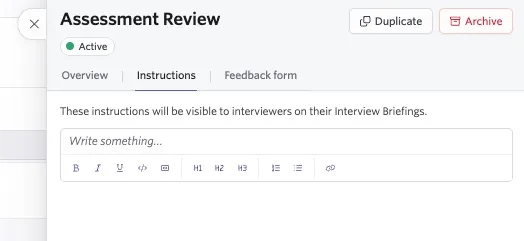
- In the Instructions tab, add information for your interviewers like specific interview questions and any additional details they need while interviewing. Instructions here show in the Briefing section of the interview, so any further briefing details for this specific interview type should be added here.
- In the Feedback Form tab, create a custom feedback form or link to an existing feedback form you've already configured.
Link an interview to a job
You can link an interview and a feedback form to a job using a Schedule Interview activity. Learn more about schedule interview activity setup at Setting up Schedule Interview ActivitiesSetting up Schedule Interview Activities.
To link an interview to a job:
- Navigate to Jobs > Jobs.
- Select a job, then click Interview Plans on the left menu of the job.
- Scroll to the interview plan stage you'd like to add the interview to and click + Activity to [stage name], then + Add Activity.
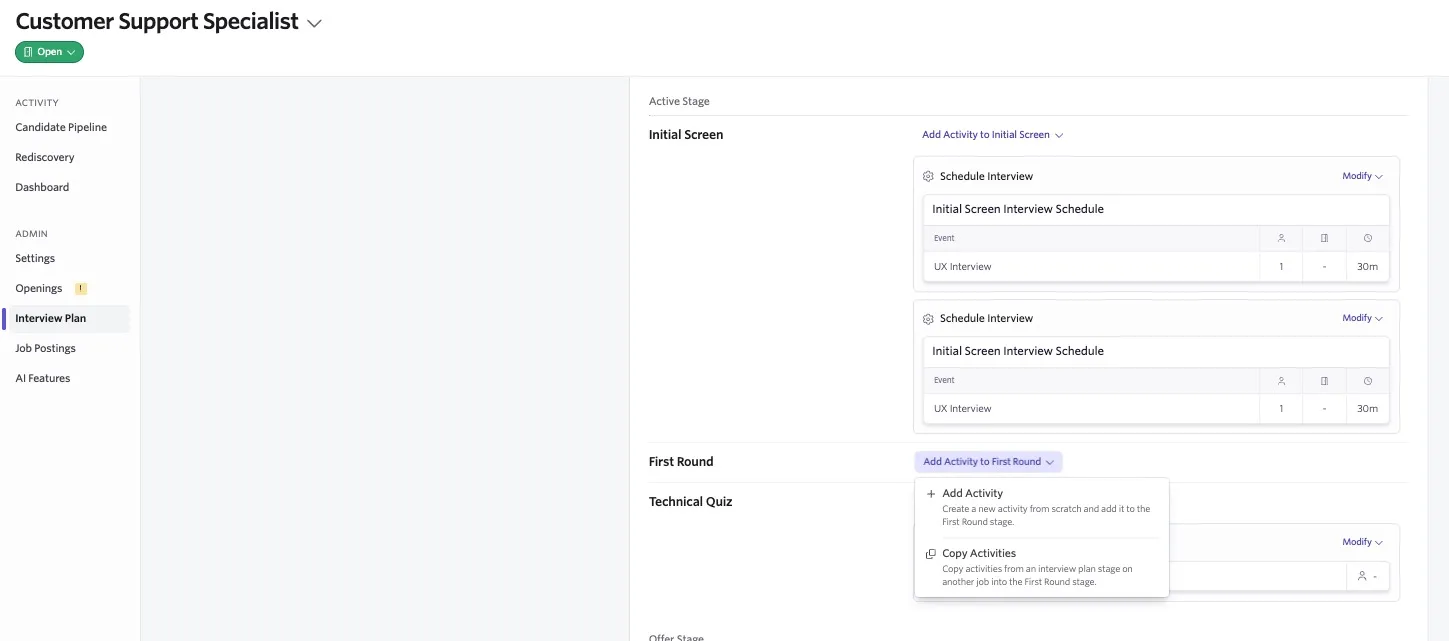
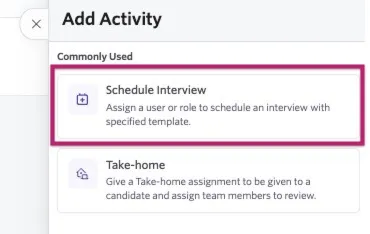
- Click Schedule Interview to create the initial activity.
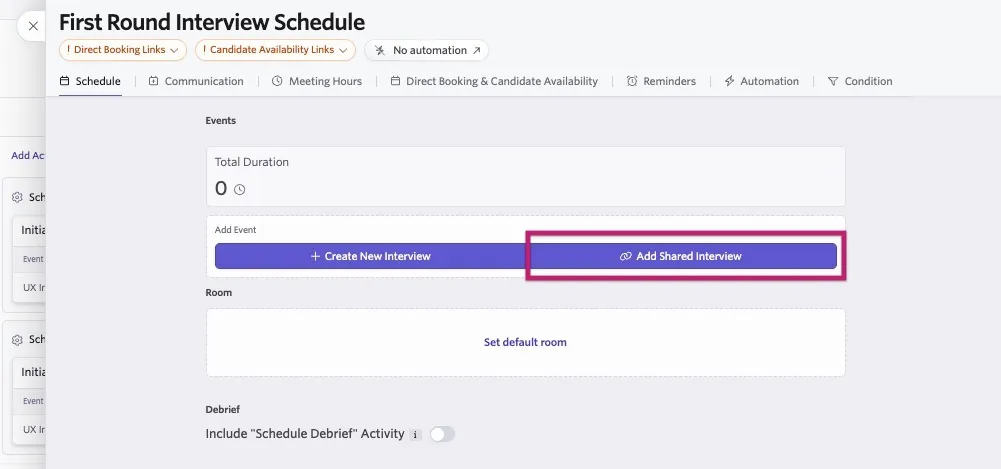
- To link your shared interview to your activity, click + Shared Interview on the Schedule tab and select one of your interviews. You can then also assign interviewers and meeting rooms to the activity as needed.
Use shared interviews for one-off scheduling
For more on manually scheduling candidates, see Manually Scheduling InterviewsManually Scheduling Interviews.
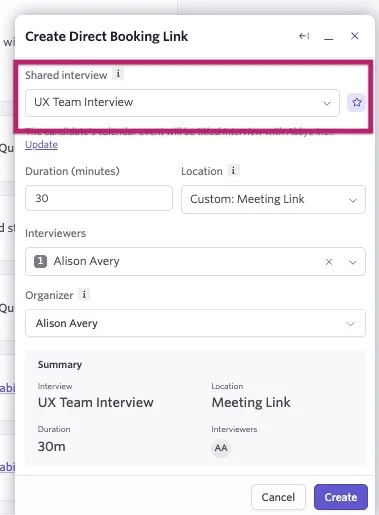
You can use an interview to schedule one-off interviews on a candidate's profile. Click + New Interview on the candidate's profile, then choose whether to schedule manually or generate a direct booking link for a candidate.
Direct Booking Link: When creating a one-off direct booking link, you can select the interview type via the Interview drop-down menu.
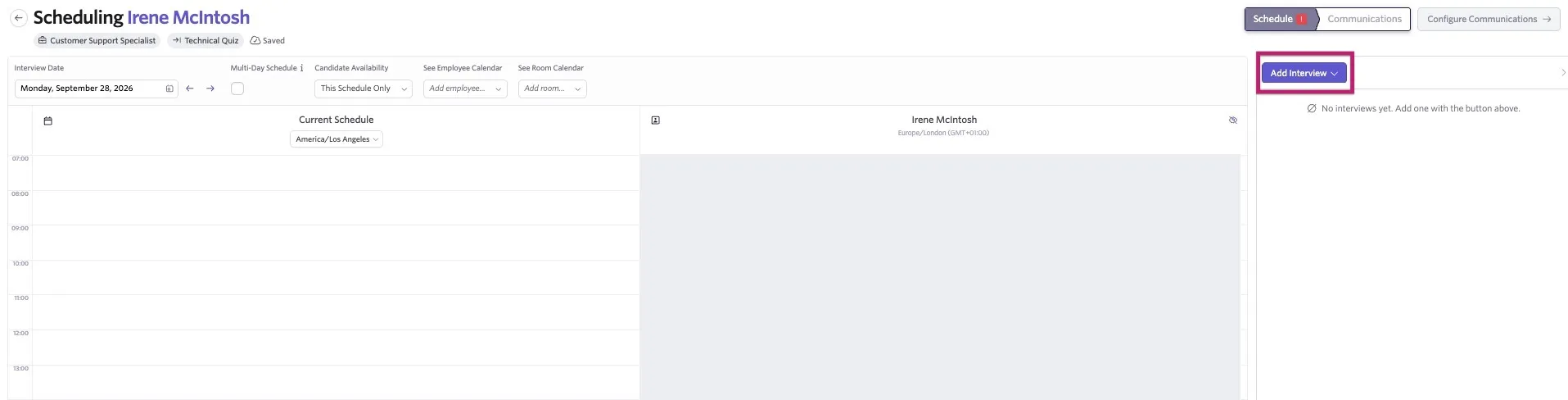
Manual Schedule: When manually scheduling the candidate, click Add Interview on the calendar interface to determine the interview type.
Feedback reminders for interviewers
If an interviewer is on a panel for an interview or a take-home where feedback is required by default, they receive one email a day prompting them to leave feedback.
Feedback reminder settings
To confirm an interview is set to have feedback required by default, click on the interview in question in Admin > Interviews & Scheduling > Shared Interviews.
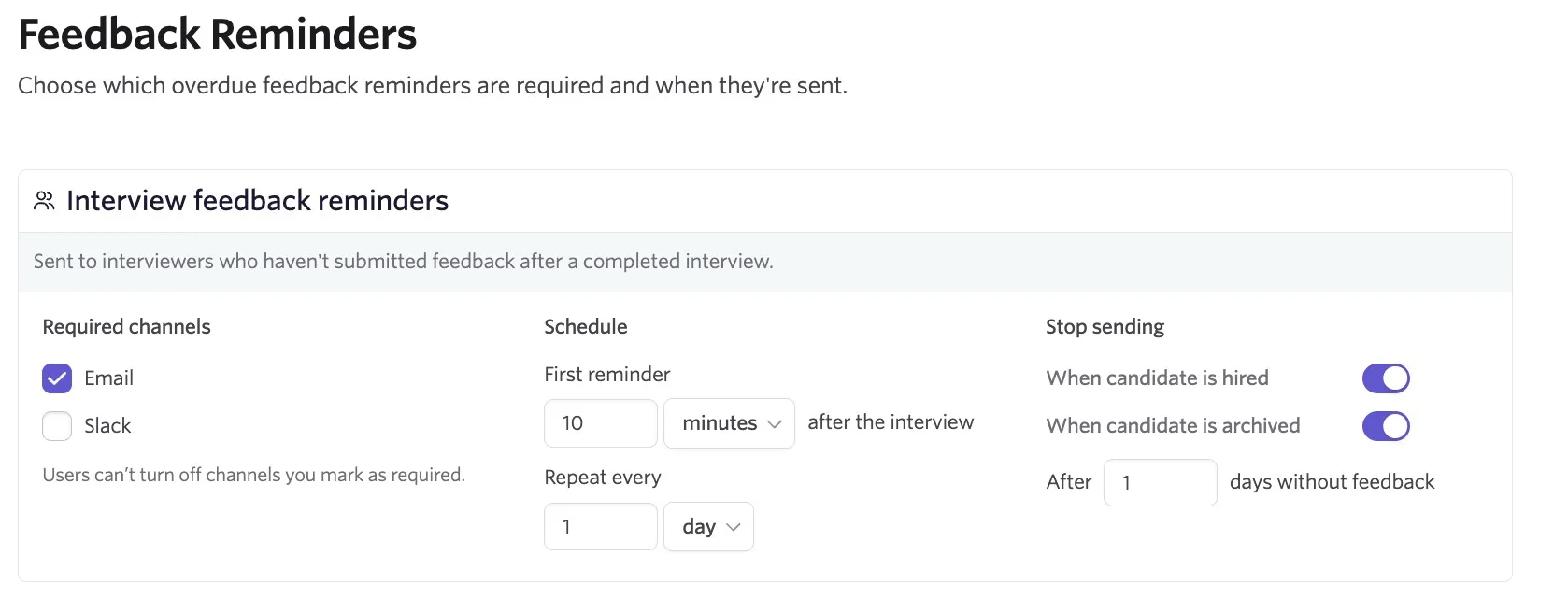
To adjust the interviewer notification settings, navigate to Admin > Organization Setup > Feedback Reminders. You can adjust the following:
- The required channels for feedback (email or Slack). If enabled, users cannot turn off the notifications in Personal Settings > Notifications.
- Set the schedule for the first interview reminder and then the cadence of the following reminders.
- Set when interview reminders should be stopped:
- Set whether interviewer notifications are stopped after a candidate is hired.
- Set whether interviewer notifications are stopped after a candidate is archived.
- Adjust the number of days notifications are sent for.
Manually sending feedback reminders
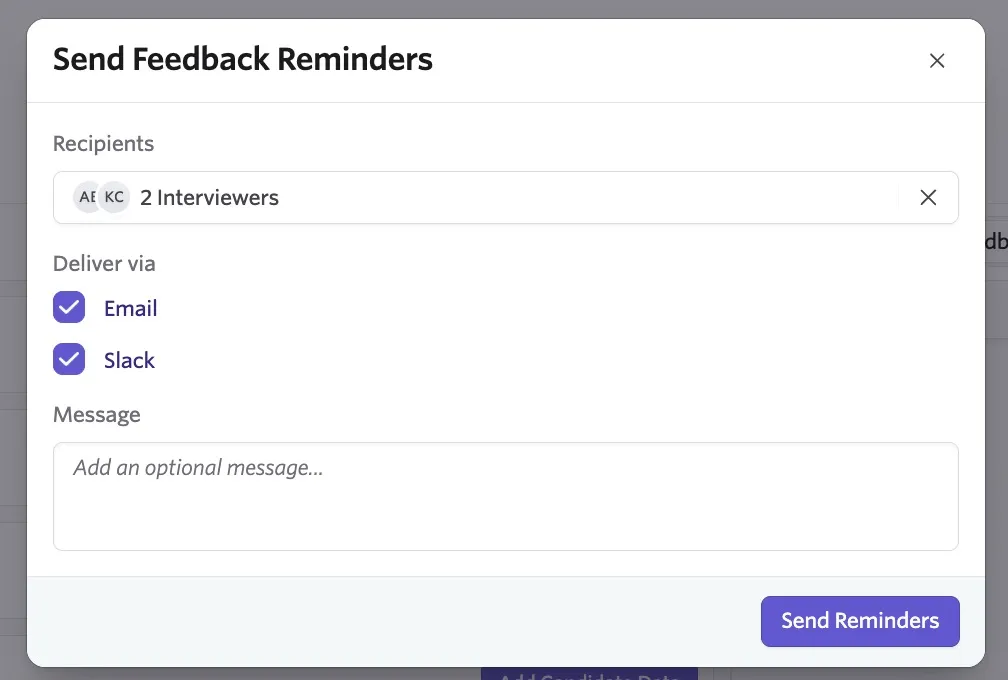
Feedback reminders can also be sent manually from the feedback entry on the candidate's feed. Navigate to the candidate profile, find the feedback entry on their feed and click Send Feedback Reminders.
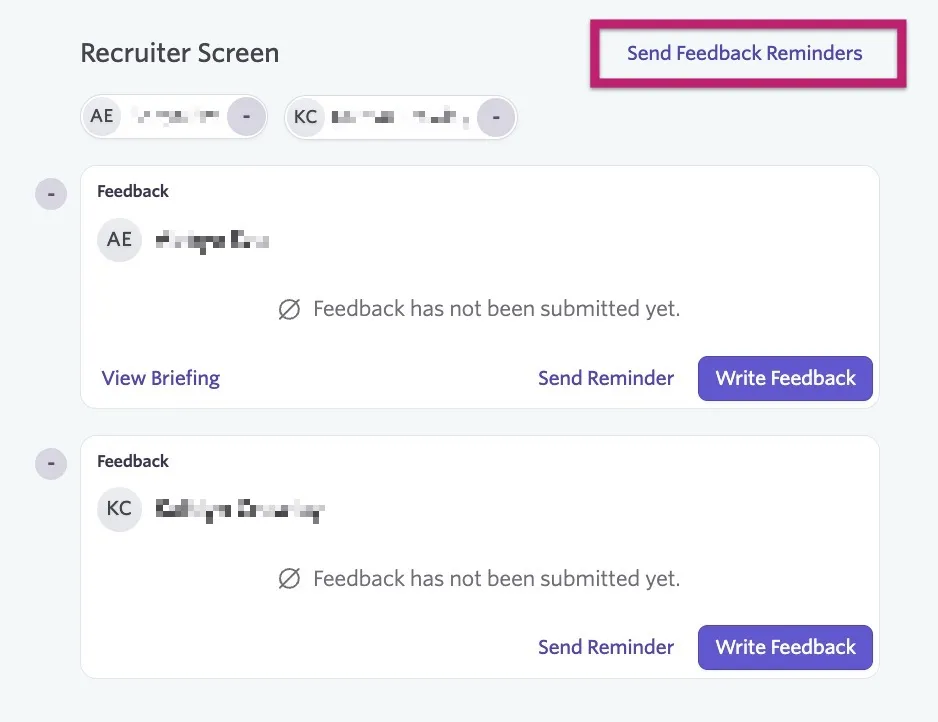
You can then determine whether the notification should be sent via email, Slack or both and add an optional message. Click Send Reminder to sent the notification.
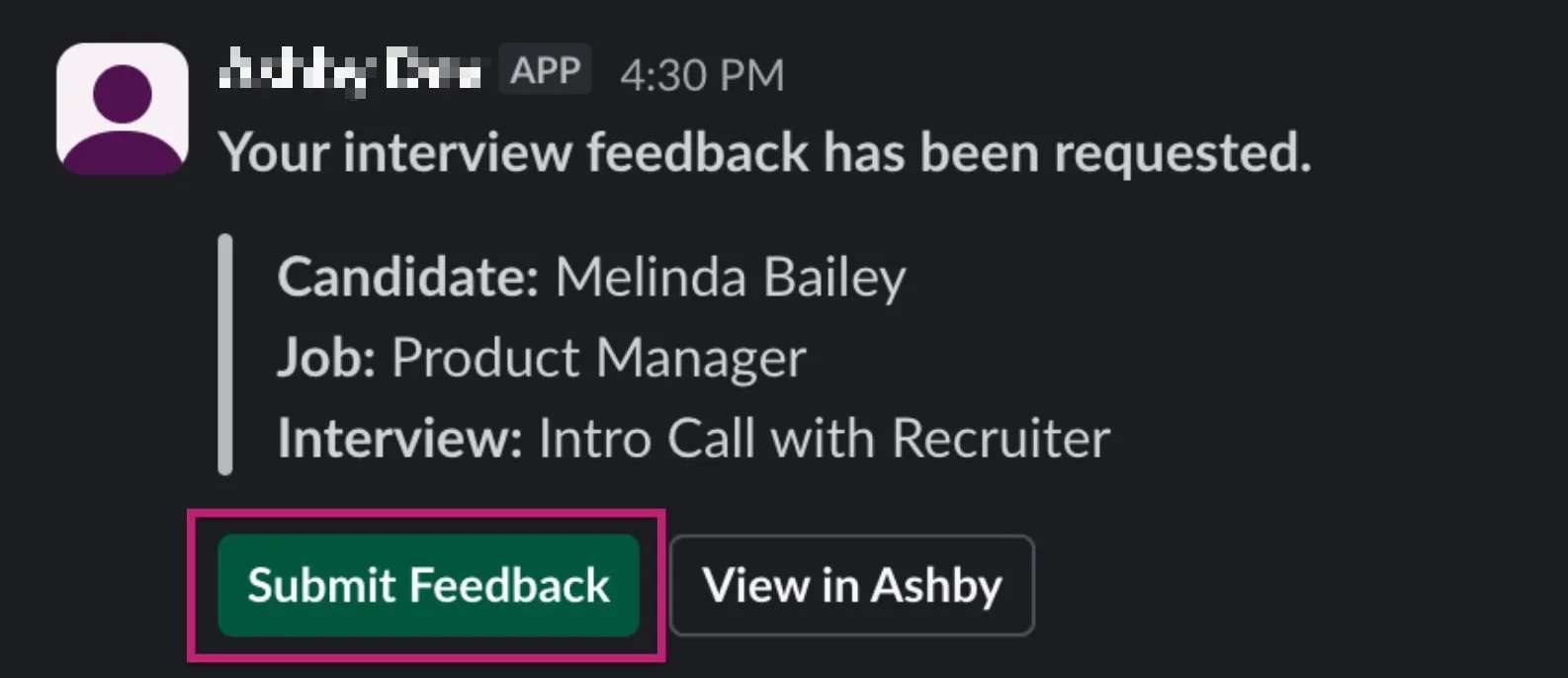
Users can submit feedback from Slack. They can click the Submit Feedback button within the notification to start the feedback submission process.
For more information on the interviewer experience, see Getting Started for Interviewers .
FAQs
How can I delete the record of a feedback form from the candidate profile?
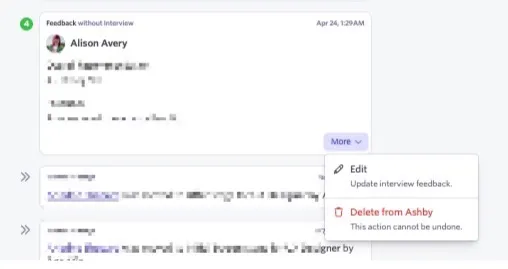
To delete a feedback form, click More at the bottom of the feedback form submission, select Delete from Ashby, then click Yes.
Only Organization Admins and the user who submitted a feedback form can delete a feedback form from the candidate's feed (if they have access to it).
What happens when I archive a feedback form?
Archiving a feedback form does not immediately remove it everywhere. The impact depends on how and where the form is being used.
Existing scheduled interviews
Ashby ties feedback forms shown on interview briefings to the interview settings, not the form's active status. If an interview is not updated to use a new, active feedback form, the archived form continues to appear on the interview briefing and interviewers can still complete it. If you change the interview's feedback form to a different active form, the interview briefing updates and the archived form no longer appears for the interview.
Reporting
You cannot report on archived feedback forms. If a report references a question from an archived feedback form, the report shows an error. Archived feedback form questions are no longer available as reportable fields.
How can I keep reporting on this data?
If you need to continue reporting on responses after archiving a feedback form, you can use Form Field ConnectorsForm Field Connectors to link feedback responses to a candidate custom field. This allows future reports to reference the custom field instead of the archived feedback form.
Can I delete the default feedback form?
You can archive other feedback forms by navigating to Admin > Interviews & Scheduling > Feedback Forms, clicking on the feedback form in question and clicking Archive.
You cannot delete the default feedback form, but you can amend it.
Can I edit my feedback on a feedback form after submitting it?
If the interview is in the past, you can click the Past Interviews button in the Interviews section of the Home page to view all interviews that have already taken place. Once you submit your feedback, you can make adjustments to your comments by navigating back to the interview in question and going to the Your Feedback tab. From there, you can click Edit Feedback to update your feedback.

If you have access to the candidate profile, you can also scroll to the interview in question on the candidate's feed, then click More and Edit for the feedback in question.
If you edit feedback, the edits directly update the feedback form fields. We do not offer versions of feedback; Ashby only shows the latest version.
Can I remove the Overall Recommendation field from my feedback form?
Ashby includes the Overall Recommendation field by default, and you cannot remove it from a feedback form. This is because the score added to this field is used for reporting and for interview feedback summaries.
Where do I set the duration of the interview?
You set the interview duration when creating a schedule interview activity, when creating a direct booking link, or when manually scheduling an interview.
Can I export feedback form templates?
While exporting candidate feedback is possible (more on this at How do I export candidate data?How do I export candidate data?), you cannot currently export feedback form templates.
Can I add multiple feedback forms to an interview type?
No, you can only assign one feedback form to an interview.
Can I fill out a feedback form on behalf of an interviewer?
If you have Elevated Access - Admin, Elevated Access - Admin Private, or Organization Admin access, navigate to the Feedback tab within the feed on the candidate's profile. If there are any feedback forms that are yet to be completed, you can click the Write Feedback button to complete the feedback form on the interviewer's behalf.
Do I have to assign a feedback form to an interview?
Yes, you must link a feedback form to an interview if Is Feedback Requested is set to Yes on the Overview tab of the interview type.
What happens when I change the question type on a feedback form question?
If you switch the question field type on a feedback form, this can impact reporting. For example, if you switch a checkbox or multiple choice question field to a short answer field, you can no longer report on the checkboxes selected within previously completed feedback forms. As such, we recommend making minimal changes to question fields once you finish creating and start using feedback forms for interviews.
An interviewer can't see all sections of the feedback form but I can. What's happening?
Some questions on the feedback form may be marked as Private. Navigate to either the shared feedback form at Admin > Interviews & Scheduling > Feedback Forms or to the schedule interview activity within the job's interview plan if the form is a custom feedback form. Confirm whether the interviewer should be able to add information to this field on the feedback form and uncheck the Private checkbox if this was set by mistake.
How do I add a feedback form to a group or category on the Feedback Forms page?
Once you create your feedback form, navigate to the full list of feedback forms at Admin > Interviews & Scheduling > Feedback Forms, then click the three dots beside the Uncategorized tag. Click Add to Group, then select the group you want to add your feedback form to.

Can I send a request to a user to leave feedback even if they weren't on the panel for an interview?
Yes! On the candidate's profile, click the More button, then Request Feedback without Scheduling to get started.
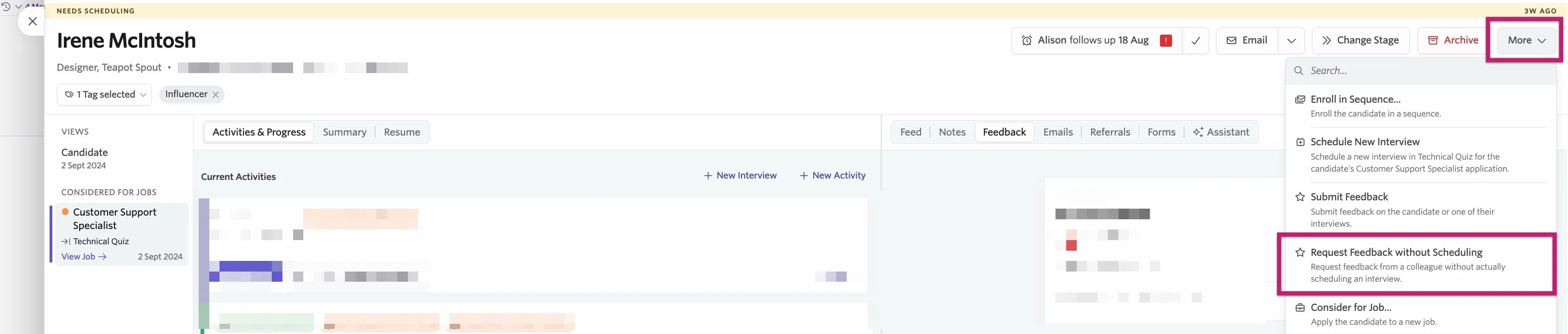
You can then specify the interview type and the user who should complete the feedback form.
Once submitted, the user sees the request on their home page, both in the Interviews section and in their tasks. Clicking on either the task or interview prompt takes them to the feedback form they should complete.
This option is to request feedback from an interviewer not already on the panel, rather than reminding an interviewer who is already assigned to the interview to leave feedback.