Direct Booking & Candidate Availability Links
Direct booking and candidate availability links simplify your scheduling workflow. By allowing candidates to choose times directly on an interviewer's calendar or provide their own availability, you reduce the back-and-forth emails typically required to book an interview. This article explains how to configure these links and use them effectively within your hiring process.
Prerequisites:
- We recommend that Org Admins configure organization-level Meeting HoursMeeting Hours when using these features.
- If needed, individuals can also set specific hours they are available via the instructions in Meeting HoursMeeting Hours.
- To get the most out of the feature, your organization should have a calendar integration configured to display interviewer availability.
Permissions & access
Direct booking and candidate availability links are available on all plans.
Foundations | Legacy Plus | Plus | Enterprise |
|---|---|---|---|
✅ | ✅ | ✅ | ✅ |
To schedule interviews or send booking links, you must be an Org Admin or have one of the below access levels for the job:
- Elevated Access - Hiring Manager
- Elevated Access - Admin
- Elevated Access - Admin Private
Understanding direct booking and candidate availability links
Direct booking
Direct booking links allow candidates to view the interviewer's availability based on their set meeting hours and calendar availability. They then select a suitable date and time to schedule their interview directly. These links are specific to the candidate, job, and interview stage. Direct booking links can be used when the interview activity has only one interview event. Only one direct booking link can be created for an activity at a time.
Direct booking links are specific to the candidate, job, and interview stage. If you want to create links for use across multiple candidates (such as for sourcing sequences), check out Public Booking LinksPublic Booking Links. Note that public booking links must still be linked to a job and interview stage.
Candidate availability
Candidate availability links allow candidates to share their available time slots so that you can book an interview in a slot that works for them. The candidate does not see any interviewer availability using this method. You then manually schedule their interview based on the times they provide. These links are useful when an activity has multiple interview events (like an onsite with multiple panels) or when you haven't assigned interviewers yet.
Sending links to candidates
You can send links via two routes: configuring schedule interview activities to streamline the process, or generating one-off links directly from the candidate profile.
While not required, we recommend setting up email templates using substitution tokens for sending these links, and then configuring the correct Direct Booking and Candidate Availability templates in your Setting Scheduling DefaultsScheduling Defaults. This enables you to use standard email templates that automatically pull in the correct direct booking or candidate availability link when used.
See Email Template Creation and ManagementEmail Template Creation and Management for steps on creating email templates.
The substitution tokens to use are:
- To pre-fill the email with a direct booking link, click the T icon in the toolbar and select the Direct Booking Link substitution token.
- To pre-fill the email with a candidate availability link, click the T icon in the toolbar and select the Candidate Availability Link substitution token.
Generating direct booking and candidate availability links for existing interviews
Setting up schedule interview activities within a job's interview plan allows you to configure interviews for each stage in advance. When you move a candidate to a stage, Ashby pre-populates the next interview's details so you can quickly email the booking or availability link. We recommend this workflow to streamline your process.
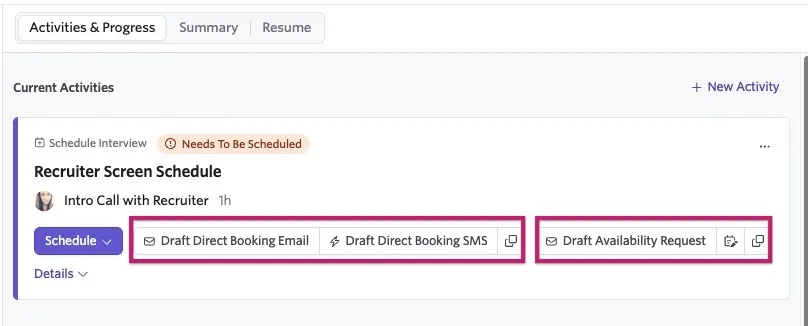
When an event is generated from a schedule interview activity, it appears in the candidate's Activity & Progress timeline. You can select whether you'd like to send them a direct booking link or a candidate availability link by selecting the appropriate option.
Sending direct booking links on existing interviews
- Select Draft Direct Booking Email to send a direct booking link via email.
- Select Draft Direct Booking SMS to send a link via SMS.
- Or simply select the overlapping squares (copy) icon to copy the direct booking link so you can paste it to the candidate using a method of your choosing.
Sending candidate availability links on existing interviews
- Select Draft Availability Request to start drafting an email to the candidate with the availability link included.
- Select the overlapping squares (copy) icon to copy the candidate availability link so you can paste it to the candidate using a method of your choosing.
- You can also edit the availability window in which the candidate must submit their availability. See Editing the availability window below for more details.
Configuring and sending the candidate communication
Once you've made your selection to send a direct booking or candidate availability link, you must configure the communication you wish to send, whether it is an email (shown below), text, or other.
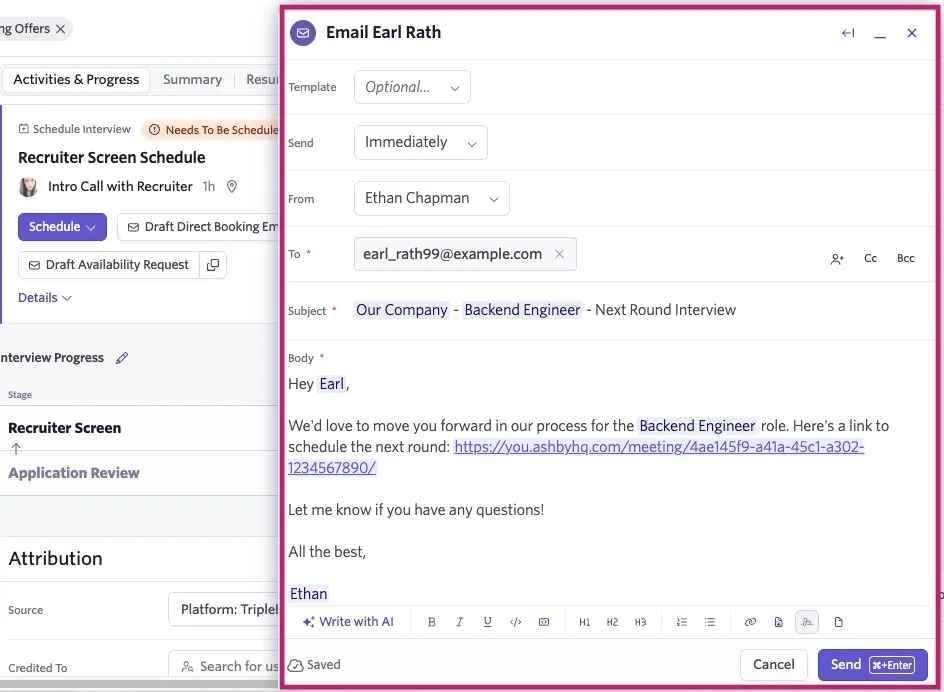
If you have email templates created for direct booking and candidate availability requests and assigned in scheduling defaults, they automatically populate, as shown in the screenshot above.
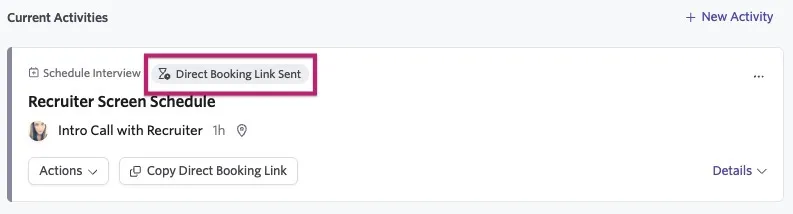
Once you click Send, the candidate receives the message and can book their interview or submit their availability at the included link. The interview entry in the timeline also updates with a status tag indicating that the link has been sent.
Instant direct booking and candidate availability links
If you need to schedule a one-off interview, you can generate links directly from the candidate's profile.
Generating direct booking links for one-off interviews
To generate a link:
- Under the Interview Progress section of the Activity & Progress timeline, click + New Interview.
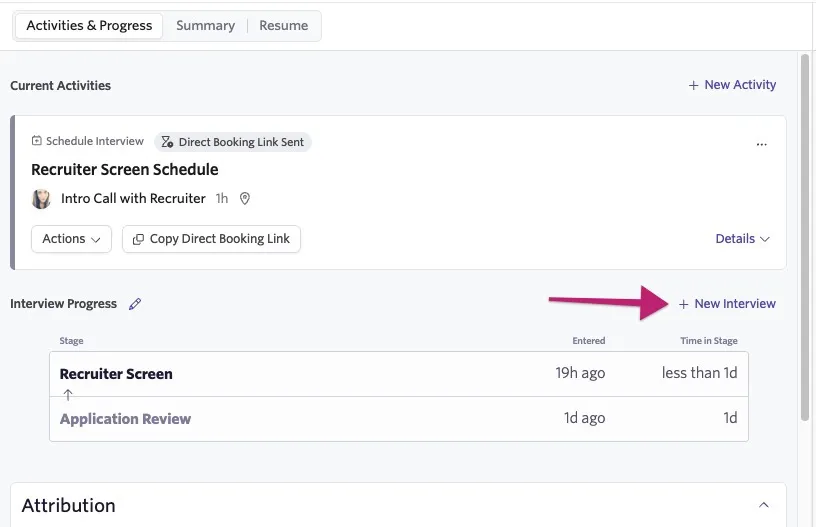
- Select Create Direct Booking Link.
- Set the interview details (type, location, interviewers, and organizer) in the pop-up.
The interview type you select determines the interviewer instructions and feedback form.
- Click Create Booking Link.
- Select Share via Email or click Copy Link to send it via another channel.
- If you selected Share via Email, the email editor appears, populating the Direct Booking Request email template set by Org Admins in Setting Scheduling DefaultsScheduling Defaults. Click Send to send.
Generating candidate availability links for one-off interviews
To generate a link:
- Click + New Interview > Schedule Interview > New Interview.
- Navigate to the Template tab in the left-hand menu.
- Click Add Shared Interview to define the interview events.
- Click Configure Interviewers to assign the team.
- Navigate to the Current tab and click Create Candidate Availability Link.
- On the candidate profile, hover over Request Candidate Availability to copy the link or draft an email.
Only one direct booking or candidate availability link can be active under a single interview activity. If you try to create another link while a previous link is still active, you receive an Active Meeting Request already exists error.
Editing the availability window
Prior to sending candidate availability links, you can specify a window of dates for candidates to submit their availability.
- Click Schedule on the interview activity.
- Hover over Request candidate availability and click Edit Availability Window.
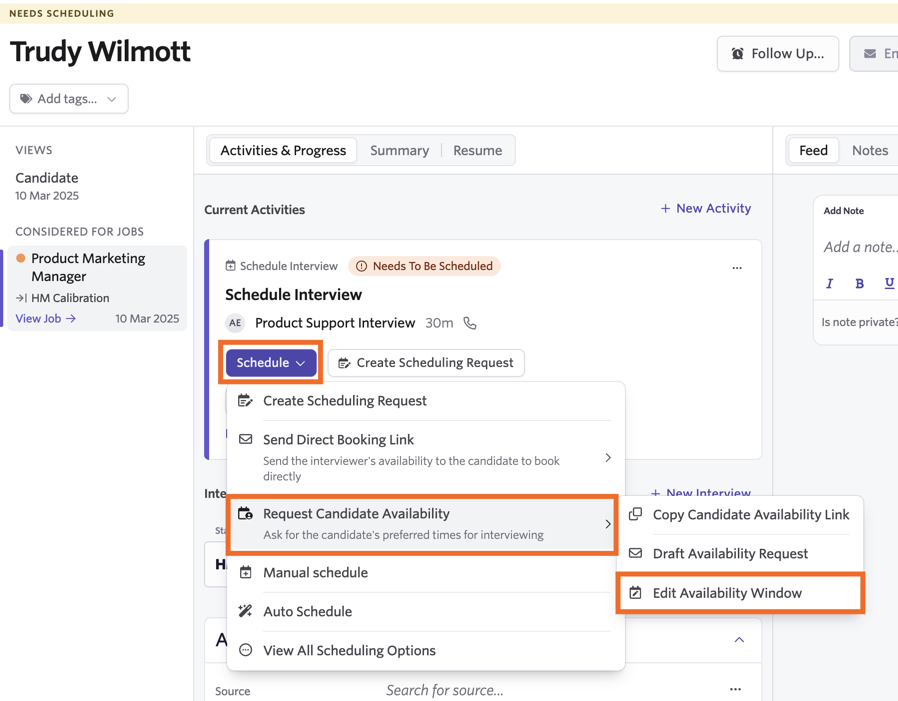
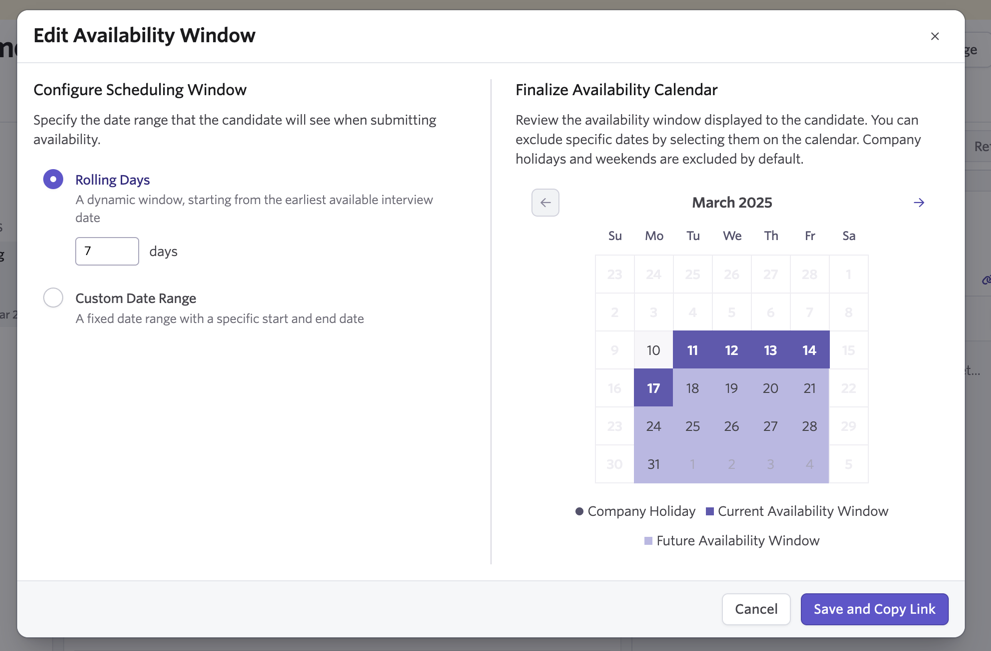
- Choose Rolling Days or Custom Date Range:
- Rolling Days: A dynamic window starting from the earliest available interview date. The window adjusts depending on when the candidate clicks the link. For example, if the window is set to 14 days and the candidate clicks the link on the 1st, they see availability up until the 15th. If they return on the 3rd, they see availability up until the 17th.
- Custom Date Range: A fixed start and end date (or just an end date) that remains the same regardless of when the candidate visits the link.
- Once you establish your scheduling window, finalize your availability window. To remove or add dates within the availability window, click them on the Finalize Availability calendar.
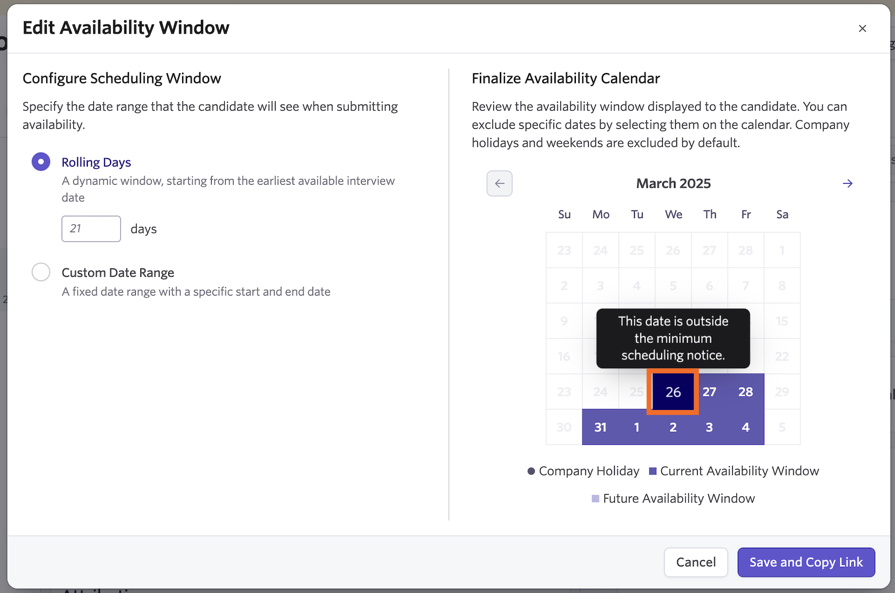
If you see a date grayed out, it is outside your minimum notice. Hover over it to confirm.
Company holidays and weekends are excluded by default.
- Click Save and Copy Link to apply changes and copy the link to send to the candidate.
What the candidate sees
Candidates land on a page that uses your organization's Theme settings.
- For direct booking:
- Candidates initially enter a landing page that displays the interviewer's or organizer's avatar. The avatar displayed depends on the setup. If one specific interviewer is assigned to a one-on-one interview, their avatar appears. Otherwise, the meeting organizer's avatar appears.
- The candidate can select a date on the calendar and is shown available time slots based on the interviewers' calendars.
- Once the candidate selects a time and clicks Book, everyone receives a calendar invite.
- They can reschedule by selecting Reschedule using the same link.
If Reschedule Limits have been set up on the interview plan for this interview, there may be limits to how many times a candidate can reschedule and how close to the interview they're allowed to reschedule. See Setting up Schedule Interview Activities for more on these settings.
- For candidate availability:
- Candidates see a landing page followed by a calendar date picker.
- Once they select dates and click Next, they can specify their available hours on each day.
- The candidate clicks Submit to share their availability, and the meeting organizer receives a notification to finish scheduling manually.
You can preview what the candidate sees by navigating to the links yourself.
Scheduling interviews after receiving availability
Once a candidate submits availability, the organizer is notified and the interview activity on the candidate's profile is updated.
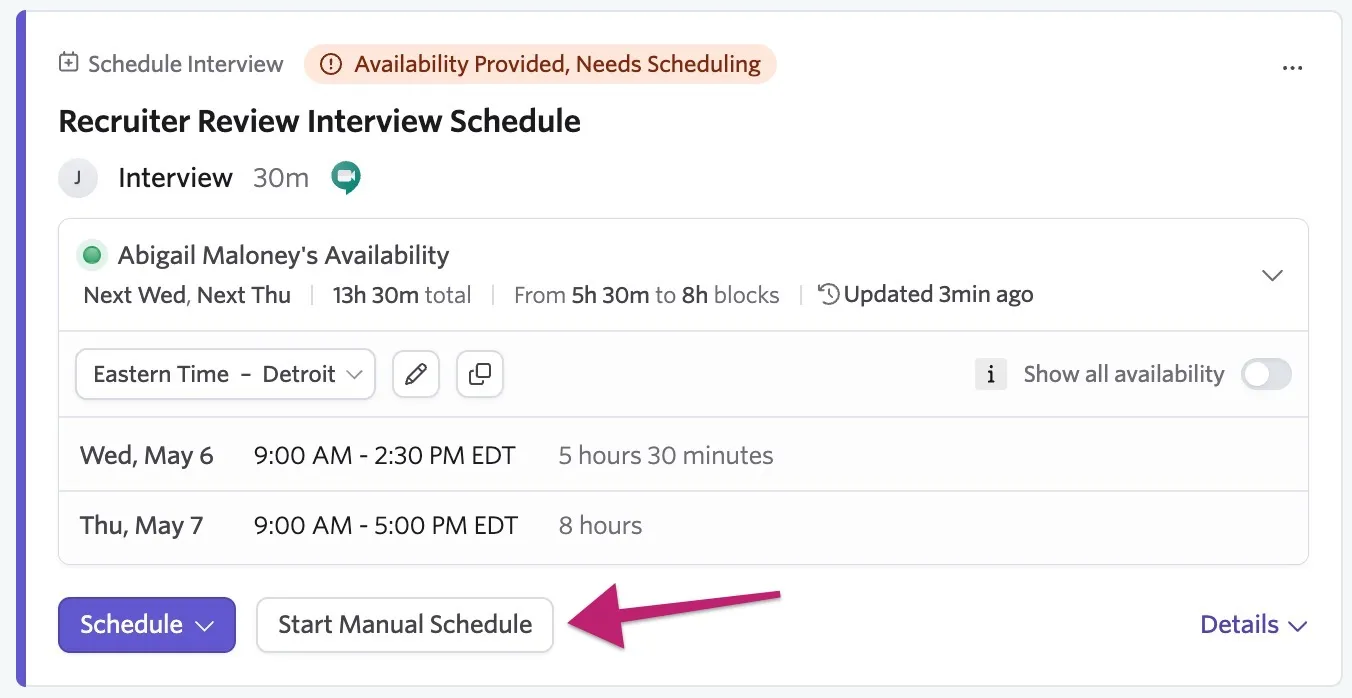
- Click Start Manual Schedule on the interview activity.
- Click the Interview Date field to see the candidate's available slots — dates with availability are marked with a green dot on the calendar.
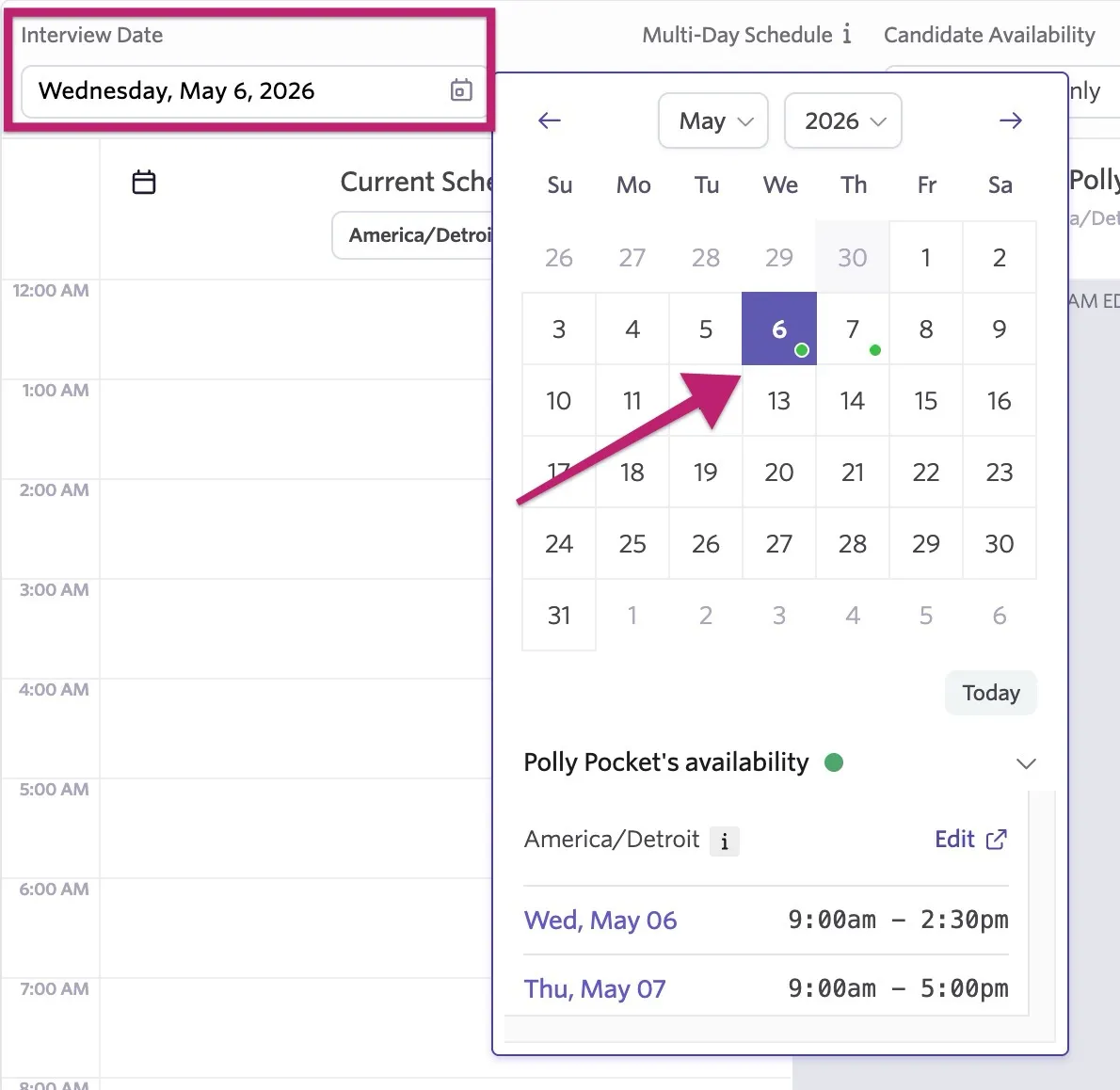
- Use the Candidate Availability dropdown to compare the candidate's availability to the interviewer's calendar, or use additional menus to include room, video conferencing, or additional employee calendars.
- Click Configure Communications then Schedule to book the interview.
FAQ
Why is direct booking unavailable on my job template?
The template itself is not an active job. This message disappears on jobs generated from the template.
Why do I see a "Missing Value For" message in an email template?
This occurs when the data Ashby is looking for doesn't exist yet, such as trying to send a link before the activity is generated or the link is created.
How do I reschedule an interview?
You can find details in our article on Manually Scheduling InterviewsManually Scheduling Interviews. Candidates can also click Reschedule on their confirmation page if they used direct booking.
Can I invalidate a link after generating it?
Yes. To cancel a direct booking link, click Schedule on the interview activity, then Cancel Direct Booking Link. For availability links, click Actions then Cancel Candidate Availability Link.
Why am I getting an "Active Meeting Request already exists" error?
This happens if a direct booking link is already active for that activity. Click Cancel Direct Booking Link before generating an availability link.
Can I send both a direct booking and a candidate availability link to a candidate in one email?
If you have multiple schedule interview activities for a stage, multiple activities populate when you move the candidate to that stage. You can generate a direct booking link for one activity and a candidate availability link for the other. If you include both the Direct Booking Link and Candidate Availability Link substitution tokens in your email template, both pull the appropriate URLs from their respective activities.
Can I assign multiple locations to a direct booking link?
No. You can only assign one location to a schedule interview activity or direct booking link. It is not currently possible to assign multiple locations or set conditional locations.
Do candidate availability links take interviewer calendars into account?
No. These links only ask for the candidate's availability. You must manually cross-reference their times with your interviewers' schedules afterward.
Can candidates edit their availability after submitting?
Yes. They can use their original link to return to the confirmation page and click Edit Availability (if unscheduled) or Update Availability (if already scheduled). Changes are only saved if the candidate clicks Submit.