Bulk Import: Email Import
The email import feature lets you add candidates to Ashby by forwarding resume files to a specific email address. You can attach up to 10 resumes per email. A common use case for this feature is sharing the import email addresses with external recruiters. If a candidate sends their resume to a recruiter via email, the recruiter can forward it to Ashby using the import email address.
If you have many resume files you'd like to upload, contact [email protected]. We can assist with bulk uploads on the backend.
Accessing the feature
There are both job-specific and general candidate upload email addresses. You can access these email addresses in two places.
You can find all email addresses, including the general email address, on the Import via Email page in Admin, in the Data Management section.
To access the general candidate upload email address, select Upload Candidate on the Import via Email page. Uploading candidates via the general candidate upload email address adds them as a lead without considering them for a specific job.

You can also find job-specific email addresses on the Settings page of the corresponding job. These email addresses are only active on a job when the job is open.

Anyone with access to these email addresses can use them, so be thoughtful about who you share them with. We advise against sharing the email address directly with candidates or on your job board to avoid spam applications.
File requirements
Your files must meet the following requirements to be parsed as resumes:
- The file must be a PDF. Image files (e.g., .jpeg, .png, .gif) cannot be parsed as resumes and are ignored.
- The document must contain a name and at least one unique identifier, such as an email address, phone number, or social link, for the candidate profile to be created.
- You may attach up to 10 resumes per email.
Upload confirmations
You receive a confirmation email letting you know whether each resume was successfully uploaded. Uploads fail when Ashby cannot parse the file.
Common reasons a file won't parse include:
- The file is an image or GIF, rather than a text-based PDF (for example, a scanned document where someone photographed a page and converted it to PDF)
- The document is in an unexpected format, such as demographic information appearing in an unusual location
- The file doesn't include a name and identifier (email, phone number, or social link). Without these, Ashby can't create a candidate profile.
If a file can't be parsed, you need to manually create the candidate profile and upload the resume. Even when manually uploaded, the candidate's data is not automatically parsed from the resume.
Reviewing uploaded candidates
When you upload a resume, Ashby creates a candidate profile, parses the resume details and stores them in the Summary tab of the candidate profile, and makes the resume available to view in the Resume tab.
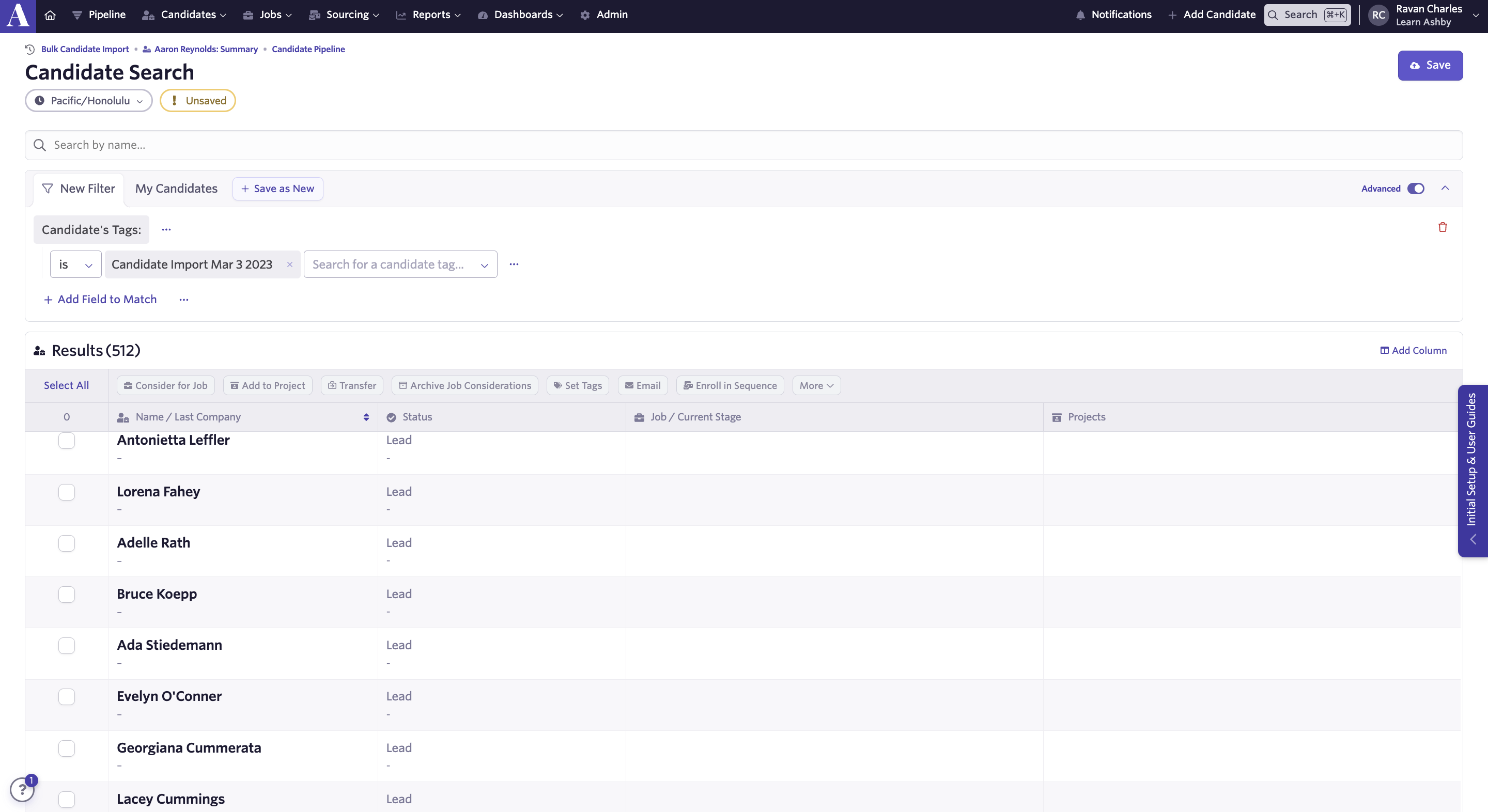
Ashby adds candidates uploaded using the general candidate upload email address to your account as leads, and you can find them using Candidate Search.
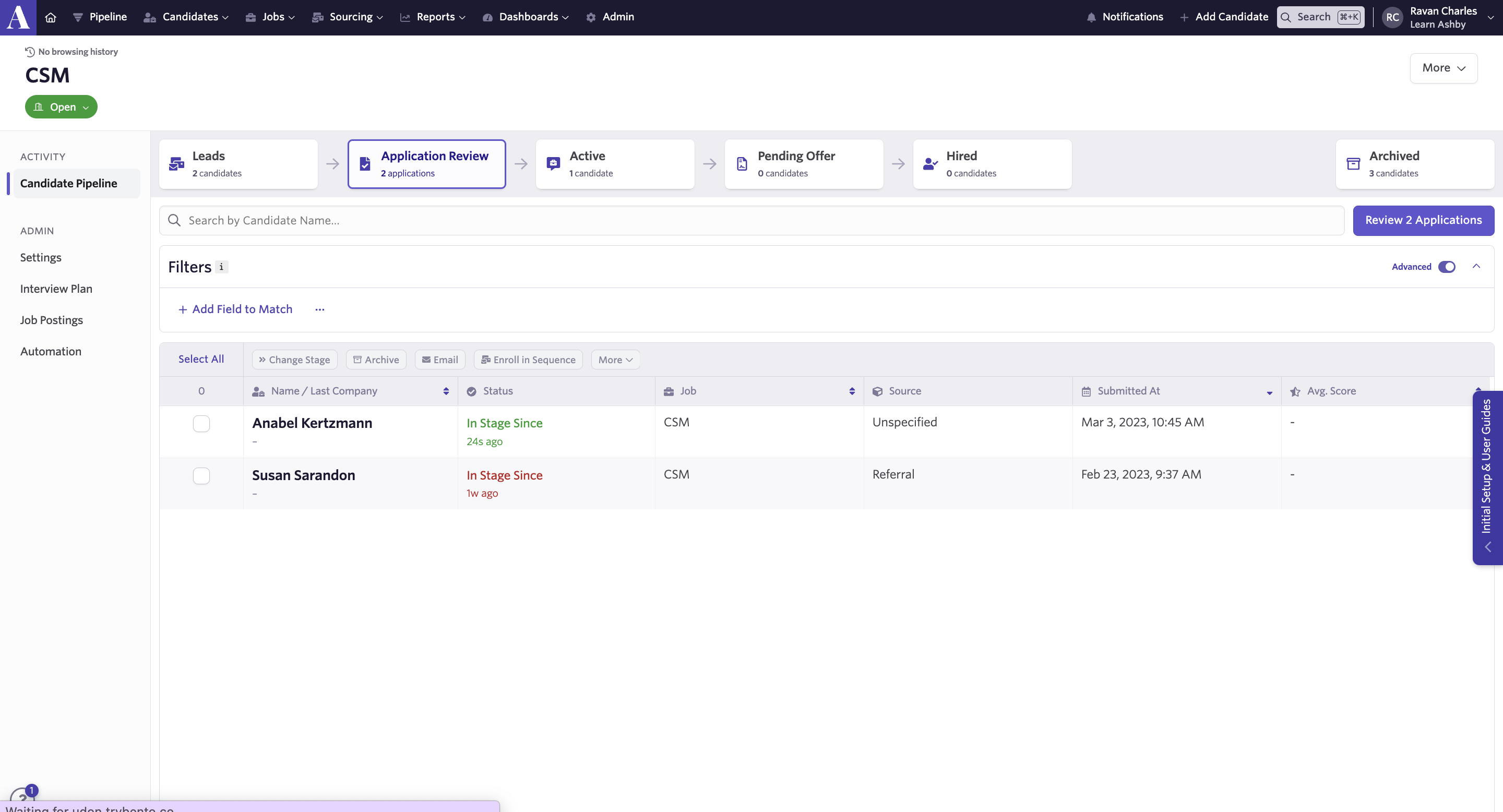
Ashby adds candidates uploaded using job-specific email addresses to the Application Review stage of the job they were uploaded to.
FAQs
Can I set up auto-forwarding for importing candidates via email?
This currently isn't possible. You need to send resumes to the provided email addresses manually to create candidates.
How can candidates submit their resume by email?
We advise against sharing the candidate upload or job-specific email addresses on your job board or directly with candidates, to avoid spam applications. We recommend advising candidates to send resumes to an internal company email address, and then forwarding those resumes to Ashby manually.
How does the email import handle duplicate candidates?
If you use the email import to send a resume for a candidate profile that already has any active job consideration, including one for a different job, Ashby flags the duplicate and sends an error. If the existing candidate profile has no active job considerations and only has archived job considerations, Ashby does not raise an error. Instead, Ashby updates the resume and creates a new job consideration.
