Ashby to S3 Data Share
The Amazon Web Services (AWS) S3 Data Share provides a simple and flexible way for organizations on the Enterprise plan to access their Ashby data directly in Amazon S3. This option supports teams who prefer to work with data in their own AWS environment, where downstream systems can consume and query that data as needed.
Permissions & access
The AWS S3 Data Share is available to organizations on the Enterprise plan only.
Foundations | Legacy Plus | Plus | Enterprise |
|---|---|---|---|
❌ | ❌ | ❌ | ✅ |
Overview: what you can expect
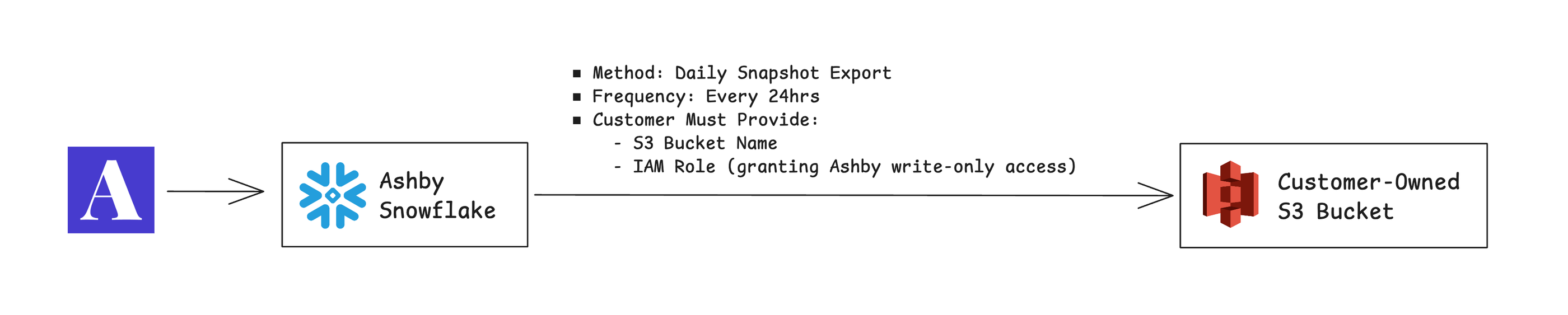
Once set up, Ashby delivers a complete, structured export of your data into a dedicated S3 bucket in your AWS account. Ashby organizes the data in a consistent format so your team can query it using any engine or platform of your choice (e.g., AWS Athena, Redshift, or Google BigQuery).
The data refreshes daily, and each cycle delivers a complete copy of your dataset to your S3 bucket. This approach removes the need for you to handle deduplication, merging, or change tracking.
Setup: What you need to provide
To activate the S3 Data Share, your team creates an S3 bucket and an IAM role in your AWS account. Your Customer Success Manager provides the Ashby-specific values you need, and Ashby completes the remaining setup.
You do not need to grant access to any other AWS services or manage AWS credentials manually.
- Reach out to your Customer Success Manager to start the setup process. Ashby provides the Ashby IAM User ARN and your unique Snowflake External ID.
- Create or choose an S3 bucket in your AWS account for the daily data exports. The bucket name can be anything.
- If possible, use the us-east-1 (N. Virginia) region to avoid cross-region data egress from Ashby’s source environment.
- You can configure S3 lifecycle rules, such as deleting older data after 30 days, according to your data governance needs.
- Server-side encryption with AWS Key Management Service (SSE-KMS) is optional and supported.
- Create an IAM role for Ashby:
- In the AWS Console, navigate to IAM > Policies > Create Policy > JSON.
- Paste the permission policy JSON from the section below, replacing the bucket-name placeholder with the name of your S3 bucket. This policy allows access to objects in that bucket only.
{
  "Version": "2012-10-17",
  "Statement": [
    {
      "Effect": "Allow",
      "Action": ["s3:ListBucket", "s3:GetBucketLocation"],
      "Resource": "arn:aws:s3:::<your-bucket-name>"
    },
    {
      "Effect": "Allow",
      "Action": ["s3:PutObject", "s3:DeleteObject"],
      "Resource": "arn:aws:s3:::<your-bucket-name>/*"
    }
  ]
}- Save the policy and remember its name.
- In the AWS Console, navigate to IAM > Roles > Create Role > Custom Trust Policy.
- Paste the trust policy JSON from the section below. This policy allows Ashby’s IAM user to assume your role using the unique Snowflake External ID.
{
    "Version": "2012-10-17",
    "Statement": [
        {
            "Effect": "Allow",
            "Principal": {
                "AWS": "arn:aws:iam::685689791302:user/iif00000-s"
            },
            "Action": "sts:AssumeRole",
            "Condition": {
                "StringEquals": {
                    "sts:ExternalId": "<ashby-external-id>"
                }
            }
        }
    ]
}- Select Next, select the permission policy you created on the Add Permissions page, and select Next.
- Enter a role name, and select Create Role.
- Send your Customer Success Manager the following details:
- Your S3 bucket name.
- The IAM role ARN for the role you created.
- After Ashby receives these details, Ashby connects your role to your dedicated S3 integration and triggers the first sync to validate access.
- Wait for Ashby to confirm that setup is complete. Your first data delivery arrives the following morning, Pacific Time, and continues daily thereafter.
What you see in S3
On each sync cycle, your bucket receives a set of Parquet files representing the entirety of your Ashby data, structured in the following format:
Ashby organizes these exports for simple downstream use, whether you're loading them into a warehouse or querying directly with an engine like Athena.
With each successful sync, Ashby updates a manifest.json file in your bucket. The file includes the following:
- The sync_dtm for the latest successful sync (i.e., the most up-to-date folder for each table in the structure above)
- The list of tables and the row count for each synced table, with their column names and data types listed
The list of included tables and their schema are also available in the Ashby Data Share schema spreadsheet. You can find an entity-relationship diagram (ERD) for the current set of shared tables in the Ashby Data Share documentation.
Related data sharing options
If your organization uses Snowflake, you can also use our Enterprise Snowflake Data Share feature, which provides direct access to your Ashby data from within your own Snowflake instance. See Ashby to Snowflake Data ShareAshby to Snowflake Data Share for more details.
FAQ
How often does the S3 data refresh?
The S3 Data Share refreshes data once per day.
Is the data provided as a delta sync or snapshot?
Each day, Ashby delivers a full snapshot of your data, with the snapshot date indicated in the folder structure.
What data is provided in the data share?
The list of included tables and their schema are available in the Ashby Data Share schema spreadsheet or our Entity Relationship Diagram (ERD).
What information does Ashby provide before I configure AWS?
Ashby provides an IAM User ARN and a Snowflake External ID. Use both values when you configure the IAM role trust policy.
What information do I send to Ashby after I configure AWS?
Send your S3 bucket name and IAM role ARN to your Customer Success Manager so Ashby can complete the setup.
When do I receive my first data delivery?
After Ashby confirms that setup is complete, your first data delivery arrives the following morning, Pacific Time. Data continues to refresh daily.