Ashby MCP Server (Beta)
The Ashby Model Context Protocol (MCP) server lets AI models and agents access and interact with your Ashby data through a standardized interface. Connect it to Claude, ChatGPT, Cursor, or any other MCP-compatible tool to query your recruiting pipeline, prepare for interviews, and take actions in Ashby—all without leaving your AI client.
Prerequisites
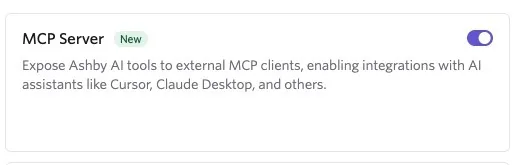
An Org Admin must enable the MCP Server toggle before users in your organization can connect. Navigate to Admin > Organization Setup > Opt-In Features and turn on MCP Server.
Permissions & access
The MCP server is available on all Ashby plans.
Foundations | Legacy Plus | Plus | Enterprise |
|---|---|---|---|
✅ | ✅ | ✅ | ✅ |
The MCP server is not available to Analytics-only organizations.
Org Admins can enable and manage the MCP Server toggle in Admin settings. Once enabled, Elevated Access users in your organization can connect their own account. Only data visible based on the user's Ashby permissions level will be available when connected to the MCP server.
Authentication
The MCP server authenticates each user individually via OAuth. Every user completes their own OAuth flow during setup, so the server only returns data that user can already see in Ashby. A user not involved in a hiring process cannot query candidates or roles they do not otherwise have access to.
Set up your MCP client
The Ashby MCP server is client-agnostic and works with any MCP-compatible tool.
The server URL is:
Select your client below for setup instructions.
ChatGPT
- In ChatGPT, open Settings > Apps and search for Ashby, or use this link: https://chatgpt.com/apps?show_chat_button=true&q=Ashby
- Select Ashby and click Connect.
- Follow the authorization prompts to complete.
Claude
- Go to Customize > Connectors and search for Ashby in the connectors list, or navigate there directly with this link: https://claude.ai/directory/connectors/dc1671e0-b14c-47b8-a625-e835ae4067ba
- Select Ashby and click Connect.
- You'll be prompted to login to Ashby (if not already) and select Approve in the MCP access window.
Cursor and other IDEs
- Open Cursor Settings > Tools & MCPs > New MCP server.
- Paste the following into your configuration:
- Save and restart Cursor. When you use an Ashby tool for the first time, complete the OAuth flow to connect your workspace.
Glean
- In Glean: Admin Console > Platform > Tools > Add
- Under Add pre-set tools, go to the MCP servers tab and select a template.
- Point it at our server URL: https://mcp.ashbyhq.com/mcp/v1
- Follow the pre-filled connection flow.
Gemini CLI
Ashby's MCP server supports dynamic client registration and so can be configured with Gemini CLI. To do this:
- Add the MCP using the command gemini mcp add --transport http ashby https://mcp.ashbyhq.com/mcp/v1
- Complete the auth process. For more on Gemini CLI's auth process, check out their MCP server guide.
- Once you have added the server, restart the Gemini CLI (or run /mcp reload if the session is active) and check the status using the built-in command /mcp list
You should see your new server listed with a "Connected" status.
Available tools
Once you've connected the Ashby MCP server, just describe what you want in plain language and your MCP client will pick the right tools and run them for you. Below is the list of available tools. Ashby adds more tools over time, including additional write actions. To request a tool, use the submit_mcp_feedback tool described below.
MCP tool inputs and outputs may change without notice. If you need a stable contract for either, build against our public API instead.
Finding people and records
search_records_by_name — Resolves a name to a record. Supports candidates, jobs, applications, and email templates. This is the starting point for most questions, such as "find the candidate Jordan Lee" or "pull up the Senior Designer job."
filter_records — Finds records matching specific criteria, and can return a total count instead of a list. Supports candidates, applications, jobs, job postings, openings, scheduled interviews, and offers. For example: "how many candidates are in the interview stage for the Sales role" or "show me applications that involve me."
describe_object_fields — A behind-the-scenes helper that discovers which fields to filter on for a given record type before calling filter_records. You do not invoke this directly, but it is what lets filtering work reliably across all supported record types.
get_record_details — Pulls the full details of records you have already located. Supports jobs, job postings, applications, email templates, openings, scheduled interviews, and offers.
get_candidate — Pulls information from a candidate's profile: resume, interview feedback, emails, texts, notes, interview transcripts, referrals, follow-ups, form submissions, and more. Use this for questions like "summarize this candidate's background" or "did this candidate mention anything about relocation?"
Interviews and feedback
get_upcoming_interviews — Lists your upcoming interviews with candidate names, job titles, times, and links. Ask "what interviews do I have this week?"
get_interview_details — Pulls a detailed prep briefing for a specific interview: candidate background, resume summary, the panel, and the hiring team. Use this right before an interview.
get_interview_plan — Shows the stages a candidate moves through for a given job or application.
get_submitted_feedback — Pulls up scorecard feedback you personally submitted for a candidate or interview. This only shows your own feedback, not other interviewers'.
Pipeline and your to-do list
get_job_pipeline — Shows how many candidates are at each stage of a job's pipeline, and can compare multiple jobs at once. Ask "how is the pipeline looking for the Engineering roles?"
get_pending_tasks — Lists your pending tasks in Ashby: scorecards you owe, approvals waiting on you, follow-ups, candidate reviews, and survey requests. Ask "what do I need to do today?"
Making changes
create_candidate — Creates a new candidate with name and contact details.
add_note_to_candidate — Drafts a note on a candidate's profile for you to confirm before saving. Can also reply to an existing note.
change_application_stage — Moves a candidate's application to a different stage in the interview process for that job.
consider_candidate_for_job — Adds a candidate to a job by creating a new application at the first stage of that job's interview process.
Getting help with Ashby
search_product_docs — Answers questions about how to use Ashby by searching the product documentation and returning an answer with links to relevant articles. Use this for "how do I" questions, such as "how do I set up an approval chain?" or "how do I create a job posting?"
Giving feedback
submit_mcp_feedback — Sends feedback to the Ashby team if the MCP server hits a limitation or you have a suggestion. If something is not working or you wish the server could do something it cannot, use this tool to let us know.
Rate limits
Ashby MCP enforces two separate rate limits to keep the service reliable:
- Requests: 120 per minute, per auth token.
- Tool calls: 120 tool-budget units per minute, per user-and-organization pair. Most tools cost 1 unit per call. filter_records costs 2 units.
What to do if you're rate-limited
Most workflows won't hit these limits. MCP clients typically make tool calls at a rate that's within these limits as they work through a task. If you do see a rate-limit error, prompt your MCP client to run fewer operations in parallel against Ashby MCP, or wait a moment before retrying.
FAQs
Can the MCP server access data I cannot see in Ashby?
No. The MCP server uses user-level OAuth, which means it authenticates as you and inherits your existing Ashby permissions. It cannot return candidates, jobs, or other records you do not already have access to in Ashby.
Do other users see the data I query through the MCP server?
No. Each user connects their own account through a separate OAuth flow. Queries and responses are scoped to your individual session and your Ashby permissions.
Can I use the MCP server with a client not listed here?
Yes. The Ashby MCP server is client-agnostic and works with any MCP-compatible tool. Point your client to https://mcp.ashbyhq.com/mcp/v1 and complete the OAuth flow when prompted.
What should I do if a tool is not working as expected?
Use the submit_mcp_feedback tool in your AI client to send feedback directly to the Ashby team. Include as much detail as possible about what you asked and what the server returned.