Application Forms
Ashby provides a convenient default application form that is pre-configured in your site, or you can create customized application forms that can be applied to one or many jobs. In this guide, we cover customizing the default application form and creating alternate forms that can be linked to your jobs.
Permissions & access
Application forms are available on all Ashby plans.
Foundations | Legacy Plus | Plus | Enterprise |
|---|---|---|---|
✅ | ✅ | ✅ | ✅ |
- To create and update default or shared application forms, you must have Organization Admin permissions.
- To update an application form on a job posting, you must be an Elevated Access user with edit permissions on that job.
Application forms overview
Application forms are templates that define what candidates fill out when they apply to a job posting. Ashby gives every organization a default application form, lets admins create additional reusable forms in Admin, and lets individual job postings either link to a shared form or unlink and customize their own version.
The main entities to know
Entity | What it is | Where it's managed | How it's used |
|---|---|---|---|
Default application form | The org-wide starter form that is automatically included on job postings unless changed. | Admin > Jobs & Applications > Application Forms | Acts as the baseline form for postings across the organization. |
Shared application form | A reusable form template meant to be used across multiple jobs and postings. | Admin > Jobs & Applications > Application Forms | Assigned from a posting via Change Link. |
Custom/job-specific application form | A posting-specific version created when you Unlink & Edit from a job posting; changes only apply to that posting. | Job > Job Postings > select posting > Application Form | Useful when one posting needs exceptions from the shared or default version. |
Application request | A way to send an application form to sourced or referred candidates who did not apply normally. | Manual from candidate profile, or Admin > Jobs & Applications > Application Request Automations | Uses the form associated with the job's default job posting. See Application Requests for more info. |
Where forms are assigned
Application forms are assigned on the job posting, not on the job itself. To set or change one, navigate to Job > Job Postings > select the posting > Application Form tab.
From there, admins (or users with the right access) can:
- Click Change Link to switch the posting to a different shared application form.
- Click Unlink & Edit to create a custom version just for that posting.
Where forms are edited
There are two editing locations, depending on the kind of form:
- Shared and default forms are created and edited in Admin > Jobs & Applications > Application Forms.
- Custom/job-specific forms are edited from the Application Form tab on the job posting after using Unlink & Edit.
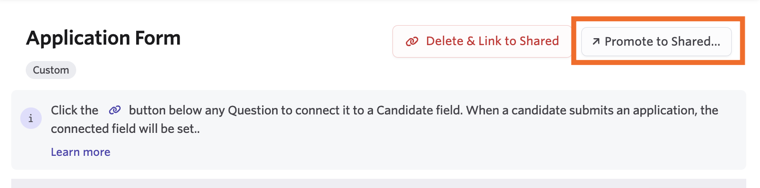
If you create a useful custom form at the posting level, you can click Promote to Shared so it becomes reusable in Admin for other jobs and postings.
What admins should know before setup
- Every job posting starts with the default form unless you swap it out.
- Reusable forms are shared; one-off forms are custom. Shared forms are better when you want consistency across jobs.
- Custom/unlinked forms have reporting tradeoffs. You cannot filter by application form answers on an edited or custom form. Shared forms are recommended because custom forms are not reportable unless connected via form field connectors.
- Form field connectors let you map an application question to a candidate field so submitted answers populate candidate data and can be backfilled to earlier applications. Learn more at Form Field Connectors .
- Private questions are available for some field types; candidates can answer them, but responses are only visible to Organization Admins and users with the right Admin Private access on the job.
Recommended setup approach
- Start by defining your default form in Admin for questions most jobs should ask. See Customize the default application form below to learn how.
- Create additional shared forms in Admin for common variants by team, department, or workflow. See Create application forms in Admin below.
- On each job posting, choose the right shared form via Change Link.
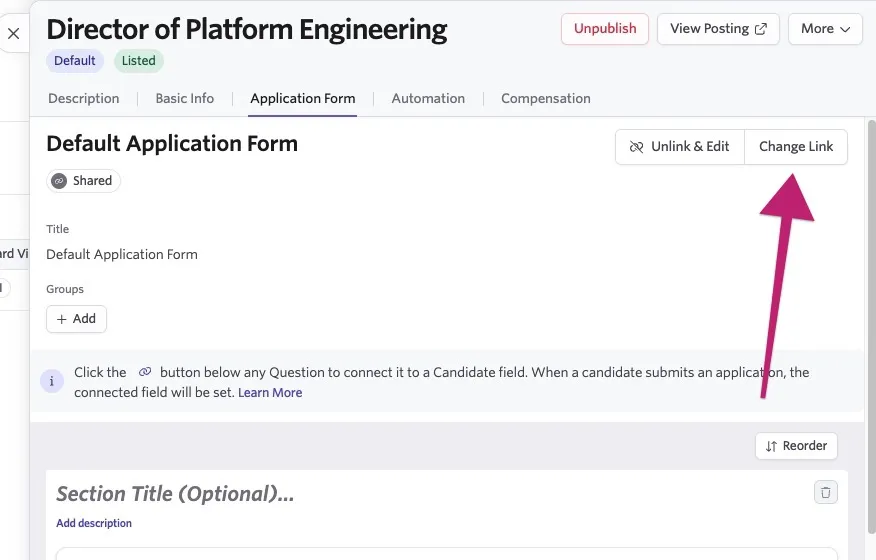
- Only use Unlink & Edit when a posting truly needs a one-off variation, as this reduces consistency and reporting flexibility.
- Use form field connectors for any application answers you want to reuse in candidate fields, automations, or reporting workflows.
Customize the default application form
The default application form can be customized and used as the starting point for all subsequent application forms.
To customize the default application form:
- Navigate to Admin > Organizational Settings > Application Forms.
- Locate the Default Application Form.
- Edit the existing questions, or scroll to the bottom of the form to add new ones.
- Once you're finished customizing, click Save Form Changes at the bottom of the form.

Create application forms in Admin (recommended)
You can create more application forms for your jobs or teams in Admin > Organizational Settings > Application Forms.
To create a reusable application form that can be linked to many jobs:
- Navigate to Admin > Organizational Settings > Application Forms.
- Click + New, then give your form a title.

- Click Add Question to add a field.

- Select the field type, then input the prompt. See the available application form field types below for a description of each field type and important notes.

You can also reorder questions and sections by either clicking and dragging them, or by using the Reorder button on the form and determining the question order from there.

- Once you have added all the questions and sections, click Save Form Changes.
Available application form field types
- Short Answer — Single line of unformatted text. LinkedIn URL responses are auto-populated on the candidate's profile.
- Long Unformatted Answer — Multiple lines of unformatted text.
- Phone — Only domestic or international phone numbers.
- Email — Only valid email addresses.
- Multiple Choice — Select a single option.
- Checkboxes — Select multiple options.
- Date — Only dates that can be selected via a date picker.
- Yes/No — Yes, no, or, if not required, no answer.
- Number — Only allows whole numbers (e.g. 1) or decimals (e.g. 1.5).
Number field type does not allow numbers (such as zipcodes) starting with 0. Use Short Answer for zipcodes or other fields that may have leading zeros.
- Resume* — Upload a single file and set it to the candidate's resume field. Can only be added once to a form.
- Candidate's location — Set the candidate's location. Can only be added once to a form.
- Other location — Allow another location to be added to the referral.
- URL — A clickable link to a website.
- File* — Upload a single file.
- Candidate's Education History — See the candidate's education history. Can only be added once to the form. School names are standardized at submission, so variations, misspellings, and aliases ("MIT," "M.I.T.," "Massachusetts Institute of Technology") all resolve to a single school record.
When adding the candidate's education history field to your form, you can specify the information asked for. You can opt to include or exclude the school, degree, field of study, start and end date fields as needed. Check the Allow multiple entries checkbox to allow those completing the form to add multiple qualifications. You can also set a minimum and maximum number of entries using the Min and Max fields.
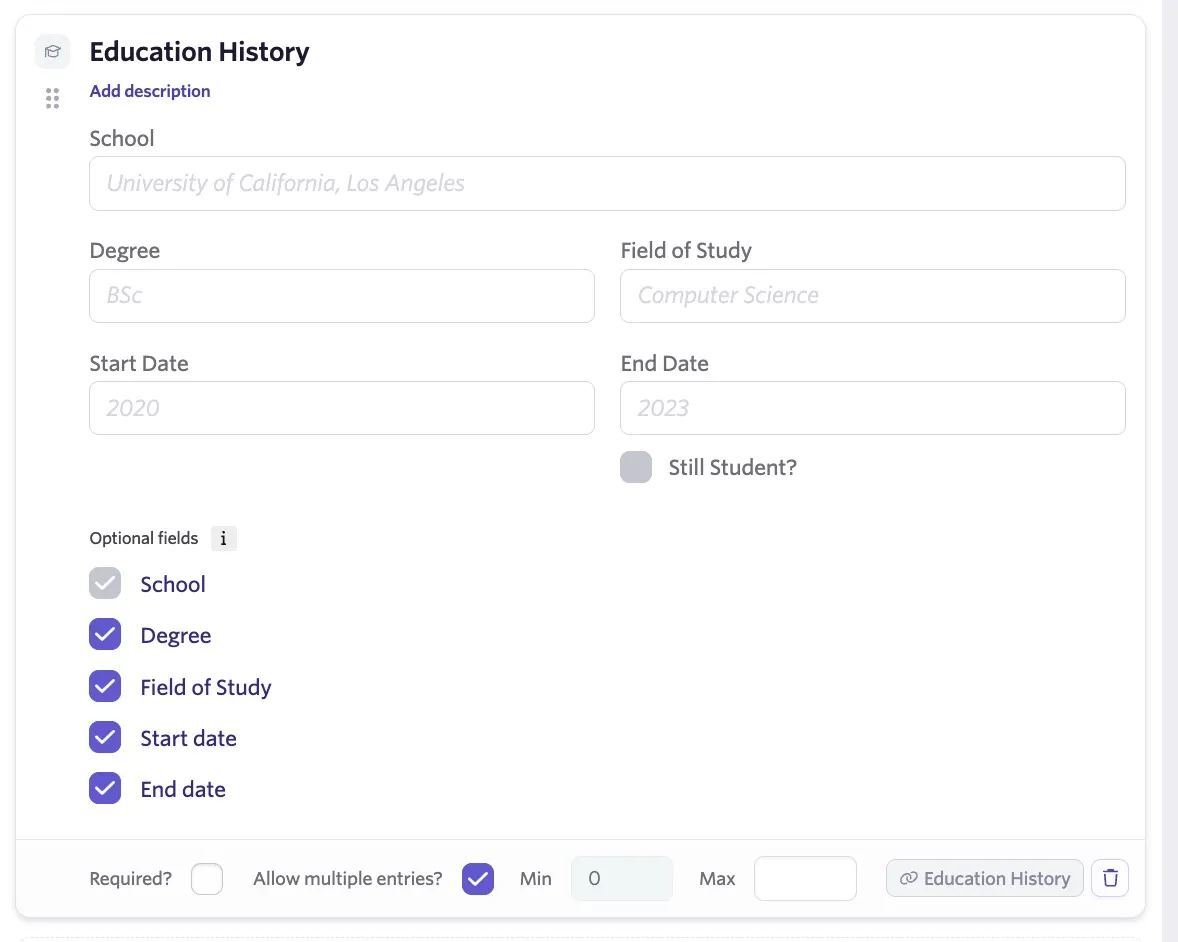
Information added to this field always completes the Education section of the candidate's profile.
Question settings
Required fields
All form question types support making fields required. To enable, check Required at the bottom of the question tile.

Private fields
Some form question types support private fields. These fields are visible to candidates, but their responses are only visible to Organization Admins and users with Elevated Access - Admin Private User Permissionspermissions on a job.
To enable, check the Private checkbox at the bottom of the question tile.
You can link application form answers to custom fields on a candidate's profile. Learn more in Form Field ConnectorsForm Field Connectors.

FAQs
Is conditional logic supported on the application form questions?
Yes, you can read more on this at Conditional Form Fields.
Can I automatically screen candidates based on their application form answers?
Yes. Check out Auto-Reject ApplicationsAuto-Reject Applications for more information.
What is the file size limit for resumes?
50MB is the maximum file size for resume uploads. Resumes need to be 16MB or smaller to be processed for full text searches and auto-filling application fields.
Can I promote a custom application form and make it into a shared application form that can be used across multiple jobs and job postings?
Yes. When editing a custom application form within a job's job posting, you'll see a Promote to Shared option. Click this and confirm the shared application form's title, then click Promote to Shared. You can then access the shared application form within Admin > Jobs & Applications > Application Forms.
Can I set up a form to add candidates to a project, rather than consider them for a role?
Check out Sourcing Forms for more information on creating a form that allows candidates to sign up for your talent pool.
Where can I view completed application forms on the candidate's profile?
Completed application forms can be accessed in the candidate's feed under the Forms tab.