Advanced Scheduling Metrics
If your company spends a significant amount of time on recruiting coordination, advanced scheduling metrics enable you to monitor and analyze the efficiency of your teams, identify potential bottlenecks, and uncover meaningful opportunities to improve. This article covers the scheduling reporting subjects and fields available to you, along with example reports and the prebuilt scheduling report templates.
Ashby's reporting suite includes several reporting subjects and filter fields for scheduling, letting you:
- See how your scheduling process is performing at a glance.
- Dig deep into granular details.
Prerequisites: Advanced scheduling metrics are included as part of the Advanced Scheduling Add-On. For more information, see Advanced Scheduling Automation Add-OnAdvanced Scheduling Automation Add-On.
Overview
Review the video below for an overview of the reporting subjects and fields.
Reporting subjects
Interview Schedule Versions
A coordinator attempting to schedule an interview may go through multiple iterations of scheduling efforts due to cancellations, modifications, or rescheduling.
Each time you confirm a new schedule for an interview (whether by modification or rescheduling), Ashby represents it as a new Interview Schedule Version.
For example, an onsite that is scheduled, then goes through three subsequent reschedules, produces four distinct Interview Schedule Versions. This is important because it provides you with a clear view of the actual scheduling volume happening across your team, as opposed to just counting each interview. Some interviews are simple, and some take a lot more effort.
Interview Schedule Versions have several distinguishing characteristics that provide visibility into the scheduling activities of your team and the reasons why schedules may have required some sort of change. Below is a list of the fields you can display or use as filters within your reporting.
A reschedule involves adjusting interview participants, start and end times, or amending the number of interviews. A modification is any other kind of adjustment (for example, updating the interview briefing or adding a Zoom link).
Fields
Field Name | Description |
|---|---|
Version | The numeric version of this schedule version (for example, the original schedule is 1 and the first reschedule is 2). |
Is Latest Version? | Whether this is the latest version of the interview schedule. |
Scheduled By | The user who scheduled this interview version. |
Scheduled By Type | The method used to schedule this interview version (for example, Auto-Schedule or Manual Schedule). |
Created At | The date and time when Ashby created this interview schedule version. |
Scheduled At | The date and time when this interview schedule version was scheduled. |
Cancelled At | The date and time when this interview schedule version was canceled (if applicable). |
Hold Requested? | Whether you used holds when scheduling this interview schedule version. |
Interviews Start At | The date and time the first interview starts for this interview schedule version. |
Interviews End At | The date and time the last interview ends for this interview schedule version. |
Number of Events | The number of events within the interview schedule version. |
Number of Interview Participants | The number of interviewers scheduled within the interview schedule version. |
Has Participant Decline? | Whether any interviewers participating in this interview schedule version responded to the calendar invite with Declined. |
Has Candidate Decline? | Whether the candidate participating in this interview schedule version responded to the calendar invite with Declined. |
Is Multi-Day Schedule? | Whether the events in this interview schedule version span multiple days. |
Version Schedule Type | The schedule type for the interview schedule version (for example, Original Schedule, Modification, or Reschedule). |
Schedule | Pull additional fields from the current interview schedule linked to this interview schedule version. |
Job Consideration | Pull additional fields from the job consideration linked to this interview schedule version. |
Location Type | The meeting location type for the interview (for example, In person, Zoom, or Google Meet). |
Report examples
Below are some common questions and examples of reports that can help you find the data points needed.
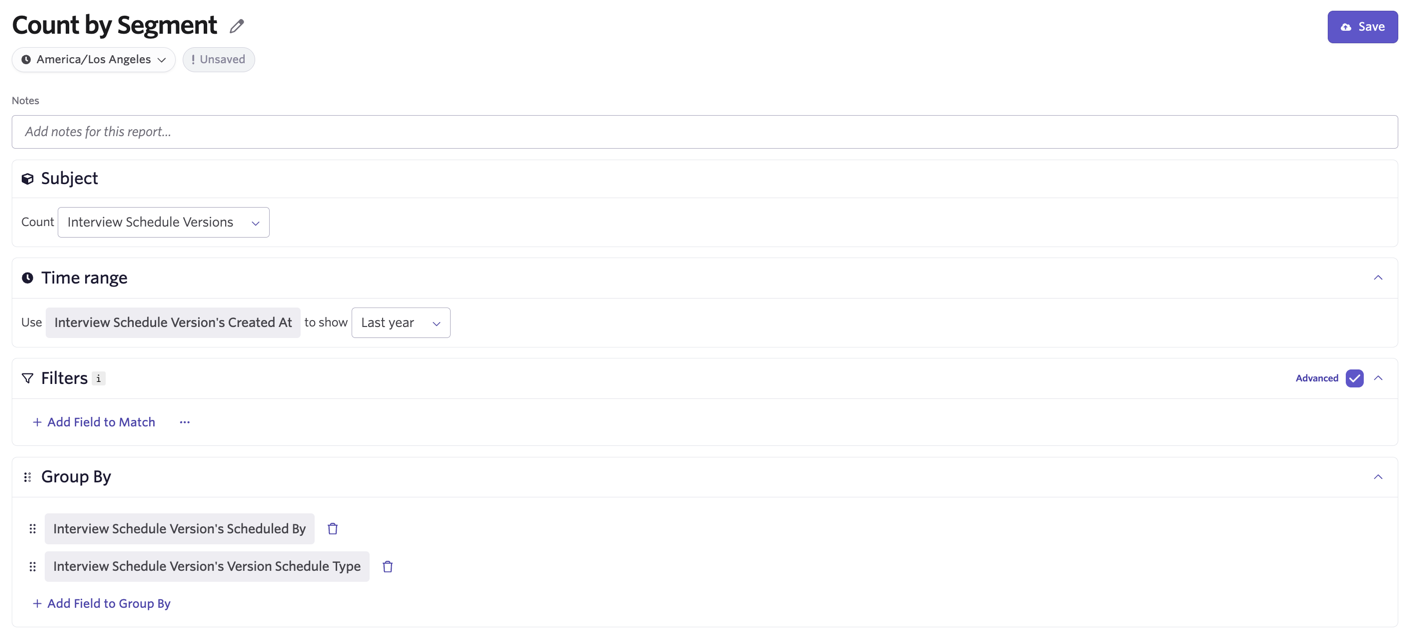
Question: How much of your scheduling effort is going towards initial interview scheduling versus reschedules over time? What does that look like by coordinator, job, or interview stage?
Report Type: Segmentation
Subject: Interview Schedule Versions
Time Range: Interview Schedule Version's Created At
Filters: Optional (you can filter by job, stage, department, and more)
Group By:
- Interview Schedule Version's Scheduled By
- Interview Schedule Version's Version Schedule Type
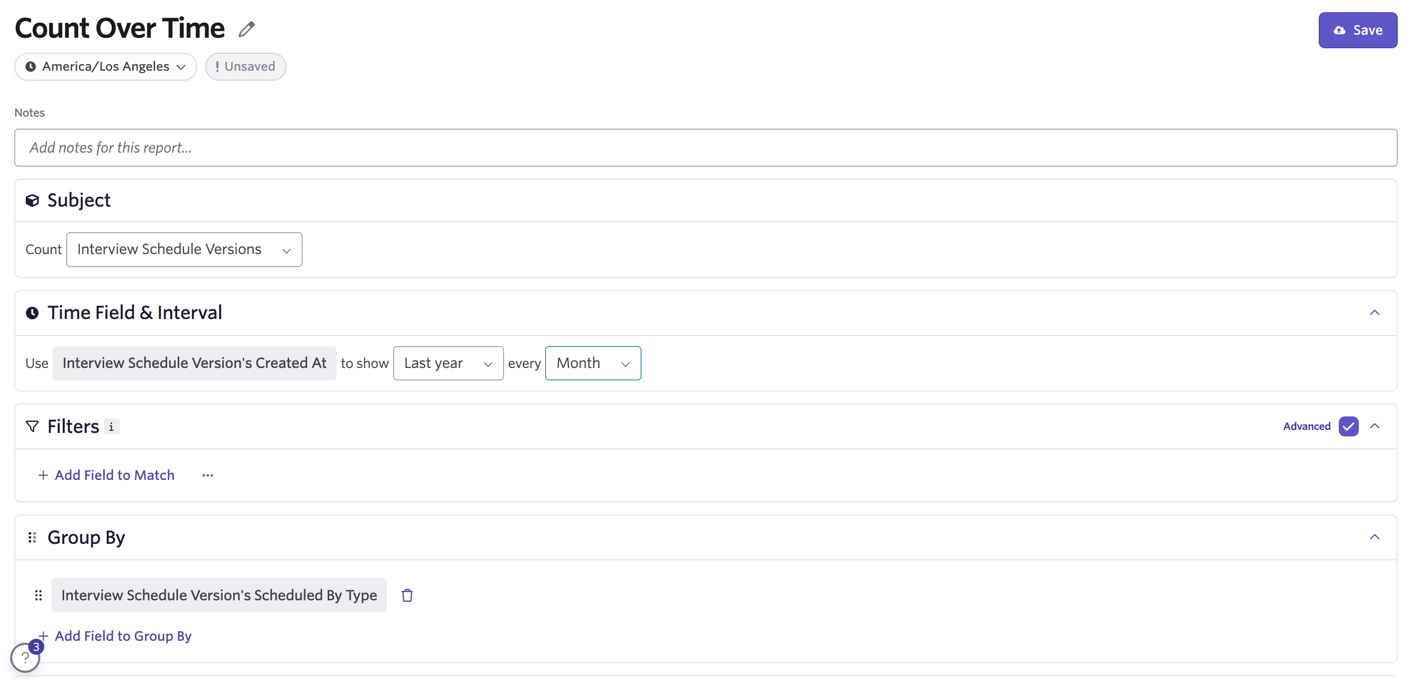
Question: Across all interview scheduling activity, how much is your team using each scheduling method?
Report Type: Count Over Time
Subject: Interview Schedule Versions
Time Range: Interview Schedule Version's Created At
Filters: Optional (you can filter by job, stage, department, and more)
Group By: Interview Schedule Version's Scheduled By Type
Interview Schedule Summaries
While Interview Schedule Versions provide granular views into each scheduling action, Interview Schedule Summaries enable you to get insights across all interview schedule versions for interview activities.
An onsite that goes through one initial scheduling and three subsequent reschedules has four versions, but only one summary.
Fields
Field Name | Description |
|---|---|
Latest Version Number | The total number of versions of this interview schedule (for example, if you rescheduled an interview once, this value is 2 — one for the original schedule and one for the reschedule). |
Title | The title of this interview schedule. |
Interview Stage | The title of this interview schedule's interview stage. |
Interview Stage Group | The title of this interview schedule's interview stage group. |
Original Version's Scheduled At | The date and time the original version of the interview schedule was scheduled at. |
Latest Version's Scheduled At | The date and time the latest version of the interview schedule was scheduled at. |
Scheduled By | The user who scheduled the interview schedule. |
Scheduled By Type | The method used to schedule the latest version of this interview schedule. |
Cancelled At | The date and time at which the latest version of the interview schedule was canceled. |
Original Version's Start Time | The start time of the first interview of the original version of the interview schedule. |
Latest Version's Start Time | The start time of the first interview of the latest version of the interview schedule. |
Latest Version's Number of Interview Events | The number of interview events within the latest version of the interview schedule. |
Latest Version's Number of Interview Participants | The number of unique interviewers scheduled to be a part of the latest version of the interview schedule. |
Availability Requested? | Whether you requested candidate availability for this interview schedule. |
Hold Requested? | Whether you used holds when scheduling this interview schedule. |
Used Direct Booking? | Whether you used direct booking links when scheduling this interview schedule. |
Had Participant Decline? | Whether any interviewers participating in this interview schedule responded to the calendar invite with Declined. |
Had Candidate Decline? | Whether the candidate participating in this interview schedule responded to the calendar invite with Declined. |
Version Schedule Type | The category of scheduling activity type across all versions of this schedule. |
Job Consideration | Pull additional fields from the job consideration linked to this interview schedule. |
Availability First Submitted At | The timestamp when availability was first submitted for this interview schedule. |
Availability Last Submitted At | The timestamp when availability was last submitted for this interview schedule. |
Availability Submission Count | The total number of availability submissions for this interview schedule. |
Version Schedule Type (Confirmed Only) | The category of scheduling activity type across versions after the initial confirmation, excluding any changes made during a hold. Original Schedule means no changes were made after you first confirmed the schedule. Useful for understanding the amount of disruption caused by changes to the interview schedule after confirming with the candidate. |
Stage Entered At | The time at which this interview schedule first entered its current stage. |
When reporting on Interview Schedule Summaries, if a summary includes any versions that were reschedules, Ashby classifies the summary as a Reschedule for the Version Schedule Type field (so if a summary has versions that are both modifications and reschedules, Ashby classifies it as a Reschedule). If a summary includes only modification versions, Ashby classifies it as a Modification. And if a summary only has a single initial version, Ashby classifies it as Original Schedule.
Report examples
Below are some common questions and examples of reports that can help you find the data points needed.
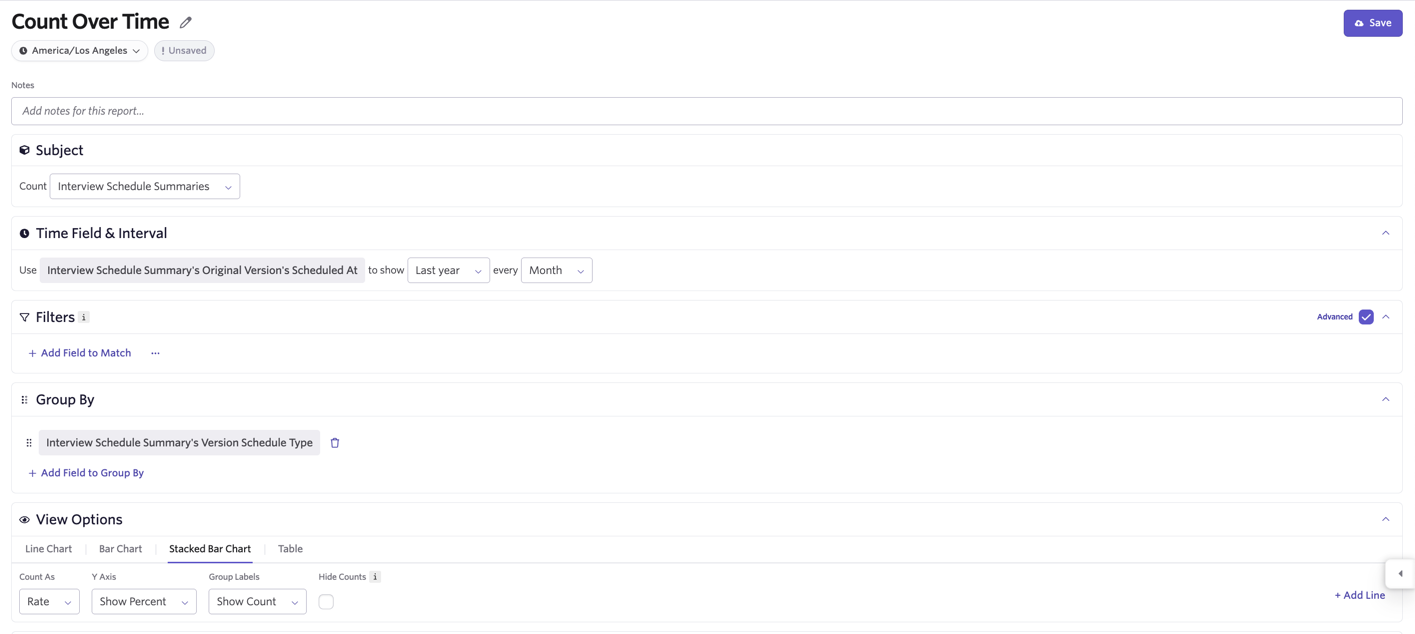
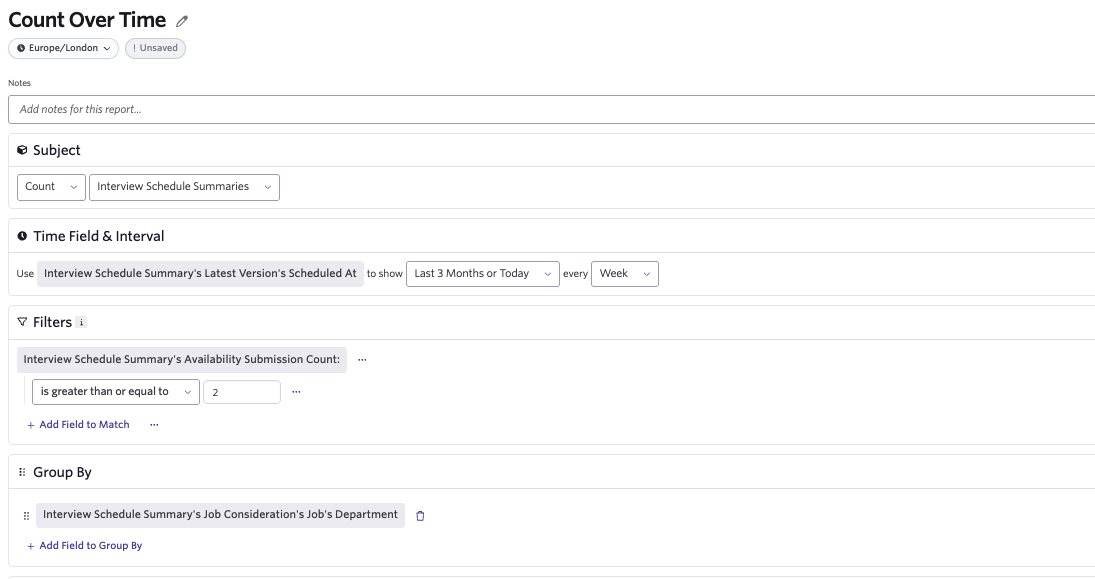
Question: How many interview schedules involved a rescheduling event at all (that is, across any version)?
Report Type: Count Over Time (or Segmentation if you want to look at a total figure for a timeframe)
Subject: Interview Schedule Summaries
Time Range: Interview Schedule Summary's Original Version's Scheduled At
Filters: Optional
Group By: Interview Schedule Summary's Version Schedule Type
Adjust your view options to show a percentage on the Y axis if you want to view this as a percentage.
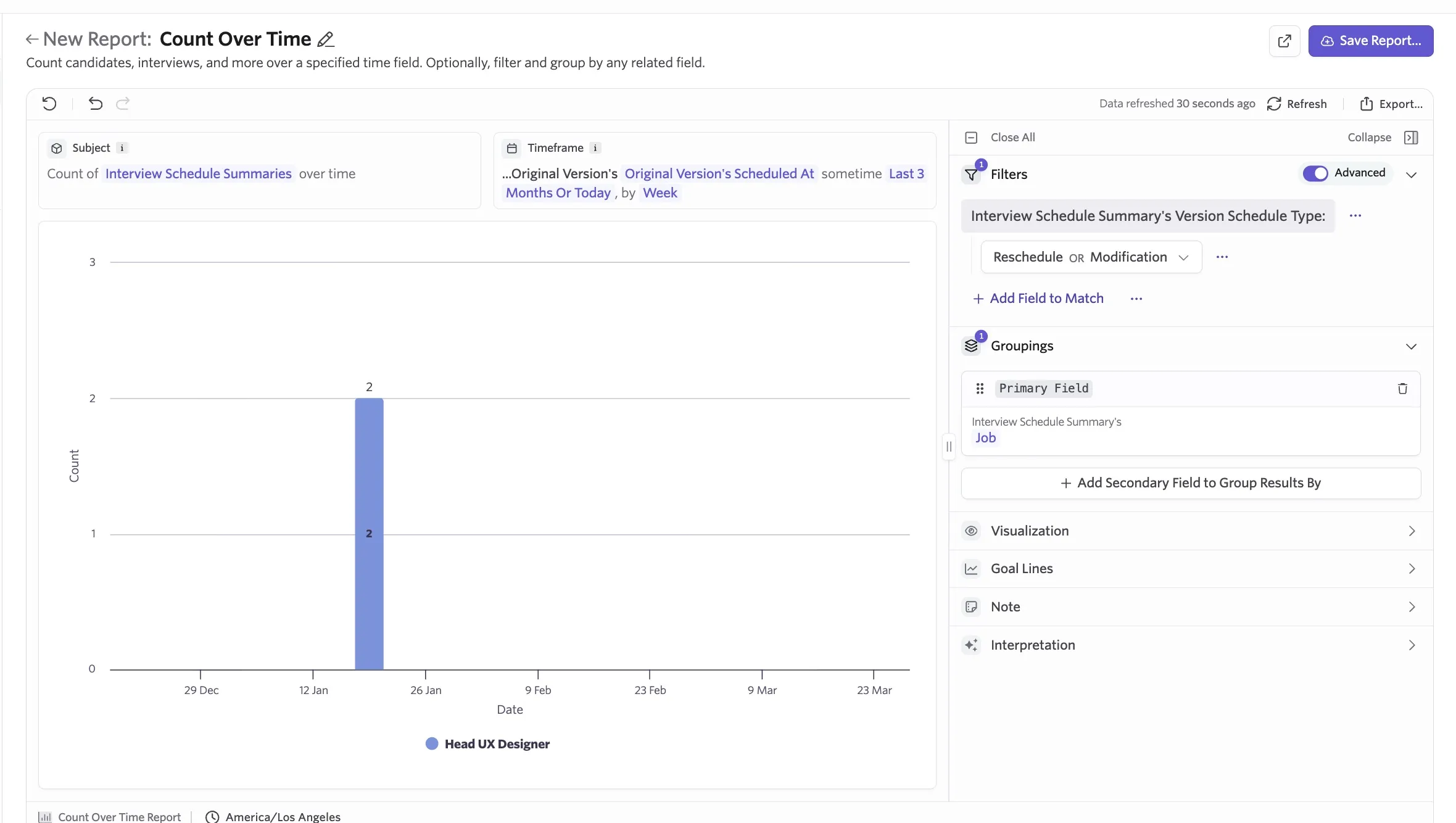
Question: How often are reschedules or modifications happening by department, job, interview stage, and more?
Report Type: Count Over Time
Subject: Interview Schedule Summaries
Time Range: Interview Schedule Summary's Latest Version's Scheduled At
Filters: Interview Schedule Summary's Version Schedule Type equals Reschedule OR Modification
Group By: Interview Schedule Summary's Job Consideration's Job, Interview Schedule Summary's Job Consideration's Job's Department, or Interview Schedule Summary's Interview Stage
Question: How many interview schedules involve a candidate entering their availability more than once across departments?
Report Type: Count Over Time
Subject: Interview Schedule Summaries
Time Range: Interview Schedule Summary's Latest Version's Scheduled At
Filters: Availability Submission Count is greater than or equal to 2
Group By: Department
Interviewer RSVPs
This subject is particularly helpful for understanding interviewer declines and improving interviewer habits around response promptness and interview attendance.
You can measure interviewer participation insights and trends on a granular level, with deep visibility into details like RSVP response times (how quickly do different participants respond to interview invites?) and notice times (how close to the time of the interview are participants responding?).
Fields
Field Name | Description |
|---|---|
Interviewer | The employee who is conducting the interview. |
Status | The interviewer's response to the interview's calendar invitation. |
RSVP Note | The note left by the interviewer when submitting their RSVP. |
Submitted At | The date and time the interviewer submitted the RSVP for the event. |
Interview Title | The title of the interview that the interviewer RSVP'd for. |
Interview Role | The interviewer's role for this interview. |
Interviewer Pool | The interviewer pool that this interviewer was chosen from. |
Is Feedback Required? | Whether the interviewer was required to leave feedback for this interview. |
Response Time (Hours) | The duration, in hours, between the invite being sent and the interviewer's response. |
Notice (Hours) | The duration, in hours, between the interviewer's response to the calendar invite and the start time of the interview. |
Was Rescheduled After? | Whether the interview was rescheduled after the interviewer submitted their RSVP. |
Schedule Version | Pull additional fields from the interview schedule. |
Report examples
Below are some common questions and examples of reports that can help you find the data points needed.
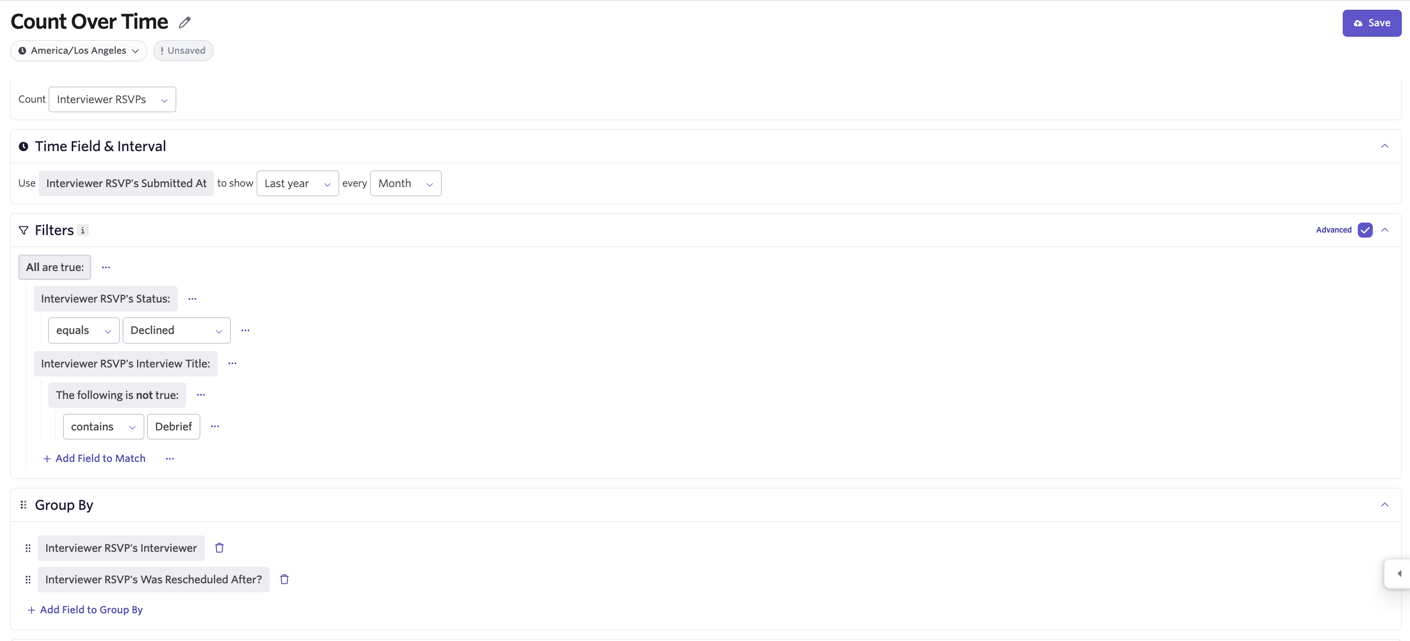
Question: Which participants are declining interviews most often?
Report Type: Count Over Time
Subject: Interviewer RSVPs
Time Range: Interviewer RSVP's Submitted At
Filters:
- Interviewer RSVP's Status equals Declined
- Interviewer RSVP's Interview Title does not contain Debrief
Group By:
- Interviewer RSVP's Interviewer
- Interviewer RSVP's Was Rescheduled After? (optional, to view reschedules based on declines)
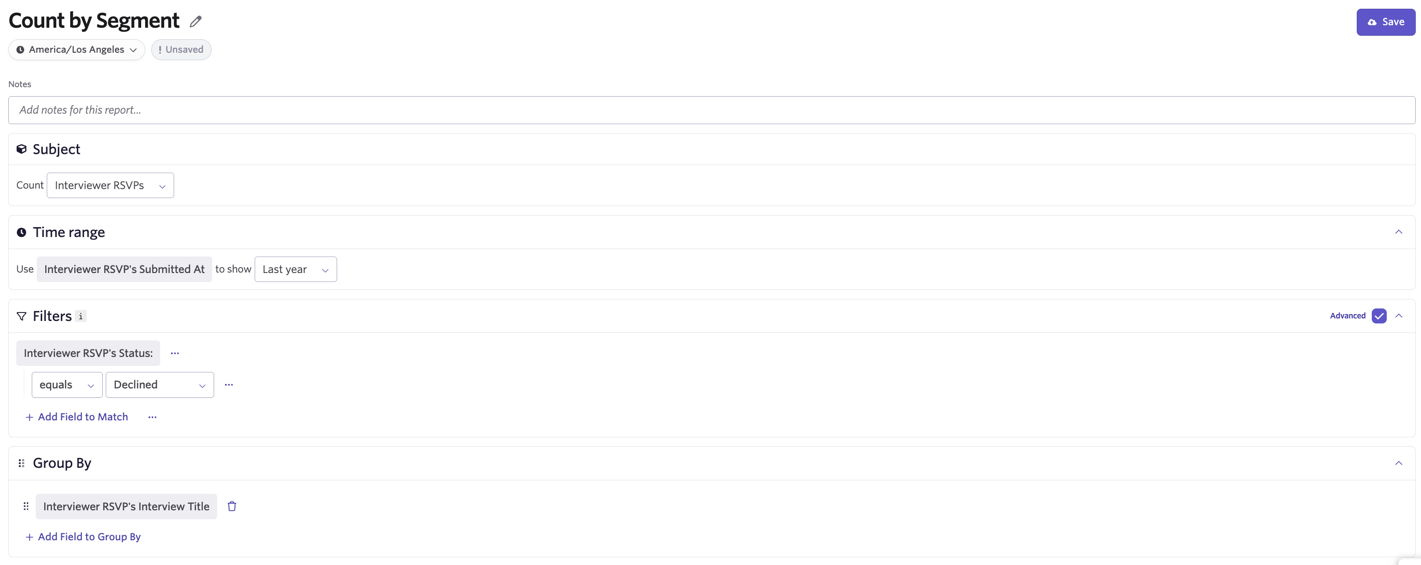
Question: Which jobs or interviews have the highest decline rates?
Report Type: Segmentation
Subject: Interviewer RSVPs
Time Range: Interviewer RSVP's Submitted At
Filters: Optional
Group By: Interviewer RSVP's Schedule Version's Job Consideration's Job (for reporting on jobs) or Interviewer RSVP's Interview Title (for reporting on interview types)
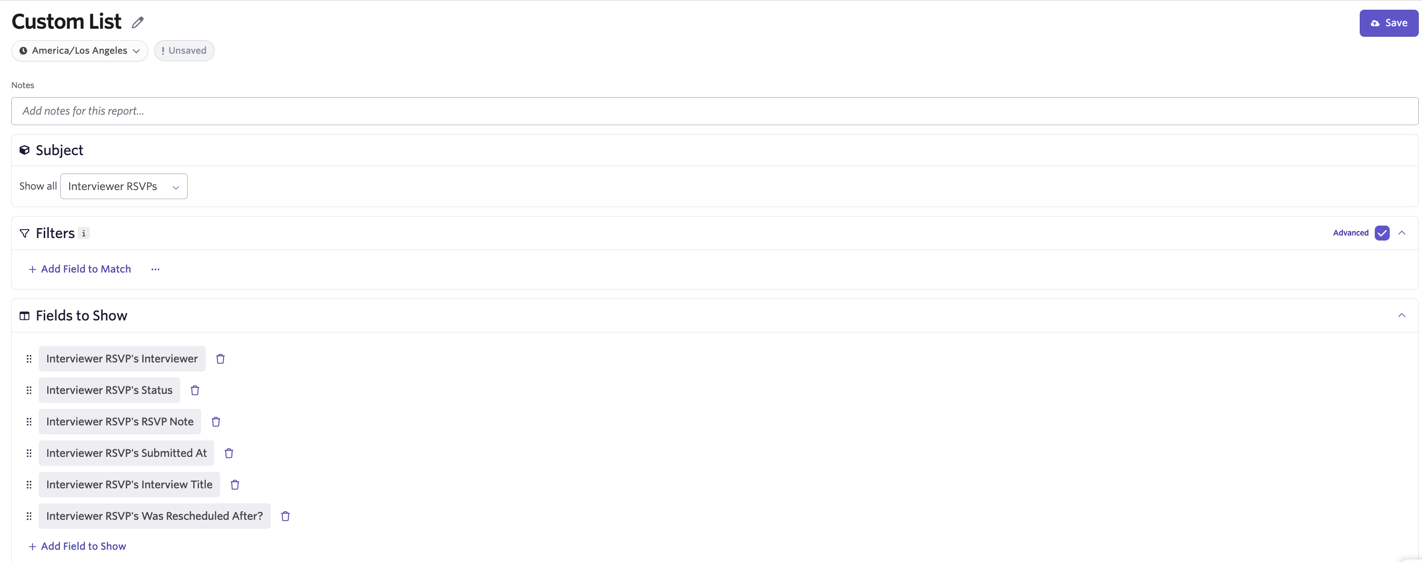
Question: How can I review individual declines, reasons given, and whether those interviews ended up being rescheduled as a result?
Report Type: Custom List
Subject: Interviewer RSVPs
Time Range: Interviewer RSVP's Submitted At
Filters: Optional
Fields to Show: Interviewer RSVP's Interviewer, Interviewer RSVP's Status, Interviewer RSVP's RSVP Note, Interviewer RSVP's Submitted At, Interviewer RSVP's Interview Title, Interviewer RSVP's Was Rescheduled After?
Interviewer Pools
With the Advanced Scheduling Add-On, you also have access to report on your interviewer pools, including whether training is enabled and any pending approvals.
Fields
The following fields are available under the Interviewer Pools subject:
Field Name | Description |
|---|---|
Title | The title of the pool. |
Is Archived? | Whether an interviewer pool is archived. |
Requires Training? | Whether training is enabled. Ashby returns interviewer pools with training but no stages. |
Training Requires Approval? | Whether any training stages require approval. |
Has Pending Approvals? | Whether any trainees are awaiting approval. |
Number of Qualified Interviewers | Number of pool members that are qualified. Doesn't include deactivated employees. |
Number of Trainees | Number of trainees. Doesn't include deactivated employees. |
Number of Trainees Pending Approval | Number of trainees pending approval. Doesn't include deactivated employees. |
Report example
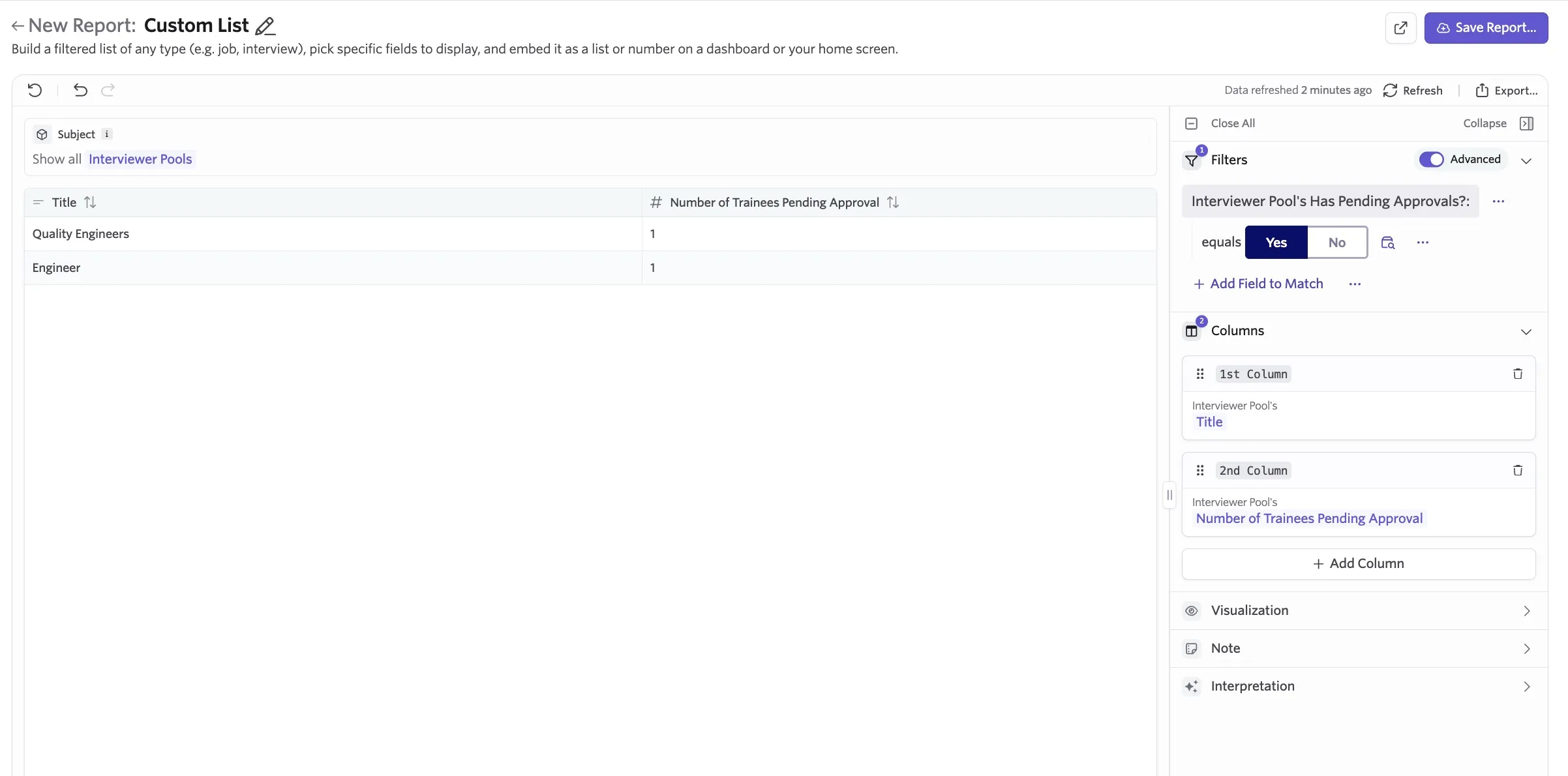
Question: How do I pull a list of interviewer pools with trainees awaiting approval?
Report Type: Custom List
Subject: Interviewer Pools
Filters: Interviewer Pool Has Pending Approvals set to Yes
Columns/Fields to Show: Title, Number of Trainees Pending Approval
Interviewer Pool Members
Use the Interviewer Pool Members subject to report on individual members of an interviewer pool.
Fields
Field Name | Description |
|---|---|
Pool | The interviewer pool that the interviewer is a member of. |
Role | The current role of the interviewer. |
Added At | The time when the user was initially added to the pool, either as a trainee or a qualified interviewer. |
Removed At | The time when the user was removed from the pool, either as a trainee or a qualified interviewer. |
Training Started At | Date of first interview as a trainee (shadow or reverse shadow). |
Time to Complete Training | Number of days the interviewer was in training, starting from the date the interviewer was enrolled. This field is empty for employees that are not enrolled in training or are still in training. |
Time in Training | For interviewers in training, this field contains the number of days they have been enrolled. Otherwise, this field is empty. |
Added to Pool as Trainee At | If the employee was added as a trainee, this field contains the date they were initially added to the pool. |
Qualified At | Date added as qualified, approved, or automatically graduated. |
Shadow Interviews Completed | Total shadow interviews completed. |
Reverse Shadow Interviews Completed | Total reverse shadow interviews completed. |
Training Interviews Completed | Total training interviews completed (sum of shadow and reverse shadow training interviews completed). |
Upcoming Shadow | The start date of the first upcoming interview where the employee is a shadow interviewer. |
Upcoming Reverse Shadow | The start date of the first upcoming interview where the employee is a reverse shadow interviewer. |
Upcoming Shadow Count | The count of upcoming interviews where the employee is a shadow interviewer. |
Upcoming Reverse Shadow Count | The count of upcoming interviews where the employee is a reverse shadow interviewer. |
Upcoming Training Interview (Shadow or Reverse Shadow) | The start date of the first upcoming interview where the employee is either a shadow or reverse shadow interviewer. |
Most Recent Shadow | The start date of the most recently completed interview where the employee is a shadow interviewer. |
Most Recent Reverse Shadow | The start date of the most recently completed interview where the employee is a reverse shadow interviewer. |
Most Recent Training Interview (Shadow or Reverse Shadow) | The start date of the most recently completed interview where the employee is a shadow or reverse shadow interviewer. |
Is Pending Approval? | Whether the member is pending approval on stage progression in training steps. |
Current Stage Type | The current stage type (Shadow or Reverse Shadow) of the employee. If the employee is not in training, this field is empty. |
Is Paused | Whether the interviewer's membership is currently paused. |
Report example
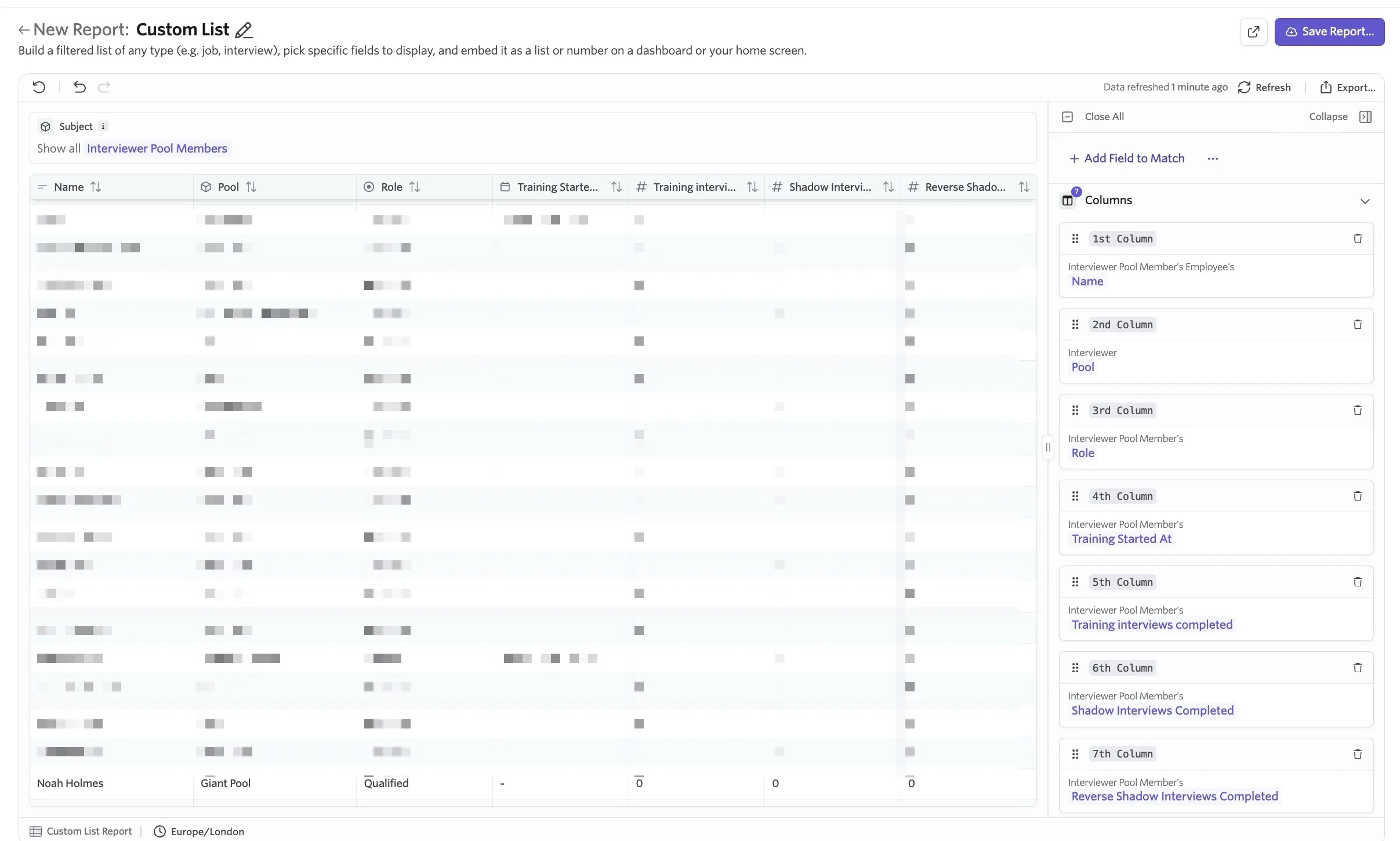
Question: How do I track completed shadow and reverse shadow interviews per interviewer pool member?
Report Type: Custom List
Subject: Interviewer Pool Members
Filters: Optional. Filter by interviewer pool.
Columns/Fields to Show: Employee Name, Interviewer Pool, Interviewer Pool Member's Role, Interviewer Pool Member's Training Started At, Interviewer Pool Member's Training Interviews Completed, Interviewer Pool Member's Shadow Interviews Completed, Interviewer Pool Member's Reverse Shadow Interviews Completed
Interview Schedules (additional fields)
If you send Scheduling Requests to coordinators or coordination teams, you can get visibility on scheduling request volume when reporting using this subject. You can find these additional fields under Requests when setting the subject of your report to Interview Schedules.
Fields
Additional Field Name | Field Description |
|---|---|
Interview Schedule's Request Requested By | The user who submitted the request. |
Interview Schedule's Request Assignee | The user assigned to the interview schedule request. |
Interview Schedule's Request Submitted At | When the interview schedule request was submitted. |
Interview Schedule's Request Priority | The priority level assigned to the interview schedule request. |
Location Type | The meeting location type for the interview (for example, In person, Zoom, or Google Meet). |
Report examples
Below are some common questions and examples of reports that can help you find the data points needed.
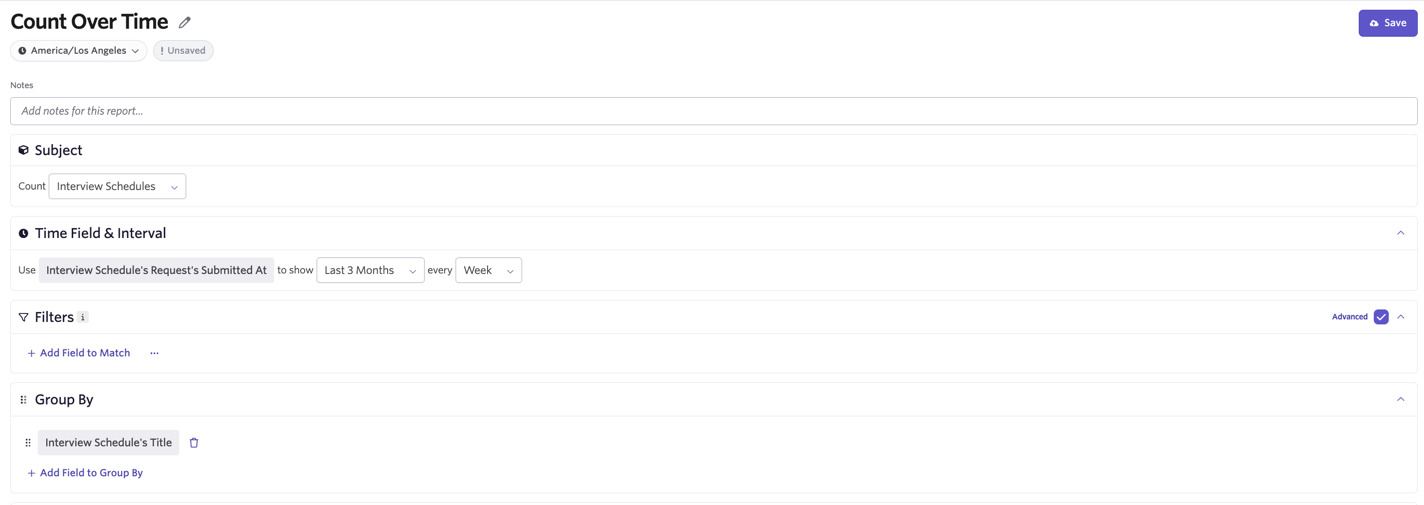
Question: What does scheduling request volume look like over time?
Report Type: Count Over Time
Subject: Interview Schedules
Time Field: Interview Schedule's Request Submitted At
Filters: Optional
Group By: Interview Schedule's Interview Stage Group or Interview Schedule's Title
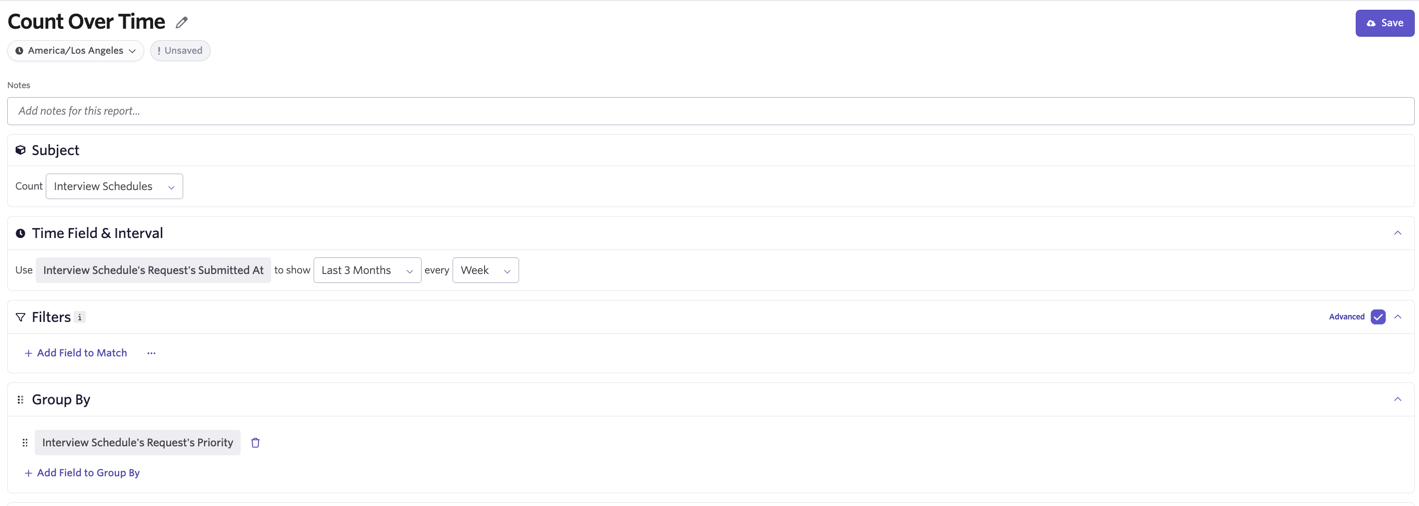
Question: How much scheduling volume is happening by request priority over time?
Report Type: Count Over Time
Subject: Interview Schedules
Time Field: Interview Schedule's Request Submitted At
Filters: Optional
Group By: Interview Schedule's Request's Priority
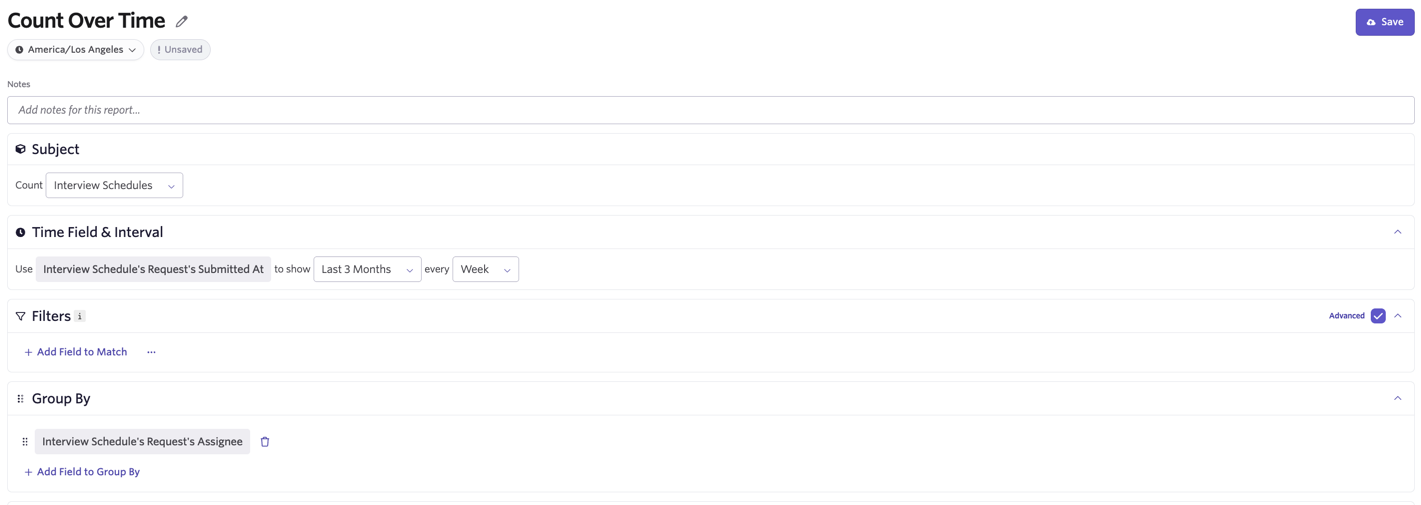
Question: How many requests are being assigned to each coordinator over time?
Report Type: Count Over Time
Subject: Interview Schedules
Time Field: Interview Schedule's Request Submitted At
Filters: Optional
Group By: Interview Schedule's Request's Assignee
Advanced scheduling templates
Navigate to Reports > Templates, or the Reporting Templates section of Reports > Report Builder, to access a selection of scheduling report templates.
Below is a visual reference showing where each key metric falls within the scheduling timeline. Each template is also listed beneath the timeline with the metrics used to calculate it, for your reference.
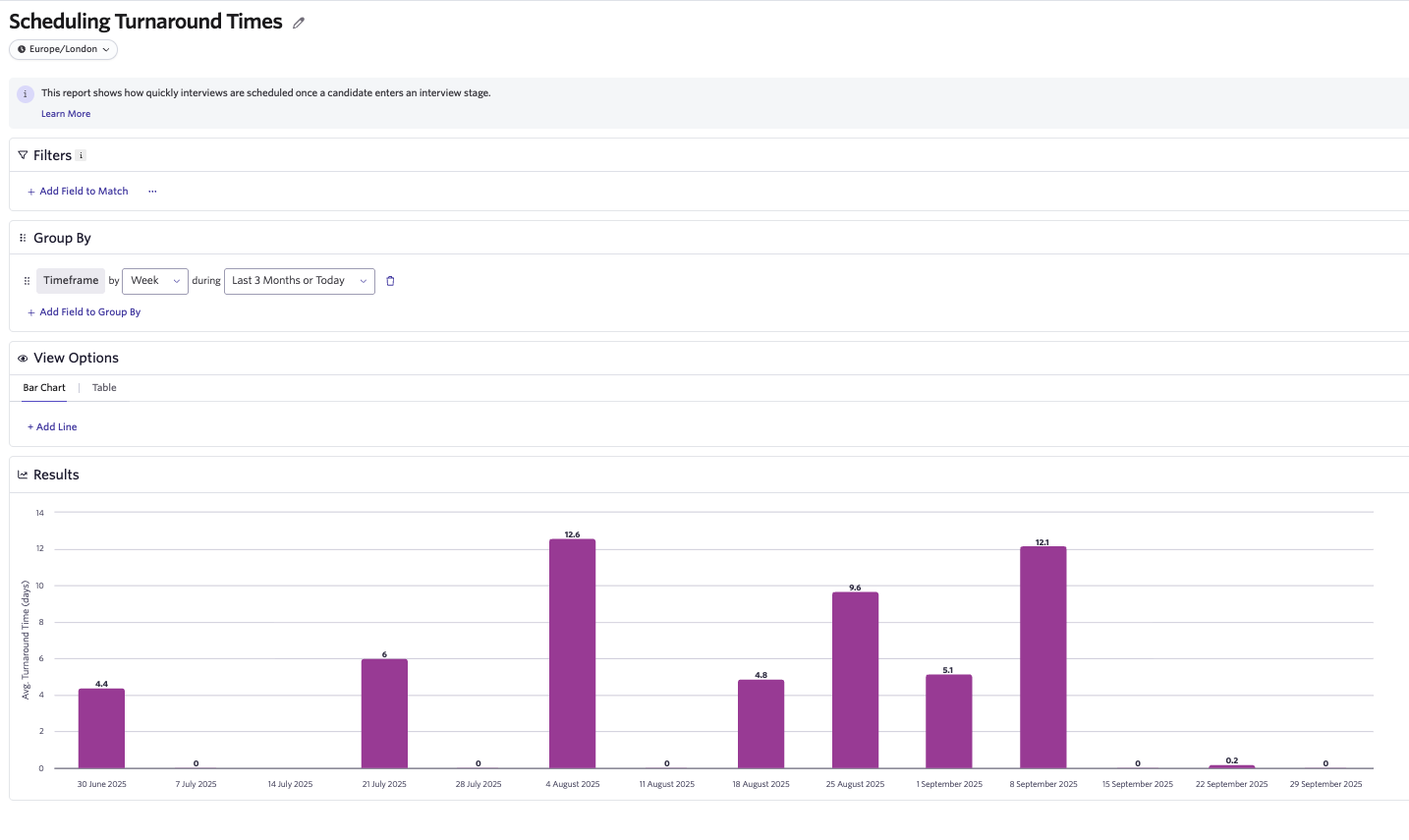
Scheduling Turnaround Times
This report shows how quickly you schedule interviews once a candidate enters an interview stage.
How to use this report
Use this report to measure the efficiency of your scheduling process. Faster turnaround times mean candidates spend less time waiting for interviews to be confirmed, improving the overall candidate experience.
What's in the data?
- Calculated as the average time from when a candidate enters an interview stage (scheduling begins) to when the interview is confirmed on the calendar.
- Reflects both recruiter responsiveness and candidate engagement.
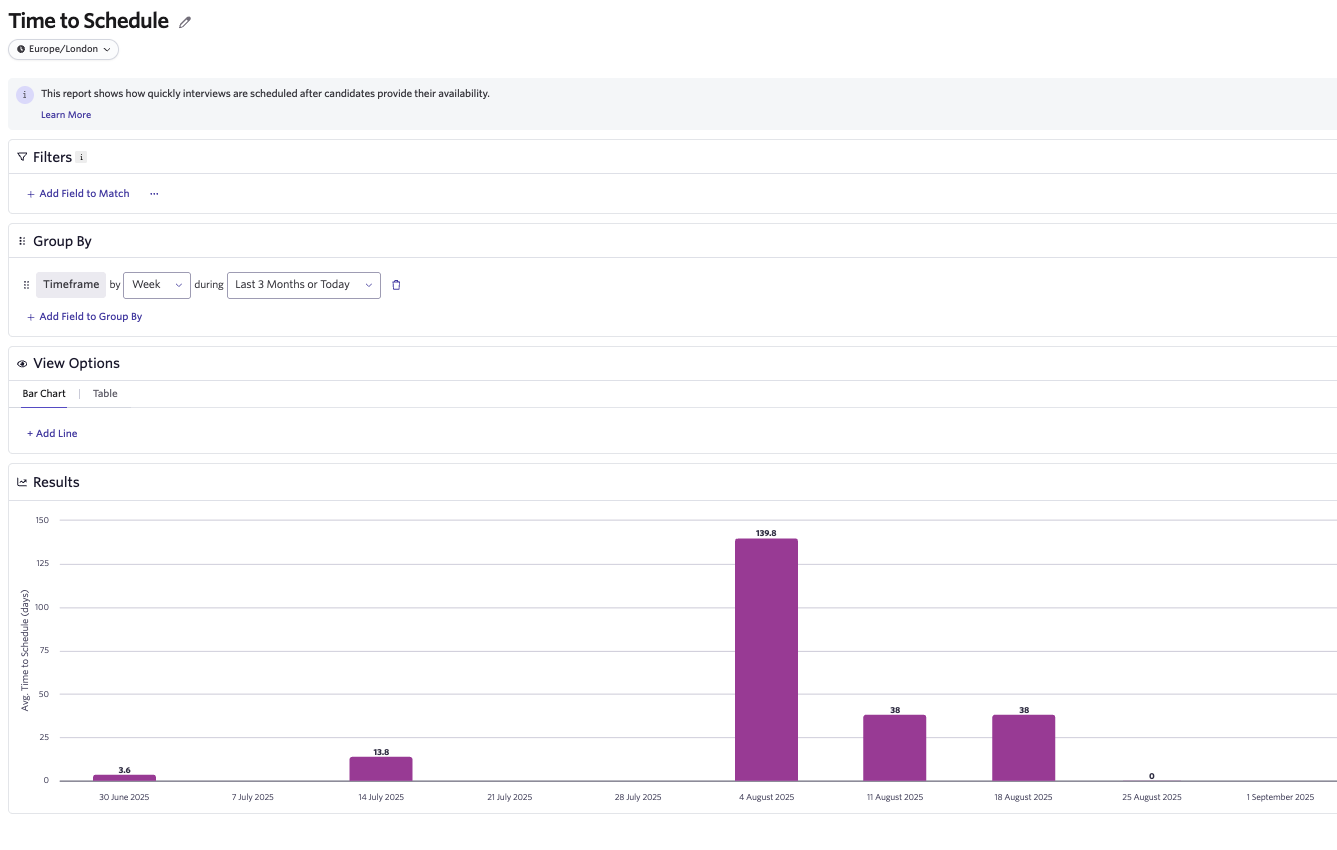
Time to Schedule
This report shows how quickly you schedule interviews after candidates provide their availability.
How to use this report
Use this report to track recruiting team responsiveness to candidate availability. Shorter times indicate efficient scheduling and a smoother candidate experience.
What's in the data?
- Calculated as the average time from when a candidate submits availability to when the interview is confirmed.
- Highlights how long candidates wait before seeing their interview scheduled.
- Only includes interviews where candidate availability was requested and submitted in Ashby (for example, it excludes direct booking).
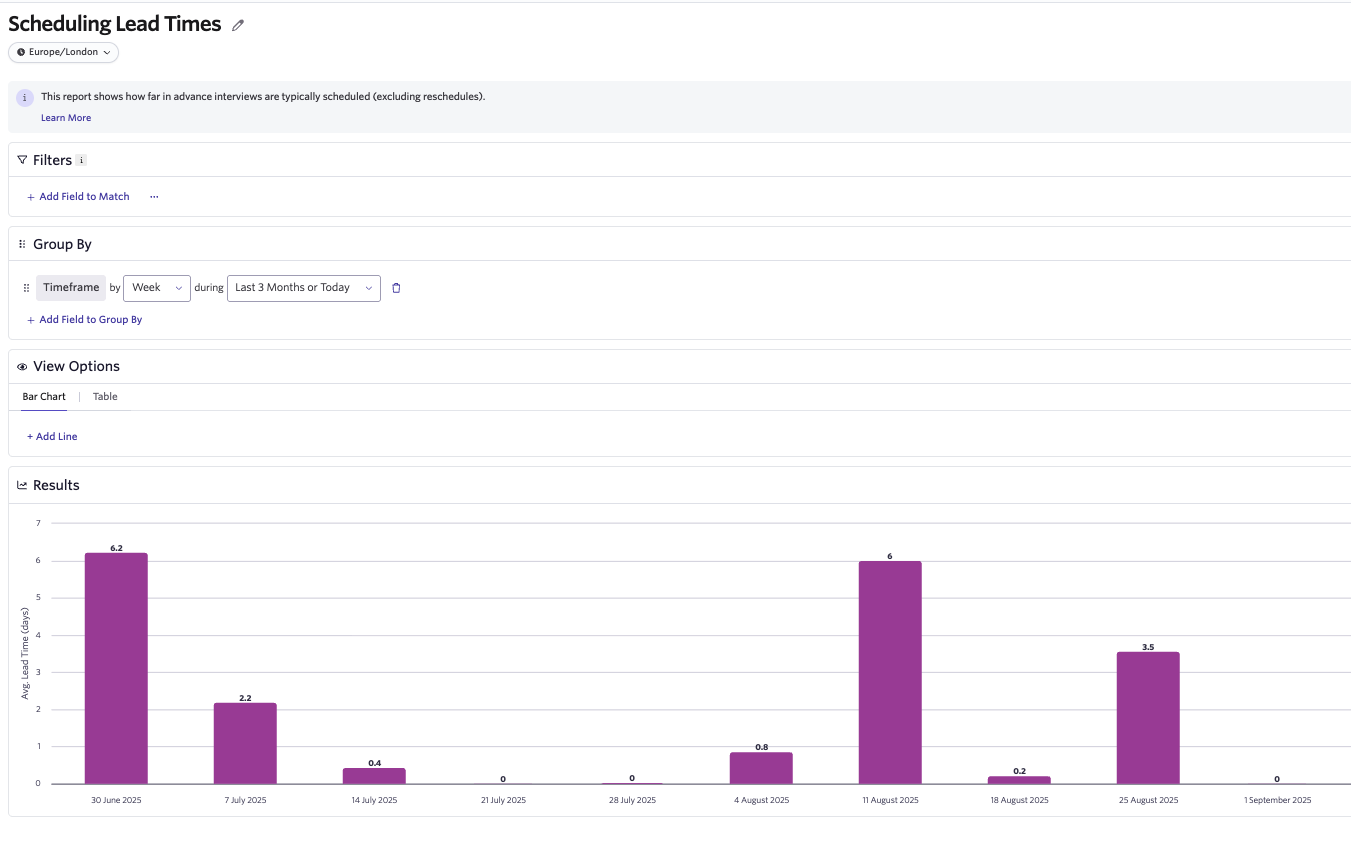
Scheduling Lead Times
This report shows how far in advance you typically schedule interviews (excluding reschedules).
How to use this report
Use this report to understand interviewer engagement and capacity. A shorter lead time generally indicates that interviewers are making themselves available in advance, while longer lead times can suggest tighter schedules or difficulty securing interviewer participation.
What's in the data?
- Calculated as the average time between when an interview is confirmed on the calendar and its initially scheduled start time.
- Excludes delays from any reschedules.
Adjusted Scheduling Lead Times
This report shows how far in advance you typically schedule interviews (including reschedules).
How to use this report
Use this report to understand interviewer engagement and capacity. A shorter lead time generally indicates that interviewers are making themselves available in advance, while longer lead times can suggest tighter schedules or difficulty securing interviewer participation.
What's in the data?
- Calculated as the average time between when an interview is confirmed and when it actually takes place.
- Includes delays caused by reschedules.
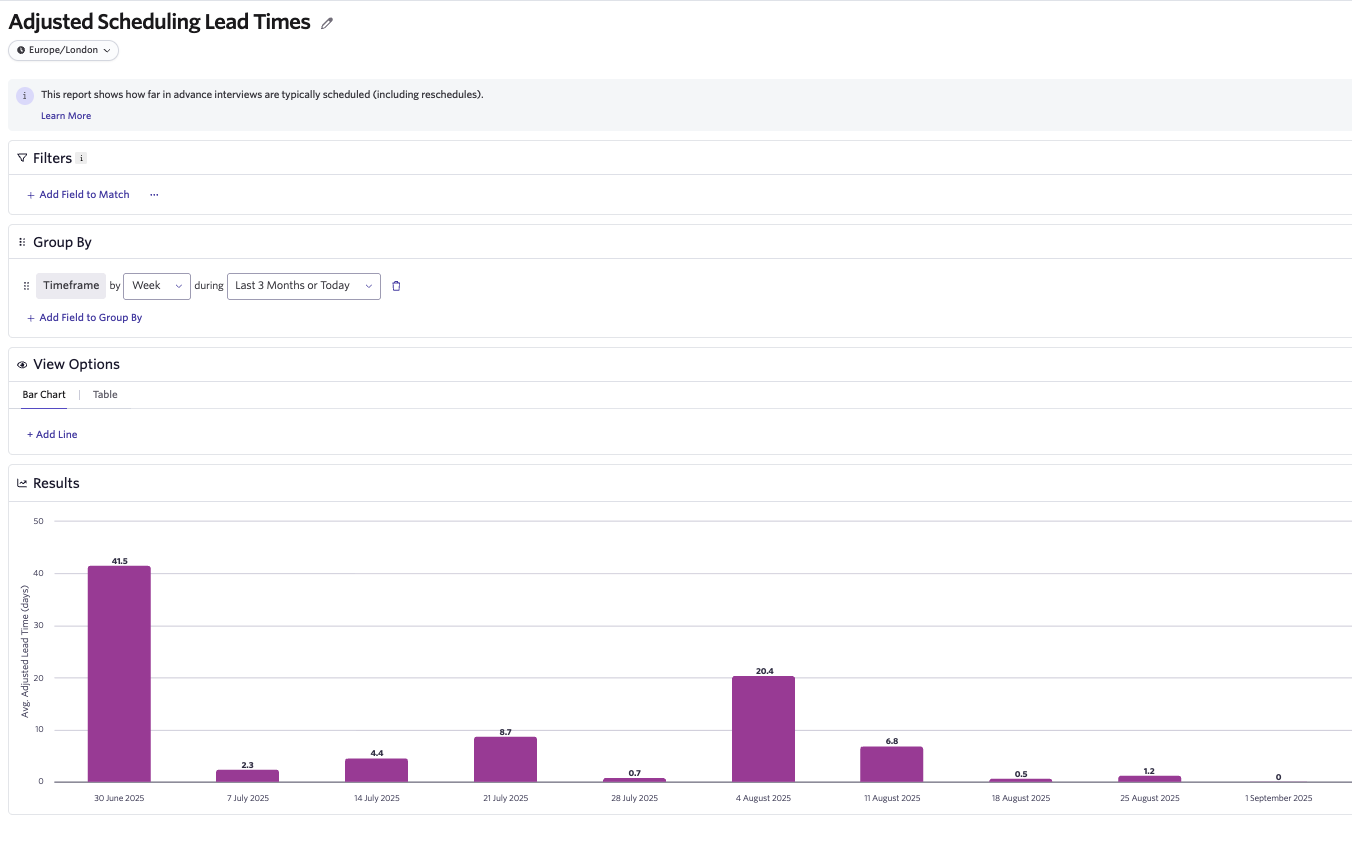
Total Scheduling Duration
This report shows the total time it takes for an interview to actually happen once a candidate enters an interview stage.
How to use this report
Use this report to evaluate the overall speed of your scheduling process. It captures both how quickly you complete scheduling and how long it takes for the interview to actually occur. You can view this as a combination of Turnaround Time and Adjusted Lead Time.
What's in the data?
- Calculated as the average time from when a candidate enters an interview stage to when the interview happens.
- Includes any delays caused by reschedules.
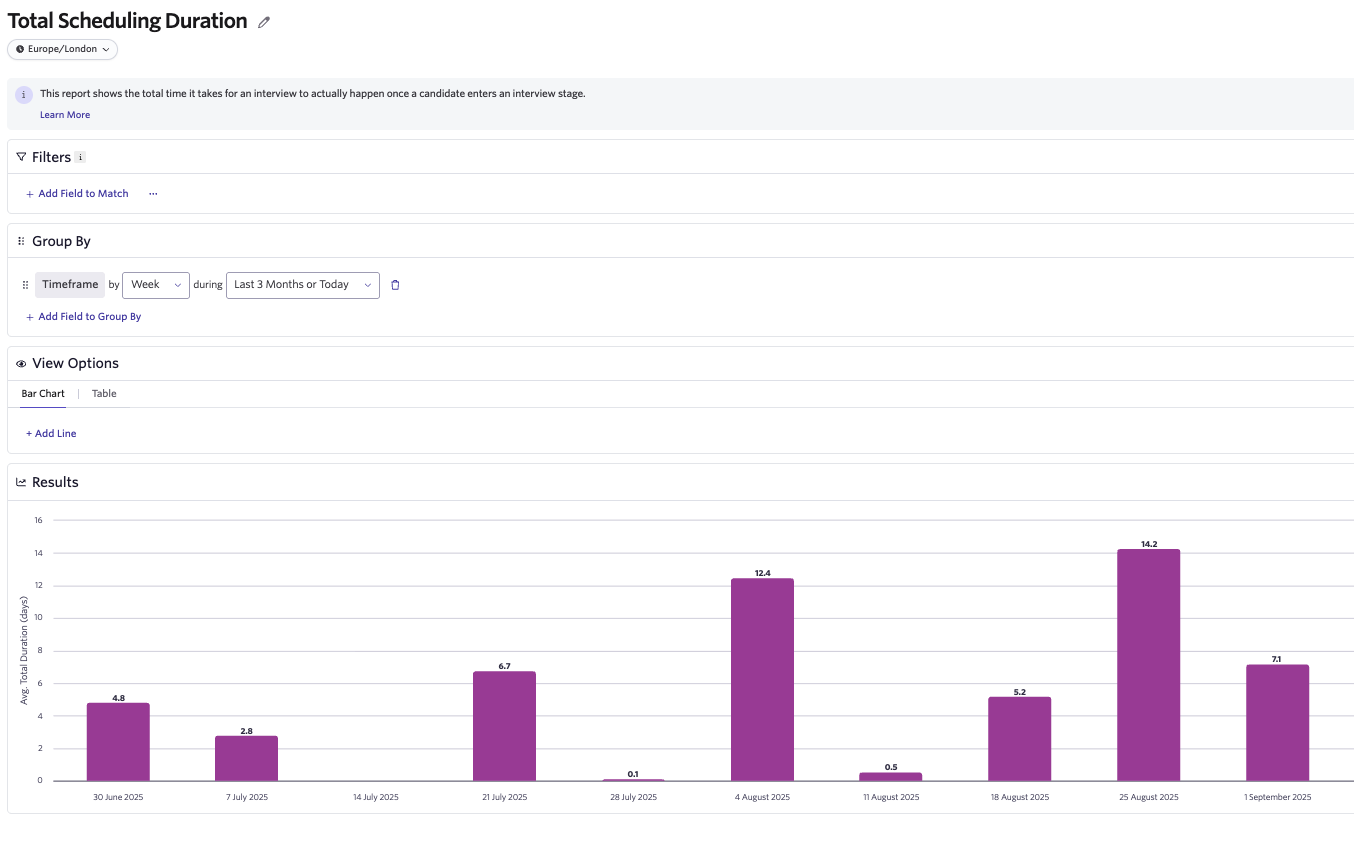
Time to Interview
This report shows how quickly candidates reach their initially scheduled interview after providing availability (excluding reschedules).
How to use this report
Use this report to understand candidate wait times from their perspective. It highlights how long it typically takes to get candidates into their next interview once they have submitted availability.
What's in the data?
- Calculated as the average time from when a candidate submits availability to the start time of their initially scheduled interview.
- Only includes interviews where candidate availability was requested and submitted in Ashby (for example, it excludes direct booking).
- Excludes delays from rescheduling.
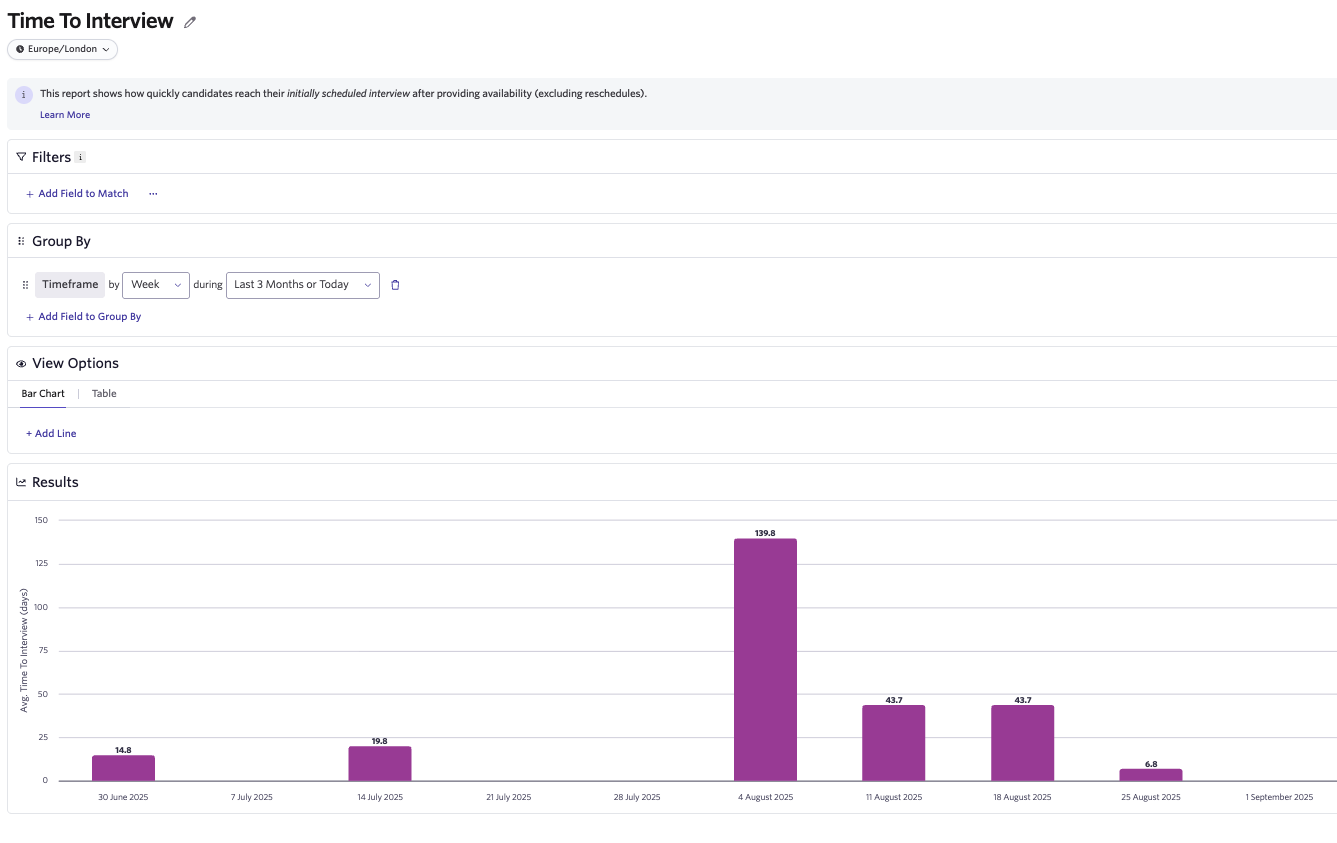
Adjusted Time to Interview
This report shows how long it actually takes for candidates to have their interview after providing availability, including delays from reschedules.
How to use this report
Use this report to measure real candidate wait times. It accounts for any reschedules and helps identify bottlenecks or reliability issues that slow things down.
What's in the data?
- Calculated as the average time from when a candidate submits availability to when the interview actually happens.
- Only includes interviews where candidate availability was requested and submitted in Ashby (for example, it excludes direct booking).
- Includes delays from rescheduling.
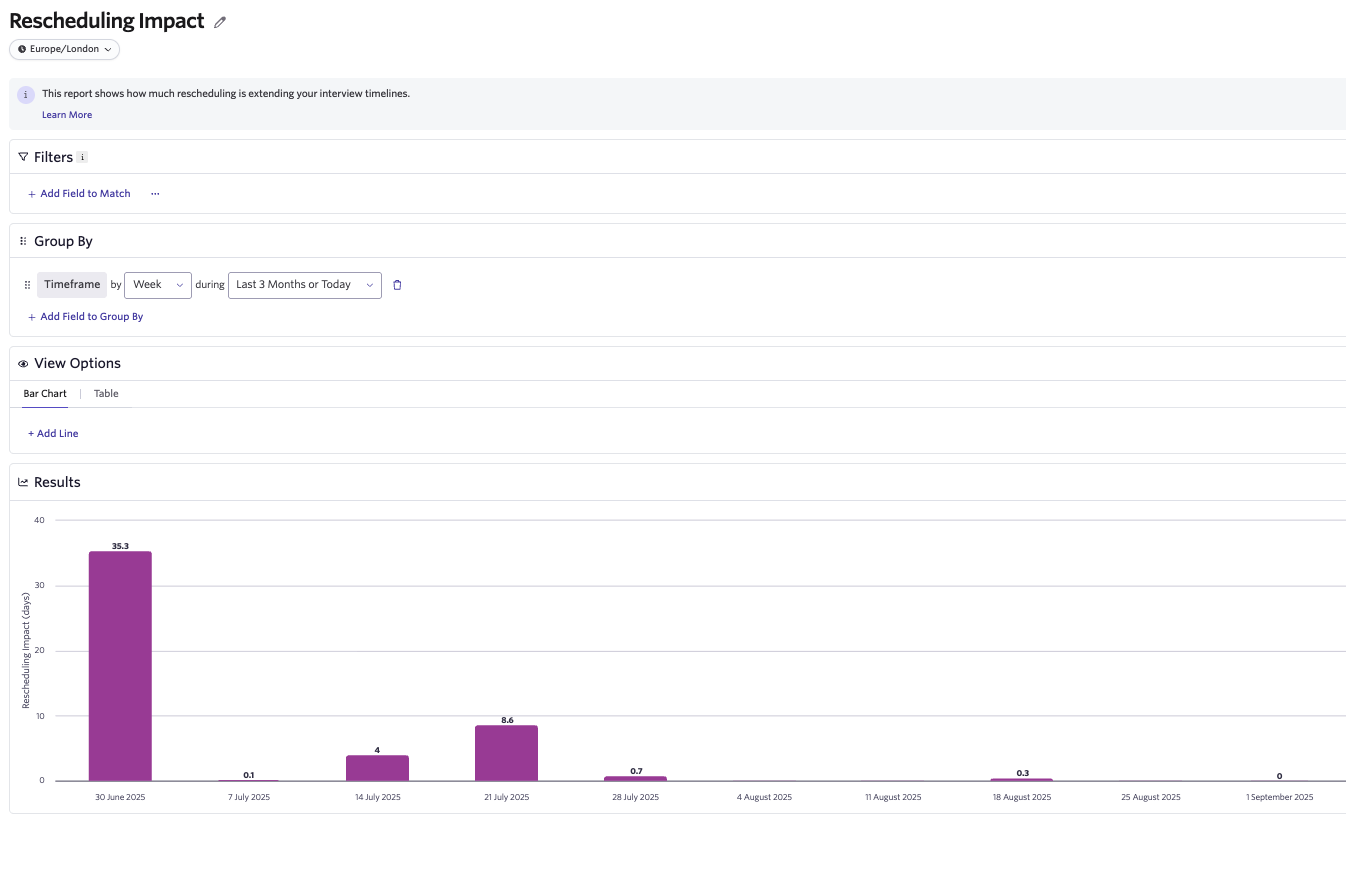
Rescheduling Impact
This report shows how much rescheduling is extending your interview timelines.
How to use this report
Use this report to assess the cost of rescheduling on both interviewer engagement and candidate experience. It highlights whether reschedules are meaningfully delaying interviews and where improvements might be needed.
What's in the data?
- Calculated as the average difference between Scheduling Lead Time (initial) and Adjusted Scheduling Lead Time (actual).
- Quantifies the impact of delays introduced by rescheduling.
Remember to click Save once you've created your report so Ashby adds it to your saved reports.
FAQs
If I start auto-scheduling an interview but have to tweak it along the way (for example, swapping out an interview on the shared plan), does the Interview Schedule Version get logged as manually scheduled?
If you start auto-scheduling and tweak something along the way within the auto-schedule flow (for example, you click Use Schedule on one of the auto-schedule options presented, then update one of the interviews on the following screen), Ashby still logs the Scheduled By Type as Auto Schedule.
Put another way, Ashby sets the Scheduled By Type at the beginning, based on how you start a new scheduling process. If you schedule the interview using auto-schedule, then reschedule it using manual schedule, Ashby lists two versions, one for each scheduling type.
Is there a way to see whether a candidate decline resulted in needing to reschedule?
What's possible today:
- You can see whether there was a candidate decline on certain interview schedules (or versions of the interview schedule, and whether it was rescheduled or modified multiple times).
- You can also see whether a schedule was rescheduled via direct booking link, which you could view as a reschedule due to a candidate.
What's not yet possible:
- Ashby doesn't currently report on decline reasons for candidates, or show how closely a candidate's decline happened to the time of the interview.
Can you see which candidate declined or rescheduled, based on the original date of the interview?
Yes, you can see each specific instance and which specific candidate responded with a decline. You can also see the Interviews Start At time for that specific schedule version. Ashby only shows whether (true/false) there was a candidate decline on one of these schedule versions.
From the data, you can also infer whether it was rescheduled, because that shows up as another version for the same candidate and the same interview or stage, but with a higher Version number — which indicates a new schedule being created (whether due to rescheduling or another minor modification).
What happens if an interview is rescheduled and then the reschedule is modified? What does the Version Schedule Type show up as when reporting on Interview Schedule Summaries?
This results in three Interview Schedule Versions, of the types original, reschedule, and modified respectively. At the Interview Schedule Summary level, Ashby marks the Version Schedule Type as a Reschedule, because reschedules supersede modifications when aggregated at the summary level.
Are interview schedule summaries based on the interview stage, interview schedule activity, or individual interview event?
They are based on interview schedule activity. Whether your interview schedule activity has one interview event or multiple events (for example, an onsite), Ashby represents it with a single interview schedule summary.
If there is more than one event in an interview schedule activity, rescheduling that activity (whether only one event changes or multiple events change) counts as one new interview schedule version (marked as a modification or reschedule depending on the change), and counts as part of the single interview schedule summary for all versions for that activity.
If you have more than one interview schedule activity within an interview stage, each has its own interview schedule summary.
If I reschedule an interview more than once in a short time, does that count as multiple reschedules?
Yes. If you reschedule an interview activity twice in quick succession, it still counts as two reschedules (two new versions) regardless of how little time has elapsed in between.
With interview schedule versions, what is the difference between a modification and a reschedule?
A reschedule involves adjusting interview participants, start and end times, or amending the number of interviews. A modification is any other kind of adjustment (for example, updating the interview briefing or adding a Zoom link).
What are the different Scheduled By Type values and what do they mean?
Here's a list showing each scheduling type and a definition:
- Manual Schedule: Interview schedules created using the Manual Schedule option within the Ashby interface.
- Auto Schedule: Schedules created via Ashby's auto-scheduling feature.
- Direct Booking: Schedules where candidates booked their own interview times through a Direct Booking link, which allows candidates to self-select from available time slots.
- Ashby Public API: Schedules created programmatically via Ashby's Public API. Used for integrations and automated scheduling through external systems.
- External Reschedule: Schedules updated automatically due to two-way calendar sync automation (for example, when external calendar changes trigger automatic updates in Ashby).
- Automation (Interviewer Declined): Automatic rescheduling triggered when an interviewer declines a calendar invite. Ashby automatically finds a replacement interviewer or reschedules.
- Automation (Training Path Update): Automatic updates to fix instances where interviewer training roles change or get out of order, to ensure training sequences remain properly ordered.