Activities
When set up, activities automatically appear on a candidate's profile when they are moved to a stage. This streamlines the candidate management process and enables a consistent experience across candidates. For more on structured interviewing, check out Scheduling & Interviews: An Introduction
Activities overview
Activities enable you to automate tasks like drafting emails, and setting up calendar invites for candidates that are in your interview process.
Ashby currently supports six activity types:
- Schedule Interview
- Take-Home
- Application Review
- Send Email
- Schedule Questionnaire
- E-Signature Document

See the table below for information on the roles that have access to set up and edit activities.
Access Role | Has Access? |
|---|---|
Limited Access | ❌ |
Agency Users | ❌ |
Elevated Access - External Recruiter (not linked to an agency) | ❌ |
Elevated Access - Analyst | ❌ |
Elevated Access - Hiring Team Member | ❌ |
Elevated Access - Hiring Manager | ❌ |
Elevated Access - Admin | ✅* |
Elevated Access - Admin (Private) | ✅* |
Organization Admin | ✅ |
*Elevated Access - Admin and Elevated Access - Admin Private users will only be able to edit the activities on the roles they have access to.
Schedule interview
The Schedule Interview activity automatically adds a schedule templateschedule template to a candidate's profile when they are moved to a particular stage, determining the interview, feedback form, interviewers and interview settings in advance. For more on configuring these, please check out Setting up Schedule Interview ActivitiesSetting up Schedule Interview Activities.
Take-home
The Take-home activity automatically adds a prompt to send a take-home assignment activity to a candidate's profile when they are moved to a particular stage. This activity supports uploading the candidate's submission so the reviewer can view and score directly in Ashby.
Learn more in the Take-home ActivitiesTake-home Activities guide
Application review
The Application Review activity is a default activity on the application review stage in an interview plan. It enables the profile to be included in bulk application review (more on this at Application Review. The Application Review activity can also be added to other active stages in the interview plan (except for the Offer stage), to provide a prompt in other stages for the candidate’s application to be reviewed.
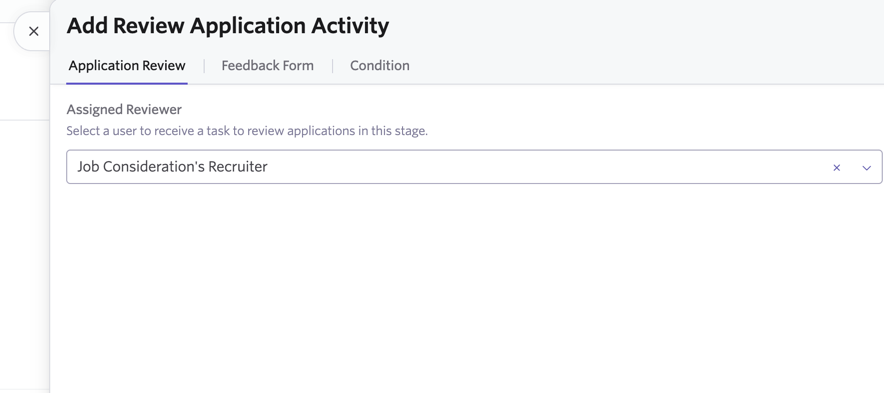
Once you add a review application activity to your job or job template’s interview plan, you’ll be prompted to select a reviewer (or a role on the hiring team to determine that users with that role will complete the review application activity). You will also be able to determine a feedback form.
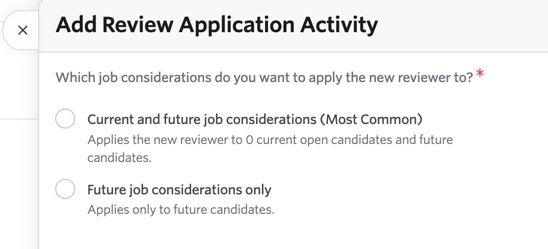
If you are adding or editing an Review Application activity, you’ll be prompted to determine the job considerations you’d like new assigned reviewers applied to.
You’ll be able to choose between current and future job considerations (so adding or amending the activity for those currently in the pipeline and applications moving forward) or only future job considerations.
Send email
The Send Email activity automatically adds a prompt to email a candidate, along with an email template to a candidate's profile when they are moved to the specified stage. Want more information on setting up email templates? Check out Emails.
Please note that the Send Email activity should only be used to email the candidate. If you’d like to receive notifications when a candidate has moved stages, this is an option you can enable within your notifications. More on this at Notifications & Notification Settings
Schedule Questionnaire
The Schedule Questionnaire activity allows you to select a questionnaire and an email template in advance. Then when a candidate is moved to the specified stage, a prompt will appear to send the questionnaire out to them using your specified email template. You can read more on configuring questionnaires at Questionnaires
E-Signature Document
The E-Signature Document activity prompts you to specify the document template you’d like to use. When the candidate is moved to the specified stage, you’ll be prompted to send them the e-signature document. More on configuring e-signature documents can be found at E-Signature DocumentsE-Signature Documents.